











Series 1 Land Rover Pedal Car – Made Easy with Solidworks!
Written by: Solid Solutions Marketing
Published: Sep 5, 2016
| View All Blogs
The Series1 began production in 1948 designed Land Rover to help get Britain farming after the war effort. It grew extremely popular and today enthusiasts are prepared to throw their life savings at restoring originals from that period.
The simplicity of the body shape made this the ideal choice for a pedal car home DIY project. This has been a low budget one-off manufacture and therefore many of the parts are recycled from surplus joinery materials. SOLIDWORKS 3D CAD tools have been utilised to take what may have been bonfire wood and turned it into something exciting.
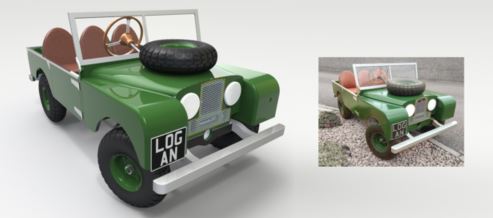
Basic design specification:
- Ergonomically suited for a 2-3 year old child
- Traditional forward push pedal arms that link to a rear axle crank (to prevent feet being trapped)
- 4:1 steering ratio to give light steering and sufficient movement at the hand wheel
- Closely represents a scaled model of the Series 1
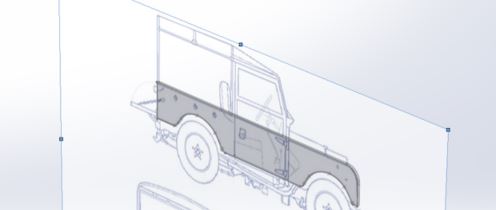
Appropriately sized, cheap, readily available wheels (regularly seen on heavy goods trolleys) were sourced and provided a starting reference. With the wheel diameter in mind, a sketch picture showing elevations is scaled and traced to give a profile ready for building features.
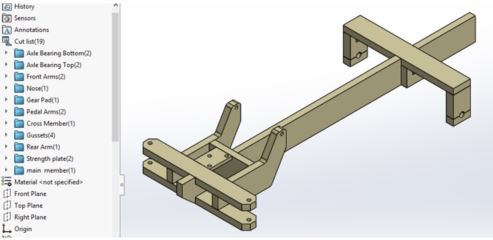
The chassis and body are both created as a single part file containing multiple solid bodies. This gives the advantage of modelling the overall shape in one environment.
A common misconception is that SOLIDWORKS Weldment functions apply specifically to steel structural members. However in this case we can regard the multibody wooden framework as a weldment structure from which we can produce a cut list. By applying bounding boxes, the resulting cut list properties contain length, width and thickness for each individual part of the structure.
When it comes to designing the steering linkage and drivetrain components it is incredibly useful to have full control within the assembly environment. Update the dimension of a referenced part and you can see the resulting behaviour immediately, without the need to move away from your preferred view orientation. All instances of the modified part rebuild simultaneously.
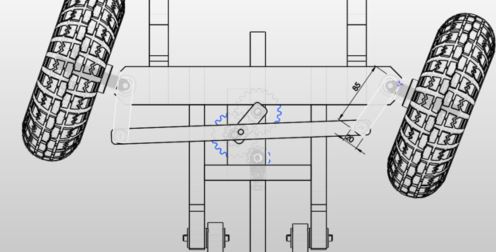
Pictorial drawing views with coinciding Bills of Material are effortless to create either in a top or sub assembly level. This is a convenient way of communicating details, parts lists and assembly instructions for individual areas of the design.

Nice to see another Series 1 Land Rover roll off the production line!
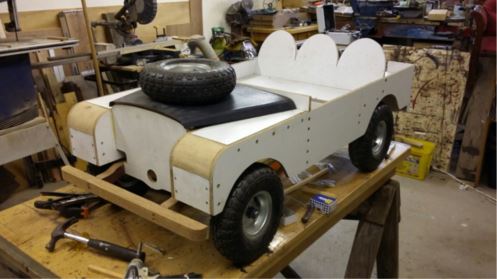
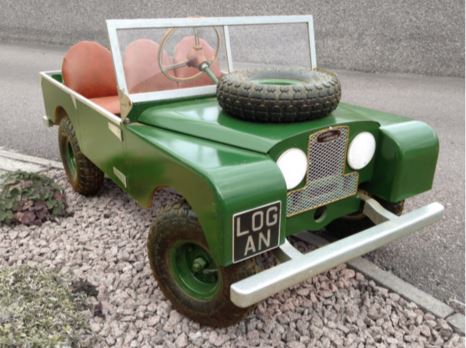
The Series1 Land Rover began production in 1948 designed to help get Britain farming after the war effort. It grew extremely popular and today enthusiasts are prepared to throw their life savings at restoring originals from that period.
The simplicity of the body shape made this the ideal choice for a pedal car home DIY project. This has been a low budget one-off manufacture and therefore many of the parts are recycled from surplus joinery materials. SOLIDWORKS 3D CAD tools have been utilised to take what may have been bonfire wood and turned it into something exciting.
Basic design specification:
- Ergonomically suited for a 2-3 year old child
- Traditional forward push pedal arms that link to a rear axle crank (to prevent feet being trapped)
- 4:1 steering ratio to give light steering and sufficient movement at the hand wheel
- Closely represents a scaled model of the Series 1
Appropriately sized, cheap, readily available wheels (regularly seen on heavy goods trolleys) were sourced and provided a starting reference. With the wheel diameter in mind, a sketch picture showing elevations is scaled and traced to give a profile ready for building features.
The chassis and body are both created as a single part file containing multiple solid bodies. This gives the advantage of modelling the overall shape in one environment.
A common misconception is that SOLIDWORKS Weldment functions apply specifically to steel structural members. However in this case we can regard the multibody wooden framework as a weldment structure from which we can produce a cut list. By applying bounding boxes, the resulting cut list properties contain length, width and thickness for each individual part of the structure.
When it comes to designing the steering linkage and drivetrain components it is incredibly useful to have full control within the assembly environment. Update the dimension of a referenced part and you can see the resulting behaviour immediately, without the need to move away from your preferred view orientation. All instances of the modified part rebuild simultaneously.
Pictorial drawing views with coinciding Bills of Material are effortless to create either in a top or sub assembly level. This is a convenient way of communicating details, parts lists and assembly instructions for individual areas of the design.
Nice to see another Series 1 roll off the production line!
Get a SOLIDWORKS Quote
Interested in SOLIDWORKS? Contact us for questions, trials, or demos by clicking the button below or call 01926 333777. Our experts will help you find the perfect solution.

Related Posts

Redesigning Santa’s Sleigh in SOLIDWORKS
Every year Father Christmas has to fly in his sleigh to deliver presents to boys and girls all over the world in just one night. To put this into perspective, it takes a little under 24 hours to fly from London (UK) to Sydney (Australia) in a streamlined Boeing 747, whereas Father Christmas’ mode of transport is believed to be a rather non-aerodynamic sleigh.

SOLIDWORKS Grid Systems – hidden away, but very useful!
Rory Niles provides an insight into the uses for Grid Systems within SOLIDWORKS 2018

Furniture Design Made Easy with SOLIDWORKS
Calling all furniture and interior designers: the days of creating square cabinets are over. What if we told you there’s a much easier way to bring your products to life?
Here’s 10 reasons why we feel SOLIDWORKS is better than any other software, especially if you’re designing furniture:
Creating Interactive Animations with SOLIDWORKS Visualize
Interactive Images are a great export option within Visualize Professional, allowing you to view the model in a series of 360 orbital spins within a web browser.
However, what happens if I want to use this interactive method to demonstrate a mechanism or animation instead?

How to Find & Activate SOLIDWORKS Xpress Products
Find & activate SOLIDWORKS Xpress products in five simple steps. Xpress tools come with every seat of SOLIDWORKS and unlock additional functionality.

How to Create 360VR Video using SOLIDWORKS Visualize
Virtual Reality(VR) videos provide one of the most immersive methods of viewing a design concept and can be used to bring your product showcases to the next level. Recently VR has become a valuable tool for many companies when it comes to design reviews and interactive product training. Check out this short blog to learn how to export 360VR videos using SOLIDWORKS Visualize.
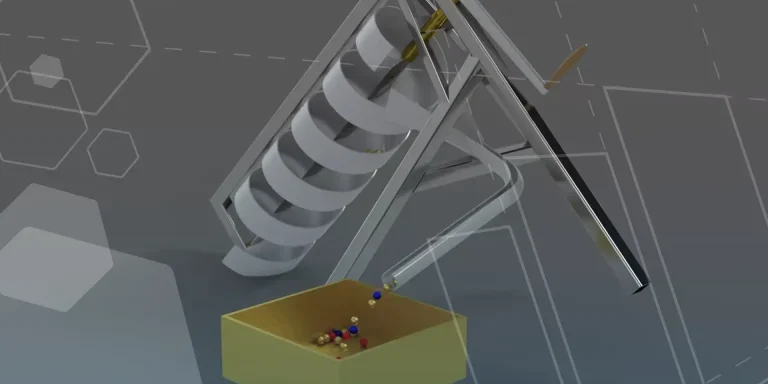
Modelling an Archimedes’ Screw with SOLIDWORKS
Archimedean screws are often referred to as “water screws” since they are commonly used to transport water between different heights. We often see some of our customers do screw feeders and we thought it may be beneficial to create a blog documenting an effective modelling workflow to create your very own Archimedean screw.

How to come up with ideas for your design or engineering project – some helpful tips
We know coming up with an interesting and creative design or engineering project can be…

Design considerations when 3D printing
3D printing is a colloquial term used to generalise a family of additive manufacturing processes. At the consumer level the most common 3D printing process is Fused Deposition Modelling (FDM) – a technique whereby thermoplastics are extruded through a nozzle, and a part is built up layer by layer. FDM is very popular with hobbyists due to the relatively low cost of the printer, alongside the wide range of properties and appearances thermoplastics present. The conveniency to turn a custom CAD model into a product in a short space of time is a superb way to make life easier.

Connection Detailing in SOLIDWORKS 2022
With SOLIDWORKS 2022 you can add connection detailing to your structural members. Learn how to create and add structural connections to your SOLIDWORKS models quickly and easily.