











Model based definition
SOLIDWORKS MBD
Eliminate 2D drawings with SOLIDWORKS MBD / Model Based Definition. Define, organise, and publish 3D Product Manufacturing Information (PMI) directly on the model.
Streamline production, reduce errors, and speed up your time-to-market with a single source of truth for manufacturing.
Key Benefits of SOLIDWORKS MBD
Skip the 2D Drawings
Forget spending hours on traditional 2D drawings. Just add your manufacturing info (PMI) directly to the 3D model - so what you see is what gets made.
Cut Down on Mistakes & Costs
Use 3D data that machines can read directly. That means less manual typing, fewer errors, and smoother handoffs to CAM and inspection tools.
Stay Standards-Compliant
Built-in support for ASME Y14.41 and ISO 16792 means your models meet global standards - no extra work needed to tick the compliance boxes.
Make Your Intent Clear
Use 3D views to show exactly how parts should be made. It’s faster to understand than flipping through drawings, and it helps avoid rework and scrap.
Share Models Easily
Export your model to formats like 3D PDF or eDrawings that anyone can open - even if they don’t have SOLIDWORKS. No more “I can’t open this file” headaches.
Keep Everyone on the Same Page
Your 3D model becomes the single source of truth. Everyone - from design to QA - is working off the same version, with traceable changes and approvals.
SOLIDWORKS MBD Features
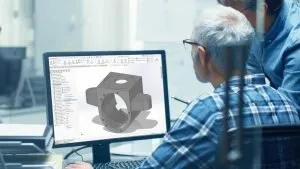
- What it does: Organises complex 3D PMI (dimensions, tolerances, notes) into clear, structured 3D views.
- Benefit: Provides instant clarity by intelligently showing and hiding annotations as you rotate the model, ensuring manufacturing data is understood quickly and correctly.
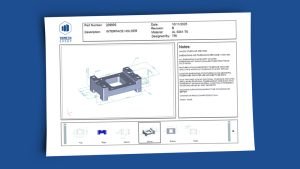
- What it does: Allows you to customise templates with your layout, company logos, and data tables (Meta-property links).
- Benefit: Instantly generate professional, consistent documents like RFQs (Request for Quote) and Inspection Reports, serving as process guidelines for all internal and external teams.
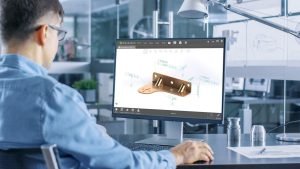
- What it does: Publishes 3D data into universally accessible formats: 3D PDF and eDrawings.
- Benefit: Accelerate collaboration by easily sharing associative information (BOMs, notes) that anyone can view and interact with using free tools like Adobe™ Reader.
Ready to ditch 2D drawings & boost efficiency?
See how SOLIDWORKS MBD instantly streamlines your manufacturing process.
Frequently Asked Questions
MBD means the 3D CAD model becomes the single source of truth for all product data, including dimensions, tolerances, and notes (PMI). It eliminates the need for 2D drawings, streamlining your design-to-manufacture process, reducing paperwork, and cutting potential errors on the shop floor.
Absolutely. SOLIDWORKS MBD supports and helps enforce compliance with critical international standards, including ISO 16792 and ASME Y14.41. This is crucial for UK firms dealing with global supply chains and regulated sectors (e.g., Aerospace, Automotive).
Yes. MBD publishes data into widely accessible, lightweight formats like 3D PDF and eDrawings. Your suppliers and shop floor staff can view, pan, zoom, and section the model using free software (like Adobe Reader), ensuring clear communication without needing a full CAD license.
SOLIDWORKS MBD creates semantic (machine-readable) annotations. This data can be directly consumed by downstream applications, such as CAM programming and CMM inspection software.
This connectivity is key to Industry 4.0 readiness and automating your processes.
Savings typically come from three areas:
1) Reducing documentation time (up to 30% saving in engineering time),
2) Minimising costly scrap and rework due to drawing misinterpretation, and
3) Speeding up time-to-market by automating data hand-off to manufacturing.
Yes, the transition doesn't have to be 'all or nothing.' You can still generate traditional 2D drawings from the 3D model, reusing the annotations you already defined.
This allows you to adopt MBD internally while accommodating traditional external partners.
SOLIDWORKS MBD is a separate add-in for SOLIDWORKS. It is an integrated tool, meaning it works seamlessly within your existing SOLIDWORKS environment, but requires a dedicated MBD license to access its full publishing and compliance features.
The learning curve is surprisingly short, particularly for experienced SOLIDWORKS users.
We offer tailored UK-specific training and consultancy to help you define your MBD standard, customise your output templates, and ensure a smooth rollout across your engineering and manufacturing teams.