











Tech Support Blog: Why are my SOLIDWORKS BOM Quantities Wrong?
Written by: Solid Solutions Marketing
Published: Aug 4, 2016
| View All Blogs
Why are my SOLIDWORKS BOM Quantities Wrong?
A support call cropped up this week which I thought was worth sharing in a blog post. Quite simply a customer was reviewing their Assembly Bill of Materials (BOM) and finding an incorrect value for the Quantity column against a certain part. Clearly this column should simply sum up the number of identical components found in the assembly and report the value- so how can this go wrong?
The answer here is that you can, on a part by part basis, set the quantity to report a different custom property. Take for example accounting for paint, oil, grease or any other supplementary product that you want to show on a BOM. It would be unlikely you want a numerical value showing an item count up, but rather an amount on for example, a volumetric basis- so therefore it may be appropriate to show 10 litres of paint- hence need the flexibility to change what the quantity reports.
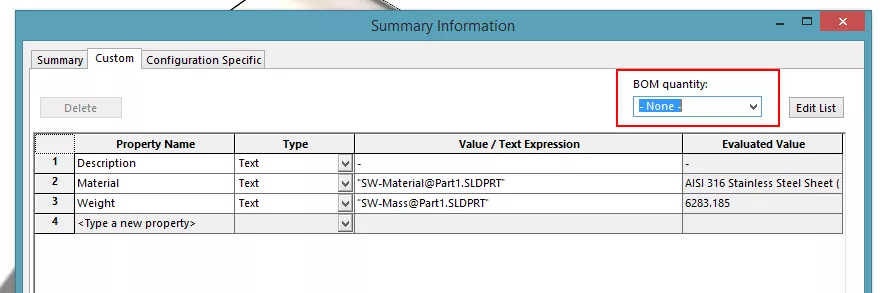
So in order to do this in SOLIDWORKS, either deliberately or to correct a problem, you need to open the part (you can open parts directly from the BOM by right clicking the relative row). Then use File > Properties and change over to the Custom tab. You will see in the upper right corner a drop down menu titled “BOM Quantity”- this should ordinarily be set to “-None-” but can be altered to any other Custom Property found on that screen. So simply if the SOLIDWWORKS BOM Quantity is wrong, set it to “-None-“, if you want it to be a specific property, you can change this in the list.
Categorised as: Tech Tips | Troubleshooting
Get a SOLIDWORKS Quote
Interested in SOLIDWORKS? Contact us for questions, trials, or demos by clicking the button below or call 01926 333777. Our experts will help you find the perfect solution.

Related Posts

How to Find Reaction Forces in SOLIDWORKS Simulation
SOLIDWORKS helps us to find resultant forces through simulation studies. These virtual tests reduce the need for physical prototypes and give us an accurate answer.

Setting number of decimal places in a table on a drawing
When creating an equation in a drawing general table, is it possible to define the…

Why is my Flat Pattern not showing in SOLIDWORKS Drawings?
This may be linked to how the drawing is saved or it can be related to how sheet metal parts are displayed in drawings, read on to find out how to fix it.

Why is SOLIDWORKS Crashing?
It’s one of the great mysteries of life – why is SOLIDWORKS crashing? Let’s explore how SOLIDWORKS crashes and how we can improve performance in SOLIDWORKS.

How to Get Your Serial Number for SOLIDWORKS Visualize Standard
Want to download Visualize to make photorealistic renders? Follow this guide for accessing your Visualize serial number that comes bundled in with SolidWorks Professional and Premium.

How to Recover SOLIDWORKS Files After a Crash
SOLIDWORKS has two different methods to help you recover from an unexpected crash or loss of data in the form of auto-recovery and back-up settings.
SOLIDWORKS Magnetic Mates
Magnetic makes are used within SolidWorks assemblies to easily configure and position assembly components. Through defining connection points and ground plane(s) – position components through drag and dropping one component within close proximity of another to snap the asset into position.

SOLIDWORKS Dimensions – Collated Quick Tips
We have collated some of our favourite tips on creating, manipulating and controlling dimensions in SolidWorks, both at a sketching and drawing level. Read on to find out more…

How to Deactivate (Transfer) a SOLIDWORKS License
A SOLIDWORKS standalone license can only be activated on one machine at a time. If you plan on moving your SOLIDWORKS license to another machine you will first need to deactivate it. Additionally if a standalone license has ended up on multiple machines or you are making a change to your computer, you will need to deactivate the license first.
How to Change a SOLIDWORKS Serial Number
Learn how to change a SOLIDWORKS serial number in the SOLIDWORKS Installation Manager in this simple step-by-step guide.