











AI in SOLIDWORKS

Written by: Terry O'Reilly
Published: Apr 10, 2026
| View All Blogs
Note: Some of the features and videos referenced in this article are currently released in BETA, and all future‑looking functionality is subject to change as development progresses. Videos were created and are owned by Dassault Systèmes.
AI in SOLIDWORKS
Just like in any other industry, Artificial Intelligence (AI) is rapidly transforming the way we design and engineer.
There are AI capabilities already directly built into SOLIDWORKS for accelerating repetitive tasks, repairing sketch and geometry issues, offering real-time guidance, and helping you stay focused on solving meaningful engineering challenges rather than managing your CAD system.
AI in SOLIDWORKS is generally categorised into tools that advise, or tools that act on your behalf. SOLIDWORKS now brings several of these capabilities together through three intelligent Virtual Companions: AURA, LEO and MARIE. Each virtual companion is designed to support different stages of the design, analysis and decision-making process.
Believe it or not, AI-powered technology has been part of SOLIDWORKS since the early 2000’s, continually evolving with each Service Pack (SP) and Functional Delivery (FD). These capabilities now span both SOLIDWORKS Desktop and the cloud-connected 3DEXPERIENCE platform, leveraging cloud intelligence to deliver smarter, faster and more intuitive workflows.
What Exactly Is AI?
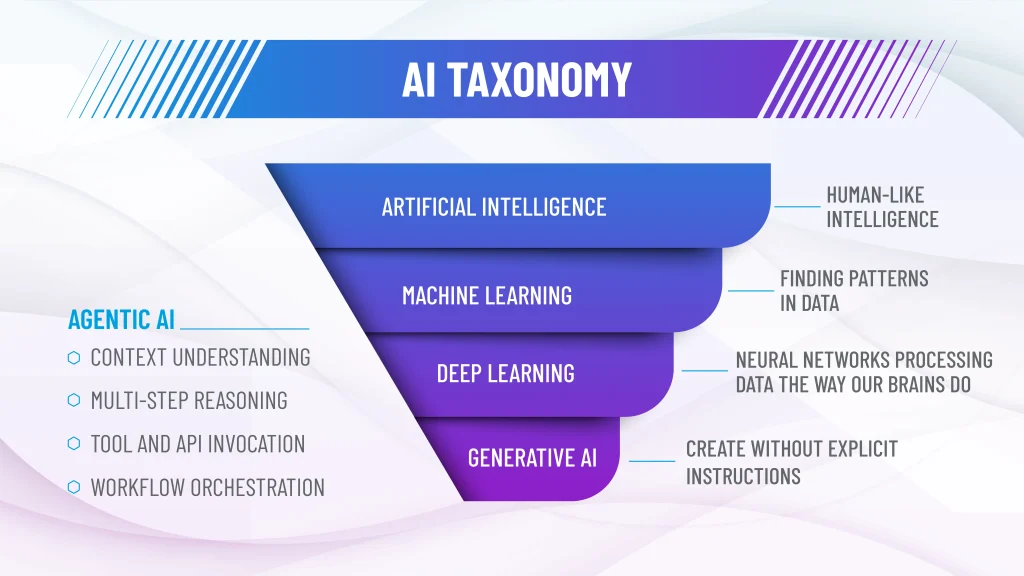
AI is an umbrella term covering multiple technologies that mimic aspects of human intelligence, problem-solving, and decision-making.
- Machine Learning (ML): Recognises patterns in data to make predictions or recommendations.
- Deep Learning: Uses neural networks to interpret complex data in a way that resembles human cognitive processing.
- Generative AI: Creates new drawings, geometry, instructions, simulations, without explicit programming.
- Agentic AI: Coordinates multiple models and tools to complete multi-step workflows.
If Generative AI creates, Agentic AI reasons, plans, and acts.
Agentic systems can:
- understand user context
- break problems into steps
- select the right model or method
- invoke tools and APIs
- execute workflows across systems
AI Tools That Advise
These tools guide, recommend and diagnose to help you work faster without taking control away from you.
Pattern Driven Component Enhancements — 2022
- Improved logic reduces “invalid selection” errors
- Works even when selecting patterned instances
Repair Sketch Relations — 2025x GA
- Automatically identifies broken sketch relations or dimensions
- Suggests intended replacements
- Repair all dangling relations/dimensions in one click
Selection Accelerators — 2025x GA
AI-powered edge selection within the Chamfer command:
- Outer edges
- Inner edges
- Edges outside selected faces
- Edges on extrusions
Dynamic previews help reduce manual clicking.
Command Predictor — 2025x GA
Machine learning predicts which command you’re likely to use next based on your current modelling behaviour.
Predict and Prevent Delay — 2026x FD01
AI analyses schedules, dependencies, and workloads to identify potential delays early.
FEA Machine Learning Model — 2027x GA (Coming Soon)
AI models trained on simulation data accelerate validation workflows by predicting outcomes without full solver runs.
AI Tools That Act
These tools perform tasks for you by generating geometry, repairing mates, producing drawings and more.
Repair Missing Mate References — 2023
Automatically redefines mate references when faces/edges change, with optional one-click batch repair.
Silhouette Defeature (Parts) — 2025x GA
Generates lightweight geometries for performance optimisation, now available for parts and bodies, not just assemblies.
Generative Rendering — 2025x GA
AI-assisted denoising and real time ray tracing accelerate Visualize workflows.
Generative Hole Callout — 2025x FD03 (xDrawing)
Automatically creates complete, intelligent hole callouts — even on imported geometry.
Automatic Fastener Recognition & Assembly — 2025x FD03
Identifies fasteners and assembles them with correct mates automatically.
Mate Replication — 2025x FD03 (xDesign)
Replicate mates across similar geometry using AI-powered suggestions.
Structural End Plate Suggestion — 2025x FD03 (xFrame)
AI identifies additional end plate opportunities automatically.
Image to 3D Mechanism — 2025x FD03 (xDesign)
Generative AI converts images into functional, constrained sketches.
Auto-Generate Drawings — 2025x FD03
Creates detailed drawings (tolerances, callouts, dimensions) automatically.
Automatic Toolpath Generation — 2027x GA (Coming Soon)
AI-driven toolpath optimisation in DELMIA for reduced machining time.
Meet Your New Virtual AI Companions



Together, these Virtual Companions provide:
- guidance (advise)
- action (execute)
- context awareness
- workflow automation
- engineering orchestration
AI built for engineers, inside your familiar SOLIDWORKS environment.
SOLIDWORKS Labs (BETA)
New experimental AI functionality is accessible through the SOLIDWORKS Labs tab in the Task Pane.
Below are selected upcoming or BETA features:
AI Advisors in Development
What’s Wrong Analysis — 2026x FD01
AI-guided root-cause analysis for modelling failures.
Model Insights – 2026x FD03 (Coming Soon)
Ask LEO to:
- identify components
- find parts based on material
- query mass properties
- select entities interactively
Explore Design Options — 2026x FD04 (Coming Soon)
AURA helps explore design alternatives via prompt-driven exploration.
AI Actions in Development
Assembly Structure Generator – 2026x FD01 (BETA)
Generate assembly structures from simple text prompts.
2026x FD02
Assembly Performance Advisor
Identifies and explains assembly performance bottlenecks.
Convert BREP to Parametric (xDesign)
AI reconstruction of imported geometry into editable models.
Auto Task Generation
AURA builds project tasks automatically.
Create PLM Change Action
AI-driven change actions within the 3DEXPERIENCE PLM workflow.
Prompt to Drawing – 2026x FD03 (BETA)
Prompt-based drawing creation with preview refinement.
2027x GA (Coming Soon)
Drawing to Parametic Model
Convert 2D drawings or PDFs into editable parametric models.
Image to Mesh
Convert images to 3D meshes for simulation or visualisation.
Drop Test Simulation
LEO guides setup of advanced SIMULIA drop-test workflows.
Spec to CAD
Generate engineering-ready starting points from written specifications.
DELMIA Integration
AURA connects engineering models with manufacturing data.
AURA + LEO Collaboration
Orchestration of engineering workflows, not isolated AI features.
There are many more AI capabilities coming to SOLIDWORKS and the 3DEXPERIENCE platform.
Categorised as: AI | Software | TOPIC | What's New
Book a SOLIDWORKS AI demo
See the AI capabilities in SOLIDWORKS and the 3DEXPERIENCE platform first hand and ask questions to our experts.
Related Posts

How to Find Reaction Forces in SOLIDWORKS Simulation
SOLIDWORKS helps us to find resultant forces through simulation studies. These virtual tests reduce the need for physical prototypes and give us an accurate answer.

Setting number of decimal places in a table on a drawing
When creating an equation in a drawing general table, is it possible to define the…

SOLIDWORKS Smart Fasteners
SOLIDWORKS Smart Fasteners is a really useful time saving tool, allowing you to automatically insert toolbox fasteners such as bolts and screws into an assembly providing there is a standard hole.

Why is my Flat Pattern not showing in SOLIDWORKS Drawings?
This may be linked to how the drawing is saved or it can be related to how sheet metal parts are displayed in drawings, read on to find out how to fix it.

Why is SOLIDWORKS Crashing?
It’s one of the great mysteries of life – why is SOLIDWORKS crashing? Let’s explore how SOLIDWORKS crashes and how we can improve performance in SOLIDWORKS.

SOLIDWORKS Tips: Are you Making this Common Mistake in Fatigue Analysis?
Simulation is a vital and complex engineering need. Fortunately, SOLIDWORKS makes it easy to test, correct mistakes and obtain accurate results.
Tech Support Blog: Why are my SOLIDWORKS BOM Quantities Wrong?
Why are my SOLIDWORKS BOM Quantities Wrong? A support call cropped up this week which…
Series 1 Land Rover Pedal Car – Made Easy with Solidworks!
The Series1 began production in 1948 designed to help get Britain farming after the war effort. It grew extremely popular and today enthusiasts are prepared to throw their life savings at restoring originals from that period.

SOLIDWORKS Visualize. Why go pro? – 6 Post Processing
In this blog we will be look at the post-processing options that can be found in SOLIDWORKS Visualize

SOLIDWORKS Visualize. Why go pro? – 7 Lighting
SOLIDWORKS Visualize uses a non-biased rendering engine, which allows for physically accurate lighting within a scene. It generates images with high amount of realism and correct set up can replicate photo studio lighting.