











SOLIDWORKS Tips: Are you Making this Common Mistake in Fatigue Analysis?

Written by: Tom McHale
Published: Jun 20, 2016
| View All Blogs
SOLIDWORKS makes fatigue simulation straightforward. We can quickly test our products in a virtual environment without needing to make or break physical prototypes to understand how they will behave in realistic situations.
WHAT IS FATIGUE ANALYSIS?
First let’s define fatigue analysis.
Fatigue analysis is the process of repeatedly exposing a part to a force and assessing how many times it can be exposed to that force before it yields.
This is known as a loading cycle. Our analysis will tell us how many of these loading cycles our part can experience before the material yields and damage is done.
THE SCENARIO
Recently, we helped an Engineer with calculating the fatigue involved for a uniaxial test of a specimen made from plain carbon steel – a straightforward test performed by engineers around the world daily.
After churning out some quick hand calculations, we modelled up the part in SOLIDWORKS to double check our figures.
Here is the simple uniaxial test set up – a turned plain carbon test piece subject to a 20 kN axial tensile load and fixed at the end.
Under these loading conditions, the static study tells us that the part will deform by 0.049 mm with a maximum P1 stress of 273.92 MPa.
Remember to define the material before running a simulation study!
HOW TO SET UP FATIGUE ANALYSIS IN SOLIDWORKS
Fatigue analysis requires the results from a static study before it can be run, which can be selected when starting a fatigue study.
We set the Fatigue Event to be Fully Reversed and used the Derived ASME carbon steel curve in the material properties for the SN curve.
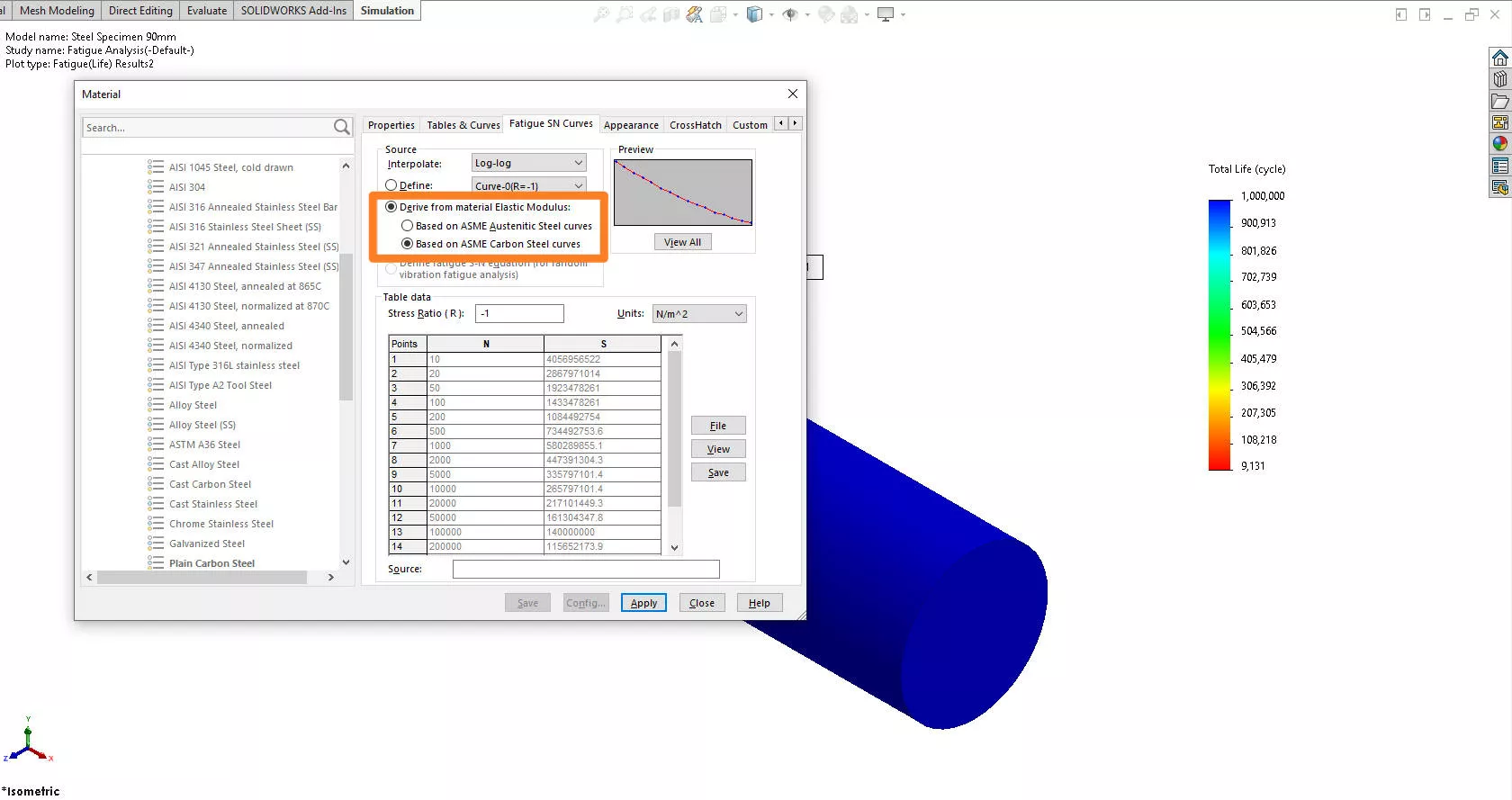
In a fully reversed event, the mean stress is zero so there is no need for a correction factor.
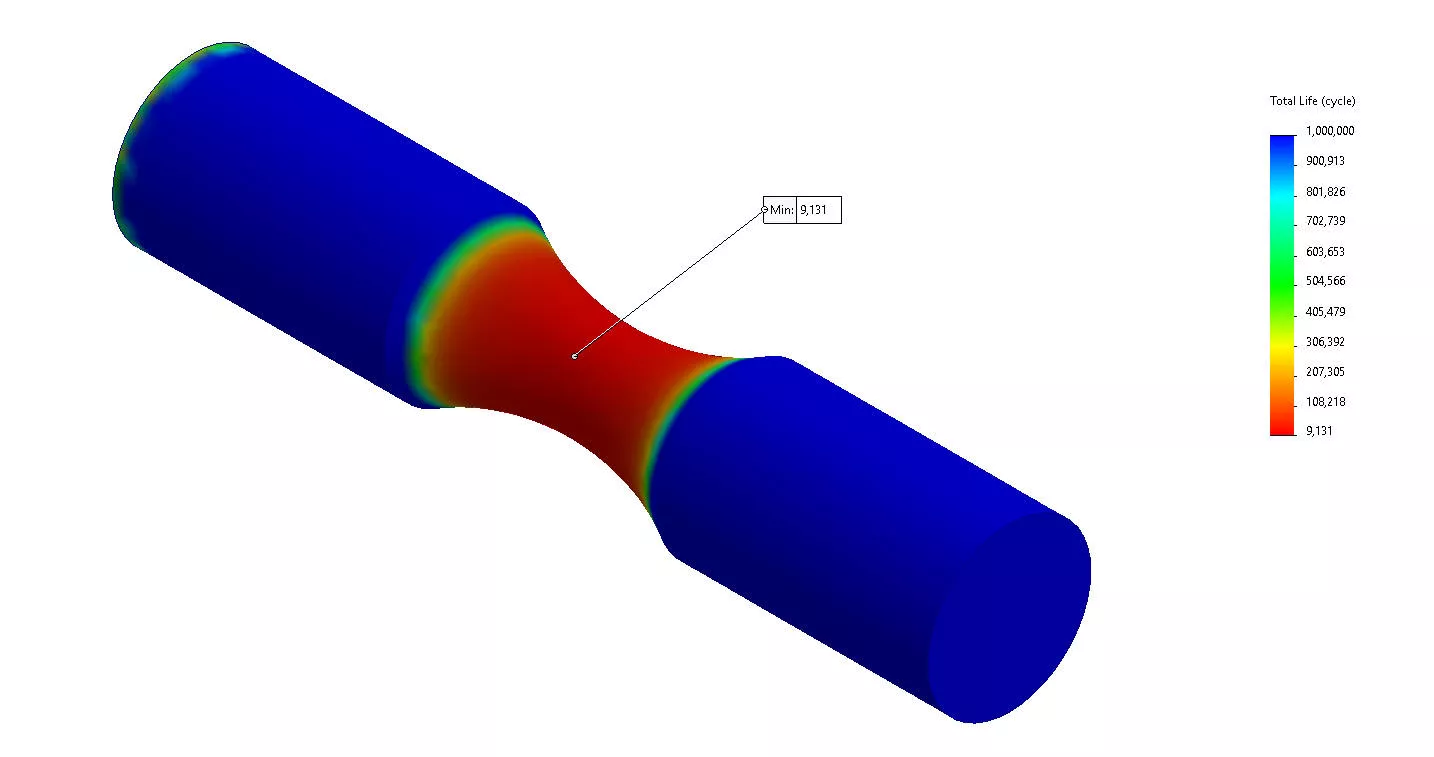
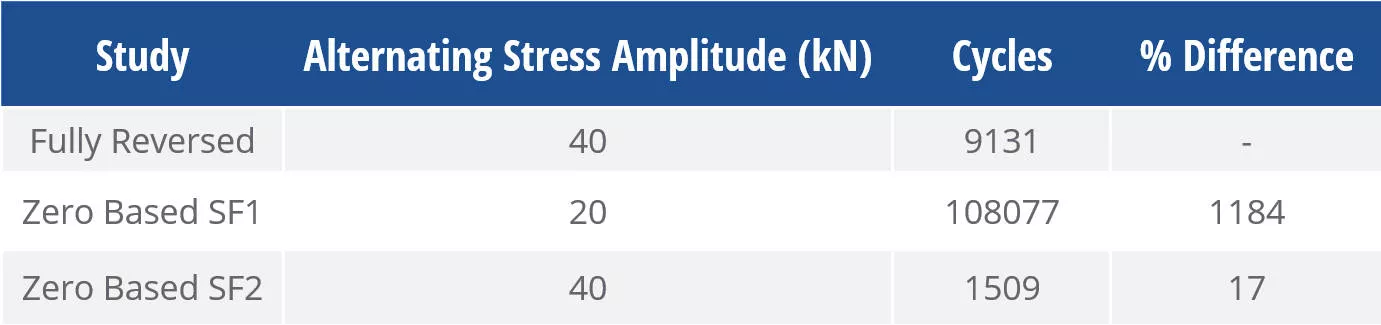
The result shows that the specimen would fail after about 9,131 cycles.
Did you know? We cover Fatigue Analysis in more detail in our Simulation Professional training course. Book your place today!
This matched up with our hand calculations to give us a nice ego boost.
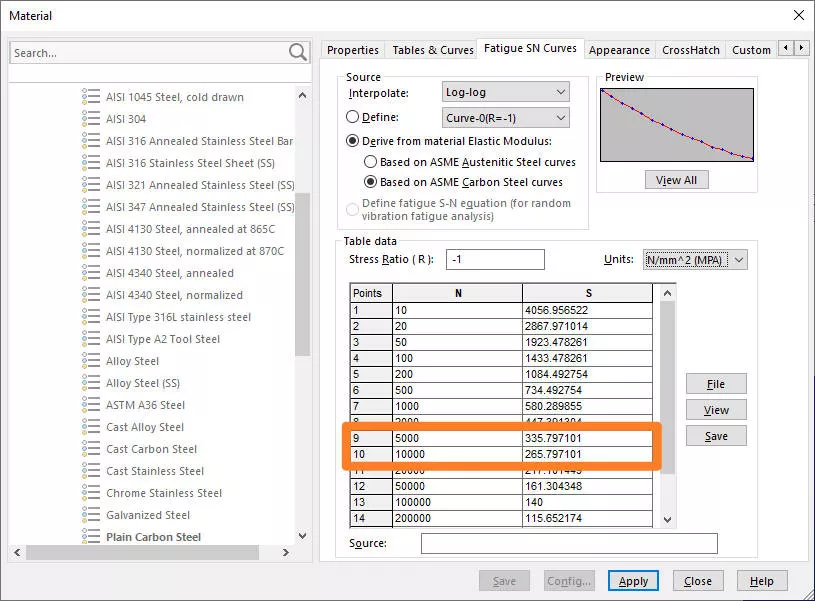
Checking in on the SN curve in the properties, we can see that the N value at 273.92 MPa will be slightly less than 10,000 cycles.
However, the Engineer wanted to prove that the lifespan would be significantly reduced if the loading was Zero-Based rather than Fully Reversed.
A Fully Reversed event is in compression for 50% of the time and, as compression does not open fatigue cracks (hence why we use compressive surface treatments as a means of increasing fatigue life), this would contribute to extending the lifespan.
By copying the initial fatigue study, we can quickly swap over the event to Zero-Based.
As this would create a positive mean stress, we also needed to add a Gerber Mean Stress Correction Factor within the study properties and we were confident that the Life would now be less than the 9,131 cycles.
Imagine our surprise when the result came in at 108,077 cycles – over 10x longer than the first study!
A COMMON MISTAKE
It didn’t take us long to realise what was causing this unanticipated difference.
The stress study was set up with 20 kN static load. This implied that, when fully reversed, the alternating stress amplitude was actually 40 kN as shown by this diagram.
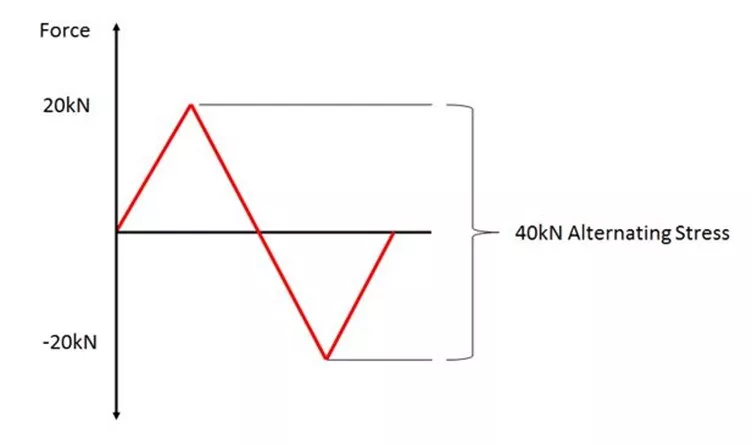
It is the alternating stress amplitude that is important. When swapping to a Zero-Based condition, the alternating stress amplitude is only 20 kN – it is halved as the part is simply unloaded, rather than compressed.
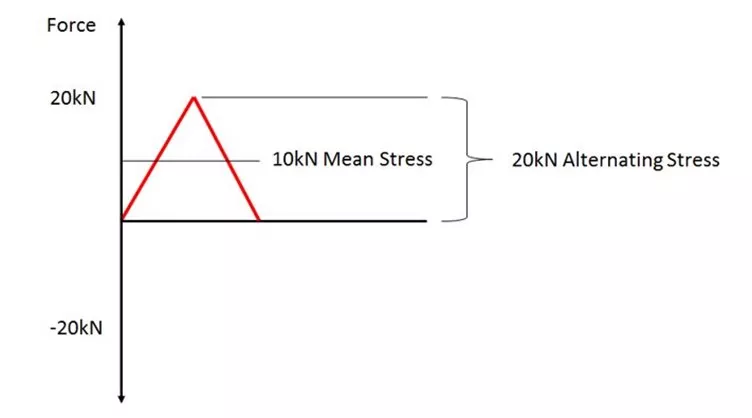
This means that you cannot just swap Fully Reversed with Zero Based if you want to directly compare the difference in lifespan.
Instead, the solution is to use the Scale Factor in the Fatigue Event set up.
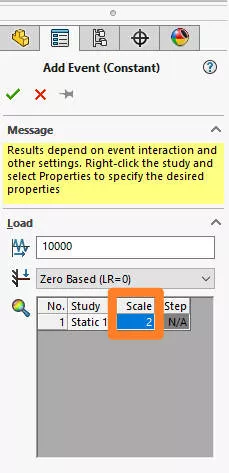
When we swapped over to Zero-Based, we had overlooked this unassuming, yet significant property that allows you to scale the stress results from the parent stress study.
Accounting for the halved amplitude, we needed to double the scale factor to have an accurate direct comparison between the two fatigue studies.
The alternating stress amplitude is now scaled up to 40 kN.
We must also recognise that the mean stress is now positive (rather than zero) and account for this by turning on the Gerber Mean Stress Correction Factor in the study properties.
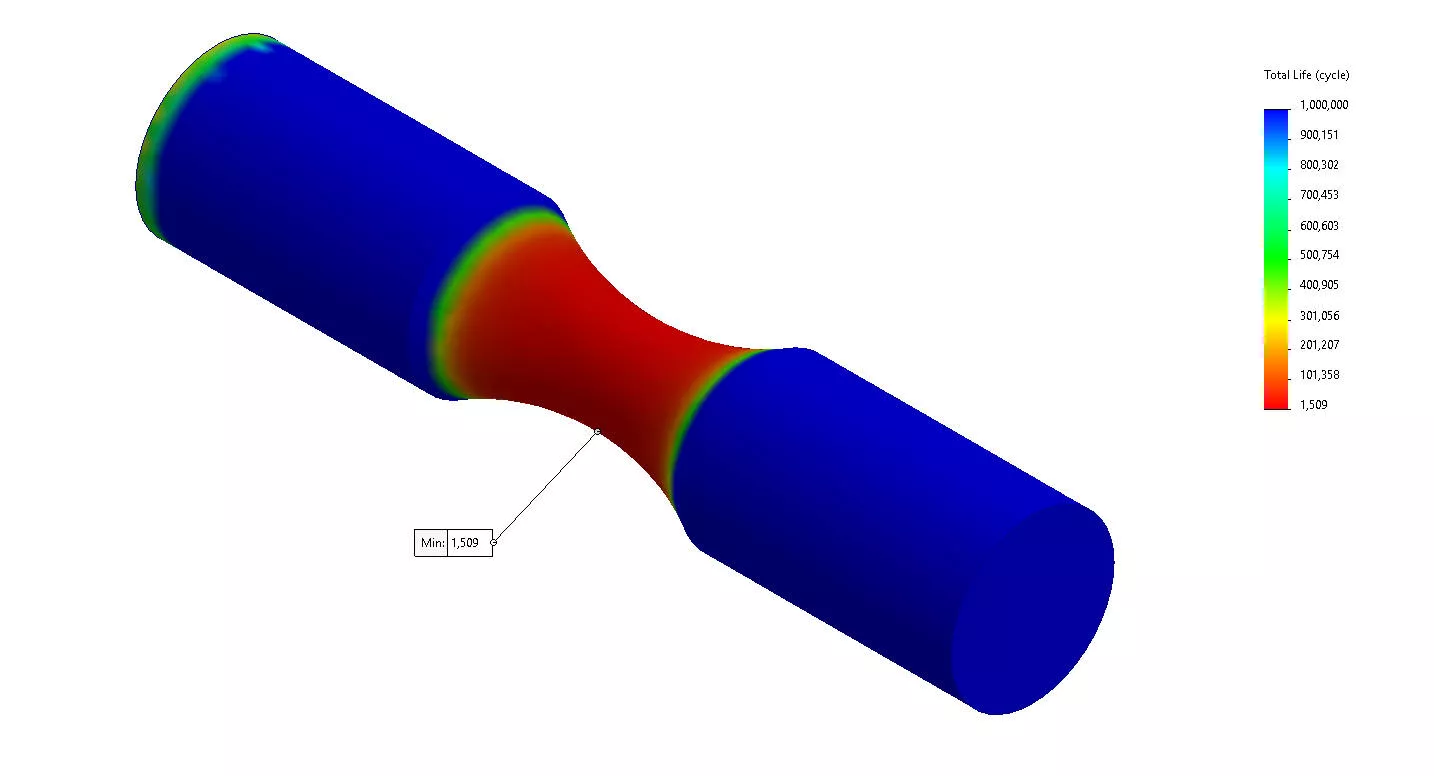
The final result is a lifespan of 1,509 cycles.
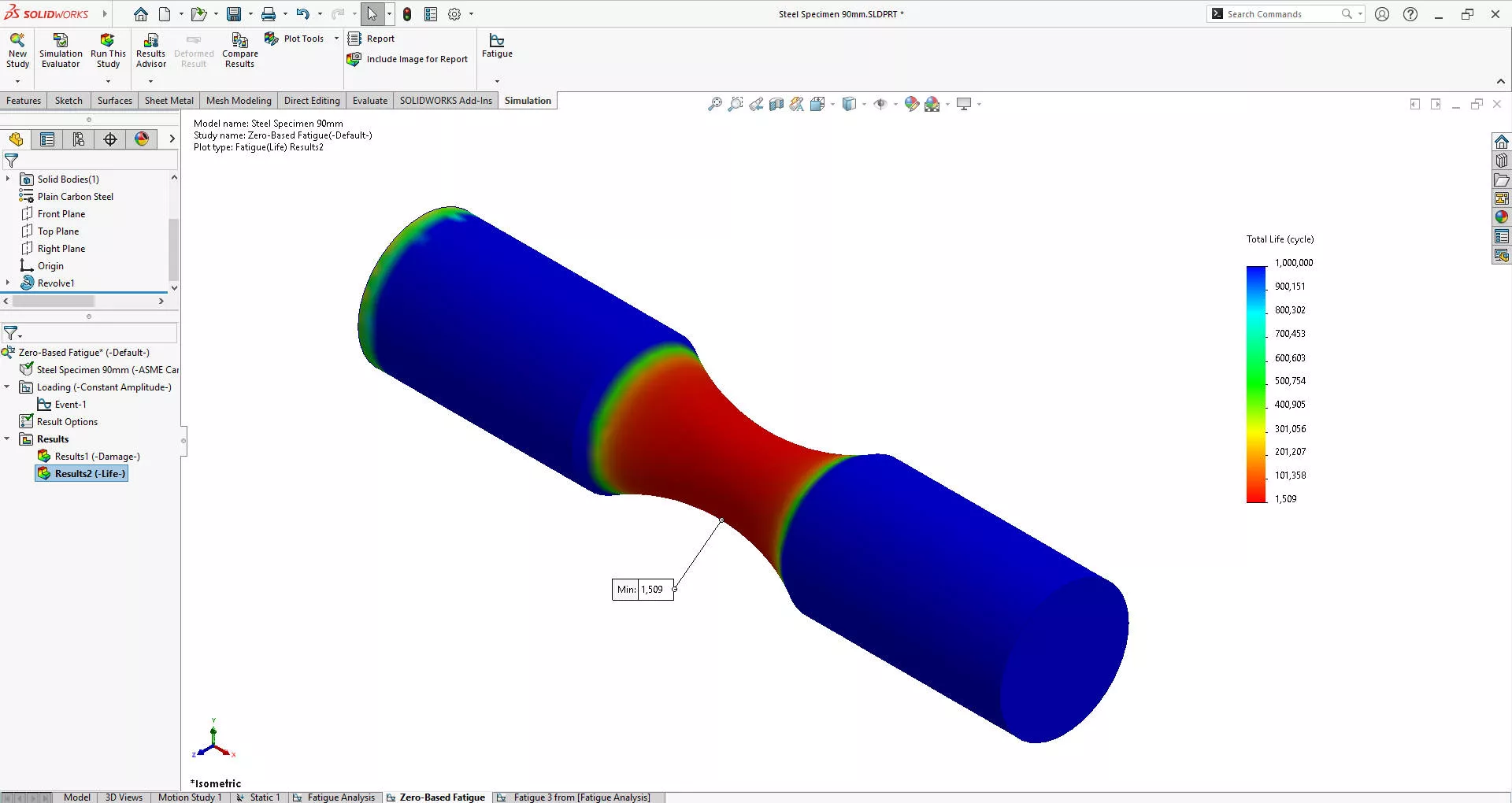
This is now much lower than the originally determined lifespan and is more accurate.
By comparing the 3 results, you can see how critical it is to get this right.
Categorised as: SOLIDWORKS Design | Simulation
Ready to Switch to SOLIDWORKS?
SOLIDWORKS Design has been the industry standard 3D CAD software for over 25 years. Solid Solutions offers a range of packages to suit your needs.

Related Posts

How to Find Reaction Forces in SOLIDWORKS Simulation
SOLIDWORKS helps us to find resultant forces through simulation studies. These virtual tests reduce the need for physical prototypes and give us an accurate answer.

Setting number of decimal places in a table on a drawing
When creating an equation in a drawing general table, is it possible to define the…

SOLIDWORKS Smart Fasteners
SOLIDWORKS Smart Fasteners is a really useful time saving tool, allowing you to automatically insert toolbox fasteners such as bolts and screws into an assembly providing there is a standard hole.

Why is my Flat Pattern not showing in SOLIDWORKS Drawings?
This may be linked to how the drawing is saved or it can be related to how sheet metal parts are displayed in drawings, read on to find out how to fix it.

How to Recover SOLIDWORKS Files After a Crash
SOLIDWORKS has two different methods to help you recover from an unexpected crash or loss of data in the form of auto-recovery and back-up settings.

Redesigning Santa’s Sleigh in SOLIDWORKS
Every year Father Christmas has to fly in his sleigh to deliver presents to boys and girls all over the world in just one night. To put this into perspective, it takes a little under 24 hours to fly from London (UK) to Sydney (Australia) in a streamlined Boeing 747, whereas Father Christmas’ mode of transport is believed to be a rather non-aerodynamic sleigh.

Radiation in Flow Simulation – Part 1 : Reflection
Technical Manager Andy Fulcher explores ‘Radiation in Flow Simulation, Part 1 : Reflection’
Radiation in Flow Simulation – Part 2 : Refraction
Technical Manager Andy Fulcher explores ‘Radiation in Flow Simulation, Part 2 : Refraction’
The Coanda Effect in Flow Simulation
Can you take advantage of the Coanda Effect & can SOLIDWORKS Flow simulate it? Applications Engineer Romel Cumare investigates in his latest blog post.
So how accurate is SOLIDWORKS Simulation?
How accurate is SOLIDWORKS Simulation? Elite Applications Engineer Chris Boyles investigates.