











Discovering SOLIDWORKS PDM Web2.0

Written by: Wayne Marshall
Published: Nov 14, 2022
| View All Blogs
Do you have team members who would benefit from access to the data in your PDM Vault but are excluded from the desktopclient because they use macOS or even Linux (Ubuntu) based hardware? If that is the case then the SOLIDWORKS PDM Web2.0 client may be the solution. Web 2.0 provides a robust, multi-platform interface to PDM via most web browsers and although most commonly used within a company’s network, can also be configured as a secure website to allow external users / field engineers, controlled access to PDM data.
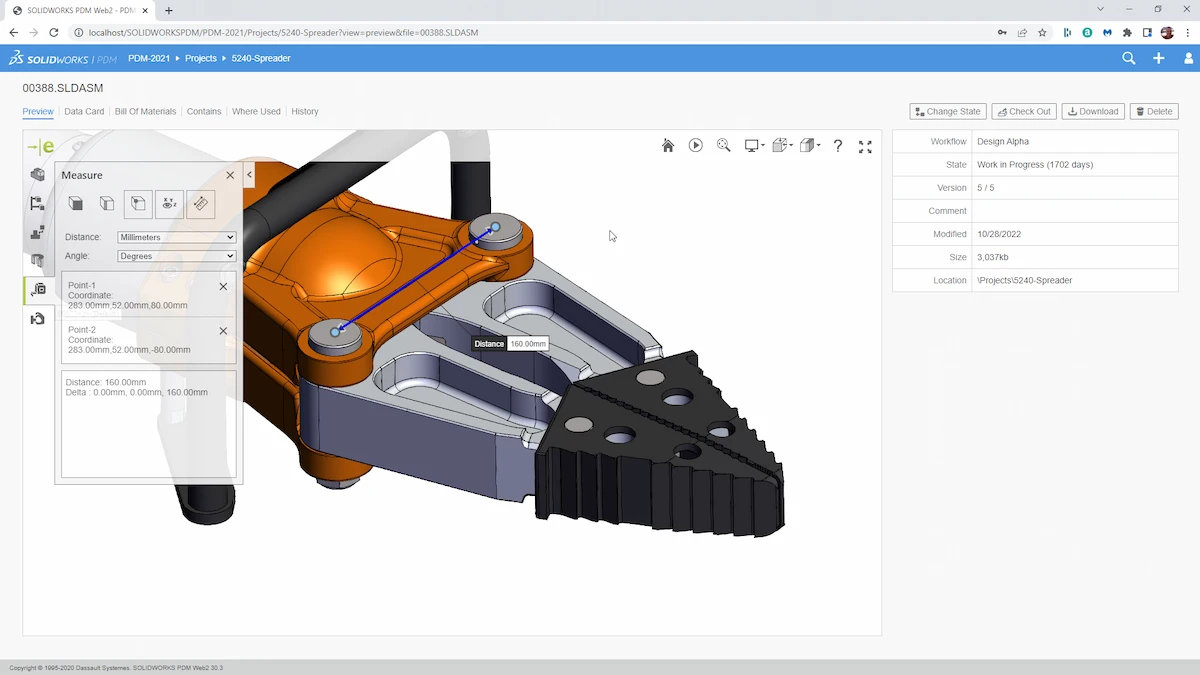
Figure 1| Embedded eDrawings Preview with full UI
Web2.0 is included with SOLIDWORKS PDM Professional and can be accessed using either a web or a viewer license noting that a web license is essentially interchangeable with each CAD editor, contributor, or universal license you have available to you.
Web2.0 allows you to dynamically access your SOLIDWORKS files using the main web browsers (Edge, Chrome etc.) without loading plug-ins., meaning MacOS and Ubuntu users can view, upload and interact with Data using their preferred platforms whilst mobile users, who also have the eDrawings App installed can view data and participate in workflows wherever they are.
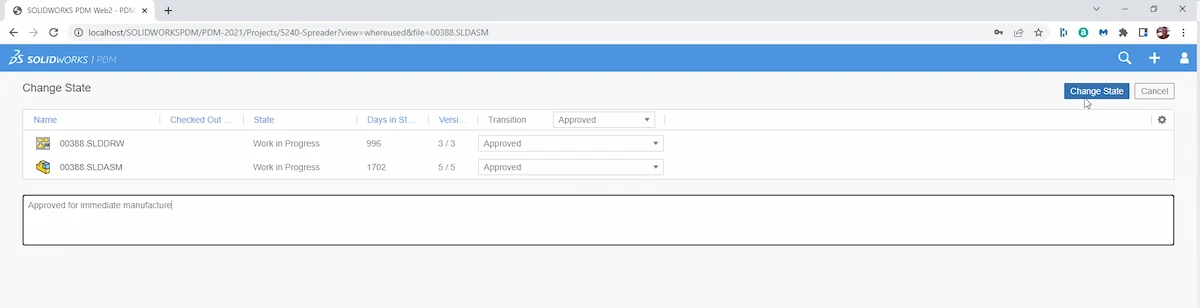
Figure 2| Change Workflow State with Web2.0
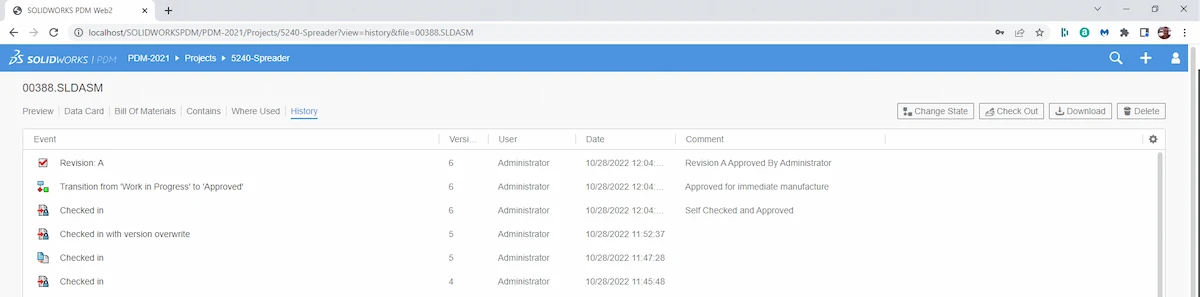
Figure 3| View File History in Web2.0
Watch an overview of Web2.0 viewer on desktop
Discover a quick demo of Web2.0 on a mobile phone
Web2.0 Installation Overview
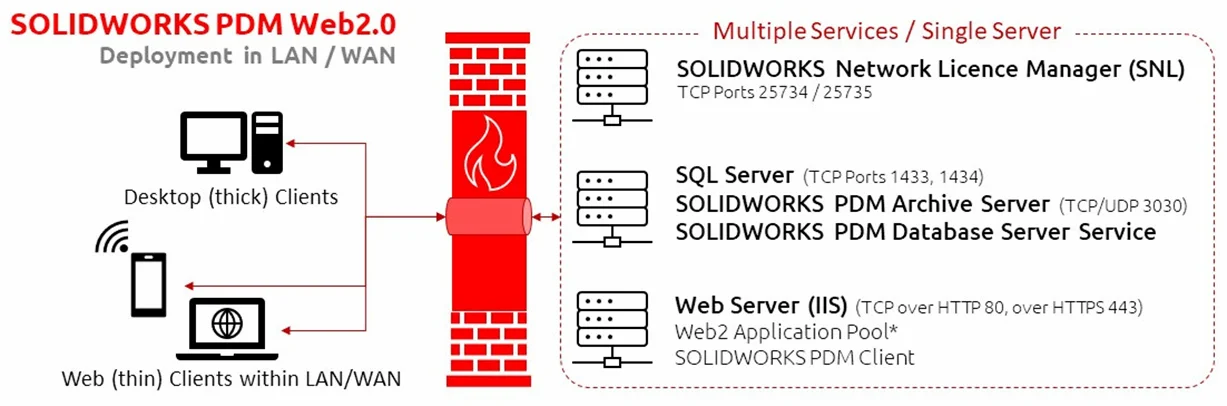
The diagram above shows the typical infrastructure of a PDM Professional installation which includes Web2.0 and where the website will be accessed as an ‘intranet’ (within the LAN/WAN). Below you will find a high-level overview of the steps required to Install / configure Web2.0 in this way. Please note that there are detailed instructions in the SOLIDWORKS PDM Installation Guide, and you should always refer to the correct version of the guide for the version of PDM you are installing in order to determine any version specific pre-requisites / options for that installation. Simply change the ‘year’ in the URL below to grab the relevant document.
Steps to Install/Configure Web2.0 in ‘intranet’ Style
- Verify prerequisites are met including the installation of IIS, if required.
- Install Web2.0 Server software with a PDM Client
- Modify the Web.config file
- Create a local vault view on the Web server
- Identify or create a Windows User account that will be used for the application pool identity
- Identify / Create a local admin user on the server that will be used as the Web2.0 application account (Disable password policy rules if you do not want to have to reset the password regularly)
- Log in to the server using the user defined in step(a)
- Log in to the local vault view with ‘any’ PDM user (Admin is fine)
- Browse to any file and ‘Right click’ over it before dismissing the pop-upmenu and instead previewing the file to confirm installation is complete.
- In IIS, change the Application Pool identity used for the Web2.0 website to instead execute using the windows account defined in step(4)
- Test operation of Web2.0 on the server (us the “Browse *.80 (http)” command from within IIS)
- Log In as PDM User
- Locate / View any file to confirm setup
- Test on another PC / Device within the network. The default URL is “ servername /SOLIDWORKSPDM” where “ servername ” is the name of the Web2.0 server.
For Customers also wishing to access Web2.0 using the internet, it is possible to configure the webserver to use SSL, attach a valid security certificate (https://support.microsoft.com/en-us/help/324069/how-to-set-up-an-https-service-in-iis) before exposing the webserver externally using a redirect with the helpof your ISP.
The diagram below illustrates the architecture in a typical ‘WWW’ based implementation with the standalone webserver outside the LAN with all typical security considerations in place.
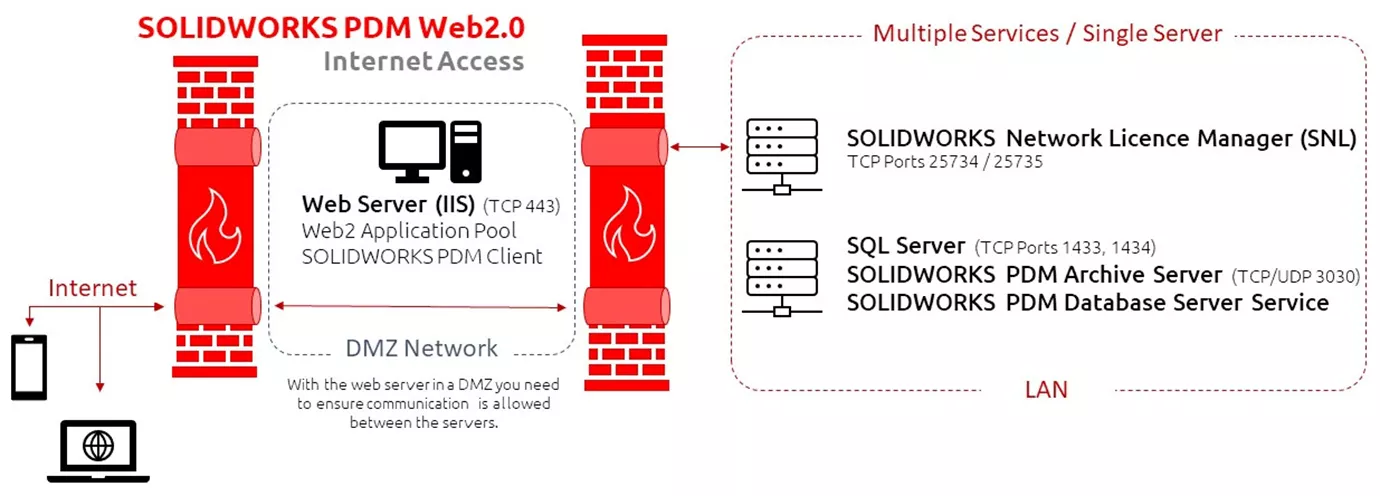
Note: If the IIS server is Windows 10 or Windows 2016 then there is currently a requirement for the site binding to have “HTTP/2” disabled in order to allow multi-file upload to work within a Web2 SSL connection. This setting is enabled by default. In Windows 10 it can be controlled under Site Bindings, for Server 2016 a Computer Registry change is required
If after reading this blog you would like to set upa Web2.0 Server within you organisation but would prefer to have this done by a member of our team, then this is something we are able to offer as a standard service.
As well as installing and configuring the website for access within your organisation, we will also implement a daily scheduled event to ensures that any temporary session files created when users access / View files via Web2.0, are cleansed from the system to avoid having to do this manually. This is something I have discussed before in my blog about Managing Disc Space
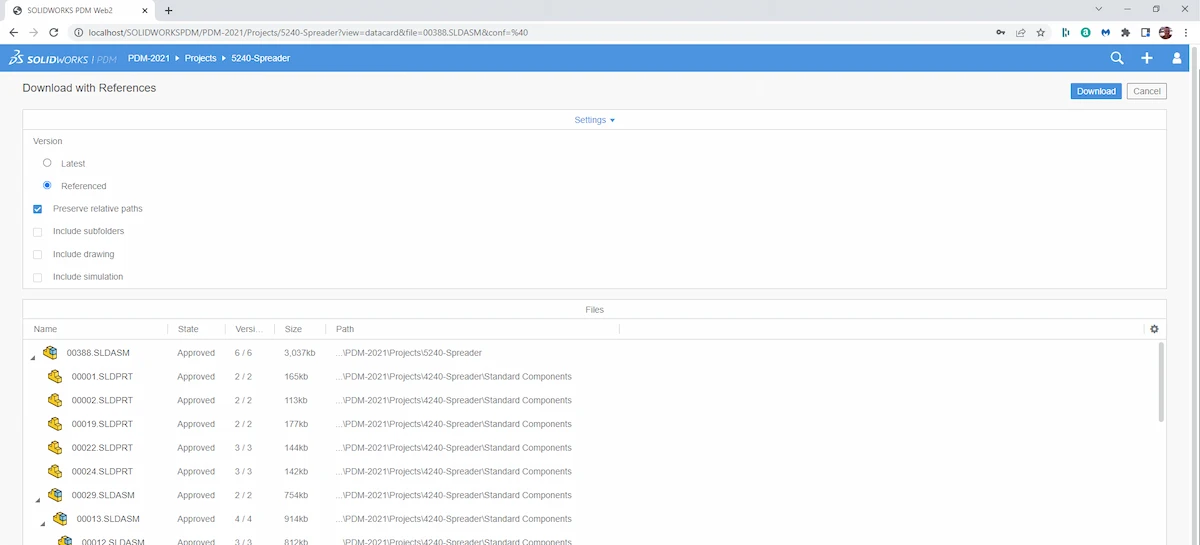
Figure 4| Download With References in Web2.0
Categorised as: Data Management | SOLIDWORKS PDM
Get a SOLIDWORKS Quote
Interested in SOLIDWORKS? Contact us for questions, trials, or demos by clicking the button below or call 01926 333777. Our experts will help you find the perfect solution.

Related Posts

How to Create a Pack and Go in SOLIDWORKS
Pack and Go in SOLIDWORKS should be used when sending SOLIDWORKS files to another person. Use this simple guide to help you safely send entire SOLIDWORKS projects.
What is 3DSWYM? A 3DEXPERIENCE Platform Tutorial
3DSwym is the application at the heart of the 3DEXPERIENCE, allowing users to connect and collaborate across the platform.
Microsoft SQL Server licensing for SOLIDWORKS PDM
October 2020 marks two important milestones for the SOLIDWORKS PDM family and SQL Server.

Part Numbering in SOLIDWORKS PDM Professional
When implementing a new PDM Professional Vault Customers will have the option to review their part numbering and classification requirements as they move to a system that allows them to, in most cases, automate the way the identify ‘parts’ within the Vault. Part Numbering is something that a lot of customers approach differently and this is often based on ‘how it’s always been done’ without necessarily considering what is the purpose of a Part Number within their organisations and wider within their supply chains. If we consider the humble part number. What is it’s purpose?

The 6 Golden Rules of Managing Data in SOLIDWORKS
When modelling in SOLIDWORKS, before you know it, you will have created lots of parts, assembly and drawing files, so it’s important to think about how you will manage these files and keep everything organised. Here we discuss the ‘6 Golden Rules’ of managing your SOLIDWORKS files using Windows Explorer and recommended methods for file naming, structuring your projects and managing revisions.
This kicks off a month looking at the management of CAD data, register for one of our upcoming live webinars at the bottom of this article.

PDM Professional – Assigning Users with Conditional Notifications
Often customers will create smaller project teams for specific jobs and in the past we have been asked if it is possible, within a multi stage workflow, to pre-assign at the creation stage users who will be notified as checker / approver within those transitions. This blog will demonstrate how, using conditional Notifications in PDM Professional, this can be configured. We will also create some logic to allow for certain parts of the workflow to be bypassed by validating the selected ‘names’ against transition conditions. In this example the ‘approvers’ will be assigned on the files DataCard, but it would be just as feasible to have these names inherited from a project folder card if defining the rules at a higher level was possible within your Teams.
Managing Disk Space with SOLIDWORKS PDM Part #1: Distributing the Archive
This blog series was prompted by a recent support ticket, logged when a customer found their PDM Professional installation suddenly became unusable. The warning message, led to my reviewing the Archive Server Log file and this quickly identified the problem being a result of the PDM Server running out of disk space.
Managing Disk Space with SOLIDWORKS PDM Part #2: Deleted vs Destroyed and the Vault Cleaner Service
In this blog series we are examining the factors influencing disk usage within PDM and what you can do to manage them. In the first part we discussed how you can re-organise your archive across multiple drives to get you back up and running quickly should you find you are short on space. This blog and the next part will discuss behaviours in PDM that can result in redundant disk usage and how you can free that up with the vault cleaner service.
Managing Disk Space with SOLIDWORKS PDM Part #4: Cold Storage
In this blog series we are examining the factors influencing disk usage within PDM and what you can do to manage them. In the first part we discussed how you can re-organise your Archive across multiple drives to get you back up and running quickly should you find you are short on space. In the second part we looked at the differences between a deleted and a destroyed file and the impact the PDM recycle bin has on Disk usage. Part three discussed temporary session files created by the PDM Web Server and this Part will look at an option within PDM called Cold Storage.
Managing Disk Space with SOLIDWORKS PDM Part #5: Archive Compression
In this blog series we are examining the factors influencing disk usage within PDM and what you can do to manage them. In the first part we discussed how you can re-organise your archive across multiple drives to get you back up and running quickly should you find you are short on space. In the second part we looked at the differences between a deleted and a destroyed file and the impact the PDM recycle bin has on Disk usage. Part three discussed temporary session files created by the PDM Web Server. In part four we discussed cold storage and in this last part we will look at archive compression.