











Enhance your 2D Draughting with these Draftsight 2025 Updates | What’s New in SOLIDWORKS 2025?
Written by: Gordon Stewart
Published: Dec 24, 2024
| View All Blogs
With the release of DraftSight 2025, users can look forward to several new features that enhance productivity, improve file compatibility, and streamline the drafting process. Whether you’re working on complex designs, collaborating with other CAD platforms, or simply looking to refine your workflow, DraftSight 2025 has something to offer. Here’s a breakdown of the top new features and improvements in this latest version.
#1 – 3D STEP File Import
In the world of CAD design, STEP files (Standard for the Exchange of Product model data) are a widely used format, especially for 3D models. With DraftSight 2025, users can now easily import 3D STEP files, making it easier to work with files from a variety of CAD systems like SOLIDWORKS, CATIA, and others within the Dassault Systèmes ecosystem.
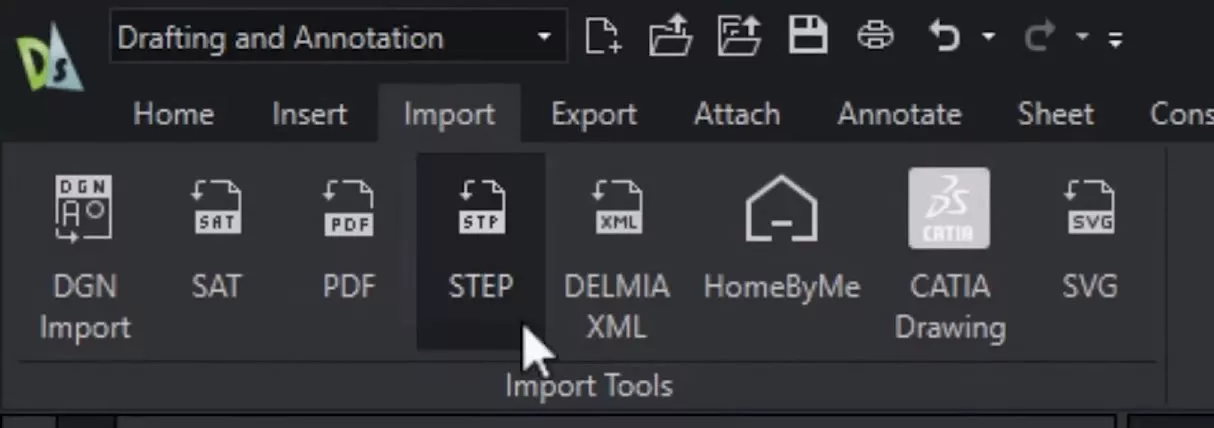
This new capability allows for a smoother transition and better interoperability when working with 3D models, ensuring that data flows seamlessly across platforms.
#2 – DGN Import and Export
DraftSight 2025 introduces full DGN file support, which is a critical feature for those involved in large-scale construction or infrastructure projects. The DGN format is commonly used for 2D and 3D technical drawings, especially in industries like civil engineering.
Now, DraftSight users can both import and export DGN files, providing greater flexibility for those working on multidisciplinary teams or with clients who rely on this format for technical drawings. This addition complements DraftSight’s existing capabilities and strengthens its compatibility with various industries.
#3 – Enhanced Custom Blocks with Multiple Visibility Elements
Custom blocks have always been a powerful tool in DraftSight for organizing and reusing design elements. DraftSight 2025 takes custom blocks to the next level by introducing multiple visibility elements within a single block.

This enhancement allows users to control which parts of a custom block are visible at any given time, making it easier to manage complex designs with conditional elements.
#4 – Menu Bar Option Across All Workspaces
DraftSight is also making the user interface more adaptable with the addition of the menu bar in all workspaces.
Previously, users had to choose between a traditional menu-based interface and the ribbon-based interface, but with version 2025, you can now keep the menu bar active across all your workspaces.

This means that users can enjoy the best of both worlds: the flexibility of a traditional menu alongside the powerful features of a ribbon interface.
#5 – New Block Structure Palette
Managing nested blocks—blocks within blocks—has never been easier. DraftSight 2025 introduces the Block Structure Palette, a tool that allows users to organize, preview, hide, and isolate blocks with greater control.

This feature is especially useful when dealing with complex drawings that contain nested blocks, enabling users to work more efficiently by isolating parts of the design.
With the Block Structure Palette, navigating and modifying nested blocks is a breeze, saving you time and reducing design errors.
#6 – Flatten Command for Clean and Optimized Files
The new Flatten command in DraftSight 2025 is designed to simplify your 3D drawings by automatically flattening all Z-axis elevations to zero. This is especially useful when working with 3D data that needs to be converted to 2D for certain applications.

The Flatten command cleans up your drawing, ensuring that all elevations are uniform, which is vital for creating accurate, readable 2D drawings from 3D models.
#7 – Visual Style Manager for 3D Customization
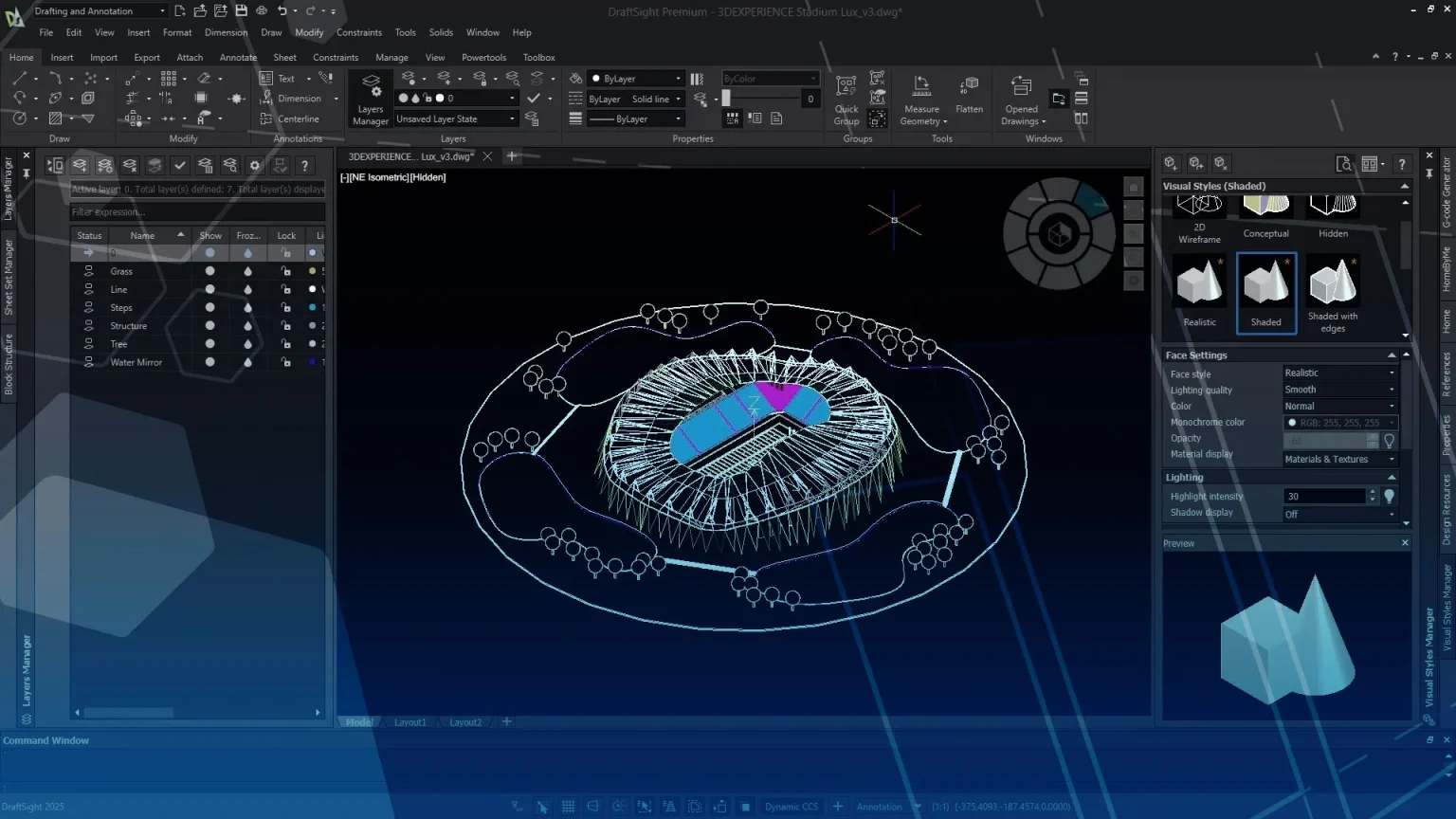
DraftSight 2025 introduces a new Visual Style Manager, giving users the ability to customize how their 3D entities are displayed.
This new interface palette allows you to adjust visual settings such as face settings, lighting, environment settings, edge settings, and silhouette edges.

Whether you’re working with realistic renderings or simple wireframes, this tool provides greater control over how your 3D models appear, ensuring that you can tailor the visual presentation of your work to suit your needs.
#8 – Dimension Space Command for Automatic Organization
The Dimension Space command in DraftSight 2025 is a significant productivity booster for engineers and drafters. This powerful tool automatically organizes and positions dimension strings with just a few clicks.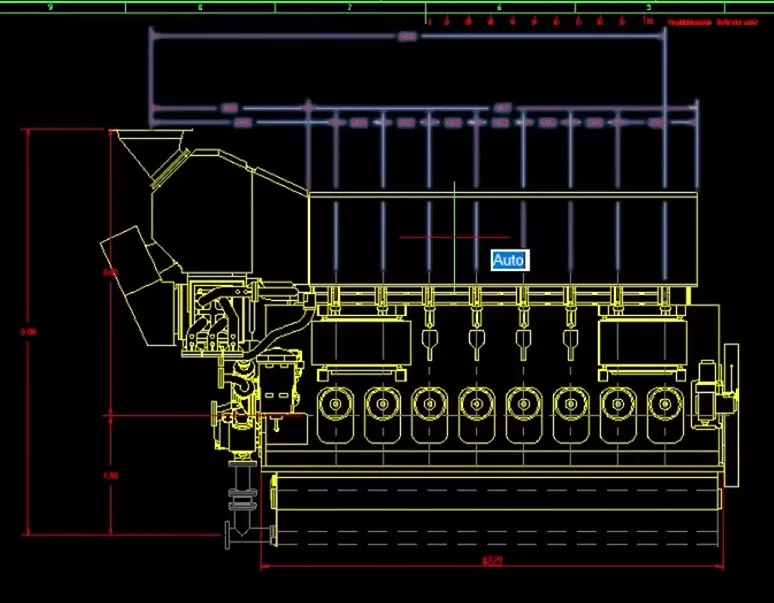
Whether you’re working on detailed mechanical designs or architectural plans, this command saves you time by automating the placement of dimensions, ensuring consistency and accuracy across your drawings.
#9 – Table Enhancements for Improved Performance
DraftSight 2025 introduces several performance and functionality improvements for tables, including the ability to insert blocks into individual cells, use quick grips for table adjustments, and access more comprehensive contextual menus.
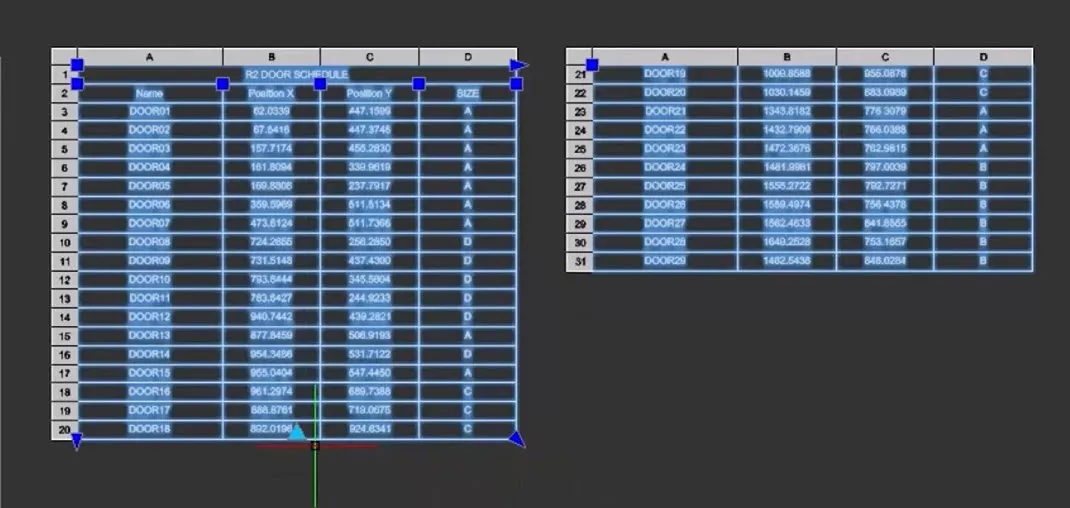
Additionally, auto formulas make it easier to create tables with dynamic content that updates automatically, further improving efficiency when working with complex data.
#10 – New Dimension Style Manager
For users who frequently work with dimensions, the new Dimension Style Manager in DraftSight 2025 offers a more efficient way to create, edit, and share dimension styles.
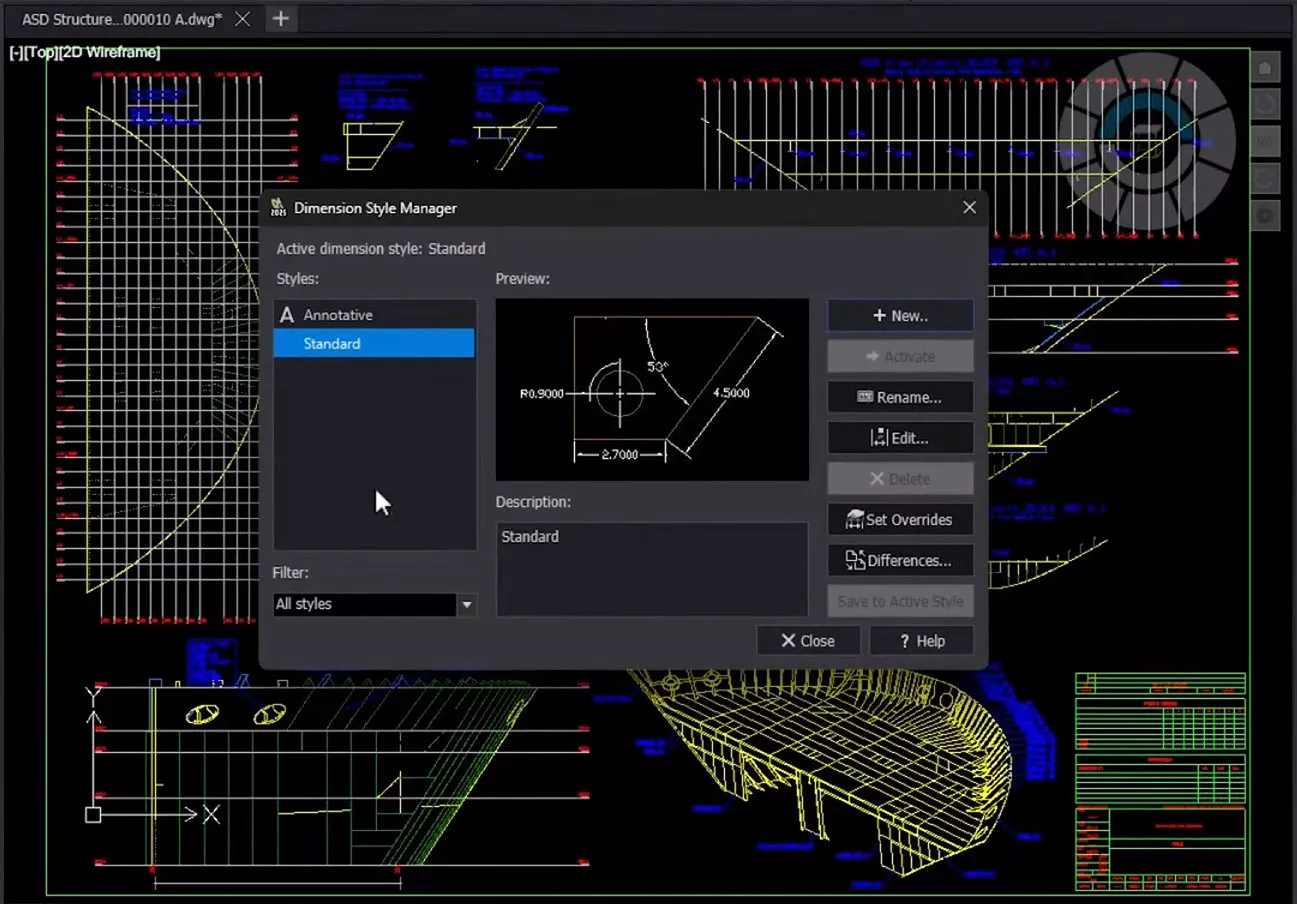
This new window allows users to manage dimension styles in a more organized manner, ensuring that dimensions are consistent throughout the drawing and easily customizable.
Conclusion
DraftSight 2025 offers a range of exciting new features and enhancements that cater to the evolving needs of CAD professionals.
Whether you’re importing STEP files for better cross-platform compatibility, managing complex blocks with nested elements, or customizing your 3D visualizations, DraftSight 2025 provides the tools necessary to take your drafting to the next level.
These updates reflect the growing demand for more flexible, efficient, and user-friendly CAD solutions—making DraftSight an even more powerful choice for your design projects.
Stay ahead of the curve by upgrading to DraftSight 2025, and make the most of these new features to enhance your productivity and streamline your workflows.
Categorised as: DraftSight | What's New
Get Expert SOLIDWORKS Training
Get hands-on SOLIDWORKS training in-person or online, led by certified experts with real industry experience. With venues across the UK & Ireland, it’s easy to start learning today.
Related Posts
Managing Disk Space with SOLIDWORKS PDM Part #3: Web2.0 Temporary Session Files
In this blog series we are examining the factors influencing disk usage within PDM and what you can do to manage them. In the first part we discussed how you can re-organise your archive across multiple drives to get you back up and running quickly should you find you are short on space. In the second part we looked at the differences between a deleted and a destroyed file and the impact the PDM recycle bin has on Disk usage. In this third part we are looking at storage for Web2 temporary files, so this is especially important to customers who have deployed the Web2.0 interface for PDM Professional and have lots of users viewing / interacting with managed data.

Laser Cut with SOLIDWORKS 2022
Create your own laser cut Christmas decorations with SOLIDWORKS 2022. We had a go ourselves and look how they turned out!

Product Lifecycle Management (PLM) Top 10 Benefits
Contrary to popular belief, a Product Lifecycle Management (PLM) Platform goes beyond the design and engineering departments and encompasses the organisation as a whole. Because of this, benefits can be unlocked across the entire organisation.
Top 4 Benefits of Composite Materials for Lightweight Engineering
One method design and engineering teams have employed to combat high costs and high carbon emissions is the use of composite materials in the development of parts.

What’s New in SOLIDWORKS 2023?
Each year, SOLIDWORKS takes your requests and works to bring the extra capabilities you need to the software.

Top 5 Enhancements to the 3DEXPERIENCE Platform for 2023x FD02 Update
The latest release of the 3DEXPERIENCE platform brings with it many enhancements designed to ease the day-day life of SOLIDWORKS users.

September Customer Spotlight
Across every industry, whatever their size, we are continually impressed and proud to support these innovators. Check out September’s selection below.

What’s New in SOLIDWORKS 2024: Top 10 New Features
SOLIDWORKS 2024 has arrived, which means there’s a whole load of new and exciting features for us to unpack. Here are the top 10 features in SOLIDWORKS 2024.

9 NEW Updates to Parts & Features: What’s New in SOLIDWORKS 2024?
Discover all the latest updates to SOLIDWORKS part modelling with SOLIDWORKS 2024.
5 NEW Time-Saving Sheet Metal & Fabrication Tools: What’s New in SOLIDWORKS 2024
Discover the great new tools in SOLIDWORKS 2024 to empower fabricators and sheet metal designers.