











How to Find Your SOLIDWORKS Serial Number or License Key

Written by: Terry O'Reilly
Published: Jan 22, 2026
| View All Blogs
Regardless of your need, it’s easy to find your SOLIDWORKS serial number or SOLIDWORKS license key.
Whether you’ve lost your purchase confirmation email, or are simply curious, this is a common question our Technical Support team gets.
Each SOLIDWORKS product can have their own license key. The following guide applies to SOLIDWORKS standalone licenses, but you can check for multi-product licenses through the SOLIDWORKS Installation Manager.
There are a few ways to locate your SOLIDWORKS serial number if you have a standalone SOLIDWORKS license, and we’ll show you how to navigate to and find your SOLIDWORKS serial number quickly.
WHERE TO FIND YOUR SOLIDWORKS SERIAL NUMBER
SOLIDWORKS serial numbers and can be found within your SOLIDWORKS session under the Help menu.
- Open SOLIDWORKS.
- In SOLIDWORKS 2020 and beyond, click the ? button in the top right corner and then About SOLIDWORKS from the menu.
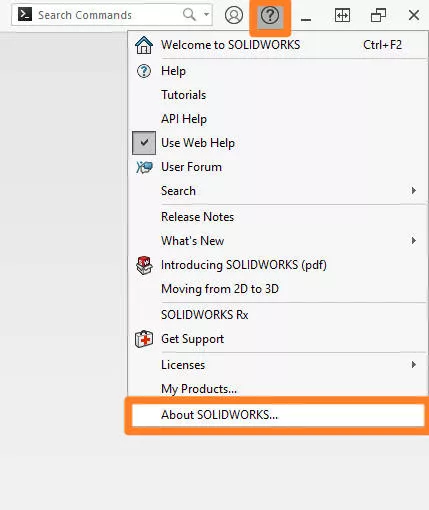 To find an older SOLIDWORKS serial number in versions below 2020, click on the Help menu then About SOLIDWORKS, the process is effectively the same.
 - A dialog pop up then shows the installed version of SOLIDWORKS as well as the major release and service pack installed. e.g. SOLIDWORKS Premium 2024 SP1
- Select Show Serial Number to reveal the serial number.
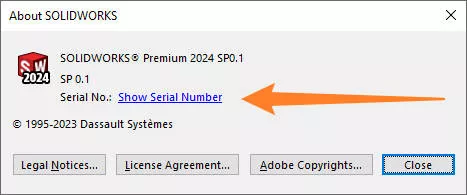
IMPORTANT: Your serial number is your access key to SOLIDWORKS. Keep it safe and never give it out to anyone other than your Technical Support team.
If you still can’t find your SOLIDWORKS serial number, then be sure to give our team a call on 01926 333 777 or drop an email to support@solidsolutions.co.uk.
FIND A SOLIDWORKS SERIAL NUMBER WITHOUT OPENING SOLIDWORKS
SOLIDWORKS serial numbers can also be located without even opening SOLIDWORKS.
The SOLIDWORKS Installation Manager stores all your license keys for any installed SOLIDWORKS product (e.g. SOLIDWORKS Visualize or SOLIDWORKS Electrical) within it.
- Search for Programs and Features in the Windows Start menu.
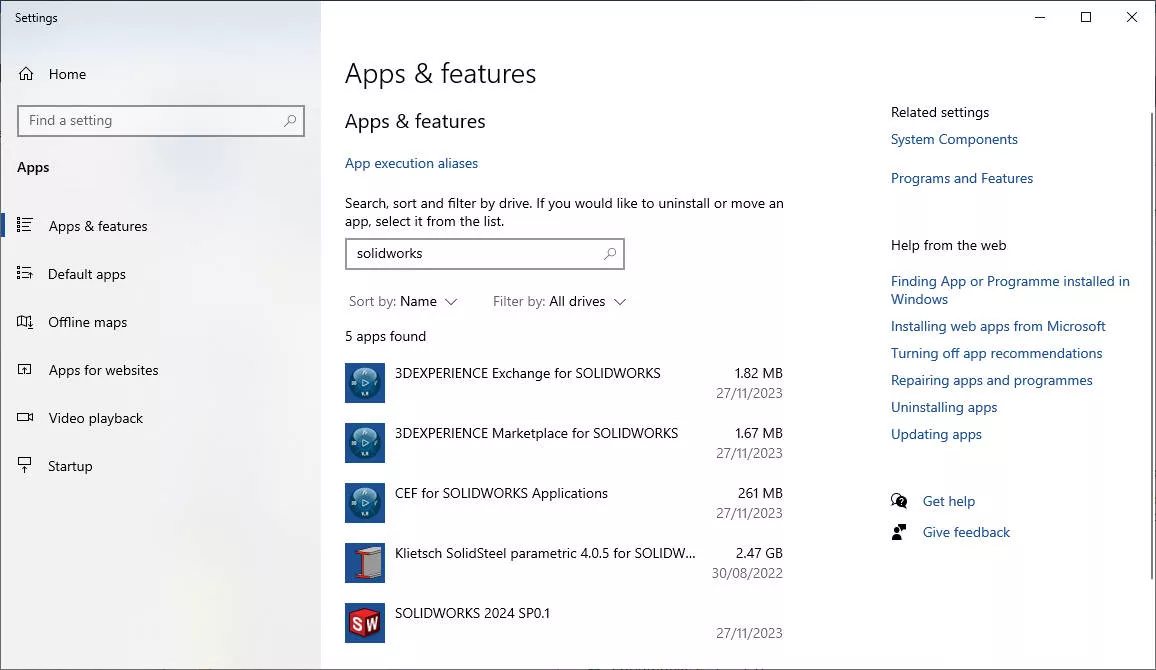
- Click on SOLIDWORKS in the list and select Modify to open the Installation Manager.
- Choose to Modify your installation and click Next to proceed to the license page.
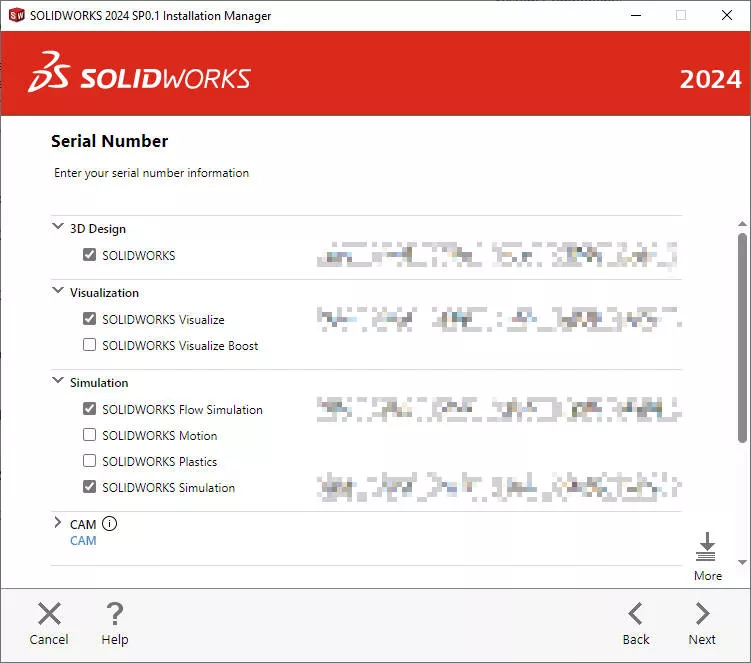
- Add, remove, copy or note down any licences visible and keep them safe.
For more experienced users, the Windows Registry provides access to SOLIDWORKS serial numbers.
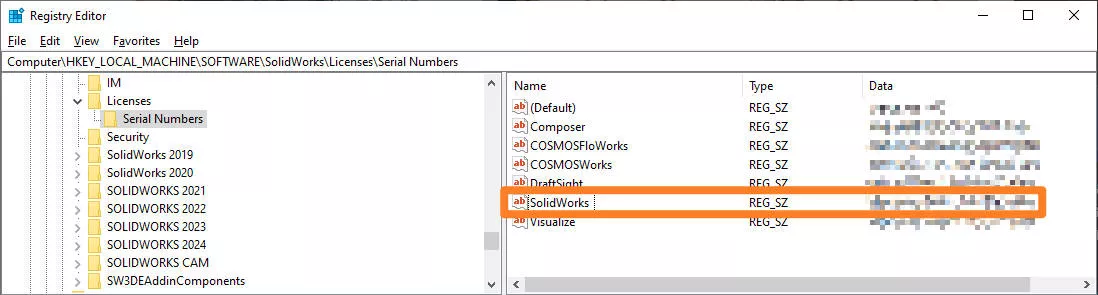
NOTE: Modifying the Windows registry can be a risky operation when you don’t know what you are doing.
This may be controlled by your Administrator as it contains all the settings and data that programs on your PC require to run, so we urge caution when accessing and modifying it.
- Search for regedit.exe in the Windows Start menu
- Browse to HKEY_LOCAL_MACHINESoftwareSolidWorksLicensesSerial Numbers
Your SOLIDWORKS license number will be stored within this folder under the data header for the SOLIDWORKS entry.
Be aware that incorrect modifications can result in irreparable changes to the system or application, so we recommend that only a professional SOLIDWORKS Engineer carries out the operation.
If you are unsure, call our team on 01926 333 777 or get in touch today.
What is the SOLIDWORKS Registry?
Discover the Windows Registry, access SOLIDWORKS licenses and learn how to perform your SOLIDWORKS registry resets safely in this short walkthrough guide.
Access and modify your SOLIDWORKS registry easily and protect yourself against making dangerous and costly mistakes.
HOW TO GET A SOLIDWORKS SERIAL NUMBER
SOLIDWORKS serial numbers can only be obtained through a Value Added Reseller (VAR).
Our customers trust Solid Solutions to deliver high quality Technical Support and provide reliable solutions to minimise any downtime that may result from software or hardware performance issues.
If you are interested in getting your own copy of SOLIDWORKS, then get in touch with our team or get a free trial and download SOLIDWORKS today.
Categorised as: SOLIDWORKS Design | Tech Tips
Get a SOLIDWORKS Quote
Interested in SOLIDWORKS? Contact us for questions, trials, or demos by clicking the button below or call 01926 333777. Our experts will help you find the perfect solution.

Related Posts

How to Find Reaction Forces in SOLIDWORKS Simulation
SOLIDWORKS helps us to find resultant forces through simulation studies. These virtual tests reduce the need for physical prototypes and give us an accurate answer.

Setting number of decimal places in a table on a drawing
When creating an equation in a drawing general table, is it possible to define the…

SOLIDWORKS Smart Fasteners
SOLIDWORKS Smart Fasteners is a really useful time saving tool, allowing you to automatically insert toolbox fasteners such as bolts and screws into an assembly providing there is a standard hole.

Why is my Flat Pattern not showing in SOLIDWORKS Drawings?
This may be linked to how the drawing is saved or it can be related to how sheet metal parts are displayed in drawings, read on to find out how to fix it.

Why is SOLIDWORKS Crashing?
It’s one of the great mysteries of life – why is SOLIDWORKS crashing? Let’s explore how SOLIDWORKS crashes and how we can improve performance in SOLIDWORKS.

SOLIDWORKS Tips: Are you Making this Common Mistake in Fatigue Analysis?
Simulation is a vital and complex engineering need. Fortunately, SOLIDWORKS makes it easy to test, correct mistakes and obtain accurate results.
Tech Support Blog: Why are my SOLIDWORKS BOM Quantities Wrong?
Why are my SOLIDWORKS BOM Quantities Wrong? A support call cropped up this week which…

How to Get Your Serial Number for SOLIDWORKS Visualize Standard
Want to download Visualize to make photorealistic renders? Follow this guide for accessing your Visualize serial number that comes bundled in with SolidWorks Professional and Premium.

How to Recover SOLIDWORKS Files After a Crash
SOLIDWORKS has two different methods to help you recover from an unexpected crash or loss of data in the form of auto-recovery and back-up settings.

Redesigning Santa’s Sleigh in SOLIDWORKS
Every year Father Christmas has to fly in his sleigh to deliver presents to boys and girls all over the world in just one night. To put this into perspective, it takes a little under 24 hours to fly from London (UK) to Sydney (Australia) in a streamlined Boeing 747, whereas Father Christmas’ mode of transport is believed to be a rather non-aerodynamic sleigh.