











How to Fix <MOD-DIAM> in SOLIDWORKS Dimensions
Written by: Terry O'Reilly
Published: Apr 15, 2019
| View All Blogs
What are the Recommended SOLIDWORKS Settings?
That’s a tricky question! As SOLIDWORKS settings are completely customisable, you have the freedom to set yours up however you feel is comfortable.
For new users, however, we recommend watching this video to find out what the best SOLIDWORKS settings are for getting started.
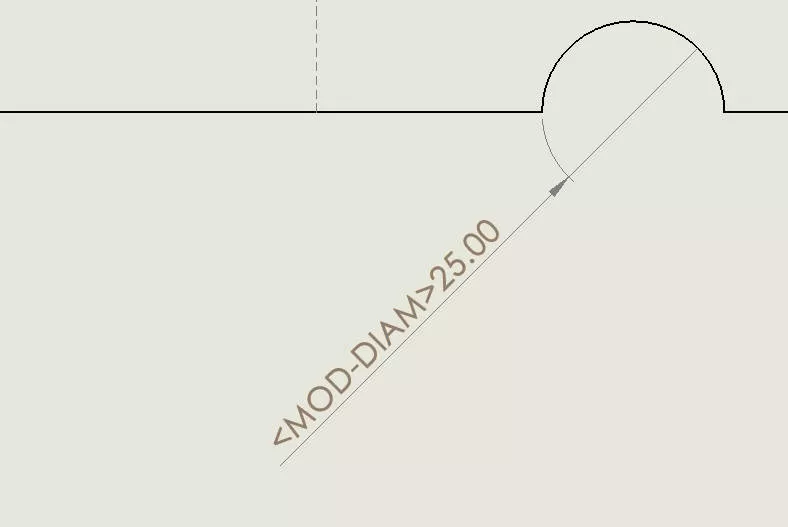
Mod-diam in place of diameter
Why does the Diameter Symbol Stop Displaying in SOLIDWORKS?
Sometimes after performing an upgrade of SOLIDWORKS, diameter symbols no longer display properly and give a message instead. You may also notice this issue after Windows has installed updates.
Either way, you’re seeing in place of diameter symbols in drawings, parts or assemblies. Here’s a simple, step-by-step guide to fix errors.
How to Change the SOLIDWORKS Symbol Library File Path
Step 1: Navigate to System Options
Within SOLIDWORKS, go to the Options cog and open the System Options.
Step 2: Select System Library File
Select File Locations and in the drop-down menu choose Symbol Library File.
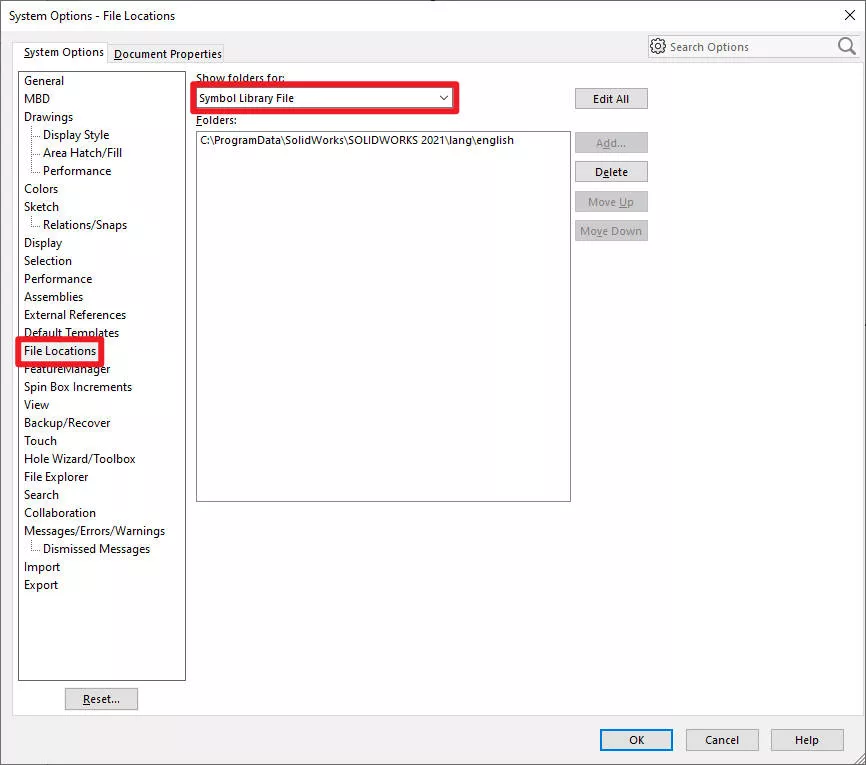
System options
Step 3: Delete Symbol Folder
Select the currently visible directory and delete it. Don’t worry, we’ll replace it in the next step.
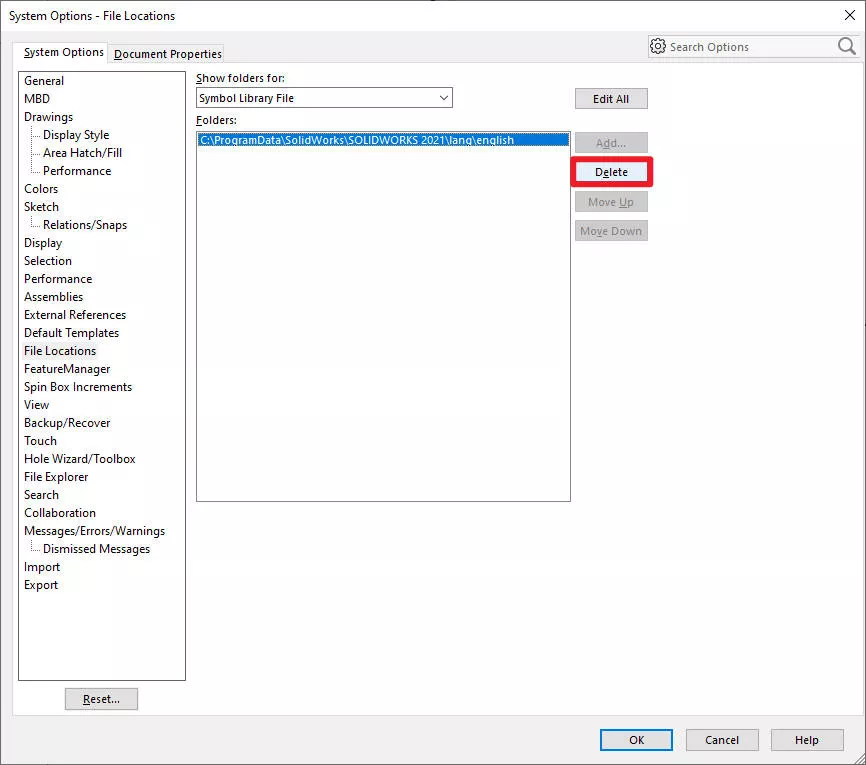
Delete the directory
Step 4: Add Symbol Library File
Click Add and navigate to the location of your Symbol Library file. By default this is:
C:\ProgramData\SOLIDWORKS\SOLIDWORKS 20XX\lang\english
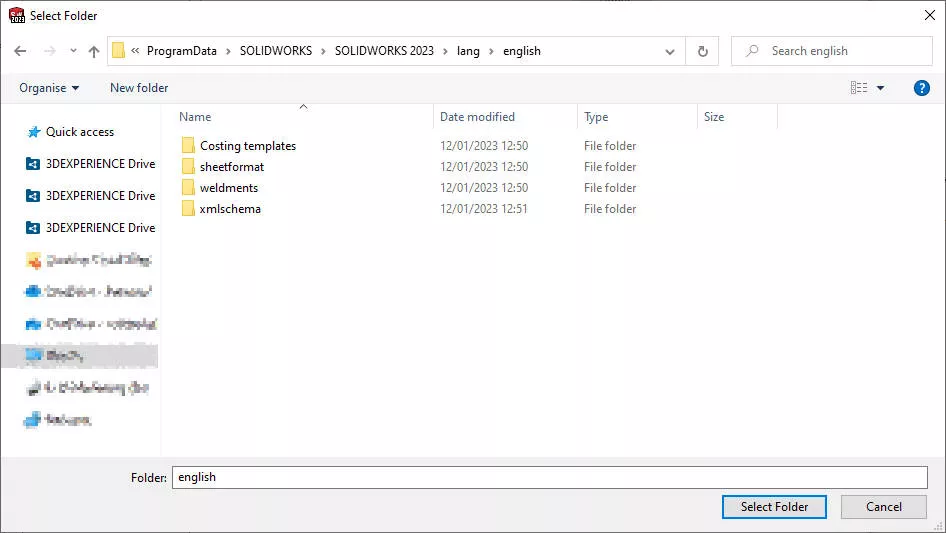
Navigate to the symbol library file
NB: ProgramData is a hidden folder. If you do not see it in your list of folders on your C: drive, head to Windows Explorer > View and select the Hidden Items checkbox.

Hidden items
Select OK and accept any Windows Firewall messages.
Done!
Select OK and accept any Windows Firewall messages. SOLIDWORKS dimensions should now display the diameter symbol.
Categorised as: SOLIDWORKS Design | Tech Tips
Get Expert SOLIDWORKS Training
Get hands-on SOLIDWORKS training in-person or online, led by certified experts with real industry experience. With venues across the UK & Ireland, it’s easy to start learning today.
Related Posts

How to Find Reaction Forces in SOLIDWORKS Simulation
SOLIDWORKS helps us to find resultant forces through simulation studies. These virtual tests reduce the need for physical prototypes and give us an accurate answer.

Setting number of decimal places in a table on a drawing
When creating an equation in a drawing general table, is it possible to define the…

SOLIDWORKS Smart Fasteners
SOLIDWORKS Smart Fasteners is a really useful time saving tool, allowing you to automatically insert toolbox fasteners such as bolts and screws into an assembly providing there is a standard hole.

Why is my Flat Pattern not showing in SOLIDWORKS Drawings?
This may be linked to how the drawing is saved or it can be related to how sheet metal parts are displayed in drawings, read on to find out how to fix it.

Why is SOLIDWORKS Crashing?
It’s one of the great mysteries of life – why is SOLIDWORKS crashing? Let’s explore how SOLIDWORKS crashes and how we can improve performance in SOLIDWORKS.

SOLIDWORKS Tips: Are you Making this Common Mistake in Fatigue Analysis?
Simulation is a vital and complex engineering need. Fortunately, SOLIDWORKS makes it easy to test, correct mistakes and obtain accurate results.

Tech Support Blog: Why are my SOLIDWORKS BOM Quantities Wrong?
Why are my SOLIDWORKS BOM Quantities Wrong? A support call cropped up this week which…

How to Get Your Serial Number for SOLIDWORKS Visualize Standard
Want to download Visualize to make photorealistic renders? Follow this guide for accessing your Visualize serial number that comes bundled in with SolidWorks Professional and Premium.

How to Recover SOLIDWORKS Files After a Crash
SOLIDWORKS has two different methods to help you recover from an unexpected crash or loss of data in the form of auto-recovery and back-up settings.

Redesigning Santa’s Sleigh in SOLIDWORKS
Every year Father Christmas has to fly in his sleigh to deliver presents to boys and girls all over the world in just one night. To put this into perspective, it takes a little under 24 hours to fly from London (UK) to Sydney (Australia) in a streamlined Boeing 747, whereas Father Christmas’ mode of transport is believed to be a rather non-aerodynamic sleigh.