











Advanced Part Modelling Training: 2 Game-Changing Features for Complex Geometry

Written by: Emily Quinn
Published: Aug 4, 2026
| View All Blogs
If you have a few weeks or months of regular SOLIDWORKS usage under your belt, you likely know how to build standard parts. But as designs become more intricate (requiring non-uniform shapes, complex sweeps, or multi-body logic) standard tools can become slow and cumbersome.
Our SOLIDWORKS Advanced Part Modelling course dives deep into multi-body techniques and lesser-known applied features to give you total control over complex models.
Here are two advanced tools that solve common engineering headaches:
1. Calculate Internal Volumes Instantly using Intersect
Determining fluid or cavity volume inside a complex enclosure (such as a valve, tank, or manifold) can be difficult when dealing with non-uniform geometry.
The Solution: Use the Intersect tool to extract the negative space inside your model. SOLIDWORKS generates a separate solid body representing the internal volume, which you can instantly measure using Mass Properties.
If you need to inspect internal cross-sections, you can use multiple planes to slice the cavity body into smaller sections for detailed analysis.
2. Master Complex Fillets with FilletXpert
Adding fillets at the end of the design process is best practice, but managing dozens of edges on complex geometry often leads to selection fatigue and unexpected rebuild failures.
The Solution: Turn to FilletXpert alongside the Edge Selection Toolbar:
- Mass Selection: Use the pop-up toolbar to automatically select all parallel, co-radial, or connected edges in a single click.
- Automated Solving: The Add, Change, and Corner tabs within FilletXpert automatically calculate complex corner blends and adjust radius orders so you don’t have to manually troubleshoot failing edges.
SOLIDWORKS Advanced Part Modelling Training
We often suggest our Advanced Part Modelling course to customers with 4+ weeks of regular SOLIDWORKS usage, however this training is beneficial to any user looking to create detailed models.
With a focus on multibody components, our Advanced Part Modelling course deep-dives into solid body modelling techniques, such as sweeps, lofts and boundaries, and investigates a broad range of lesser-known applied features, like physical threads and advanced fillets, to provide you full control over your final design.
By understanding the parameters available within these tools, you can ensure your complex geometry is both accurate and quick to generate.
Categorised as: SOLIDWORKS Design | Tech Tips
Take Control of Your Complex Designs
Stop fighting complex geometry. Gain the tools you need to model faster, accurately calculate critical volume parameters, and keep rebuild times low.

Related Posts
How to Find Reaction Forces in SOLIDWORKS Simulation
SOLIDWORKS helps us to find resultant forces through simulation studies. These virtual tests reduce the need for physical prototypes and give us an accurate answer.

Setting number of decimal places in a table on a drawing
When creating an equation in a drawing general table, is it possible to define the…
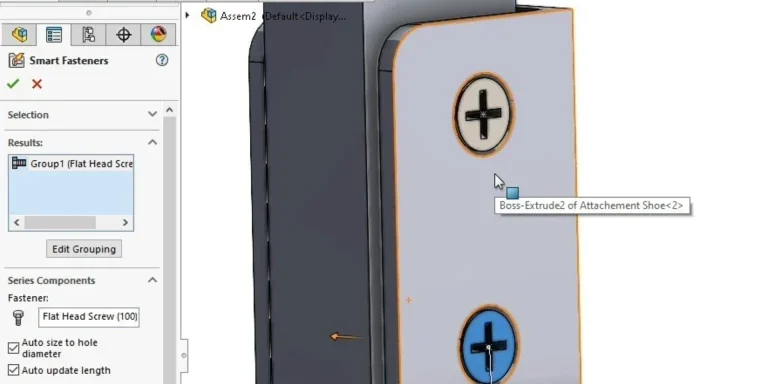
SOLIDWORKS Smart Fasteners
SOLIDWORKS Smart Fasteners is a really useful time saving tool, allowing you to automatically insert toolbox fasteners such as bolts and screws into an assembly providing there is a standard hole.
Why is my Flat Pattern not showing in SOLIDWORKS Drawings?
This may be linked to how the drawing is saved or it can be related to how sheet metal parts are displayed in drawings, read on to find out how to fix it.

Why is SOLIDWORKS Crashing?
It’s one of the great mysteries of life – why is SOLIDWORKS crashing? Let’s explore how SOLIDWORKS crashes and how we can improve performance in SOLIDWORKS.

SOLIDWORKS Tips: Are you Making this Common Mistake in Fatigue Analysis?
Simulation is a vital and complex engineering need. Fortunately, SOLIDWORKS makes it easy to test, correct mistakes and obtain accurate results.
Tech Support Blog: Why are my SOLIDWORKS BOM Quantities Wrong?
Why are my SOLIDWORKS BOM Quantities Wrong? A support call cropped up this week which…
How to Get Your Serial Number for SOLIDWORKS Visualize Standard
Want to download Visualize to make photorealistic renders? Follow this guide for accessing your Visualize serial number that comes bundled in with SolidWorks Professional and Premium.
How to Recover SOLIDWORKS Files After a Crash
SOLIDWORKS has two different methods to help you recover from an unexpected crash or loss of data in the form of auto-recovery and back-up settings.

Redesigning Santa’s Sleigh in SOLIDWORKS
Every year Father Christmas has to fly in his sleigh to deliver presents to boys and girls all over the world in just one night. To put this into perspective, it takes a little under 24 hours to fly from London (UK) to Sydney (Australia) in a streamlined Boeing 747, whereas Father Christmas’ mode of transport is believed to be a rather non-aerodynamic sleigh.