











What is Data Management in Product Design and Engineering?
Written by: Wayne Marshall
Published: Mar 26, 2025
| View All Blogs
Effective Engineering Data Management is critical for successful product design and manufacture.
It serves as the foundation for engineering, enabling designers, engineers, and other stakeholders to collaborate seamlessly, make informed decisions, and drive innovation.
Let’s explore the benefits and key aspects of Engineering Data Management (EDM) in this practical guide to the components of a Product Data Management (PDM) system.
WHAT IS ENGINEERING DATA MANAGEMENT?
’Engineering Data Management’ (EDM) refers to the process of systematically acquiring, storing, organising, and maintaining engineering data throughout its lifecycle.
This practice ensures data quality, accessibility, security, and usability across an organisation – it is a structured approach to managing all engineering-related data from creation through to end-of-life.
6 Key Aspects of Engineering Data Management
Fundamentally, we can break down such a vast topic into a handful of key mechanisms:
- Data Acquisition: Collecting engineering data from various sources such as design tools, simulation, and other data sources.
- Data Storage: Securely storing engineering data in a centralised repository, using a specialised software system such as Product Data Management (PDM).
- Data Organisation: Structuring and classifying engineering data for easy retrieval, analysis, and reuse, including metadata management.
- Data Validation: Ensuring the accuracy, integrity, and consistency of engineering data.
- Data Analysis: Utilising tools to analyse engineering data for insights into engineering and product performance.
- Data Governance: Establishing policies and procedures for managing data access, security, and compliance with relevant regulations.
These mechanisms underpin product development cycles, and managing these without the right tools requires a shed-load of patience and can drain resources, limit organisations, and heavily impact productivity.
The Unseen Benefits of Engineering Data Management
There are huge benefits to be realised by an organisation implementing Engineering Data Management, including:
- Improved Collaboration: Enables seamless sharing of engineering data across teams and departments.
- Enhanced Decision Making: Provides reliable and readily accessible data for informed engineering decisions.
- Increased efficiency: Streamlines engineering workflows by reducing data redundancy and eases access.
- Cost Reduction: Cuts duplicated effort and minimizes the need for data re-entry and rework by maintaining a single source of truth.
- Product Quality: Eases analysis of design variations and potential issues to enhance product quality.
These benefits often affect the processes and workflows that happen in the background of organisations and product development.
EDM provides the structure and maintenance framework that helps organisations to maximise efficiencies and generate higher quality output from the same inputs.
This theoretical definition gives a good insight into the subject matter and key aspects of EDM. But, from a practical point of view, how does EDM work and what does it look like to the end users?
How can organisations deploy a system to realise the benefits of improved EDM? Well, it all starts with effective management of your data…
’Product Data Management (PDM)’ is a system that centralises and organises all product-related information.
This includes all CAD data and other associated technical documentation generated across a product’s lifecycle to ensure all teams within a company have access to correct and consistent data for better collaboration and decision-making.
10 Key Features of a PDM System
A PDM system is the main technology for enabling EDM in an engineering and product design environment.
By deploying PDM, an organisation can manage and store product data in a single, accessible location to streamline operations and improve efficiency. Let’s dive into 10 of the key features of a PDM system like SOLIDWORKS PDM.
#1 Centralised Data Storage
A common analogy used to describe a PDM system is a “Vault”.
It is true that a PDM system protects product information and maintains its integrity in a secure way, but rather than a vault, consider that a “Library” is a better analogy for describing a PDM system.
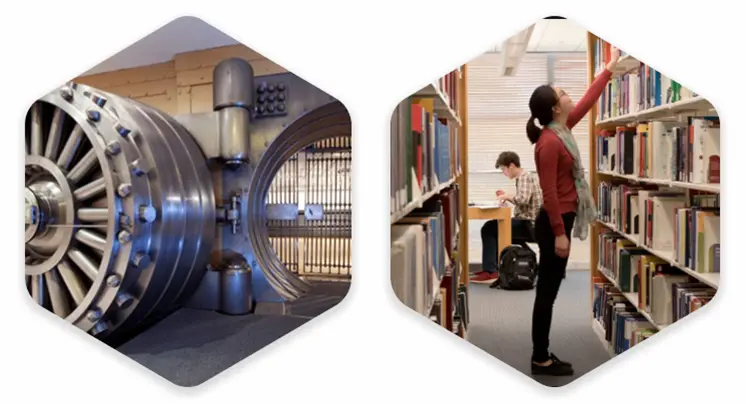
Like a library, a PDM system stores information in one place, cutting the need to search for data across different systems or departments.
Rather than locking product information away, the primary purpose of a PDM system is to share product information between teams, ensuring everyone can access accurate information and fostering better decision-making and collaboration between teams.
Public libraries are the original knowledge-sharing technology, and PDM provides organisations with their very own, private space for their documentation.
#2 Data Organisation
To continue the library analogy, the information in a PDM system is well organised and structured, making it easy to retrieve and reuse.
SOLIDWORKS PDM sits within the familiar Windows Explorer interface for ease of use, and it combines logical folder structures with data cards to capture and display part number, description, revision, and other important information known as metadata.
PDM systems are normally the custodians of part and document numbers and prevent duplication of this data. SOLIDWORKS PDM has user-defined templates to automate file creation and support data structure and organisation.
#3 Data Integrity
When it comes to CAD data, the robust management of file-to-file references and cutting duplication is critical to data integrity.
If tackled manually, this is an almost impossible task and inevitably leads to loss of valuable design data, reduced productivity (due to rework and duplicate design effort), and poor product quality (due to the lack of correct design data).
Through the support of embedded CAD integrations, PDM systems automatically capture CAD file references and bi-directionally map information between the PDM system and the CAD files (and other documentation) so that it always up to date.
Instead of shuffling and managing files, engineers can focus on their design tasks when they have the support of a strong data management system.
#4 Search & Query Tools
The primary benefit of a PDM system is the ability to easily find and reuse product information.
It is not only the time saved when searching for information, but the much larger productivity gains associated with the reuse of existing, proven designs.
#5 Version & Revision Control
A PDM system provides version and revision control to ensure that all changes made to a document or CAD file are tracked and recorded.
This helps to reduce the risk of errors, inconsistencies, and duplication of effort, which can be costly and time-consuming. Returning to the Library analogy once more, users can “Check Out” files to make design changes without affecting the latest released version.
Meanwhile, team members are aware of changes being made and can continue with their own design work in parallel. When design changes are complete, files can be “Checked In” and made available to teammates to update their design.
File versions can be working versions or revision-stamped, formerly released versions, which are made available to a wider audience. Plus, there are no ‘shushing’ librarians here…
#6 Lifecycle Status
The current stage or phase at which you find a CAD design or document is its lifecycle status. This lifecycle is tracked by a PDM system and shows a file’s position within the development process.
In SOLIDWORKS PDM, CAD file and document status is controlled via configurable workflows. Different workflows can be assigned to different file types and have different statuses.
#7 User Access Control
A key component of a PDM system is the ability to control access to the engineering data it maintains; this could be to ensure there are no unauthorised changes by engineers, or make sure consumers of engineering information are viewing the latest released version of a drawing only.
User access and authorisation is normally applied to groups of users rather than individual users to make it easier to manage.
Authorisation is also applied to the lifecycle status of files and their location or classification within the PDM system.
In SOLIDWORKS PDM, user access and authorisation is applied to workflow states which control what can be done to a file, while workflow transition permissions control who can promote files from one workflow state to another.
#8 Application Integration
To maximise design productivity and efficiency, a good PDM system includes direct integration with CAD tools and other applications that may be used to generate to new design and product information.
Through a PDM interface, ‘Search’ tools make it easy to rapidly find and load the latest design files, while a command-rich menu ensures that data management tasks are performed as part of the design process, instead of being an afterthought or a separate operation.
Design teams can collaborate more effectively, share design changes more easily, and maintain access to only the latest design files through PDM interfaces or integrated task panes within CAD tools like SOLIDWORKS.
#9 Bill of Materials (BoM)
PDM systems automatically manage the BoM data encapsulated in a 3D CAD assembly and provide visibility to users who do not have access to the CAD authoring tools.
The BoM information is normally presented in tabular format which can be manipulated to display the BoM in different formats, such as a full idented BoM, a single level BoM or a flattened or parts only BoM.
Component metadata such as part number, description, material, revision, quantity, and other information can be included in the BoM enabling users to search for components and compare different versions of a BoM to identify changes.
Systems such as SOLIDWORKS PDM can export component and BoM information in different neutral file formats to facilitate the transfer of data to third-party business systems (such as an ERP system) and eliminate the time-consuming and error-prone process of manual data entry.
#10 Change Notes
In a PDM system, change notes are one of the standard forms for an engineering change process.
Typically, this document records the changes made to CAD files and other technical documentation before transitioning between stakeholders for change approval and sign-off.
Change notes combine with revision controls and lifecycle workflows to provide a full history and audit trail of engineering changes that are vital for compliance purposes.
PDM VERSUS PLM – PRODUCT LIFECYCLE MANAGEMENT
Product Data Management, therefore, forms one part of the product lifecycle management (PLM) process.
PLM involves managing the processes required to take a product from its initial inception all the way through to manufacture, production, retirement, and disposal.
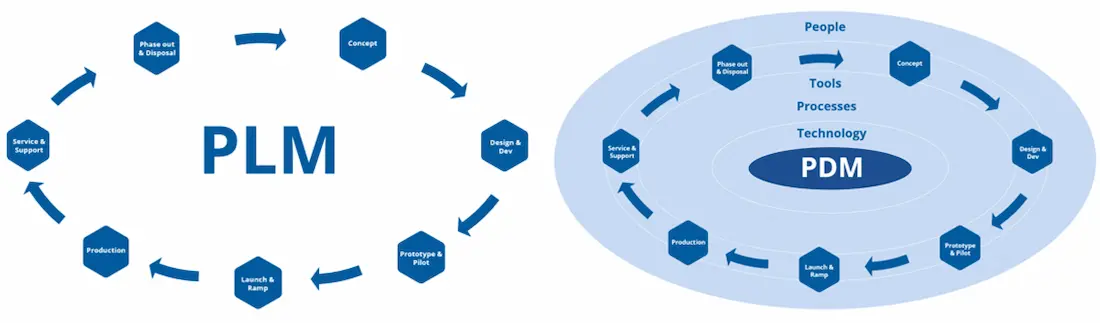
PDM forms part of Product Lifecycle Management.
Many commonly consider PLM a system, but it could be considered more of a philosophy, or guiding principle, for product development and delivery.
As soon as an idea for a product is conceived, PLM has begun – at some point along that journey (perhaps when the first files are being generated), PDM will likely be required and find its place and its own lifespan within PLM and the product development cycle.
That said, tools and PLM systems do exist which are more advanced, record-based data management systems.
These extend the file management and application integrations enabled by a PDM system to include a comprehensive set of capabilities that you can use and distribute to many areas of your business to improve and fully realise the benefits of Engineering Data Management.
Manage Engineering Data with Confidence
A product data management system such as SOLIDWORKS PDM is crucial for engineering and design teams as they centralise and organise product-related information.
That way, you can be certain that everyone in your organisation has access to the latest, correct data, leading to improved collaboration, faster product development cycles, reduced errors, and better overall decision-making by everyone involved.
Implementing a PDM system like SOLIDWORKS PDM is a great first step and eliminates the pains associated with poor CAD and file data management. You can compare PDM packages online or get in touch with us to help you find the best-fit solution for your specific requirements.
SOLIDWORKS Manage is an advanced, record-based data management system that leverages the file management capabilities of SOLIDWORKS PDM Professional to add powerful project, process and item management capabilities.
These tools are great for businesses looking to develop their data management capabilities and enhance reporting, as Interactive dashboards and reports extend the benefits of engineering data management to other areas of your business.
Take the Next Steps
Take a deeper dive into SOLIDWORKS PDM and learn how this highly configurable data management system can work for you and your business.
Or learn to master data management with our CPD-accredited SOLIDWORKS PDM training courses delivered by industry experts.
Categorised as: Data Management
Get Expert SOLIDWORKS Training
Get hands-on SOLIDWORKS training in-person or online, led by certified experts with real industry experience. With venues across the UK & Ireland, it’s easy to start learning today.
Related Posts

How to Create a Pack and Go in SOLIDWORKS
Pack and Go in SOLIDWORKS should be used when sending SOLIDWORKS files to another person. Use this simple guide to help you safely send entire SOLIDWORKS projects.
What is 3DSWYM? A 3DEXPERIENCE Platform Tutorial
3DSwym is the application at the heart of the 3DEXPERIENCE, allowing users to connect and collaborate across the platform.
Microsoft SQL Server licensing for SOLIDWORKS PDM
October 2020 marks two important milestones for the SOLIDWORKS PDM family and SQL Server.

Part Numbering in SOLIDWORKS PDM Professional
When implementing a new PDM Professional Vault Customers will have the option to review their part numbering and classification requirements as they move to a system that allows them to, in most cases, automate the way the identify ‘parts’ within the Vault. Part Numbering is something that a lot of customers approach differently and this is often based on ‘how it’s always been done’ without necessarily considering what is the purpose of a Part Number within their organisations and wider within their supply chains. If we consider the humble part number. What is it’s purpose?

The 6 Golden Rules of Managing Data in SOLIDWORKS
When modelling in SOLIDWORKS, before you know it, you will have created lots of parts, assembly and drawing files, so it’s important to think about how you will manage these files and keep everything organised. Here we discuss the ‘6 Golden Rules’ of managing your SOLIDWORKS files using Windows Explorer and recommended methods for file naming, structuring your projects and managing revisions.
This kicks off a month looking at the management of CAD data, register for one of our upcoming live webinars at the bottom of this article.

PDM Professional – Assigning Users with Conditional Notifications
Often customers will create smaller project teams for specific jobs and in the past we have been asked if it is possible, within a multi stage workflow, to pre-assign at the creation stage users who will be notified as checker / approver within those transitions. This blog will demonstrate how, using conditional Notifications in PDM Professional, this can be configured. We will also create some logic to allow for certain parts of the workflow to be bypassed by validating the selected ‘names’ against transition conditions. In this example the ‘approvers’ will be assigned on the files DataCard, but it would be just as feasible to have these names inherited from a project folder card if defining the rules at a higher level was possible within your Teams.
Managing Disk Space with SOLIDWORKS PDM Part #1: Distributing the Archive
This blog series was prompted by a recent support ticket, logged when a customer found their PDM Professional installation suddenly became unusable. The warning message, led to my reviewing the Archive Server Log file and this quickly identified the problem being a result of the PDM Server running out of disk space.
Managing Disk Space with SOLIDWORKS PDM Part #2: Deleted vs Destroyed and the Vault Cleaner Service
In this blog series we are examining the factors influencing disk usage within PDM and what you can do to manage them. In the first part we discussed how you can re-organise your archive across multiple drives to get you back up and running quickly should you find you are short on space. This blog and the next part will discuss behaviours in PDM that can result in redundant disk usage and how you can free that up with the vault cleaner service.
Managing Disk Space with SOLIDWORKS PDM Part #4: Cold Storage
In this blog series we are examining the factors influencing disk usage within PDM and what you can do to manage them. In the first part we discussed how you can re-organise your Archive across multiple drives to get you back up and running quickly should you find you are short on space. In the second part we looked at the differences between a deleted and a destroyed file and the impact the PDM recycle bin has on Disk usage. Part three discussed temporary session files created by the PDM Web Server and this Part will look at an option within PDM called Cold Storage.
Managing Disk Space with SOLIDWORKS PDM Part #5: Archive Compression
In this blog series we are examining the factors influencing disk usage within PDM and what you can do to manage them. In the first part we discussed how you can re-organise your archive across multiple drives to get you back up and running quickly should you find you are short on space. In the second part we looked at the differences between a deleted and a destroyed file and the impact the PDM recycle bin has on Disk usage. Part three discussed temporary session files created by the PDM Web Server. In part four we discussed cold storage and in this last part we will look at archive compression.