











3D Printing: Using Simulation to Reduce Scrap & Improve Outcomes

Written by: Tom McHale
Published: Jun 22, 2023
| View All Blogs
Most 3D printing processes result in warpage and residual stress in parts due to the way the incremental layers cool from their fusion/deposition temperatures and the orthropic nature of a layered material. Choosing the right orientation and build parameters can reduce this effect, but doing so through trial and error by printing physical parts can be costly. In addition, measuring residual stress is not straightforward and since it can have an effect on part durability it is important to understand.
Simulation using Finite Element Analysis can help us decide on the best additive manufacturing strategy, as well as developing compensated initial shapes to offset for warpage and shrink resulting in higher tolerance, better quality parts.
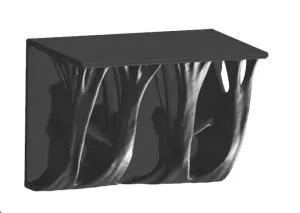
Digimat AM, from MSC Software, is a dedicated AM simulation tool for plastics. It uses the powerful Marc non-linear FEA solver to simulate SLS, FFF and FDM processes but through a manufacturing-centric interface that does not require an in-depth knowledge of the FEA process or the Marc solver.
The best way to illustrate the benefits of this software is through example. We’ll use a component created with Apex Generative Design as an example.
We can use Digimat AM to simulate printing the part in Nylon 12 using the SLS process in three different orientations (on the two planar surfaces and on end) to compare the overall distortion and residual stress levels. Setting up these simulations is as simple as importing an STL file and choosing the orientation, material and machine settings.
The meshing of the part is automatic using a voxel based method to achieve layers of elements through the part in the build direction so requires nothing more than a single size setting. The solver uses the Inherent Strain method to reduce the complex thermo-mechanical problem to a solely mechanical one while retaining good predictive capabilities that have been validated through correlation.
Comparing the results, we can see that the maximum distortion value doesn’t vary much (+/- 0.08mm) but the part formed on end has a residual stress of just 5MPa compared with 28MPa for the other two orientations.
Orientation 1

Displacement – Orientation 1
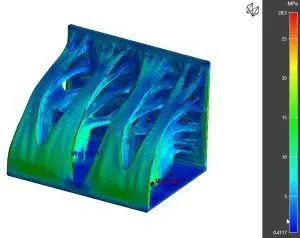
Stresses – Orientation 1
Orientation 2

Displacement – Orientation 2

Stresses – Orientation 2
Orientation 3

Displacement – Orientation 3

Stresses – Orientation 3
After selecting the best orientation we can use Digimat AM to automatically compensate for the shrinkage/warpage predicted and produce a new STL file that accounts for the potential distortion/shrinkage and, if used to print from, will result in a part much closer to the design intent.
Digimat AM is available standalone or as part of the MSC.One token system. This flexible licensing system gives access not just to Digimat, but also to Simufact for simulating metal powder based printing process and both Apex Generative and Nastran Optimisation to support a process for developing this type of component as part of a lightweighting strategy. A wide range of other FEA tools are also included in MSC.One.
If this is of interest, or you wish to understand more about Digimat or any other aspect of MSC.One please don’t hesitate to get in touch.
Categorised as: Simulation | Tech Tips
Get a SOLIDWORKS Quote
Interested in SOLIDWORKS? Contact us for questions, trials, or demos by clicking the button below or call 01926 333777. Our experts will help you find the perfect solution.

Related Posts

How to Find Reaction Forces in SOLIDWORKS Simulation
SOLIDWORKS helps us to find resultant forces through simulation studies. These virtual tests reduce the need for physical prototypes and give us an accurate answer.

Setting number of decimal places in a table on a drawing
When creating an equation in a drawing general table, is it possible to define the…

Why is my Flat Pattern not showing in SOLIDWORKS Drawings?
This may be linked to how the drawing is saved or it can be related to how sheet metal parts are displayed in drawings, read on to find out how to fix it.
Why is SOLIDWORKS Crashing?
It’s one of the great mysteries of life – why is SOLIDWORKS crashing? Let’s explore how SOLIDWORKS crashes and how we can improve performance in SOLIDWORKS.

SOLIDWORKS Tips: Are you Making this Common Mistake in Fatigue Analysis?
Simulation is a vital and complex engineering need. Fortunately, SOLIDWORKS makes it easy to test, correct mistakes and obtain accurate results.
Tech Support Blog: Why are my SOLIDWORKS BOM Quantities Wrong?
Why are my SOLIDWORKS BOM Quantities Wrong? A support call cropped up this week which…

How to Get Your Serial Number for SOLIDWORKS Visualize Standard
Want to download Visualize to make photorealistic renders? Follow this guide for accessing your Visualize serial number that comes bundled in with SolidWorks Professional and Premium.

How to Recover SOLIDWORKS Files After a Crash
SOLIDWORKS has two different methods to help you recover from an unexpected crash or loss of data in the form of auto-recovery and back-up settings.

Redesigning Santa’s Sleigh in SOLIDWORKS
Every year Father Christmas has to fly in his sleigh to deliver presents to boys and girls all over the world in just one night. To put this into perspective, it takes a little under 24 hours to fly from London (UK) to Sydney (Australia) in a streamlined Boeing 747, whereas Father Christmas’ mode of transport is believed to be a rather non-aerodynamic sleigh.

Radiation in Flow Simulation – Part 1 : Reflection
Technical Manager Andy Fulcher explores ‘Radiation in Flow Simulation, Part 1 : Reflection’