











5 Reasons Why Businesses are Switching to SOLIDWORKS

Written by: Solid Solutions Marketing
Published: Jan 16, 2025
| View All Blogs
An estimated three million professionals currently use SOLIDWORKS 3D CAD, and the user base continues to expand.
Across industries, professionals are making the switch to SOLIDWORKS and swapping their current CAD system for the flexibility in design that SOLIDWORKS provides.
The multi-disciplinary solution embraces automation, streamlining the journey from design to manufacture – far surpassing the limits of traditional 2D drawing and single-point 3D modelling systems.
So, why are professionals still choosing SOLIDWORKS as their 3D Computer-Aided Design (CAD) solution?
Boost Productivity
SOLIDWORKS can help boost your functionality with built-in features designed to limit the need for duplication of work.
Teams can build out their customisable user interface, harness powerful data management capabilities, and extend their productivity through API integration with SOLIDQ help to tailor the design process to their needs.
SOLIDWORKS enables a streamlined design workflow:
- Model parts so that they can facilitate design changes and update instantly when modifications are required.
- Use configurations to create variations of similar products, without the need to recreate similar files from scratch.
- Customise the software to your liking – create keyboard shortcuts, mouse gestures and even macros to speed up your design process.
Discover the key features of SOLIDWORKS that make it so popular, and you can even get a free SOLIDWORKS trial so you can try it today.
Reduce Design Costs & Cycle Times
Engineers who work with SOLIDWORKS can incorporate proper design intent into their modelling practice.
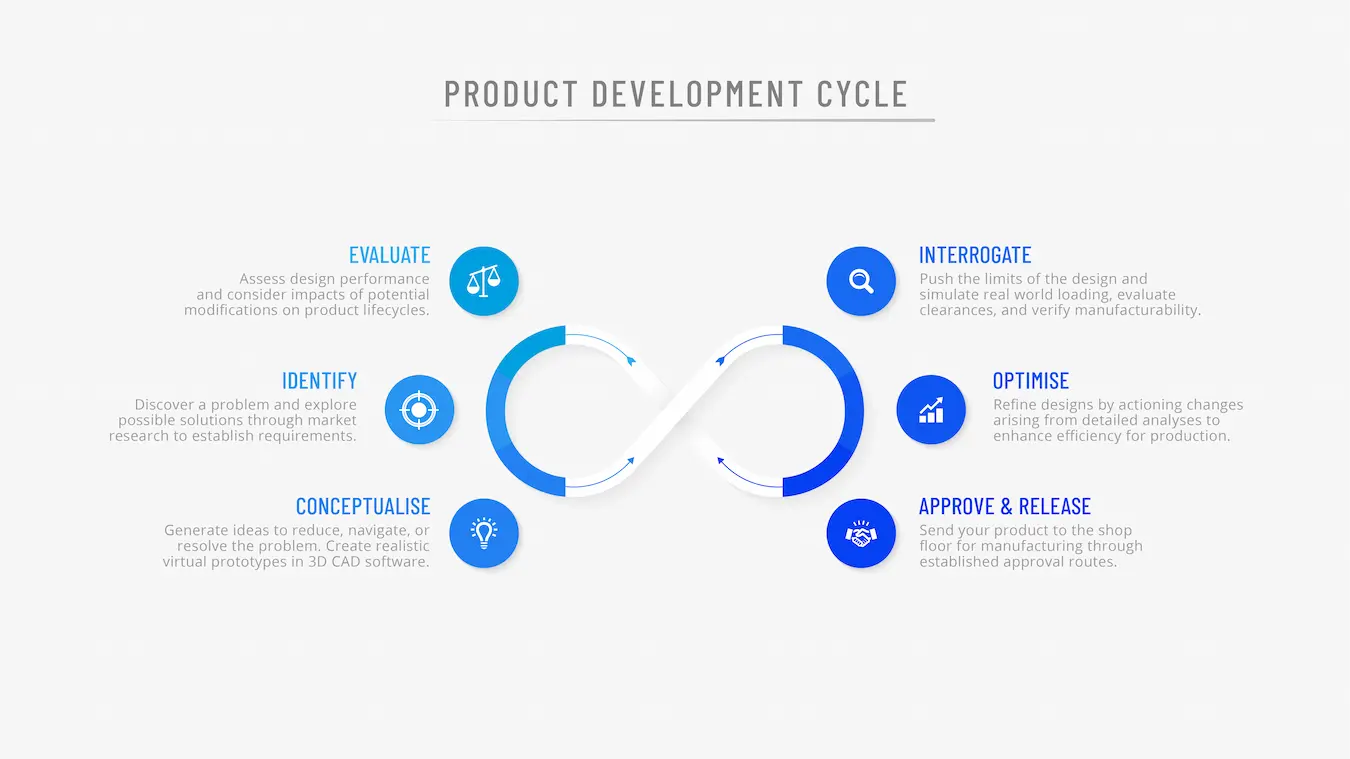
An extensive toolset allows even novice uses to generate models that can be updated rapidly as designs develop and ideas change, so you can:
- Shorten design cycles and accelerate time to market.
- Avoid multiple rounds of physical prototyping.
- Minimise scrap/rework caused by data miscommunications or revision errors.
This ensures that changes can be quickly implemented into a design so that less time is wasted redesigning or reworking models.
Simply utilise good design intent and SOLIDWORKS rewards you so you can modify designs and communicate updates easily without wasting time or money.
Improve Design Quality
SOLIDWORKS provides you with accurate evaluation tools to help enhance design quality.
Built-in design review tools let you interrogate models, use real material properties to validate performance, and analyse centres of mass; you can also check clearances and evaluate the manufacturability of the designs using a suite of simple tools.
- Build robust models, designed to update quickly to incorporate design changes.
- Minimise errors from manual updates to design data.
- Leverage integrated simulation tools for virtual prototyping.
- Enhance quality assurance with CAD-integrated inspection tools.
SOLIDWORKS enriches your models with metadata and properties that aid the inspection and optimisation of design quality, all while managing your design data from concept to product release.
Foster Collaboration
SOLIDWORKS can protect your IP when sharing design data through neutral file formats and share & markup functionality so you can collaborate with suppliers and contractors with confidence.
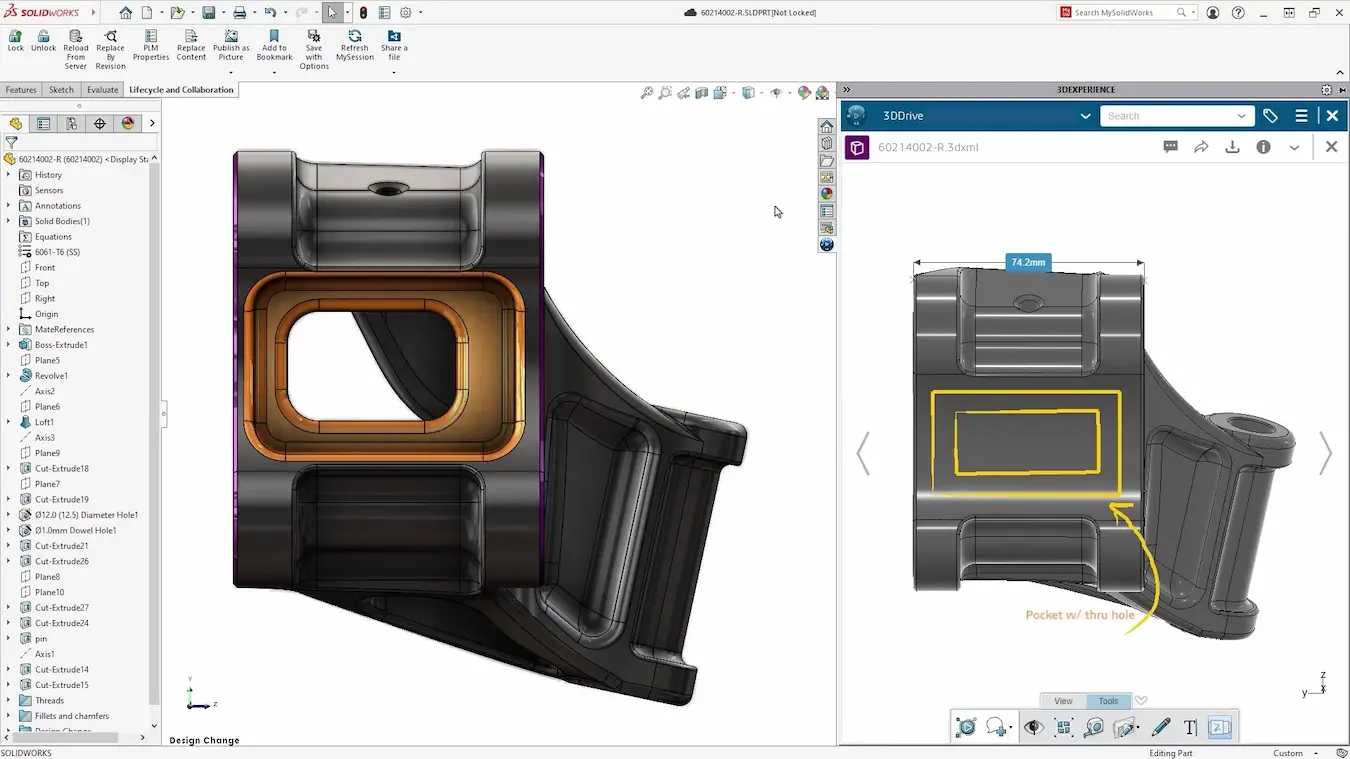
Utilise intuitive markup tools and share ideas across departments to any device.
The power of the 3DEXPERIENCE platform or SOLIDWORKS PDM can also be harnessed by SOLIDWORKS so you can collaborate with team members, manage revisions, and build a complete audit trail as you design.
SOLIDWORKS 3D CAD also connects to the wider SOLIDWORKS portfolio, encouraging efficient collaboration across departments and disciplines:
- Collaborate across mechanical and electrical disciplines with easy integration between SOLIDWORKS and SOLIDWORKS Electrical.
- Add comments natively to your designs to ensure proper communication when implementing design changes.
- Access support from a growing SOLIDWORKS user community as well as our dedicated expert support team
Increase Innovation
Discover how easy designing can be with SOLIDWORKS, where users and teams can rapidly adopt a powerful design tool so you can join a host of businesses designing and engineering innovative products through:
- Streamlined design workflows.
- Advanced visualisation and rendering tools.
- Virtual testing and finite element analysis solvers.
- Easy to use commands and tooltips to get you up-and-running quickly.
In a competitive market, staying ahead requires tools that not only meet today’s demands, but also pave the way for future innovations.
SOLIDWORKS offers an integrated approach to design and manufacturing workflows, addresses the challenges of outdated CAD systems and lets you unlock opportunities to increase productivity, reduce design costs, enhance quality, and innovate with confidence.
Discover our customer spotlight to learn more about how our customers leverage the power of SOLIDWORKS and get in touch today to find out how your specific workflows can benefit.
Are you a Startup?
Make your design dreams a reality with the SOLIDWORKS for Startups programme that provides new startups with the CAD software, support and guidance to succeed.
Learn more about unlocking your FREE CAD software for a year with the startup programme.
Categorised as: Industry Insight | SOLIDWORKS Design
Ready to Switch to SOLIDWORKS?
SOLIDWORKS Design has been the industry standard 3D CAD software for over 25 years. Solid Solutions offers a range of packages to suit your needs.

Related Posts

How to Find Reaction Forces in SOLIDWORKS Simulation
SOLIDWORKS helps us to find resultant forces through simulation studies. These virtual tests reduce the need for physical prototypes and give us an accurate answer.

Setting number of decimal places in a table on a drawing
When creating an equation in a drawing general table, is it possible to define the…

SOLIDWORKS Smart Fasteners
SOLIDWORKS Smart Fasteners is a really useful time saving tool, allowing you to automatically insert toolbox fasteners such as bolts and screws into an assembly providing there is a standard hole.

Why is my Flat Pattern not showing in SOLIDWORKS Drawings?
This may be linked to how the drawing is saved or it can be related to how sheet metal parts are displayed in drawings, read on to find out how to fix it.

SOLIDWORKS Tips: Are you Making this Common Mistake in Fatigue Analysis?
Simulation is a vital and complex engineering need. Fortunately, SOLIDWORKS makes it easy to test, correct mistakes and obtain accurate results.

How to Recover SOLIDWORKS Files After a Crash
SOLIDWORKS has two different methods to help you recover from an unexpected crash or loss of data in the form of auto-recovery and back-up settings.

Redesigning Santa’s Sleigh in SOLIDWORKS
Every year Father Christmas has to fly in his sleigh to deliver presents to boys and girls all over the world in just one night. To put this into perspective, it takes a little under 24 hours to fly from London (UK) to Sydney (Australia) in a streamlined Boeing 747, whereas Father Christmas’ mode of transport is believed to be a rather non-aerodynamic sleigh.

SOLIDWORKS Grid Systems – hidden away, but very useful!
Rory Niles provides an insight into the uses for Grid Systems within SOLIDWORKS 2018

Furniture Design Made Easy with SOLIDWORKS
Calling all furniture and interior designers: the days of creating square cabinets are over. What if we told you there’s a much easier way to bring your products to life?
Here’s 10 reasons why we feel SOLIDWORKS is better than any other software, especially if you’re designing furniture:
Making 3D Textures from Images on SOLIDWORKS
Turn images into 3D geometry with brand new SOLIDWORKS 3D Textures Feature