











SOLIDWORKS Grid Systems – hidden away, but very useful!

Written by: Terry O'Reilly
Published: Nov 3, 2017
| View All Blogs
SOLIDWORKS grid systems is a useful feature to work on designing.
If you ever design framework, or furniture (e.g. kitchen units, drawers etc.), or maybe racking systems (as a few examples off the top of my head) – or other things, there is a Reference Geometry command that can do quite a lot of work for you and is well worth a look.
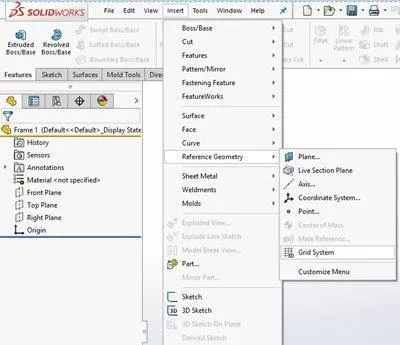
It is called “Grid System” and it is not as standard on the Command Manager, you have to go to the Insert menu, Insert, Reference Geometry, Grid System:
It will straight away put you into a sketch on the Top plane – and then wait for you to draw something.
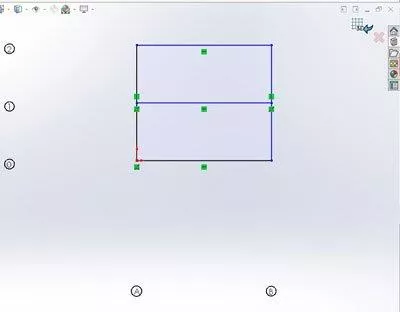
So I’ve drawn something – notice the numbers that appear automatically, and the fact that it shows in Confirmation Corner that I’m in a 3D Grid sketch.
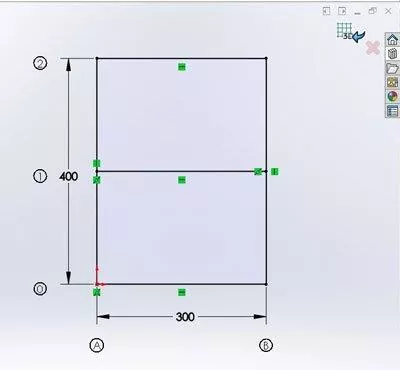
I guess I’d better put some dimensions on:
The action then happens when you come out of that sketch, you get the Property Manager asking you about how many Levels you want:
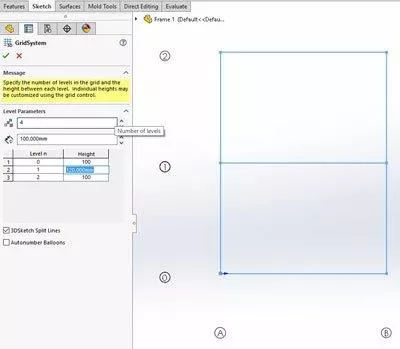
I’ve gone for 4, and a spacing of 100mm between them.
I have however varied the spacing of level 1 to 120mm, just to show you can…
Then of course it’s green tick time:
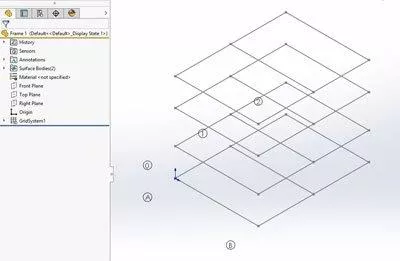
“Oh great, it’s re-created the sketch onto 4 sketch planes…” you might be thinking.
Well, yes, but there’s more that it has done for you – expand the SOLIDWORKS Grid System feature and you’ll find more goodies:
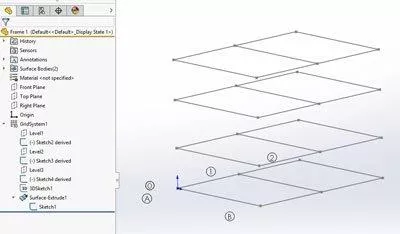
One thing to mention here is that your Top plane is classed as level zero. That is where your original sketch is – listed right down at the bottom inside a Surface Extrude feature.
The extruded surface has produced 2 separate surface bodies:
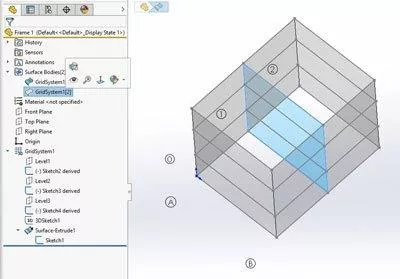
One going around the outside, another for the line going across.
There is also a 3D sketch that connects up any end points or corners between all the sketches:
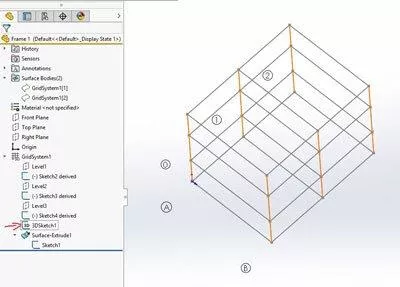
You could use what it has given you for something like Structural Member features:
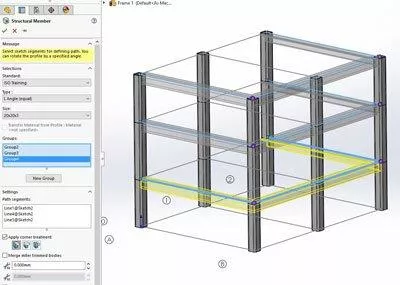
Or whatever you want!
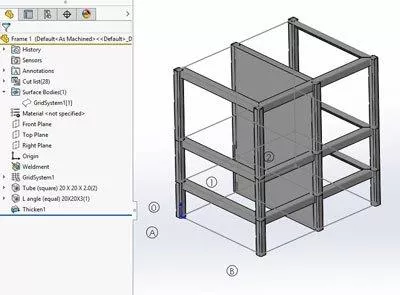
You can also use the surfaces for sketching on, or even Show them, and use “Thicken” to make solid slabs.
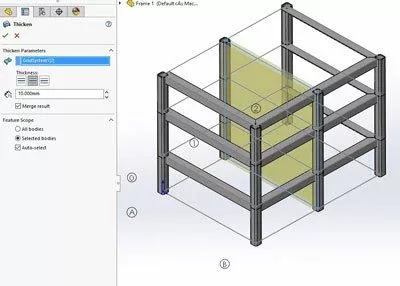
If you edit the SOLIDWORKS Grid System feature, you can adjust the spacing of the different levels, if you edit the original sketch all the other ones will update automatically.
Categorised as: Design | SOLIDWORKS Design
Get a SOLIDWORKS Quote
Interested in SOLIDWORKS? Contact us for questions, trials, or demos by clicking the button below or call 01926 333777. Our experts will help you find the perfect solution.

Related Posts

How to Find Reaction Forces in SOLIDWORKS Simulation
SOLIDWORKS helps us to find resultant forces through simulation studies. These virtual tests reduce the need for physical prototypes and give us an accurate answer.

Setting number of decimal places in a table on a drawing
When creating an equation in a drawing general table, is it possible to define the…

SOLIDWORKS Smart Fasteners
SOLIDWORKS Smart Fasteners is a really useful time saving tool, allowing you to automatically insert toolbox fasteners such as bolts and screws into an assembly providing there is a standard hole.

Why is my Flat Pattern not showing in SOLIDWORKS Drawings?
This may be linked to how the drawing is saved or it can be related to how sheet metal parts are displayed in drawings, read on to find out how to fix it.

SOLIDWORKS Tips: Are you Making this Common Mistake in Fatigue Analysis?
Simulation is a vital and complex engineering need. Fortunately, SOLIDWORKS makes it easy to test, correct mistakes and obtain accurate results.
Series 1 Land Rover Pedal Car – Made Easy with Solidworks!
The Series1 began production in 1948 designed to help get Britain farming after the war effort. It grew extremely popular and today enthusiasts are prepared to throw their life savings at restoring originals from that period.

How to Recover SOLIDWORKS Files After a Crash
SOLIDWORKS has two different methods to help you recover from an unexpected crash or loss of data in the form of auto-recovery and back-up settings.

Redesigning Santa’s Sleigh in SOLIDWORKS
Every year Father Christmas has to fly in his sleigh to deliver presents to boys and girls all over the world in just one night. To put this into perspective, it takes a little under 24 hours to fly from London (UK) to Sydney (Australia) in a streamlined Boeing 747, whereas Father Christmas’ mode of transport is believed to be a rather non-aerodynamic sleigh.

Furniture Design Made Easy with SOLIDWORKS
Calling all furniture and interior designers: the days of creating square cabinets are over. What if we told you there’s a much easier way to bring your products to life?
Here’s 10 reasons why we feel SOLIDWORKS is better than any other software, especially if you’re designing furniture:
Making 3D Textures from Images on SOLIDWORKS
Turn images into 3D geometry with brand new SOLIDWORKS 3D Textures Feature