











Calculating the Trajectory of a Cricket Ball with SOLIDWORKS Motion

Written by: Tom McHale
Published: Jan 22, 2026
| View All Blogs
Cricket is a game of precision and strategy, and both England legends Jimmy Anderson and Stuart Broad would tell you that the result is all down to how you bowl…
Successful bowling depends on the trajectory of a ball, the spin imparted by the bowler, and the reaction of stumps and bails upon contact and these could, in theory, be calculated to gain a competitive advantage.
We’ve already seen how SOLIDWORKS is used to design safety equipment for cricketers, but can we as engineers and cricket enthusiasts influence strategy by accurately predicting ball movements with SOLIDWORKS Motion simulation?
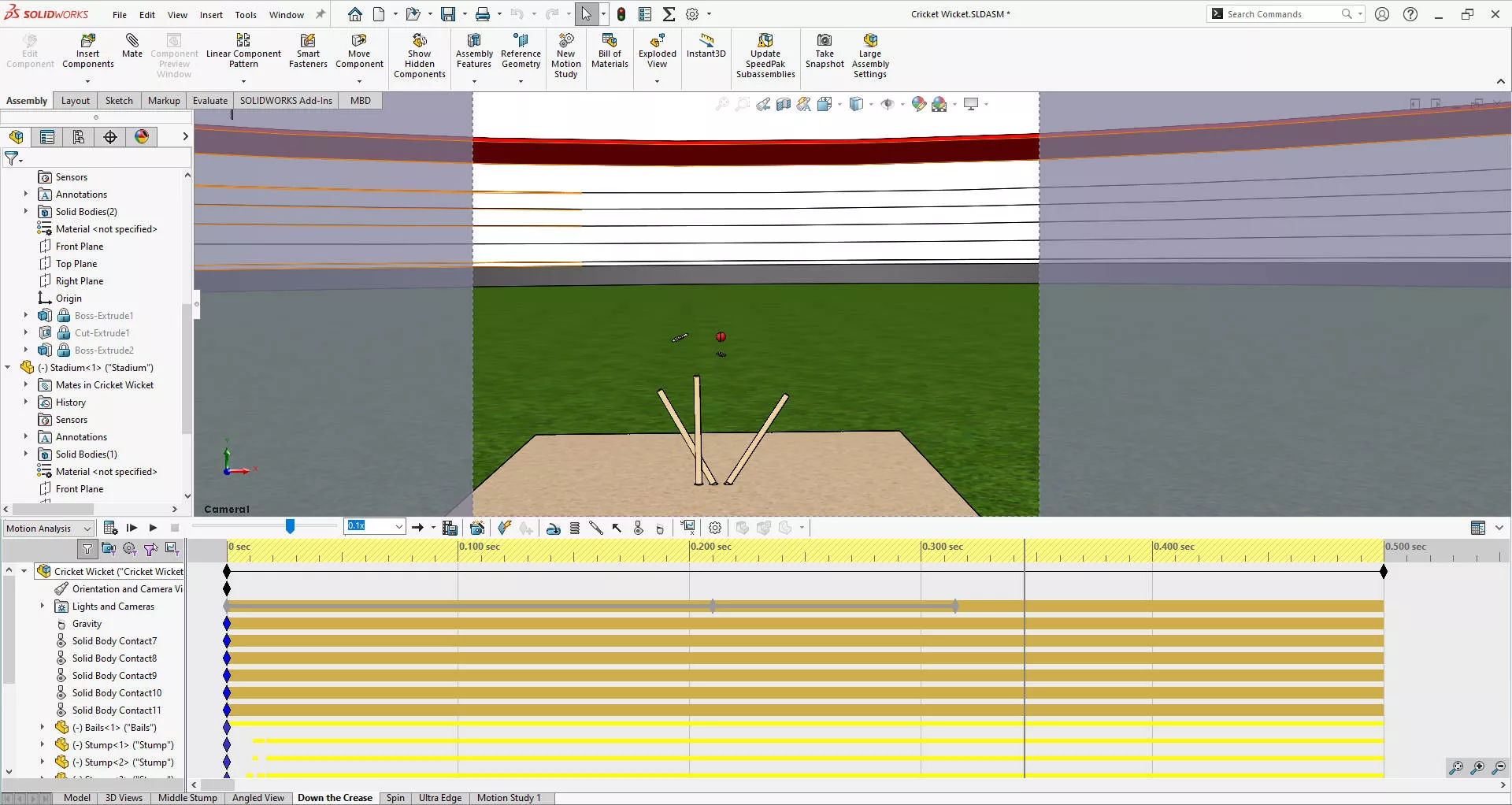
Let’s find out by delving into how SOLIDWORKS can help predict the motion of a cricket ball and the subsequent interactions on the field.
#1 Predicting the Motion of a Cricket Ball
To predict the motion of a cricket ball being bowled we need to track the ball’s trajectory but also need to understand how it interacts with other elements on the field.
So this motion study accounts for various factors including the initial velocity, spin rate, trajectory set by the bowler, as well as the height of the release point.
As hard as the ground staff try, we have to accept the limitations of the idealised smooth ground plane, as the real pitch comes with numerous imperfections that will influence the ball.
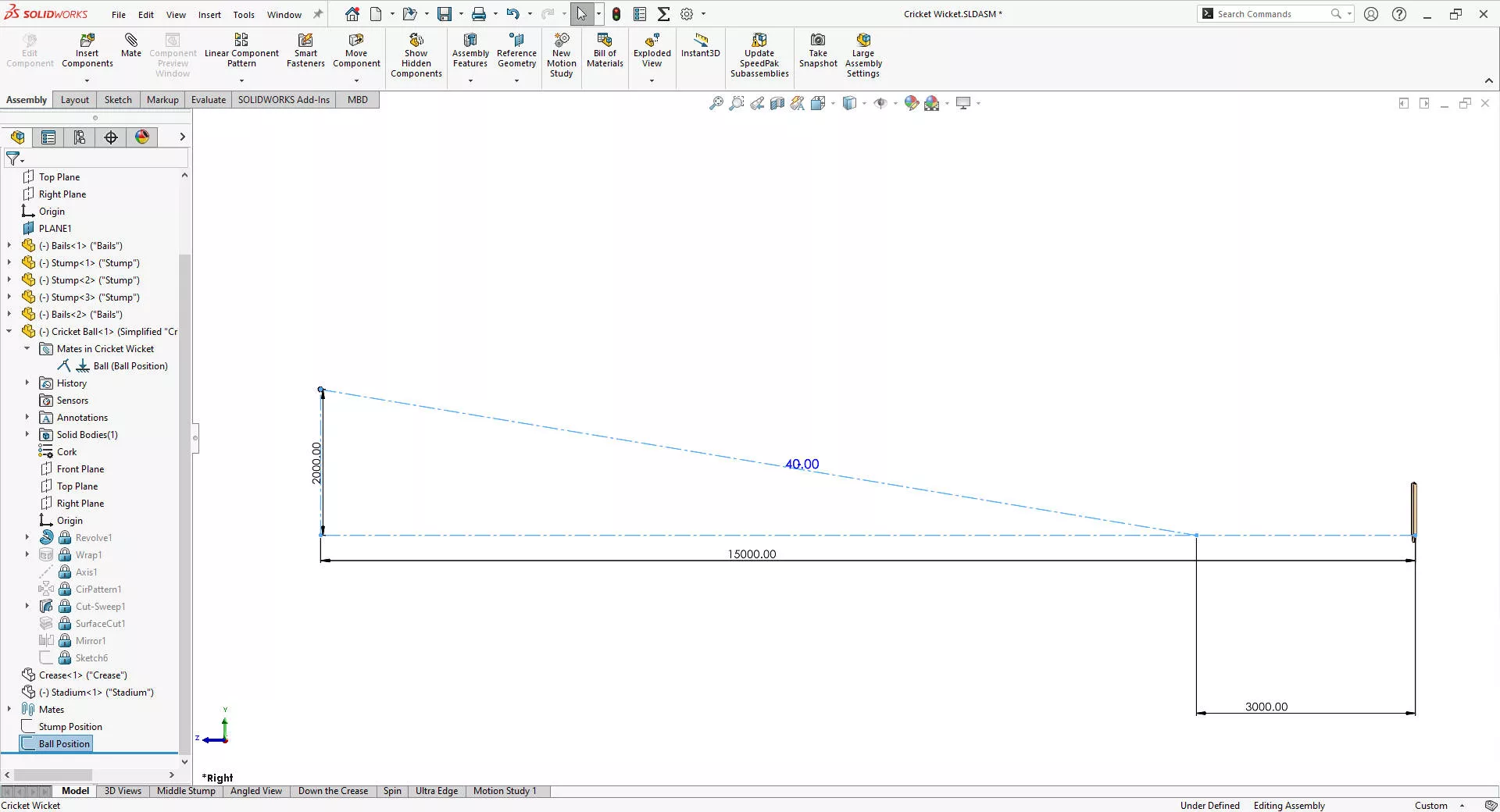
We’ve parametrically modelled up the geometry of the ball, stumps, and bails in SOLIDWORKS to specification, and put them into an assembly to virtually represent a cricket pitch.
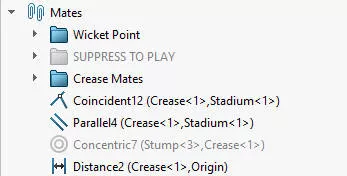
The mates (constraints) between these components are carefully split into two groups: those that remain active and those suppressed during the Motion Study to rely on real-world contact interactions.
#2 What is an Accurate Contact Response?
One of the critical aspects of the simulation is the accurate contact response between the ball and other components like the crease, stumps, and bails.
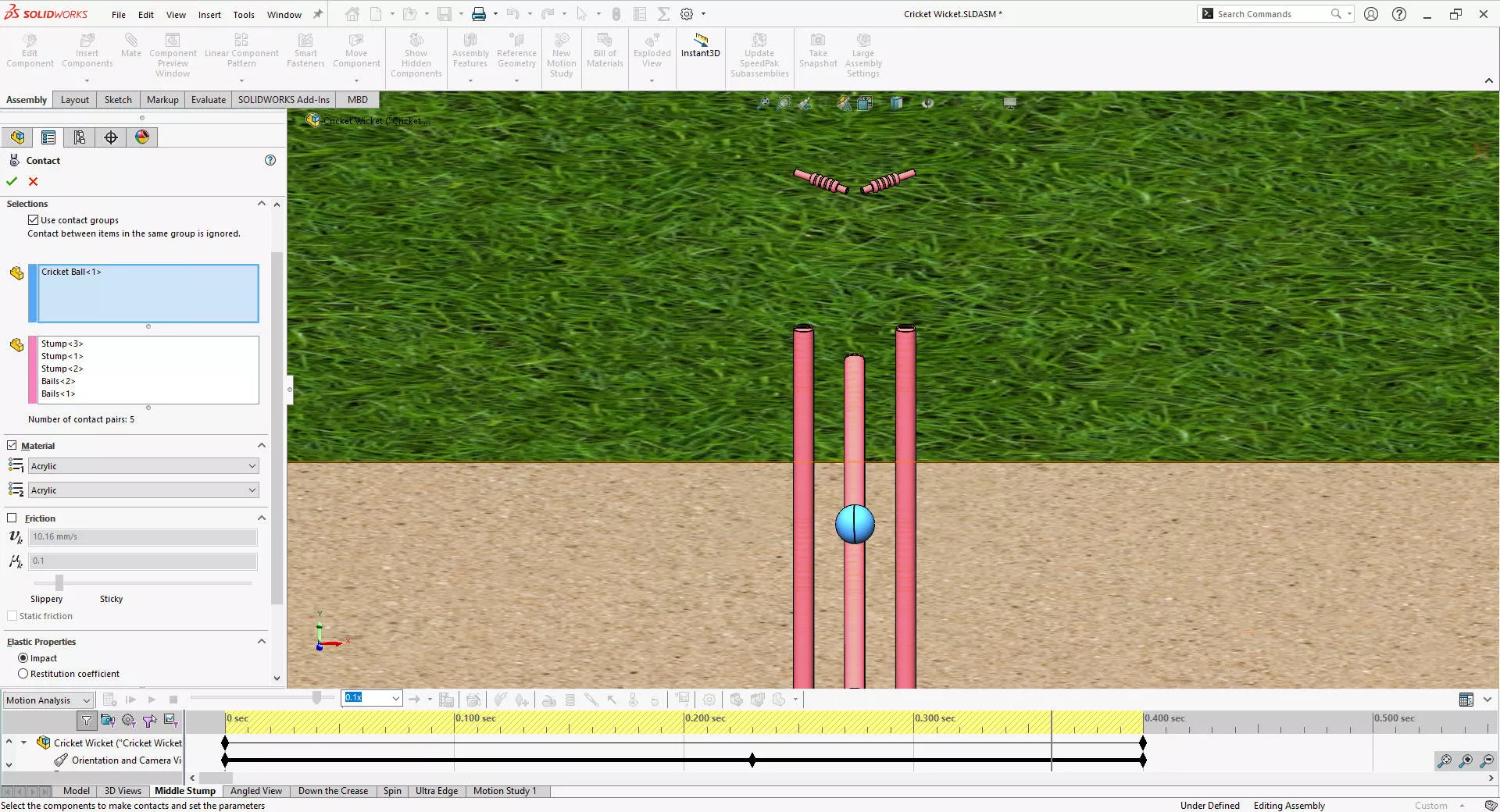
This involves defining the initial position, velocity, and spin rate of the ball, along with accounting for gravitational effects.
SOLIDWORKS includes an extensive library of materials with precise mechanical properties and friction values that we must assign to the components to ensure realistic interactions.
To set up the study, contacts were defined not just between the ball and the crease, but also between the stumps and bails, keeping the bails in position until disturbed by the ball.
Increasing the contact accuracy and lowering the maximum integration step size helps account for the complex contacts, ensuring that every interaction is simulated with high precision.
Watch SOLIDWORKS Motion in action to see exactly how it can help to validate the performance of mechanisms and predict performance of your products.
As part of the TriMech Group, we support businesses throughout every stage of their design journey, not just with SOLIDWORKS! Get in touch or explore our the TriMech website to discover all the ways we can help your business grow.
#3 Can SOLIDWORKS calculate the Effects of ball Spin?
SOLIDWORKS Motion simulation is perfectly capable of calculating the effects of spin and other bowling variations.
The simulation effectively demonstrates how different spin rates, initial velocities, and trajectories affect the motion of the ball, and this is crucial for understanding how various bowling techniques can influence the game.
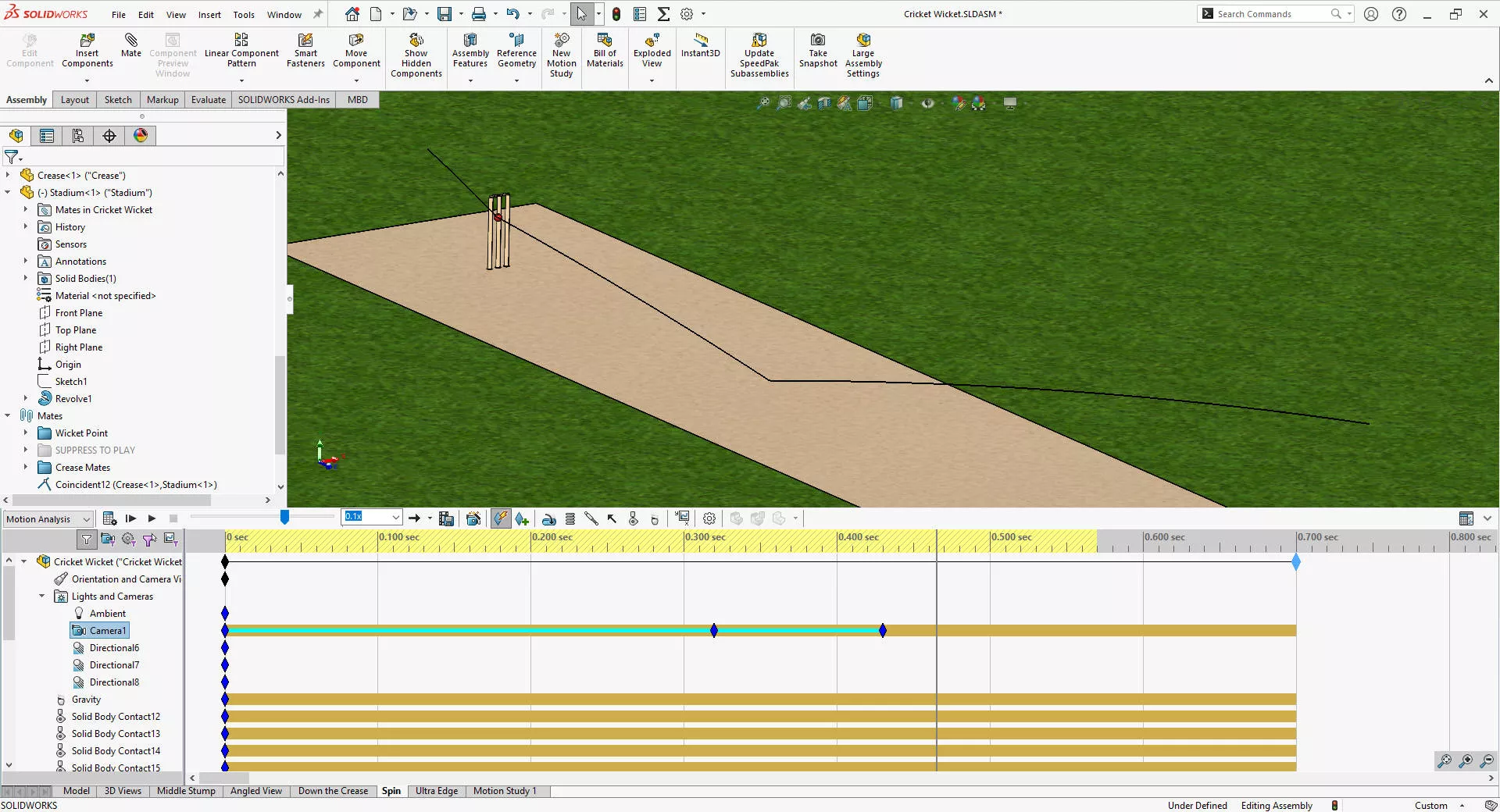
In SOLIDWORKS Motion we can run several variations of ball position, velocity, and spin rates, generating multiple animations that visualize each of the different scenarios.
#4 How Accurate is SOLIDWORKS Motion?
SOLIDWORKS Motion simulation relies on the MSC Adams solver to get the job done.
And, while this kinetic analysis can provide highly accurate predictions, it’s important to note that the accuracy is contingent upon the data input by the user.
Real-world cricket fields have their own set of imperfections such as slight bows in the crease, stud markings, and weather-induced changes. These factors can affect the ball’s behaviour, making it essential to compare simulation results against actual test data.
However, within controlled parameters, SOLIDWORKS Motion excels in showing the effects of different trajectories, spin rates, and initial velocities.
It also accurately predicts the contact behaviour between the ball and stumps, and stumps and bails, allowing for detailed analysis of contact forces to ensure that components like stumps do not break upon impact.
Additionally, if we pursued some Bazball-esque tactic and decided to try not aiming for the stumps…
SOLIDWORKS could show how the ball’s trajectory changes after hitting the stumps, helping to determine the dispersion area where a wicketkeeper could position themselves effectively to anticipate a snick.
#5 SOLIDWORKS can be used to Predict Sport Performance
We can gain a deeper understanding of sporting mechanics by using SOLIDWORKS Motion simulation.
In theory, we can then use these results to analyse performances on the pitch for informed equipment design or even proposing new strategies.
SOLIDWORKS Motion simulation stands as a robust tool for predicting and analysing the dynamic interactions and can even be applied to the sports field!
And over the next couple of months, we’ll be looking at how SOLIDWORKS can be used to analyse the performance of various sports equipment, and validate how different techniques might impact athlete performance.
So whether it’s for improving player performance or designing more resilient cricket gear, it’s fair to say that SOLIDWORKS provides the precision and reliability needed to elevate your game.
Categorised as: SOLIDWORKS Design | Simulation
Explore Our Motion Analysis Service
If you need to free up resources or help with predicting product performance, it’s worth considering our motion analysis services.
Whether you work in robotics, biomechanics, or industrial machinery, we provide the expertise to elevate your projects and streamline your product development process.
Related Posts

How to Find Reaction Forces in SOLIDWORKS Simulation
SOLIDWORKS helps us to find resultant forces through simulation studies. These virtual tests reduce the need for physical prototypes and give us an accurate answer.

Setting number of decimal places in a table on a drawing
When creating an equation in a drawing general table, is it possible to define the…

SOLIDWORKS Smart Fasteners
SOLIDWORKS Smart Fasteners is a really useful time saving tool, allowing you to automatically insert toolbox fasteners such as bolts and screws into an assembly providing there is a standard hole.

Why is my Flat Pattern not showing in SOLIDWORKS Drawings?
This may be linked to how the drawing is saved or it can be related to how sheet metal parts are displayed in drawings, read on to find out how to fix it.

SOLIDWORKS Tips: Are you Making this Common Mistake in Fatigue Analysis?
Simulation is a vital and complex engineering need. Fortunately, SOLIDWORKS makes it easy to test, correct mistakes and obtain accurate results.

How to Recover SOLIDWORKS Files After a Crash
SOLIDWORKS has two different methods to help you recover from an unexpected crash or loss of data in the form of auto-recovery and back-up settings.

Redesigning Santa’s Sleigh in SOLIDWORKS
Every year Father Christmas has to fly in his sleigh to deliver presents to boys and girls all over the world in just one night. To put this into perspective, it takes a little under 24 hours to fly from London (UK) to Sydney (Australia) in a streamlined Boeing 747, whereas Father Christmas’ mode of transport is believed to be a rather non-aerodynamic sleigh.

Radiation in Flow Simulation – Part 1 : Reflection
Technical Manager Andy Fulcher explores ‘Radiation in Flow Simulation, Part 1 : Reflection’
Radiation in Flow Simulation – Part 2 : Refraction
Technical Manager Andy Fulcher explores ‘Radiation in Flow Simulation, Part 2 : Refraction’
The Coanda Effect in Flow Simulation
Can you take advantage of the Coanda Effect & can SOLIDWORKS Flow simulate it? Applications Engineer Romel Cumare investigates in his latest blog post.