











Radiation in Flow Simulation – Part 2 : Refraction

Written by: Solid Solutions Marketing
Published: Jun 19, 2017
| View All Blogs
Radiation in Flow Simulation – Part 2: Refraction
In my earlier blog on Radiation in Flow Simulation, I showed how Flow accurately ‘ray traces’ solar radiation and how surfaces can be set as ‘Symmetry’ Radiative Surfaces that perfectly reflect the radiation. I used a parabolic solar trough to illustrate this.
That work led me to wonder whether Flow could refract solar radiation through a transparent medium. Could it bend the radiation waves? If so, Flow can be used for all manner of radiation / heating / lighting applications.
I decided to test a magnifying glass and see if a convex lens would concentrate the sun’s solar radiation at a spot – like I used to do when a boy, setting fire to newspaper. If so, it would prove that the ray tracing bends the light as it passes through the glass.
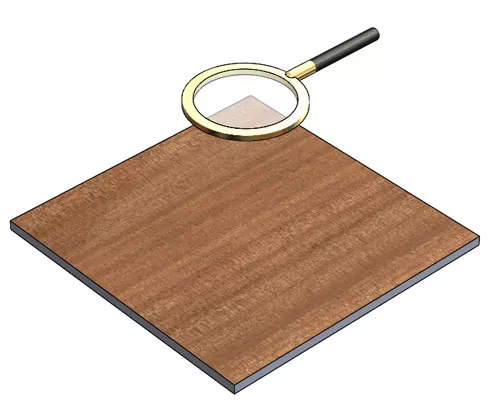
Here is my magnifying glass.
I have positioned it above a wooden surface and applied a transparent appearance to the lens body. The lens has a radius of 150 mm and I have positioned it such that the wooden floor is exactly 150 beneath the centre of the lens – i.e. at the focal point.
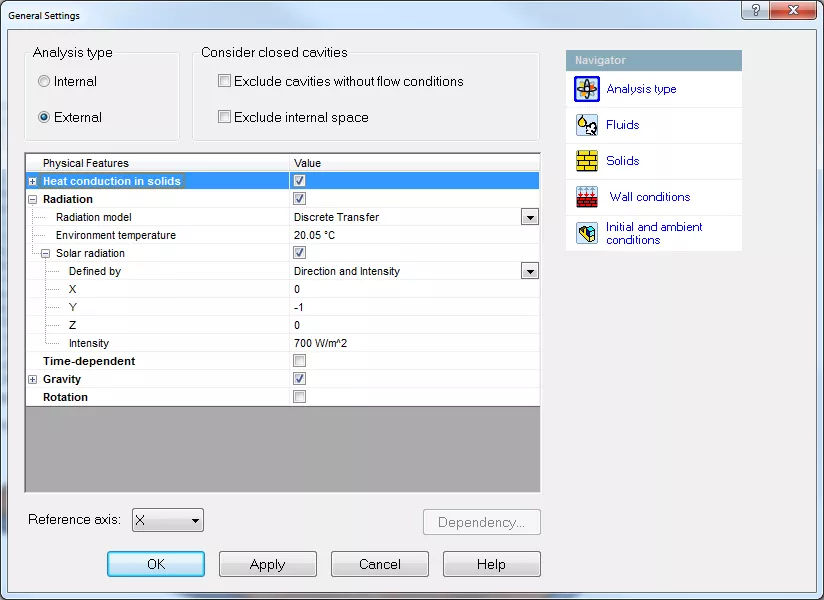
The set up in Flow is an External study with Solar Radiation and Gravity enabled. I used the ‘Direction and Intensity’ option for defining the solar values and, for convenience, set the sun to shine straight down the Y axis. The ‘Gravity’ option enables natural convection which will cool the surfaces by drawing in cold air as warm air rises from an expected hot spot.
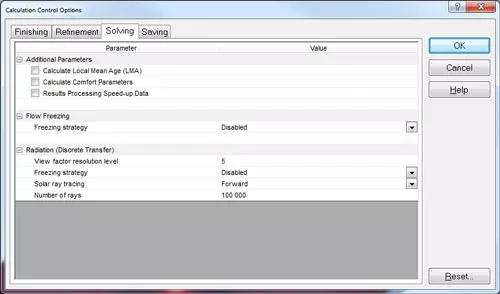
There are some further Radiation in flow simulation options you can enable in the ‘Calculation Control Options’. Below you can see that I have set the ‘Solar ray tracing’ to ‘Forward’ meaning the rays start at the sun and are traced through the lens to the floor surface. You can also define the ‘Number of rays’ and the ‘View factor resolution level’. These will give more refined rays but take longer to run. I used the default values.
The results show a hot spot at the focal point. The surface of the wood has reached 368 degrees C.
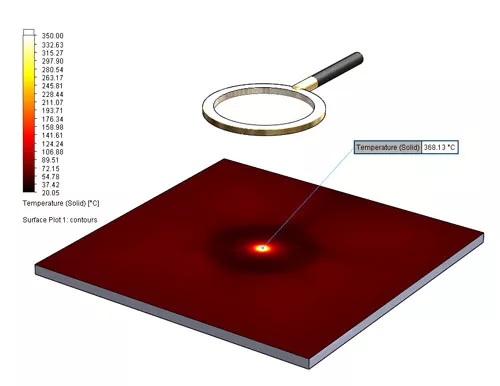
Refraction through Magnifying Glass Flow is not a specialist Optics package so I would not expect it to be used for advanced optical designs like car headlights. If you want that capability, there are SOLIDWORKS partner products that can be used.
However, for thermal studies where radiation reflects or refracts solar or other radiation, Flow Simulation is an exceptional, easy-to-use tool that gives accurate real-life results.
Categorised as: SOLIDWORKS Flow Simulation | Simulation
Get a SOLIDWORKS Quote
Interested in SOLIDWORKS? Contact us for questions, trials, or demos by clicking the button below or call 01926 333777. Our experts will help you find the perfect solution.

Related Posts

How to Find Reaction Forces in SOLIDWORKS Simulation
SOLIDWORKS helps us to find resultant forces through simulation studies. These virtual tests reduce the need for physical prototypes and give us an accurate answer.

SOLIDWORKS Tips: Are you Making this Common Mistake in Fatigue Analysis?
Simulation is a vital and complex engineering need. Fortunately, SOLIDWORKS makes it easy to test, correct mistakes and obtain accurate results.

Redesigning Santa’s Sleigh in SOLIDWORKS
Every year Father Christmas has to fly in his sleigh to deliver presents to boys and girls all over the world in just one night. To put this into perspective, it takes a little under 24 hours to fly from London (UK) to Sydney (Australia) in a streamlined Boeing 747, whereas Father Christmas’ mode of transport is believed to be a rather non-aerodynamic sleigh.

Radiation in Flow Simulation – Part 1 : Reflection
Technical Manager Andy Fulcher explores ‘Radiation in Flow Simulation, Part 1 : Reflection’
The Coanda Effect in Flow Simulation
Can you take advantage of the Coanda Effect & can SOLIDWORKS Flow simulate it? Applications Engineer Romel Cumare investigates in his latest blog post.
So how accurate is SOLIDWORKS Simulation?
How accurate is SOLIDWORKS Simulation? Elite Applications Engineer Chris Boyles investigates.
Set Your Fluids Free with SOLIDWORKS Flow Simulation
A look at the new Free Surface feature coming in SOLIDWORKS Flow Simulation 2018.
So how accurate is SOLIDWORKS Flow Simulation?
Applications Engineer Chris Boyles explores the accuracy of SOLIDWORKS Simulation.
Finding a Good Mesh Fast in SOLIDWORKS Flow Simulation
‘How do I know when to stop my calculation?’ and ‘How do I know my mesh is good enough?’ are questions often asked when running SOLIDWORKS Flow Simulation studies.
The answer is to ensure the solution reached is both fully converged AND mesh independent. In practice this can take a bit of trial and error as well as some experience in the process. However, SOLIDWORKS Flow can help us do both of these at once! Here’s how…

Free Surface Evaluation & Validation – SOLIDWORKS Flow Simulation
In 2018 SOLIDWORKS introduced a new capability to their Flow software. This is called ‘Free Surface’ and opens up many more applications for users who need to simulate fluid behaviour where a gas and a liquid (or two immiscible liquids) share the same region of space without an intervening solid