











The Coanda Effect in Flow Simulation
Written by: Tom McHale
Published: Jul 4, 2017
| View All Blogs
Can you take advantage of the Coanda Effect?
The Coanda Effect, what is it? Can SOLIDWORKS Flow simulate it? And how can you take advantage of it?
The Coanda effect is one of those phenomena of fluids that seem like magic, difficult to wrap your head around and a must see to believe. The effect causes a jet flow to attach itself to a surface and remain attached even when the surface moves away from the initial jet direction, magic right?
Knowing the mechanism of the Coanda effect is not the main purpose of this blog, so let’s just skip the mind-numbing explanation. Many of us have already witnessed the Coanda effect before when it’s time to do the dishes without realising. Creating splash patterns when washing a spoon can be quite fun and messy, but if you align the convex part of it with the water stream you’ll feel the spoon getting sucked in, but most importantly, it diverts the flow of water following the spoon curvature, behold the Coanda effect!
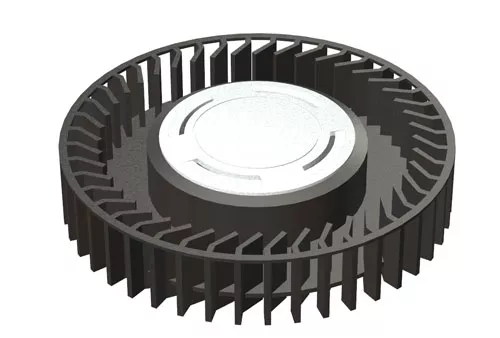
In order to answer the question, can SOLIDWORKS Flow simulate it? It is appropriate to test it rather than take my word for it. Consider a radial fan as seen below…
Apply some angular velocity to witness the surrounding air flow…
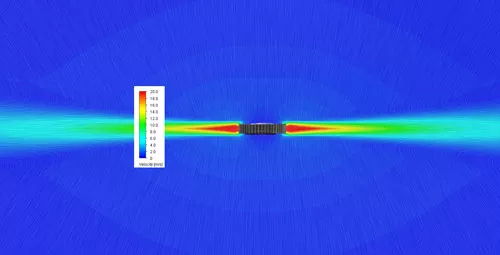
As expected, the fan generates a constant horizontal flow of air. Now, let’s place a surface at the bottom of the fan and see the effect…
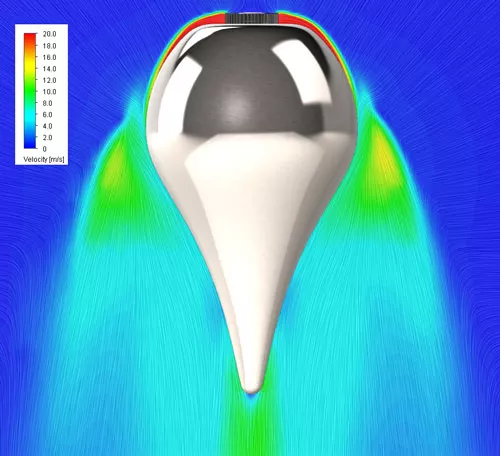
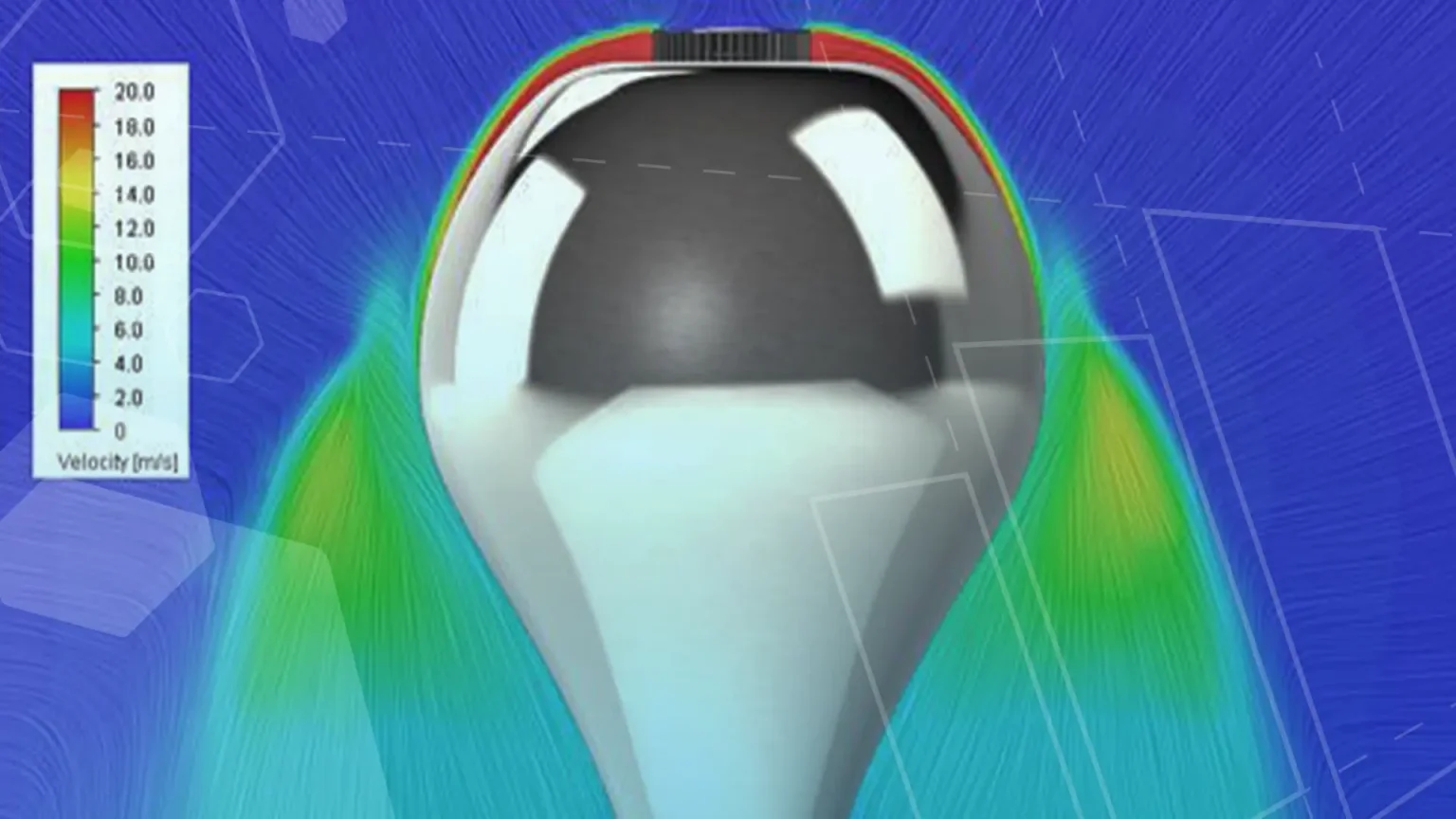
Isn’t that just fascinating? By simply adding a surface for the fluid to stick to, the air flow amazingly bends beyond 90 deg, proving that SOLIDWORKS Flow takes this effect into account. If you were to test this yourselves, you’ll find something that is ever more counter intuitive, the higher the flow speed, the more powerful the Coanda effect becomes.
Now this is all very interesting, but does it have any useful applications?
Absolutely, designers have taken advantage of this in different areas for years. From bladeless fans to no tail rotor helicopters, high lift devices on airplanes and even flying saucer prototypes.
The summer weather is finally here (sort of) so the next practical example is appropriate. Almost every HVAC system will have some type of ceiling diffuser rather than a simple grill. Why is this? Let’s do a bit of testing.
We’ll examine how the following inlet designs affect the overall temperature of a room, a simple grill and a diffuser.
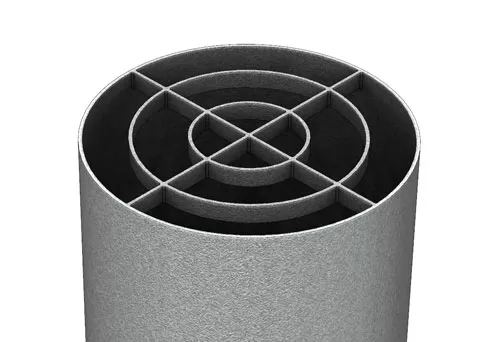
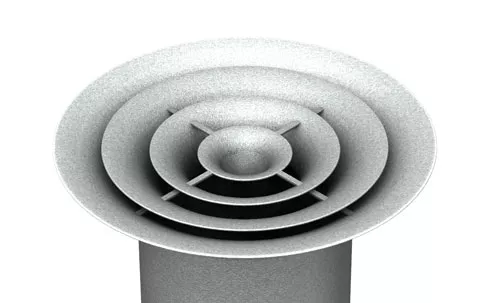
The following temperature results show a cross section of the
room, note that the scale is the same for both result.
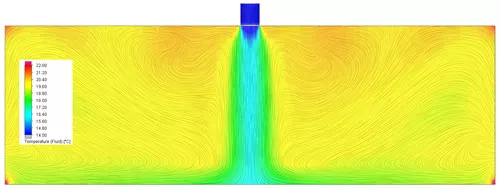
Cross section of room for the grill design
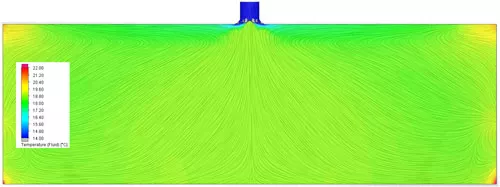
Cross section of room for the diffuser design
Just by looking at the previous results you can quickly tell which of the designs you are likely to use. The grill purely directs the air to the floor as expected. The uneven temperatures present throughout the room will inevitably cause discomfort and a cold draft in the middle of the room.
On the other hand, the diffuser spreads the cool air throughout the ceiling due to the Coanda effect. As the air travels further away from the diffuser, it naturally loses velocity and its “stickiness” to the ceiling, thus gradually falling towards the floor. The result is an evenly distributed air pattern across the room, ensuring perfect comfort in every corner by solely exploiting the Coanda effect.
Notice that by merely changing the inlet design we can now enjoy those warm summer days thanks to a more efficient HVAC system, all because of the Coanda effect. Now having a nice cool room will let you think of how to implement and take advantage of this effect in your future designs.
Want an even more impressive test of the Coanda effect? Place a lit candle behind a drink can as to block the candle, now blow in front of the can, it’s just magic!
Categorised as: SOLIDWORKS Flow Simulation | Simulation
Get a SOLIDWORKS Quote
Interested in SOLIDWORKS? Contact us for questions, trials, or demos by clicking the button below or call 01926 333777. Our experts will help you find the perfect solution.

Related Posts

How to Find Reaction Forces in SOLIDWORKS Simulation
SOLIDWORKS helps us to find resultant forces through simulation studies. These virtual tests reduce the need for physical prototypes and give us an accurate answer.

SOLIDWORKS Tips: Are you Making this Common Mistake in Fatigue Analysis?
Simulation is a vital and complex engineering need. Fortunately, SOLIDWORKS makes it easy to test, correct mistakes and obtain accurate results.

Redesigning Santa’s Sleigh in SOLIDWORKS
Every year Father Christmas has to fly in his sleigh to deliver presents to boys and girls all over the world in just one night. To put this into perspective, it takes a little under 24 hours to fly from London (UK) to Sydney (Australia) in a streamlined Boeing 747, whereas Father Christmas’ mode of transport is believed to be a rather non-aerodynamic sleigh.

Radiation in Flow Simulation – Part 1 : Reflection
Technical Manager Andy Fulcher explores ‘Radiation in Flow Simulation, Part 1 : Reflection’
Radiation in Flow Simulation – Part 2 : Refraction
Technical Manager Andy Fulcher explores ‘Radiation in Flow Simulation, Part 2 : Refraction’
So how accurate is SOLIDWORKS Simulation?
How accurate is SOLIDWORKS Simulation? Elite Applications Engineer Chris Boyles investigates.
Set Your Fluids Free with SOLIDWORKS Flow Simulation
A look at the new Free Surface feature coming in SOLIDWORKS Flow Simulation 2018.
So how accurate is SOLIDWORKS Flow Simulation?
Applications Engineer Chris Boyles explores the accuracy of SOLIDWORKS Simulation.
Finding a Good Mesh Fast in SOLIDWORKS Flow Simulation
‘How do I know when to stop my calculation?’ and ‘How do I know my mesh is good enough?’ are questions often asked when running SOLIDWORKS Flow Simulation studies.
The answer is to ensure the solution reached is both fully converged AND mesh independent. In practice this can take a bit of trial and error as well as some experience in the process. However, SOLIDWORKS Flow can help us do both of these at once! Here’s how…

Free Surface Evaluation & Validation – SOLIDWORKS Flow Simulation
In 2018 SOLIDWORKS introduced a new capability to their Flow software. This is called ‘Free Surface’ and opens up many more applications for users who need to simulate fluid behaviour where a gas and a liquid (or two immiscible liquids) share the same region of space without an intervening solid