











How Poor Data Management Costs Businesses Time and Money

Written by: Wayne Marshall
Published: May 12, 2025
| View All Blogs
Good data management goes beyond administrative tasks, forming the foundation of engineering success.
Businesses face costly delays, wasted effort, and missed market opportunities without dependable information.
This post highlights the hidden costs of poor data handling and outlines steps to safeguard your projects and profitability.
The Hidden Toll on Engineering Teams
Engineering teams juggle complex designs, tight deadlines, and extensive collaboration. When data is scattered or outdated, engineers spend valuable hours locating or verifying information instead of innovating.
Much like a patient troll lurking in the shadows of the only bridge in town, the issues caused by improper data management sneak up on unsuspecting engineering teams, stealing precious time as well as their lunch money.
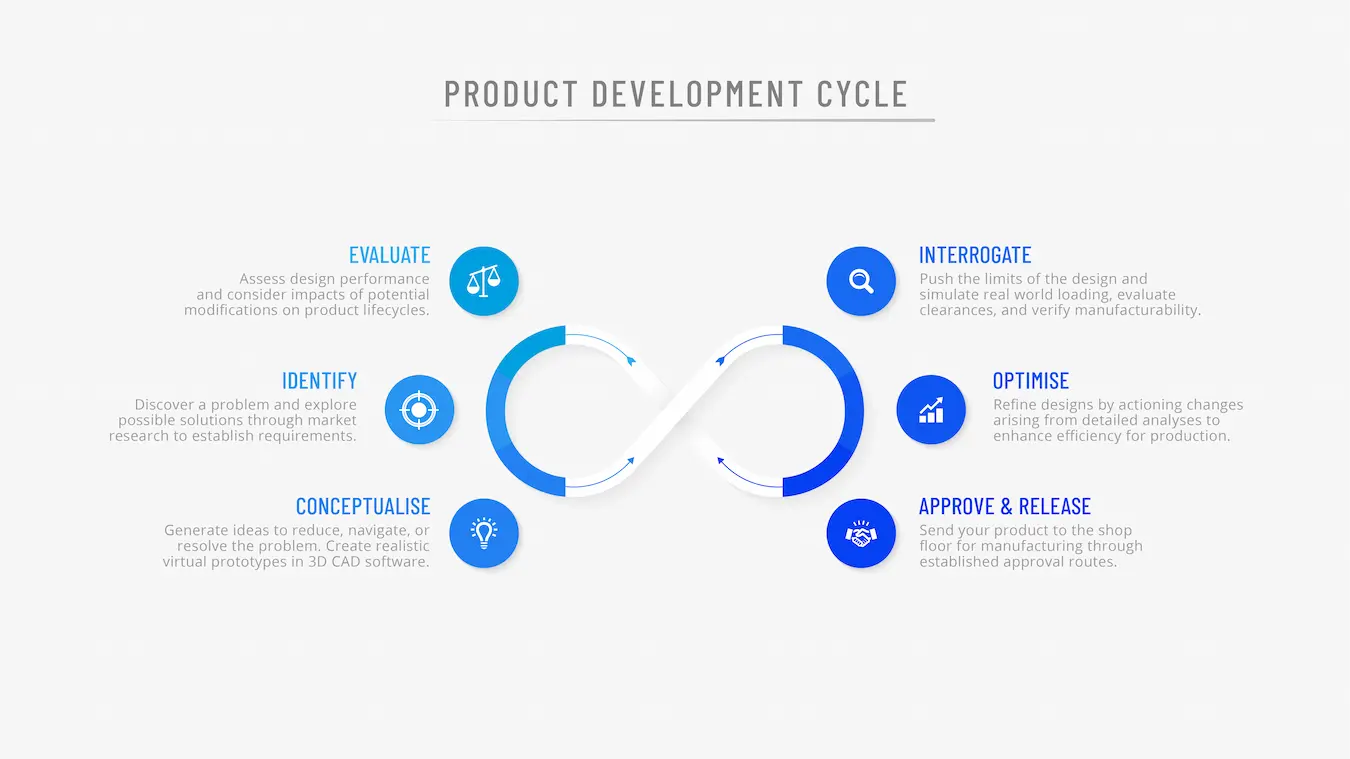
Addressing these issues restores capacity and speeds up development cycles.
- Outdated Information: Engineers work with obsolete data 28% of the time, leading to design mistakes and extra rework.
- Time Spent on Non-Value Activities: Almost 40% of engineering hours are spent on collaboration and rework caused by poor data practices, nearly matching the 50% devoted to design tasks.
- Cycle Delays: Design timelines extend as teams chase file versions, manage manual approvals or correct late-stage errors.
By improving data integrity, teams can focus on innovation and quality rather than searching and correcting.
Enhance efficiency, reduce delays. Explore smarter SOLIDWORKS data management strategies.
Financial Consequences for the Business
Poor data control affects more than engineers, with every lost hour impacting budgets and margins. Strong data practices protect both schedules and revenue.
The results from Tech Clarity’s survey indicate that businesses who are not using data management effectively struggle with higher development costs.
Outdated information can also consume up to 20% of engineering resources, expanding budgets.
Product costs may also be elevated, as late-stage fixes often require expensive workarounds or feature cuts that increase unit costs and potentially weaken the market position of both product and business.
Key Benefits of Data Management
- Seamless Collaboration: Central storage ensures every stakeholder accesses the same, up-to-date information. Review cycles shrink when designers, analysts and manufacturing engineers converge on a single source of truth.
- Faster Decision-Making: When validated data is a few clicks away, it becomes straightforward to compare design alternatives, evaluate materials or validate compliance requirements without time-consuming searches.
- Greater Efficiency: Automated workflows and metadata tagging eliminate repetitive tasks such as manually renaming files or updating spreadsheets. Engineers focus on design, not on document wrangling.
- Cost Control: Reducing duplicate effort and minimising rework lowers development expenses. Organisations recoup their investment in data management tools by avoiding the hidden costs of lost or outdated data.
- Improved Quality: With an audit trail of every change and robust version control, teams can pinpoint root causes quickly when issues arise, minimising defects and supporting regulatory compliance.
When data management is poorly implemented or absent entirely, teams risk overshooting product development deadlines and missing out on significant revenue.
These delayed launches hand the advantage to faster competitors and reduce the time available for the product developer to generate returns.
It’s therefore clear, that investing in systematic data management helps to reduce wasteful spending and provides a structure for projects to remain on schedule and within budget.
Why Data Management Matters More Than Ever
A cliché? Perhaps… Although data management will always remain relevant and integral in successful product development cycles.
Product ecosystems span multiple disciplines, locations, and external partners. Workflows and processes are continuously ‘streamlined’ or evolving, yet data streams only seem to get larger.

Data Management systems provide security to files and teams through controlled, user-based permissions.
And, as new technologies like artificial intelligence (AI) emerge and are adopted, the complexity of a business’ processes rises – as does the risk of misaligned data and costly errors:
- Supply Chain and Outsourcing: Up to 16% of design work may be external, yet 59% of companies find synchronising this data only moderately effective or worse.
- Regulatory and Quality Requirements: Strict traceability rules mean poor data control can lead to compliance failures or product recalls.
Unified data practices enable all stakeholders to work from the same reliable information, turning complexity into a competitive advantage.
Common Challenges for Engineering Teams
Even well-resourced organisations confront data silos and inefficiencies.
Identifying these barriers is the first step to choosing the right solution, and from there, suitable tools can be evaluated and deployed to reduce these common challenges:
- Disconnected tools create isolated data pools across CAD systems, spreadsheets, and standalone applications.
- Manual file-sharing via email or network drives leads to confusion over the current version.
- Limited access for non-engineering teams creates delays in procurement, manufacturing, and customer feedback loops.
Overcoming these challenges requires a cohesive strategy that unites systems, automates workflows, and provides easy access to all users.
Best Practices to Reduce Design Costs
It should be clear by now that effective data management is a great way to reduce inefficiencies when designing new products.
How much time and resource could you recover by better managing your data?

Don’t you have enough to do already? PDM systems establish background processes that allow design & engineering teams to increase their efficiency and navigate challenges.
Here are a few simple ways businesses can benefit before implementing any formal data management system and establish a foundation for ongoing improvement:
- Centralise Your Data: Adopt a single centralised system so that every user accesses the most recent files.
- Automate Version Control: Build workflows that issue automatic notifications for changes and enforce approval steps.
- Streamline Communications: Apply consistent processes for all your engineering, procurement and manufacturing teams as well as customers.
- Raise and Track Issues Early: Encourage early collaboration between engineers and analysts to identify issues before they reach production and follow them to resolution.
- Gather Customer Feedback Early: Securely share preliminary designs to confirm requirements and avoid late-stage changes.
- Adapt to your Needs: Your processes and workflow will naturally evolve over time and product development, regularly review your requirements and consider whether there are more efficient ways of working.
These measures reduce hidden costs and support a culture of agility and continuous refinement.
Exploring Your Data Management Options
Fortunately, poor data handling is avoidable with relative ease. Consolidating information, automating critical processes, and providing transparent access across teams, organisations can recover lost hours, cut rework, and accelerate launches.
Consider how your business can benefit from implementing a data management system, like SOLIDWORKS PDM, the SOLIDWORKS Cloud Services, or advanced ENOVIA solutions.
Get in touch with our experienced consultants to discover how data management and services can help you implement tailored data management strategies.
We can help you combining leading PDM systems, cloud collaboration tools and expert consultancy.
Contact us to discuss how our solutions can streamline your operations and strengthen your bottom line.
Take the Next Steps
Take a deeper dive into SOLIDWORKS PDM and learn how this highly configurable data management system can work for you and your business.
Or learn to master data management with our CPD-accredited SOLIDWORKS PDM training courses delivered by industry experts.
Categorised as: Data Management | SOLIDWORKS PDM
Get a SOLIDWORKS Quote
Interested in SOLIDWORKS? Contact us for questions, trials, or demos by clicking the button below or call 01926 333777. Our experts will help you find the perfect solution.

Related Posts

How to Create a Pack and Go in SOLIDWORKS
Pack and Go in SOLIDWORKS should be used when sending SOLIDWORKS files to another person. Use this simple guide to help you safely send entire SOLIDWORKS projects.
What is 3DSWYM? A 3DEXPERIENCE Platform Tutorial
3DSwym is the application at the heart of the 3DEXPERIENCE, allowing users to connect and collaborate across the platform.
Microsoft SQL Server licensing for SOLIDWORKS PDM
October 2020 marks two important milestones for the SOLIDWORKS PDM family and SQL Server.

Part Numbering in SOLIDWORKS PDM Professional
When implementing a new PDM Professional Vault Customers will have the option to review their part numbering and classification requirements as they move to a system that allows them to, in most cases, automate the way the identify ‘parts’ within the Vault. Part Numbering is something that a lot of customers approach differently and this is often based on ‘how it’s always been done’ without necessarily considering what is the purpose of a Part Number within their organisations and wider within their supply chains. If we consider the humble part number. What is it’s purpose?

The 6 Golden Rules of Managing Data in SOLIDWORKS
When modelling in SOLIDWORKS, before you know it, you will have created lots of parts, assembly and drawing files, so it’s important to think about how you will manage these files and keep everything organised. Here we discuss the ‘6 Golden Rules’ of managing your SOLIDWORKS files using Windows Explorer and recommended methods for file naming, structuring your projects and managing revisions.
This kicks off a month looking at the management of CAD data, register for one of our upcoming live webinars at the bottom of this article.

PDM Professional – Assigning Users with Conditional Notifications
Often customers will create smaller project teams for specific jobs and in the past we have been asked if it is possible, within a multi stage workflow, to pre-assign at the creation stage users who will be notified as checker / approver within those transitions. This blog will demonstrate how, using conditional Notifications in PDM Professional, this can be configured. We will also create some logic to allow for certain parts of the workflow to be bypassed by validating the selected ‘names’ against transition conditions. In this example the ‘approvers’ will be assigned on the files DataCard, but it would be just as feasible to have these names inherited from a project folder card if defining the rules at a higher level was possible within your Teams.
Managing Disk Space with SOLIDWORKS PDM Part #1: Distributing the Archive
This blog series was prompted by a recent support ticket, logged when a customer found their PDM Professional installation suddenly became unusable. The warning message, led to my reviewing the Archive Server Log file and this quickly identified the problem being a result of the PDM Server running out of disk space.
Managing Disk Space with SOLIDWORKS PDM Part #2: Deleted vs Destroyed and the Vault Cleaner Service
In this blog series we are examining the factors influencing disk usage within PDM and what you can do to manage them. In the first part we discussed how you can re-organise your archive across multiple drives to get you back up and running quickly should you find you are short on space. This blog and the next part will discuss behaviours in PDM that can result in redundant disk usage and how you can free that up with the vault cleaner service.
Managing Disk Space with SOLIDWORKS PDM Part #4: Cold Storage
In this blog series we are examining the factors influencing disk usage within PDM and what you can do to manage them. In the first part we discussed how you can re-organise your Archive across multiple drives to get you back up and running quickly should you find you are short on space. In the second part we looked at the differences between a deleted and a destroyed file and the impact the PDM recycle bin has on Disk usage. Part three discussed temporary session files created by the PDM Web Server and this Part will look at an option within PDM called Cold Storage.
Managing Disk Space with SOLIDWORKS PDM Part #5: Archive Compression
In this blog series we are examining the factors influencing disk usage within PDM and what you can do to manage them. In the first part we discussed how you can re-organise your archive across multiple drives to get you back up and running quickly should you find you are short on space. In the second part we looked at the differences between a deleted and a destroyed file and the impact the PDM recycle bin has on Disk usage. Part three discussed temporary session files created by the PDM Web Server. In part four we discussed cold storage and in this last part we will look at archive compression.