











Speeding up Simulations with Global Adaptive Meshing

Written by: Tom McHale
Published: Nov 16, 2022
| View All Blogs
Predicting the time needed to perform a non-linear and meshing analysis can be very difficult, particularly if it is very non-linear and not something that you’ve done before. Some years ago, in a different job, I quoted what I thought was a small services job, modelling the insertion of a rubber plug into a test tube used in automated blood testing equipment.
The geometry was trivial and could be modelled axi-symetrically. The client even had the necessary inputs for the Mooney model of the elastomer and I was using what I was told was the best non-linear FEA tool on the market. I figured it was a day’s work to model the insertion and provide some basic results to them. How wrong could I have been?
Over a week later I was still struggling with converging the model. As the plug was inserted it folded around the lip of the tube and slid past itself into the tube.

Analysis stuck before completion
At that location there was a very high strain condition and a very small bend radius which led to some horribly distorted/collapsed elements which stopped the analysis. Endless attempts at meshing the initial geometry to give elements that didn’t distort so badly didn’t work out, so I went through a process of running the solve a little way, converting the distorted mesh to geometry, remeshing, mapping the strain as a pre-state and running a little way further. It was a complete nightmare.
Other convergence problems, relating to high-friction large sliding contact conditions, led us to look at changing solver. We had a demonstration from MSC of the Marc non-linear FEA and after seeing the simplicity of the contact set up and the powerful global adaptive meshing capabilities we were sold and moved forward with Marc as our main FEA tool.
So, what is global adaptive meshing? Well, essentially it automates the manual process I went through with the plug/tube problem. We can define a 2D or 3D contact body to globally re-mesh at specific intervals during the simulation but also on detection of large strain changes, element distortion, contact penetration etc. In this way we’re not sacrificing accuracy through having distorted elements in the critical areas where high strain events are taking place.
It lets us easily simulate scenarios like these:
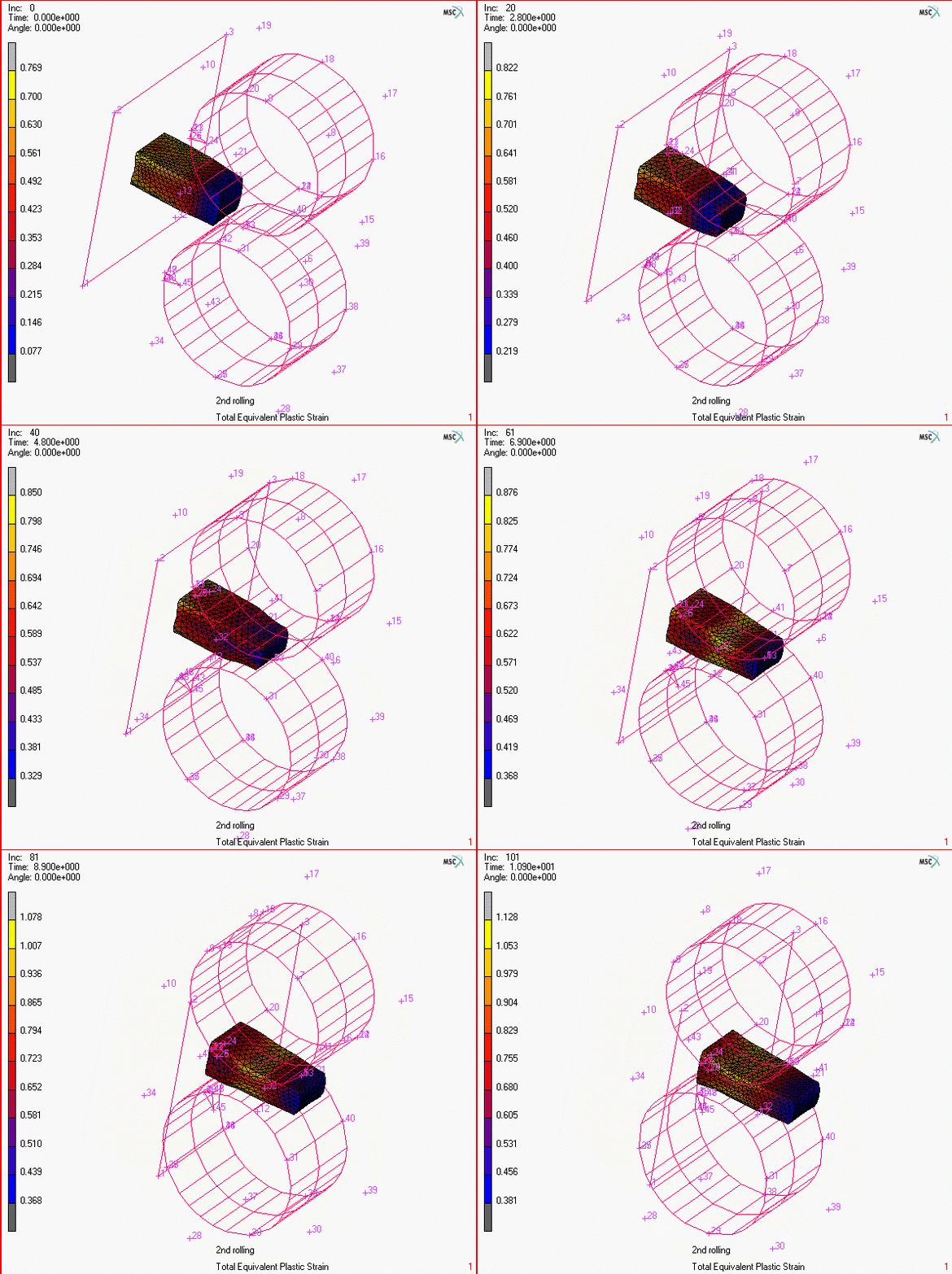
Rolling a billet

Packer seals

Forming

Machining chip formation
And my plug/stopper example? Adding adaptivity to the mesh, a 2 minute job in the gui, results in a successful solution in less than 30s runtime. I wish I’d changed to Marc earlier!

Analysis completed quickly thanks to adaptive meshing
If you have problems with your trickier non-linear problems, like degrading the fidelity of the solution or compromising on aspects you really want to model but that cause convergence issues, maybe you should have a look at Marc too. It’s MSC’s best kept secret.
Marc is available as part of the MSC One token licensing system which also gives you access to many of the other MSC solutions like Nastran, Adams and Apex. For small capacity users this can cost a lot less than you imagine, or indeed pay for your existing solution.
I’ve been working with tricky non-linear problems for over 25 years, so please get in touch if you’d like to investigate how Marc might improve your simulation quality and throughput and we’ll see if we can help.
Categorised as: Simulation | Tech Tips
Get Expert SOLIDWORKS Training
Get hands-on SOLIDWORKS training in-person or online, led by certified experts with real industry experience. With venues across the UK & Ireland, it’s easy to start learning today.
Related Posts

How to Find Reaction Forces in SOLIDWORKS Simulation
SOLIDWORKS helps us to find resultant forces through simulation studies. These virtual tests reduce the need for physical prototypes and give us an accurate answer.

Setting number of decimal places in a table on a drawing
When creating an equation in a drawing general table, is it possible to define the…

Why is my Flat Pattern not showing in SOLIDWORKS Drawings?
This may be linked to how the drawing is saved or it can be related to how sheet metal parts are displayed in drawings, read on to find out how to fix it.

Why is SOLIDWORKS Crashing?
It’s one of the great mysteries of life – why is SOLIDWORKS crashing? Let’s explore how SOLIDWORKS crashes and how we can improve performance in SOLIDWORKS.

SOLIDWORKS Tips: Are you Making this Common Mistake in Fatigue Analysis?
Simulation is a vital and complex engineering need. Fortunately, SOLIDWORKS makes it easy to test, correct mistakes and obtain accurate results.

Tech Support Blog: Why are my SOLIDWORKS BOM Quantities Wrong?
Why are my SOLIDWORKS BOM Quantities Wrong? A support call cropped up this week which…

How to Get Your Serial Number for SOLIDWORKS Visualize Standard
Want to download Visualize to make photorealistic renders? Follow this guide for accessing your Visualize serial number that comes bundled in with SolidWorks Professional and Premium.

How to Recover SOLIDWORKS Files After a Crash
SOLIDWORKS has two different methods to help you recover from an unexpected crash or loss of data in the form of auto-recovery and back-up settings.

Redesigning Santa’s Sleigh in SOLIDWORKS
Every year Father Christmas has to fly in his sleigh to deliver presents to boys and girls all over the world in just one night. To put this into perspective, it takes a little under 24 hours to fly from London (UK) to Sydney (Australia) in a streamlined Boeing 747, whereas Father Christmas’ mode of transport is believed to be a rather non-aerodynamic sleigh.

Radiation in Flow Simulation – Part 1 : Reflection
Technical Manager Andy Fulcher explores ‘Radiation in Flow Simulation, Part 1 : Reflection’