











Time Saving Techniques with FEA

Written by: Tom McHale
Published: Nov 16, 2022
| View All Blogs
I’ve given a number of training courses in the last few years and have discovered that there are some simple modelling techniques that can save time with FEA that are falling out of use through lack of knowledge. I’m not sure what’s behind it, perhaps the wider availability of faster hardware, constraining the part geometry representation within the PLM system, or even that many companies are undertaking stress analysis without specialists in place to oversee it.
We’re talking about symmetry modelling. Symmetry modelling takes advantage of the symmetry in your part. That might be a simple reflected left/right symmetry, a cyclic symmetry where, for example, a 30 degree segment is repeated 12 times or full axial symmetry where the part has a uniform revolved cross section.
Taking advantage of these conditions allows us to reduce the number of nodes and elements in the model. With matrix maths if we can halve the number of nodes in the model the matrix size goes down by a factor of 4. This has many knock-on advantages – faster runtimes, less RAM, less disk and smaller result sets to store and archive. Or we can run a much higher fidelity model in the same time as the full geometry.
As an example of simple symmetry, take this part. It has two planes of symmetry and because the loading too is symmetrical we quarter the part, apply simple symmetry constraints to the cut planes and run a smaller model.
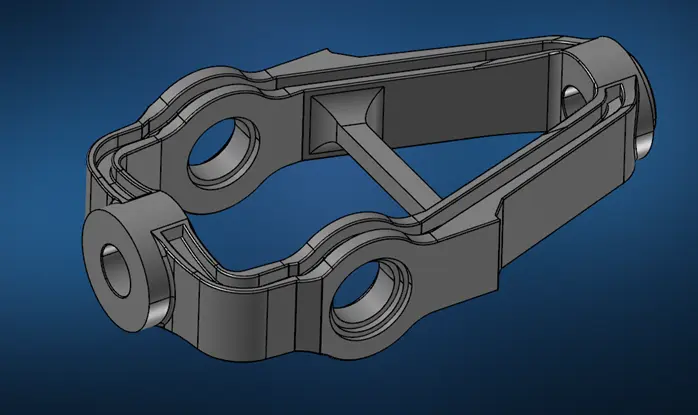
Running this simulation with a high fidelity, fatigue quality mesh takes 1500s for the full model, whereas the quarter model runs in 180s – in large part because it is now able to fit the entire solution into RAM, eliminating 130GB of I/O transfer.
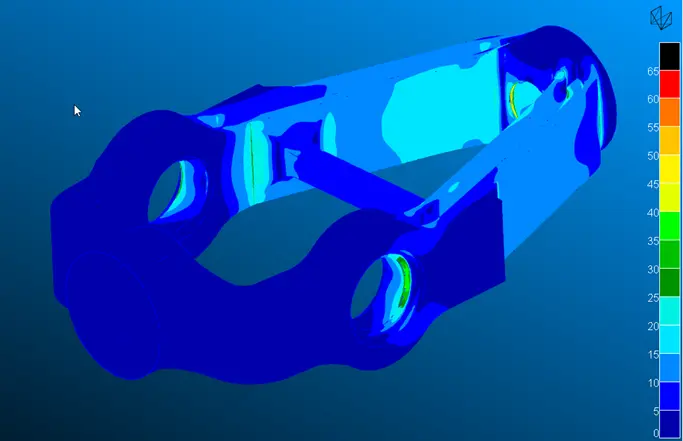

The results are comparable for the two methods and the much shorter run time allows us to run many more iterations in a day to improve our design.
For other types of geometry there are even better time savings. If your part has rotational or periodic symmetry then we can reduce the size of your FEM even further.
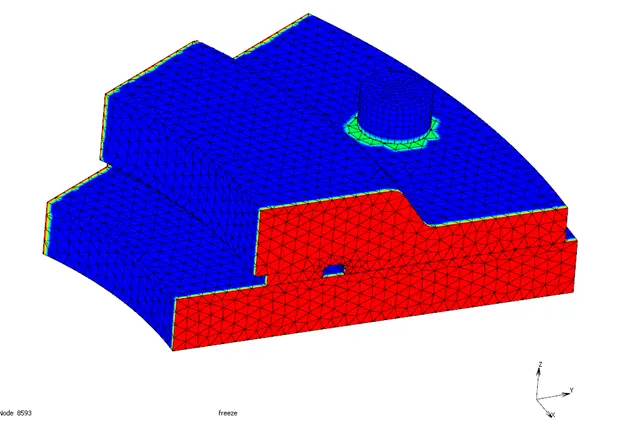
With a periodically symmetrical part, like the flywheel ring below, you can use cyclic symmetry conditions to simulate just one period – in this case the runtime to preload the bolt(s) reduces from 2800s and 30GB of RAM needed to 148s and 5GB, with much less effort in job set up and post-processing.


Full rotational symmetry, where the geometry is a uniform cross section and the loading is either axial or radial, can be represented by an axi-symmetric model. This is particularly efficient compared with a full 3D mesh, particularly for non-linear conditions such as the large sliding interference fit condition shown below. The 2D axi-symmetric model runs in a few seconds whereas the full 3D takes more than an hour to complete.


These techniques are not so useful if your loading conditions is not all symmetric. The Marc solver, from MSC Software, has capabilities that use the benefits of 2D modelling for the assembly case, then map the stress and deflection state to a 3D model as initial conditions for subsequent service loads. As an example, consider a simulation where we fit a tyre to a wheel, inflate it and then apply the vehicle weight to the axle compressing the tyre. The first two steps can be done on a 2D slice of the model, very quickly, then the model is expanded to 3D with the pre-stress effects included and the non-symmetric condition is run in 3D.

At Solid Solutions BT our lead CAE support engineer has 30 years of experience working with companies of all sizes on their analysis processes. We provide the MSC Software products, mainly via the MSC One token licensing scheme which delivers many of the best-in-class solutions used in industry, with our support backed up by MSC’s veteran support team in the UK so you get the best input, advice and problem solving.
Get in touch to find out how we can help you get the most out of your company’s simulation.
Categorised as: Simulation | Tech Tips
Get a SOLIDWORKS Quote
Interested in SOLIDWORKS? Contact us for questions, trials, or demos by clicking the button below or call 01926 333777. Our experts will help you find the perfect solution.

Related Posts

How to Find Reaction Forces in SOLIDWORKS Simulation
SOLIDWORKS helps us to find resultant forces through simulation studies. These virtual tests reduce the need for physical prototypes and give us an accurate answer.

Setting number of decimal places in a table on a drawing
When creating an equation in a drawing general table, is it possible to define the…

Why is my Flat Pattern not showing in SOLIDWORKS Drawings?
This may be linked to how the drawing is saved or it can be related to how sheet metal parts are displayed in drawings, read on to find out how to fix it.

Why is SOLIDWORKS Crashing?
It’s one of the great mysteries of life – why is SOLIDWORKS crashing? Let’s explore how SOLIDWORKS crashes and how we can improve performance in SOLIDWORKS.

SOLIDWORKS Tips: Are you Making this Common Mistake in Fatigue Analysis?
Simulation is a vital and complex engineering need. Fortunately, SOLIDWORKS makes it easy to test, correct mistakes and obtain accurate results.

Tech Support Blog: Why are my SOLIDWORKS BOM Quantities Wrong?
Why are my SOLIDWORKS BOM Quantities Wrong? A support call cropped up this week which…

How to Get Your Serial Number for SOLIDWORKS Visualize Standard
Want to download Visualize to make photorealistic renders? Follow this guide for accessing your Visualize serial number that comes bundled in with SolidWorks Professional and Premium.

How to Recover SOLIDWORKS Files After a Crash
SOLIDWORKS has two different methods to help you recover from an unexpected crash or loss of data in the form of auto-recovery and back-up settings.

Redesigning Santa’s Sleigh in SOLIDWORKS
Every year Father Christmas has to fly in his sleigh to deliver presents to boys and girls all over the world in just one night. To put this into perspective, it takes a little under 24 hours to fly from London (UK) to Sydney (Australia) in a streamlined Boeing 747, whereas Father Christmas’ mode of transport is believed to be a rather non-aerodynamic sleigh.

Radiation in Flow Simulation – Part 1 : Reflection
Technical Manager Andy Fulcher explores ‘Radiation in Flow Simulation, Part 1 : Reflection’