











Why Data Management is Critical for Modern Engineering Teams
Written by: Wayne Marshall
Published: May 9, 2025
| View All Blogs
Engineering teams generate vast quantities of design files, simulation outputs and documentation at every stage of product development.
Without a deliberate approach to organising and governing that information, projects stall and errors proliferate.
Let’s explore why robust data management must be at the heart of any contemporary engineering operation, and how it delivers measurable gains in collaboration, quality, and speed.
What is Product Data Management (PDM)?
’Product Data Management (PDM)’ is a system that centralises and organises all product-related information.
This includes all CAD data and other associated technical documentation generated across a product’s lifecycle to ensure all teams within a company have access to correct and consistent data for better collaboration and decision-making.
The Challenge of Unmanaged Data
Imagine you are in a busy workshop where every drawing, component, and test report for every project you’ve ever started is strewn across its workbenches.
There are no consistent labels, and every piece of information, from part numbers to revisions, must be individually added by hand.
And, to make matters worse, none of your team can easily see who last worked on their assigned project or which changes were made. Quite simply, it is chaos.

In practice, ad hoc file-sharing like that chaotic workshop fosters:
- Data Silos: Teams hoard local copies rather than sharing updates centrally.
- Version Confusion: Multiple “latest” files circulate, increasing rework.
- Missed Insights: Lessons learned from previous projects lie hidden in unindexed archives.
Those issues drag project schedules, inflate costs, and erode product reliability. A structured data management strategy tackles them head-on.
5 Reasons Data Management Matters
- Seamless Collaboration: Central storage ensures every stakeholder accesses the same, up-to-date information. Review cycles shrink when designers, analysts and manufacturing engineers converge on a single source of truth.
- Faster Decision-Making: When validated data is a few clicks away, it becomes straightforward to compare design alternatives, evaluate materials or validate compliance requirements without time-consuming searches.
- Greater Efficiency: Automated workflows and metadata tagging eliminate repetitive tasks such as manually renaming files or updating spreadsheets. Engineers focus on design, not on document wrangling.
- Cost Control: Reducing duplicate effort and minimising rework lowers development expenses. Organisations recoup their investment in data management tools by avoiding the hidden costs of lost or outdated data.
- Improved Quality: With an audit trail of every change and robust version control, teams can pinpoint root causes quickly when issues arise, minimising defects and supporting regulatory compliance.
Key Pillars of Effective Data Management
A comprehensive Engineering Data Management (EDM) framework rests on these fundamentals:
Automated Capture
Integrate directly with CAD and simulation tools for real-time data ingestion.
Centralised Storage
A secure “library” (often called Product Data Management or PDM) that organises files and metadata.
Structured Organisation
Logical folder hierarchies and consistent metadata templates make searching effortless.
Version and Revision Control
Track every iteration, distinguishing working copies from released designs.
Lifecycle Workflows
Map file states (for example, ‘Under Review,’ ‘Approved,’ ‘Obsolete’) to your engineering process.
Role-Based Access
Grant teams exactly the permissions they need, nothing more, nothing less.
Reporting and Analytics
Dashboards that highlight bottlenecks, compliance metrics and data-quality trends.
Together, these components transform raw files into strategic assets that drive the product development cycle.
PDM: The Cornerstone of Control and Collaboration
A dedicated Product Data Management (PDM) system underpins almost every successful EDM initiative.
Rather than acting as a locked vault, it functions more like a well-run library where:
Metadata Indexing
Part numbers, revisions and descriptions are captured automatically.
Reference Management
Sub-assembly links and standard parts stay up to date without manual intervention.
Check-Out / Check-In
Engineers “borrow” files to make changes, and the system records every modification.
Search Tools
Query by metadata or full-text content to locate documents in seconds.
By embedding PDM into daily design workflows, rather than treating it as an afterthought, organisations achieve far greater consistency and transparency.
However, that’s not to say existing practices wouldn’t benefit from implementing PDM at any stage. Data migrations are an effective way of implementing PDM processes within existing workflows.
Beyond PDM: Embracing PLM
While PDM focuses specifically on file-level data, Product Lifecycle Management (PLM) extends oversight across the entire product journey: from concept and procurement through manufacturing, service, and disposal.
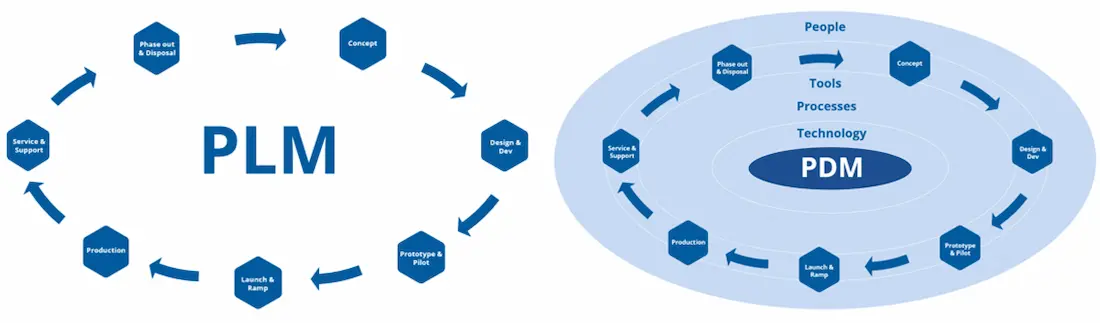
PLM platforms like SOLIDWORKS Manage and the 3DEXPERIENCE platform integrate PDM capabilities alongside project management, supplier collaboration and quality assurance modules.
For companies aiming to scale their data maturity, layering PLM on top of a solid PDM foundation brings end-to-end visibility and tight process control.
Getting Started with Data Management
The world of data management may be vast, but adopting a data management solution need not be daunting.
When starting out on your journey with data management, these initial steps will help you along your way:
Audit Current Practices
Identify where data resides, how it flows between teams and the pain points blocking efficiency.
Define Objectives
Set clear, quantitative targets such as “reduce design review time by 30%” or “cutting revision errors in half”.
Select the Right Toolset
Evaluate PDM platforms for easy integration with your CAD tools, scalability, and user interface.
Pilot and Iterate
Roll out to a small engineering team first, refine workflows and train power users.
Scale Across Teams
Use lessons from the pilot to expand system adoption and promote best practices across the organisation.
Monitor and Optimise
Gauge success with key metrics (such as search times, number of revisions and user satisfaction) and continuously refine processes.
Explore Data Management Solutions
It’s clear that effective data management is essential for engineering organisations striving to innovate reliably and efficiently.
By centralising information, enforcing workflows and embedding version control, teams gain the clarity to make rapid, well-informed decisions.
Investing in data and lifecycle management solutions is a powerful way to turn engineering data from a source of friction into a powerful enabler of collaboration, quality, and speed.
Our experienced data management consultants can help you to find the solution that works for your business. Explore effective data management options for design and manufacturing software
Take the Next Steps
Take a deeper dive into SOLIDWORKS PDM and learn how this highly configurable data management system can work for you and your business.
Or learn to master data management with our CPD-accredited SOLIDWORKS PDM training courses delivered by industry experts.
Categorised as: Data Management
Get Expert SOLIDWORKS Training
Get hands-on SOLIDWORKS training in-person or online, led by certified experts with real industry experience. With venues across the UK & Ireland, it’s easy to start learning today.
Related Posts

How to Create a Pack and Go in SOLIDWORKS
Pack and Go in SOLIDWORKS should be used when sending SOLIDWORKS files to another person. Use this simple guide to help you safely send entire SOLIDWORKS projects.
What is 3DSWYM? A 3DEXPERIENCE Platform Tutorial
3DSwym is the application at the heart of the 3DEXPERIENCE, allowing users to connect and collaborate across the platform.
Microsoft SQL Server licensing for SOLIDWORKS PDM
October 2020 marks two important milestones for the SOLIDWORKS PDM family and SQL Server.

Part Numbering in SOLIDWORKS PDM Professional
When implementing a new PDM Professional Vault Customers will have the option to review their part numbering and classification requirements as they move to a system that allows them to, in most cases, automate the way the identify ‘parts’ within the Vault. Part Numbering is something that a lot of customers approach differently and this is often based on ‘how it’s always been done’ without necessarily considering what is the purpose of a Part Number within their organisations and wider within their supply chains. If we consider the humble part number. What is it’s purpose?

The 6 Golden Rules of Managing Data in SOLIDWORKS
When modelling in SOLIDWORKS, before you know it, you will have created lots of parts, assembly and drawing files, so it’s important to think about how you will manage these files and keep everything organised. Here we discuss the ‘6 Golden Rules’ of managing your SOLIDWORKS files using Windows Explorer and recommended methods for file naming, structuring your projects and managing revisions.
This kicks off a month looking at the management of CAD data, register for one of our upcoming live webinars at the bottom of this article.

PDM Professional – Assigning Users with Conditional Notifications
Often customers will create smaller project teams for specific jobs and in the past we have been asked if it is possible, within a multi stage workflow, to pre-assign at the creation stage users who will be notified as checker / approver within those transitions. This blog will demonstrate how, using conditional Notifications in PDM Professional, this can be configured. We will also create some logic to allow for certain parts of the workflow to be bypassed by validating the selected ‘names’ against transition conditions. In this example the ‘approvers’ will be assigned on the files DataCard, but it would be just as feasible to have these names inherited from a project folder card if defining the rules at a higher level was possible within your Teams.
Managing Disk Space with SOLIDWORKS PDM Part #1: Distributing the Archive
This blog series was prompted by a recent support ticket, logged when a customer found their PDM Professional installation suddenly became unusable. The warning message, led to my reviewing the Archive Server Log file and this quickly identified the problem being a result of the PDM Server running out of disk space.
Managing Disk Space with SOLIDWORKS PDM Part #2: Deleted vs Destroyed and the Vault Cleaner Service
In this blog series we are examining the factors influencing disk usage within PDM and what you can do to manage them. In the first part we discussed how you can re-organise your archive across multiple drives to get you back up and running quickly should you find you are short on space. This blog and the next part will discuss behaviours in PDM that can result in redundant disk usage and how you can free that up with the vault cleaner service.
Managing Disk Space with SOLIDWORKS PDM Part #4: Cold Storage
In this blog series we are examining the factors influencing disk usage within PDM and what you can do to manage them. In the first part we discussed how you can re-organise your Archive across multiple drives to get you back up and running quickly should you find you are short on space. In the second part we looked at the differences between a deleted and a destroyed file and the impact the PDM recycle bin has on Disk usage. Part three discussed temporary session files created by the PDM Web Server and this Part will look at an option within PDM called Cold Storage.
Managing Disk Space with SOLIDWORKS PDM Part #5: Archive Compression
In this blog series we are examining the factors influencing disk usage within PDM and what you can do to manage them. In the first part we discussed how you can re-organise your archive across multiple drives to get you back up and running quickly should you find you are short on space. In the second part we looked at the differences between a deleted and a destroyed file and the impact the PDM recycle bin has on Disk usage. Part three discussed temporary session files created by the PDM Web Server. In part four we discussed cold storage and in this last part we will look at archive compression.