











Beyond the Vault: Why Your PDM Deployment Deserves a Second Look

Written by: Wayne Marshall
Published: Sep 4, 2026
| Last Updated: September 4, 2026
| View All Blogs
Beyond the Vault: Why Your PDM Deployment Deserves a Second Look
Many organisations implement SOLIDWORKS PDM Professional to solve a specific engineering challenge: typically, those issues commonly seen within fast paced teams creating and accessing lots of uncontrolled CAD Data.
That first phase is important, and often highly successful, but for many businesses, the initial deployment only scratches the surface of what PDM can deliver. As the organisation grows, changes ownership, introduces new business systems, expands manufacturing processes, or moves toward cloud-first strategies, the question becomes: has your PDM system evolved with the business, or is it still configured around the problems and capabilities you had five or ten years ago?
Within this blog we will try and help you to unlock the next phase of SOLIDWORKS PDM Professional within your organisation and discuss how our Professional Services team could support that evaluation and future growth.
Look Back: Why Did You Implement PDM?
PDM Is often implemented to address one specific problem, but with a scalable product that continues to add real value in each new release, we know it can solve many more, as well as potentially solving that original problem better!
As we start this review, we should therefore ask ourselves; Why did we implement SolidWorks PDM and was that implementation a success, based on that requirement being addresses.
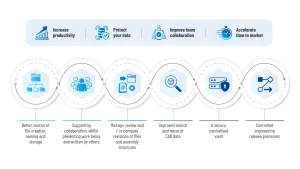
Figure 1: Typical reasons why Customers implement PDM
For many businesses, when starting this process, the initial PDM implementation may have been understood to be only the first phase with the expectation that the real long-term value would come when PDM evolved from an engineering file vault into a wider business platform.

Assess Success: Start with an Honest Internal Review
Before thinking about next steps, we encourage you first to begin with a structured review of the current system.
Some key questions that could help you with this would be:
When Was PDM Originally Implemented?
- Was it 2 years ago, 5 years ago, 10 years ago?
- Since then, have upgrades been performed purely for SOLIDWORKS compatibility, or have new capabilities been reviewed and adopted?
What Were your Original Objectives and were those Objectives Achieved?
Thinking about your objectives, how has PDM delivered? Are files easier to find? Are revisions trusted? Are workflows followed? Are Change requests down / completed quicker?
But more importantly from a success perspective:
- Are users confident in the system?
- Are any workarounds / legacy tools still being used?
- Are teams outside Engineering (Design) benefiting?
What were your Plans for “Phase 2”?
As part of the justification for implementing PDM, many customers will have ideas for later expansion that include topics such as:
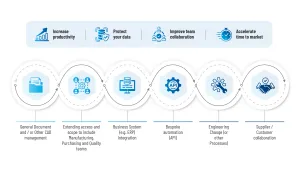
Figure 2: Typical drivers for phase #2 expansion of PDM
If those ideas were discussed during the pre-sales process but never subsequently implemented, why not?
What Stopped the Next Step?
There are several reasons why an initial CAD-focused deployment of a PDM system could stall:
- The original project solved the immediate pain.
- Engineering became comfortable with “good enough”.
- Internal ownership of PDM was unclear.
- Administrators changed roles or left the business.
- Budget was only allocated for initial deployment.
- Users feared disruption.
- Other systems, such as ERP, became the business priority.
- The company did not know what else PDM could do.
- Customisation was assumed to be expensive or complex.
- There was no regular system review process.
However, whilst a stalled PDM deployment should not usually be considered a failure. It is, often a sign that after the system delivered its first objective, focus slipped or ownership was lost. The result being that the system will likely now need to be realigned to the next stage of your business maturity.
PDM Has Moved On — Has Your Configuration?
Around the time of the release of SOLIDWORKS 2026, I decided to go back over the previous 5 releases, or so, highlighting some of the less obvious, but potentially most powerful enhancements in PDM.
As these features all required enabling or changes to your configuration in some way to allow the benefits to be realised, unless you were actively looking at ways to do more things in PDM, or how you could do existing things better, they would likely have not been implemented or even things that you were aware of!
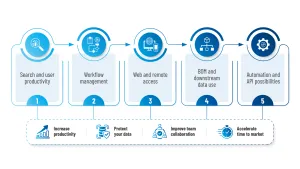
Figure 3: What Else can PDM be doing for you?
Search and User Productivity
Recent releases introduced various enhancements affecting search usability, favourite searches and search behaviour. All helping users find information faster and with fewer clicks. However, to get the most from QuickSearch (for example) you need to create a Variable List to search, and to alter the Wildcard behaviour of specific variables in a Search Card the ‘default’ option would have needed to be adjusted.
Workflow Management
SOLIDWORKS PDM 2024 (for example) brought an option to add a column to a Change State dialog that would allow you to automatically Check Out files when moving them into an editable State. PDM 2026 included the option for Workflow State archiving, which can help administrators declutter older processes and maintain cleaner administrative environments.
Web and Remote Access
Major enhancements in Web2.0 over several recent releases mean that PDM Professional now offers unparalleled browser-based access that allows appropriate users tailored access to data without requiring the full desktop client. Simplifying the user experience, extending availability to ‘non-windows’ devices and making upgrades for Web based ‘Viewers’ and ‘Contributors’ a breeze.
There have also been many other enhancements over the last few releases that add or enhance other use cases for PDM within the business as well as long term capabilities that you may not be aware of.
Please read that blog for a full list, but whilst we are talking about configuration changes there are likely other features you could me making use of too…
BOM and Downstream Data Use
PDM Professional supports BOM information that can be used beyond engineering, including downstream processes such as manufacturing, purchasing or ERP-related workflows. Much can be done ‘Out Of The Box’, and Solid Solutions have created additional API Add-ins that build even additional options and capabilities that enhance this process further when it comes to getting this data to those other business tools.
Templates
Simplifying and standardising document creation, PDM templates can automate the creation of standard folder structures and even create files such as SOLIDWORKS, Word, Excel and any other document types, helping enforce consistency across projects when it comes to file naming, numbering, content and location within the Vault.
New Software Tools Introduced
SOLIDWORKS PDM Professional offers integrations & connectors within multiple SOLIDWORKS applications and supported third-party products.
These integrations can extend your data management capabilities to ensure that all design data and associated documents are stored and managed securely to maximise the productivity of your design operations, while ensuring effective collaboration across teams and projects. Solutions vary from best practices, to full ‘integration services and cover SOLIDWORKS Electrical, Inspection, Composer, MBD, Draftsight and Visualize as well as DriveWorks, SWOOD and SolidCAM.
Automation and API Possibilities
SOLIDWORKS PDM Professional includes API capabilities that can be used to extend functionality, automate repetitive processes and integrate with wider business systems. Recent enhancements to this area include a new WebAPI for customers looking to integrate or access PDM via bespoke web applications via a more modern Restful API.
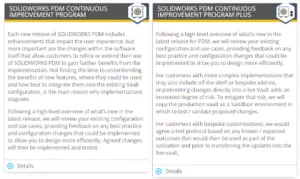
In short… Regularly reviewing available PDM functionality against your changing requirements can reveal simple configuration changes that save time, reduce errors and improve adoption — often without a major reinvestment. And, at Solid Solutions we offer a Continual Improvement Service that can help you to identify and implement new functionality specifically targeted to your Vault and business requirements.
(https://www.solidsolutions.co.uk/business-development/#PDM )
Expand the Scope: From Engineering CAD Data to Business-Critical Information
Once CAD data is controlled, organisations can start asking what other data needs structure, visibility and approval.
Engineering Documents:
Specifications, Calculations, Test reports, Design review records, Engineering standards, Technical notes.
Manufacturing Documents:
Work instructions, Build packs, Neutral Files (DXF, STEP, PDF etc), Inspection documents, Sheetmetal Flat patterns / nesting documents and other CNC-related files.
Quality Documentation:
NCRs, Concessions, Inspection reports, Change impact records, Compliance evidence.
Commercial and Project Documents:
Customer requirements, Proposal data, Approved specifications, Contractual deliverables, Project folders.
Supplier and Purchasing Information:
Supplier drawings, Approved vendor documents, Purchased part specifications, Quotation packs.
If a document needs version control, approval, traceability or controlled access, it may be a candidate for PDM.
Increase the User Base — Carefully and Purposefully
Considering the types of Data above, extending access beyond design engineering to other Teams within the organisation is something that can bring major benefits the business.
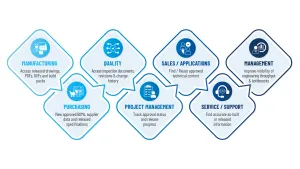
Figure 4: Who else can benefIt from PDM
When considering how to expand PDM there are some key bits of basic advice.
- Do not give every user the same access. PDM ‘Group’ membership can determine visibility, and permissions, associated with data created by or consumed by specific groups of users.
- Group membership also allows you to tailor the UI and UX to provide a more tailored view of PDM.
- Group permissions can stop exposing work-in-progress data unnecessarily.
- Consider how those users will access the system (Web or Desktop) and tailor your onboarding to ensure you train non-CAD users differently from CAD users.
Develop More Workflows — But Avoid Overcomplication
All data added to a PDM Vault will be added to a Workflow on first ‘check in’. It is likely that for different file types created by different teams the requirement for formal approval processes will vary in both need and complexity.
Additional Workflows could focus on things like…
- Document approval.
- Engineering change requests \ orders.
- Quality concessions.
- Manufacturing (data) release.
- Standard Part request.
- Technical publication approval (e.g. Composer).
When considering where to start, start with one high-value process
- Map the existing process first (noting that the process the business follows, will be different to the Workflow for any documents that support that process).
- Question the stages in that process, can you remove any unnecessary steps before considering automating?
- Avoid recreating inefficient manual processes digitally.
- Use smart workflow conditions to route different document types appropriately and automatically.
- Where possible, remove the need for the user to make the right choice by making it for them.
- Review your use of notifications to avoid “alert fatigue”.
The goal here is not to build the most complex workflow possible. The goal is to make the current manual process easier to follow and execute in PDM, whilst providing additional ‘value add’ features such as Automatic Document ‘stamping’ and file conversions (pdf creation) where appropriate along with controlled access / auditability.
Use Templates to Standardise and Accelerate Work
PDM Templates are one of the most underused productivity tools in PDM. Templates can create predefined folder structures, apply metadata and generate files such as Word or Excel documents, helping standardise naming and storage, while reducing manual setup. Considering the ‘new’ Workflows in the previous section, would a Template streamline this further?
A few examples of use cases for Templates include.
- New customer project \ New product development project Folders.
- New Engineering change request Document.
- New Calculation document.
- New Inspection Report.
- New SOLIDWORKS Composer Project1.
In short, if users are repeatedly creating the same folders / folder structures, documents or adding metadata manually (that could be inherited from a form), that is a strong candidate for building as a PDM template.
Automate the Repetitive, Error-Prone Tasks
Automation is where PDM starts paying you back and can be looked at in two ways. Standard automation and Custom API Automation.
Standard Automation covers the capabilities built into PDM to help simplify the mundane and includes…
- Automated PDF/ DXF/STEP (etc) creation.
- Workflow notifications (requests, reminders, alerts).
- Revision Table / Drawing Border updates.
- File naming/serial numbers (Simple).
- Metadata population (within supported File types).
- Conditional / automated Approval routing.
- Export / Import Tasks.
- Intelligent DataCard Lists (e.g. List of all open EC Numbers).
SOLIDWORKS PDM Professional also supports API-based customisation that can be task based, event triggered or launched via manual input. Solid Solutions have developed several ‘Off the shelf’ Productivity tools but also have the skills in house to develop Custom Automation tools that can help with areas such as…
- Automated PDF Creation from ‘other’ tools (e.g Visio, MathCAD).
- ERP item creation / BOM export.
- Complex file naming / Serial Numbers.
- Drawing / Document pack generation.
- Metadata manipulation (Data Prep / Repair) Tools.
- Custom Reports.
- Integration with nesting, CAM or manufacturing tools.
- Custom Data Loaders.
In summary. The PDM API allows developers to interact with vaults, files, folders, variables, references and workflows, which makes it suitable for deeper custom automation and integrations. The best automation candidates are tasks that are frequent, rules-based, time-consuming and costly when performed incorrectly.
Connect PDM to the Wider Business System Landscape
PDM Should Not Sit in Isolation. We have already highlighted how extending the departmental reach of PDM can bring many benefits and how you may approach that, but what about the other business systems in place?
As part of a wider review, we should also consider…
- Has the business implemented a new ERP system?
- Has the company moved to using SharePoint for internal Document sharing?
- Has the company changed ownership?
- Are there new manufacturing sites, new partners or suppliers?
- Is there a new quality system?
- Has the business moved toward cloud-first IT?
- Are more users working remotely more often?
- Are there more compliance requirements?
- Has the company acquired another business with different CAD/PDM processes?
If you answered yes to any of the above points, then there could be many integration opportunities to consider such as:
- ERP: Item master creation, BOM transfer, Part number control, etc.
- MRP: Build pack generation, Shopfloor access to released files.
- Quality systems: Change records, non-conformance documents, Inspection reports.
- Customer and supplier collaboration: Controlled export packs, Web access, Supplier document approval.
- Cloud Infrastructure / Web Access: Migrating the infrastructure to a Private or Public, or introducing Web2.0 as an Intranet Solution for Shop Floor consumers.
SOLIDWORKS PDM Professional includes BOM support, web access, notifications and multi-CAD/ document management capabilities that can support broader collaboration beyond the core CAD team, and Solid Solutions have additional toolsets to support these endeavours further.
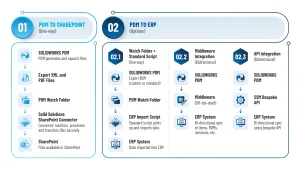
Figure 5: Extended Enterprise example: PDM / SharePoint / ERP links
Has Your Business Outgrown PDM, or is it Just Underused?
Companies rarely outgrow SOLIDWORKS PDM because of the number of CAD files they have. They outgrow it when their business processes, product complexity, or cross-department collaboration requirements exceed what file-centric data management can comfortably support.
Dependant on what you uncover in your review it’s likely that you will find that PDM is still the right fit for the business.
Especially if those requiremeJnts are based on…
- CAD file control and revision management.
- Approval workflows for drawings and models.
- BOM extraction from CAD.
- Secure vaulting and replication.
- Basic engineering change processes.
- Remote access through Web2.0.
- Integration with ERP via custom tools or middleware.
There may however be requirements identified in this review which suggest a need for a more comprehensive Solution.
SOLIDWORKS Manage takes the CAD and file management functionality of SOLIDWORKS PDM Professional and builds upon it by providing an advanced set of tools. Manage eliminates the need to use disconnected software and to manage multiple data sources by providing integrated project, process and item management as a new layer on top of your Existing PDM Professional environment.
Signs that SOLIDWORKS Manage should be considered:
- Engineering changes have become a business process.
- Projects are managed outside PDM.
- The business needs records beyond CAD files.
- Management wants dashboards rather than reports.
- PDM customisation is becoming excessive.
The 3DEXPERIENCE platform is an online collaborative environment that delivers Dassault Systèmes engineering software for complete product development through browser‑based apps and integrated data management. As a modular, browser‑based solution, the 3DEXPERIENCE platform scales with your needs. Every app is fully connected and uses the same data, enabling cross‑department collaboration, simplified data management, and shared access to key information. Due to their very different architectures and approaches to data management and collaboration, migrating from SOLIDWORKS PDM to the 3DEXPERIENCE platform should be treated as a major business transformation project, but also one that Solid Solutions can guide you through.
Signs that 3DEXPERIENCE should be considered:
- Multi-site and global product development.
- Mechanical CAD is no longer the whole product definition.
- Product lifecycle management is required.
- Cloud-first strategy.
- Highly regulated industries.
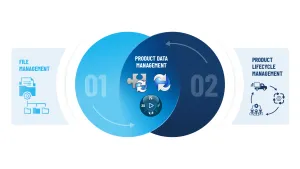
Figure 6: PDM landscape inc Manage and 3DE
Useful distinction: PDM manages product data. SOLIDWORKS Manage and PLM via the 3DE Platform manages the wider lifecycle, decisions, processes and collaboration around the product.
A simple maturity model may look like this…
| Business need | Recommended platform |
| Secure CAD files and Documents with Revision control | SOLIDWORKS PDM Professional |
| Formal engineering change control for CAD and BoM’s plus Project management | SOLIDWORKS Manage + PDM |
| Requirements management, business records, dashboards, reports, cross-functional processes | SOLIDWORKS Manage + PDM |
| Enterprise PLM, global collaboration, multi-discipline product development | 3DEXPERIENCE |
| Digital thread from requirements through manufacturing and service | 3DEXPERIENCE |
How to Plan the Next Phase Without Disrupting the Business
Start with a candid review. Solid Solutions can help guide you through this via our PDM Performance Review Service and subsequently assist with the rollout and validation using Workshops, ad-hoc ‘Assist’ sessions or a complete SOW based on delivering discrete changes. Working inhouse…
Phase 1 — Review
- Audit current workflows.
- Interview engineering plus upstream and downstream teams.
- Document current pain points.
- Identify unused features / Review upgrade/new feature opportunities against identified requirements / changes requested.
Phase 2 — Prioritise
You do not need to try and implement everything in one hit, so rank the potential changes based on:
- Time saved.
- Risk reduced.
- Number of users affected.
- Ease of implementation.
- Business value vs Cost.
Phase 3 — Pilot
Identify and implement your highest ranked improvements within a Sandbox copy of your PDM environment.
- Pilot with a control group and refine until ready to deploy into Production.
Introduce the changes mindfully:
- Ensure impacted users / consumers are aware of the impending changes and the reasons for their introduction (benefits they will bring).
- Ensure new teams are onboarded properly and existing users training effectively on the modified set up.
- Provide a forum for feedback and respond / make changes as appropriate.
Go-Live
Phase 4 — Measure
It is likely that this process has required investment in time, additional licenses and perhaps new software / Add-ins. To validate success, you should now consider the impact via things such as:
- Time and money saved via a reduction in manual steps / errors.
- User adoption / acceptance (are legacy manual processes still used?)
- Approval cycle time / number of automated outputs.
- Fewer support / admin requests.
Phase 5 — Expand
Use the pilot success to justify the next improvement.
Conclusion: PDM Should Evolve with the Business
Your original PDM deployment may have been designed to solve an engineering CAD data challenge. But your business has almost certainly changed since then. Products, people, systems, customers, suppliers and working practices all evolve — and your PDM environment should evolve with them.
If your PDM system has not been reviewed recently, now is the time to step back, assess what has changed and identify where workflows, templates, automation and wider collaboration could deliver measurable value. By regularly reviewing workflows, templates, automation opportunities, integrations and user needs, organisations can often unlock significant productivity gains from technology they already own. And where the business has genuinely outgrown PDM, that same review provides the evidence needed to plan the next step toward broader PLM capabilities with confidence.
Use this blog to guide you through a review in house or contact Solid Solutions now to see how a tailored PDM Performance Review could help you identify and implement the opportunities to support this process.
Categorised as: Data Management | SOLIDWORKS Design | SOLIDWORKS PDM
Discover our SOLIDWORKS Subscription
Get the most from your tools and the best from your designers with a SOLIDWORKS subscription package that is designed to help you succeed.

Related Posts
How to Find Reaction Forces in SOLIDWORKS Simulation
SOLIDWORKS helps us to find resultant forces through simulation studies. These virtual tests reduce the need for physical prototypes and give us an accurate answer.

Setting number of decimal places in a table on a drawing
When creating an equation in a drawing general table, is it possible to define the…
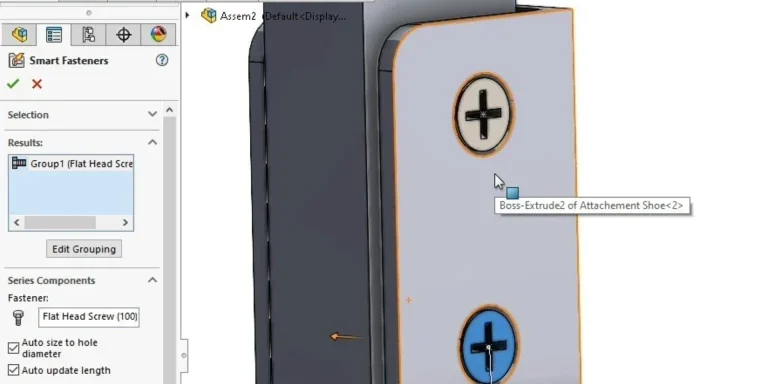
SOLIDWORKS Smart Fasteners
SOLIDWORKS Smart Fasteners is a really useful time saving tool, allowing you to automatically insert toolbox fasteners such as bolts and screws into an assembly providing there is a standard hole.
Why is my Flat Pattern not showing in SOLIDWORKS Drawings?
This may be linked to how the drawing is saved or it can be related to how sheet metal parts are displayed in drawings, read on to find out how to fix it.

SOLIDWORKS Tips: Are you Making this Common Mistake in Fatigue Analysis?
Simulation is a vital and complex engineering need. Fortunately, SOLIDWORKS makes it easy to test, correct mistakes and obtain accurate results.

How to Recover SOLIDWORKS Files After a Crash
SOLIDWORKS has two different methods to help you recover from an unexpected crash or loss of data in the form of auto-recovery and back-up settings.

Redesigning Santa’s Sleigh in SOLIDWORKS
Every year Father Christmas has to fly in his sleigh to deliver presents to boys and girls all over the world in just one night. To put this into perspective, it takes a little under 24 hours to fly from London (UK) to Sydney (Australia) in a streamlined Boeing 747, whereas Father Christmas’ mode of transport is believed to be a rather non-aerodynamic sleigh.
SOLIDWORKS Grid Systems – hidden away, but very useful!
Rory Niles provides an insight into the uses for Grid Systems within SOLIDWORKS 2018

Furniture Design Made Easy with SOLIDWORKS
Calling all furniture and interior designers: the days of creating square cabinets are over. What if we told you there’s a much easier way to bring your products to life?
Here’s 10 reasons why we feel SOLIDWORKS is better than any other software, especially if you’re designing furniture:
Making 3D Textures from Images on SOLIDWORKS
Turn images into 3D geometry with brand new SOLIDWORKS 3D Textures Feature