











Easter Egg-citing Innovations: Unwrapping Core Functions & SP3D 3D Printing Packaging Designs
Written by: Solid Solutions Marketing
Published: Mar 21, 2024
| View All Blogs
3D printing packaging design is a core component of the modern Easter Weekend. Bright colours line the shelves, all battling for your attention.
Now, while we haven’t transformed into master chocolatiers overnight, we did hatch a plan to design and produce our own Easter egg using SOLIDWORKS, and see how easy it is to create luxury product packaging designs.
In this blog, we’ll look at three egg-cellent disciplines to get our egg from shell to shelf:
- 3D Printing Packaging: We entered into the world of luxury product packaging design to make sure our egg stands out on those Easter shelves and shows our brand.
- Mould Making: SOLIDWORKS mould tools allow us to create moulds from 3D models so we can manufacture a real egg.
- Low-Volume Production: We explore low-volume production techniques to bring our egg to life without cracking under pressure.
SOLIDWORKS Sheet Metal Tools can Design Product 3D Printing Packaging
An egg of such grandeur deserves a luxury home.
SOLIDWORKS Sheet Metal tools can be applied to a cardboard medium to produce intricate and functional packaging designs.
Employing multibody part design, we took the geometry of the egg to produce an accurate and parametric packaging design that can be easily updated if changes are needed and configured for different sizes.
To quickly create the correct basic geometry for the design, we created a simple solid hexagonal boss to enclose the whole egg, allowing space around the egg for 3D printing packaging padding.
This provided us with our building block to convert the body into the outer shell of the packaging.
From there, we could extrapolate the internal structure required to support the egg and add the relevant tabs, slots, holes, and relief cuts with the standard sheet metal tools to ensure the shape could be created from a single flat net, without overlapping geometry.
Checking the sheet metal flat pattern regularly confirmed we were on the right track, with features such as edge flange letting us fold areas back on themselves to ensure the egg has a snug nest to rest in.
Creating the internal supports from cardboard meant we could reduce the amount of plastic needed in the packaging and maintain its recyclability.
Exporting the Flat Pattern
Flat patterns can be exported easily from SOLIDWORKS using the export option from the right click menu of the flattened form.

Using the SOLIDWORKS Cloud Services, we delivered the net to our Graphics design team via the 3DEXPERIENCE platform.
SOLIDWORKS has plenty of tools to boost collaboration and speed up processes, and our Graphics team were able to produce stand-out packaging to catch the eye of the passing customer.

If you are interested in 3D printing packaging design, we have a webinar that will take you through some of the skills and techniques that we have at our disposal within the SOLIDWORKS suite. We will show you the rich toolset in SOLIDWORKS before opening up the floor for a Q and A with one of our Elite SOLIDWORKS Certified Engineers. Scroll to the top to view our feature video on using SOLIDWORKS for packaging design
Designing the Mould in SOLIDWORKS
After establishing the design of the egg, we needed to create the negative of the final product to create our mould.
By utilising draft analysis to determine where positive and negative draft would occur, we were able to extract the parting line with the use of the mould tool features.
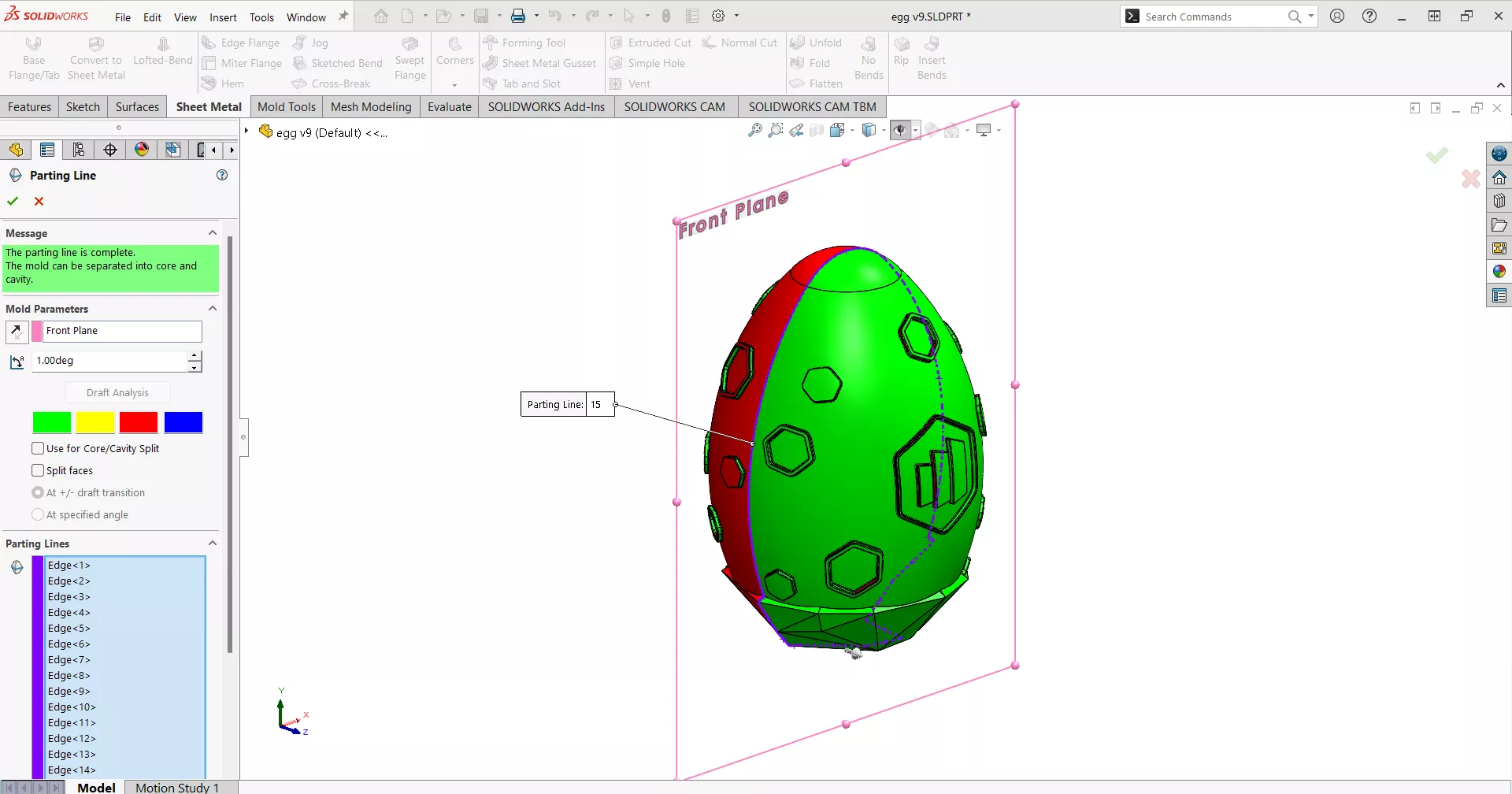
From here, we created the parting line that we will use to define the two halves of the mould.
The flat base allows the egg to stand up by itself, but the geometric design of the base meant the parting surface was not as simple as your standard egg design.
I certainly don’t want to be the chicken that has to lay that.
Parting lines are easily generated with a single command to split the surfaces and identify where positive and negative draft occur – the path can be manually altered to achieve a clean end result.
No shut-off surfaces are required for this design, so we moved on to constructing the parting surface.
To construct the surface, we used the manual mode inside the parting surface tool to allow us to define how the surface extends from the parting line, ensuring the generated surface is larger than the intended mould size.
The Tooling Split command then automatically creates the folders and relevant bodies and surfaces for the mould in one swift operation.
This laid the foundations ready to be modified for manufacture.
If you are interested in learning more about mould tool design in SOLIDWORKS, check out our on-demand webinar Mastering mould tools and die design

Using SOLIDWORKS for Small Batch and Lower Volume Production
To manufacture our Easter egg, we enlisted the Trimech Manufacturing Solution team to produce the physical versions of our mould designs.
As fellow members of the TriMech Group, Trimech Manufacturing Solution are perfectly positioned to provide us with additive manufacturing solutions, offering a portfolio of best-in-class 3D printing, 3D scanning and workbench manufacturing solutions, across the UK, Ireland and Nordic regions.
We decided to implement a two-stage manufacturing process to create our mould.
Firstly, the mould was printed on the Formlabs resin printer in High Temp resin. This resin was chosen because it is rigid and can withstand the temperatures of the pressure forming later in the process. Resin printing on the Form 3L results in a smooth high-quality finish – an important consideration as any layer lines or print imperfections would show in the final product.
We modified our mould design to make it more cost-effective, and under the advice of the Trimech Manufacturing Solution team, we added additional features to help reduce resin usage and incorporated perforations for the second stage of the manufacturing process.
For the second stage of the process, we opted to utilize the Mayku Multiplier pressure former.
This method allowed us to use food-grade thin material to form over our resin mould design.
We integrated ribs/support and location features into the mould design. All these features will transfer to the thin plastic shell to produce a semi-flexible mould.
This flexibility will compensate for the lack of negative draft on the embossed designs around the circumference of the egg, making it easy to release the final product from the mould.
Discover more about the versatile technology solutions used in this project, ideal for low-volume, high-accuracy production, over on the Trimech Manufacturing Solution website.
Conclusion
Thank you for joining in on the egg-citing Easter fun, it has been a cracking journey.
This design was created purely for some egg-stra fun, and the specialised techniques for optimising Easter egg manufacturing are certainly more complex than in this simplified design process.
That being said, the skills, principles, and techniques used, serve as a great example of what SOLIDWORKS can enable with a touch of creativity. SOLIDWORKS lays a robust foundation for fostering your design and innovation endeavours in the future, and we are here to support you throughout your journey.
Categorised as: Manufacturing
Get a SOLIDWORKS Quote
Interested in SOLIDWORKS? Contact us for questions, trials, or demos by clicking the button below or call 01926 333777. Our experts will help you find the perfect solution.

Related Posts

How to come up with ideas for your design or engineering project – some helpful tips
We know coming up with an interesting and creative design or engineering project can be…
Design considerations when 3D printing
3D printing is a colloquial term used to generalise a family of additive manufacturing processes. At the consumer level the most common 3D printing process is Fused Deposition Modelling (FDM) – a technique whereby thermoplastics are extruded through a nozzle, and a part is built up layer by layer. FDM is very popular with hobbyists due to the relatively low cost of the printer, alongside the wide range of properties and appearances thermoplastics present. The conveniency to turn a custom CAD model into a product in a short space of time is a superb way to make life easier.
Why should I be nesting parts?
Firstly we should define what is nesting? Nesting is like putting the pieces of a jigsaw together, it is the process of creating an optimal layout of your flat parts so that you get the most out of your material. Typically this process would be used in the sheet metal, fabric, plastic and wood/joinery markets. Nesting can also be used to align parts with a specific grain such as brushed metal products, patterned materials or wood grain.
Top 4 Benefits of Composite Materials for Lightweight Engineering
One method design and engineering teams have employed to combat high costs and high carbon emissions is the use of composite materials in the development of parts.
SWOOD Licensing Explained
Learn the differences between SWOOD licensing. Understand how online licences connect to Eficad’s server for flexibility, while network licences allow shared access across multiple users. Discover which option suits your workflow.
How to Install and Use SWOOD Editor
Customisable SWOOD reports provide a comprehensive set of documentation for production including cutting lists, hardware lists, labels, and material summaries.
FEA Simulation: How to Reduce Simulation Time of Automotive Wheel Models
Modelling things like wheels can be a lengthy process in simulation time due to the…

Manufacturing: How to Create Templates in SolidCAM
Using SolidCAM templates reduces repetitive tasks and boosts your productivity. Read on to find out how to create them.

Manufacturing Showcase 2023 Wrapped
From concept to creation and beyond! Here’s what you missed at the Manufacturing Showcase 2023 event in September.
What is Subdivision Modelling? Get started with 3D Sculptor
Learn how to create new components, add primitives, and manipulate basic forms with 3D Sculptor.