











Integrated PCB Design with CircuitWorks | What’s New in SOLIDWORKS 2025
Written by: Tom McHale
Published: Jan 9, 2025
| View All Blogs
SOLIDWORKS 2025 brings a host of exciting new features to CircuitWorks, revolutionizing how mechanical engineers collaborate with electrical designers.
In this blog, we’ll walk you through the most noteworthy enhancements that promise to make your design process smoother, faster, and more detailed than ever before.
#1 Expanded Access to CircuitWorks: Now Available at All SOLIDWORKS Levels
One of the most significant changes in SOLIDWORKS 2025 is that CircuitWorks is now available at all SOLIDWORKS levels, not just Professional and Premium versions. This opens up a world of possibilities for more users to work with ECAD files, regardless of their SOLIDWORKS subscription tier. Whether you’re working on a basic assembly or a highly complex design, CircuitWorks has become more accessible, enabling a wider range of engineers to seamlessly import and work with electrical design data.
#2 Overhauled CircuitWorks User Interface
The user interface (UI) of CircuitWorks has undergone a complete overhaul in SOLIDWORKS 2025. This redesign includes a new look and improvements to ensure that the interface is easier to navigate and better scaled for 4K displays.
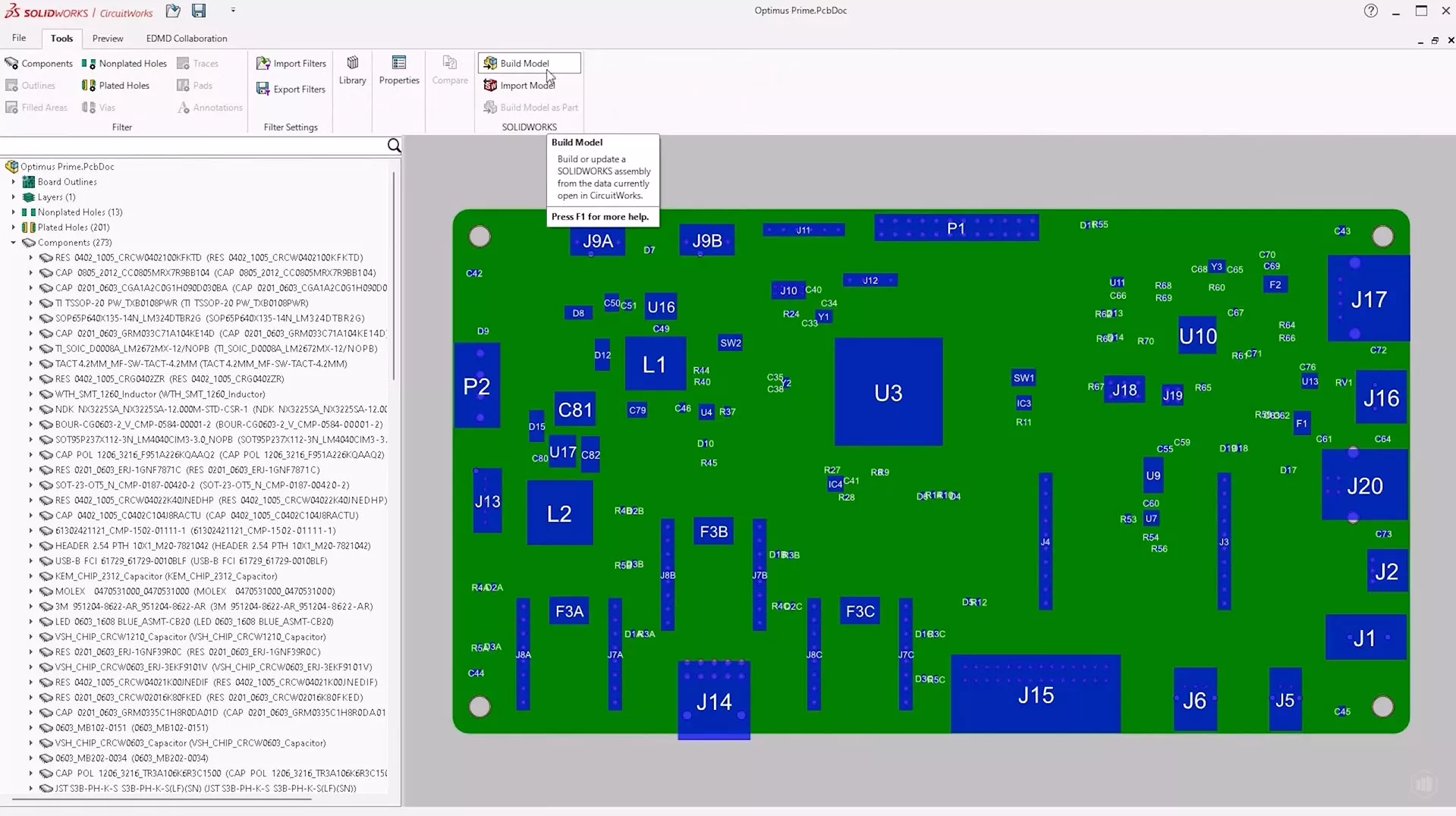
The improved UI enhances usability and helps users perform tasks with greater efficiency.
#3 Enhanced IDX File Capabilities
One of the standout features in SOLIDWORKS 2025 is the enhanced functionality of IDX files. IDX (Industry Data Exchange) files are commonly used for transferring electrical design data between ECAD and MCAD systems.
In the 2025 release, IDX files have been dramatically expanded, allowing for much more detailed and accurate representation of the electrical design.
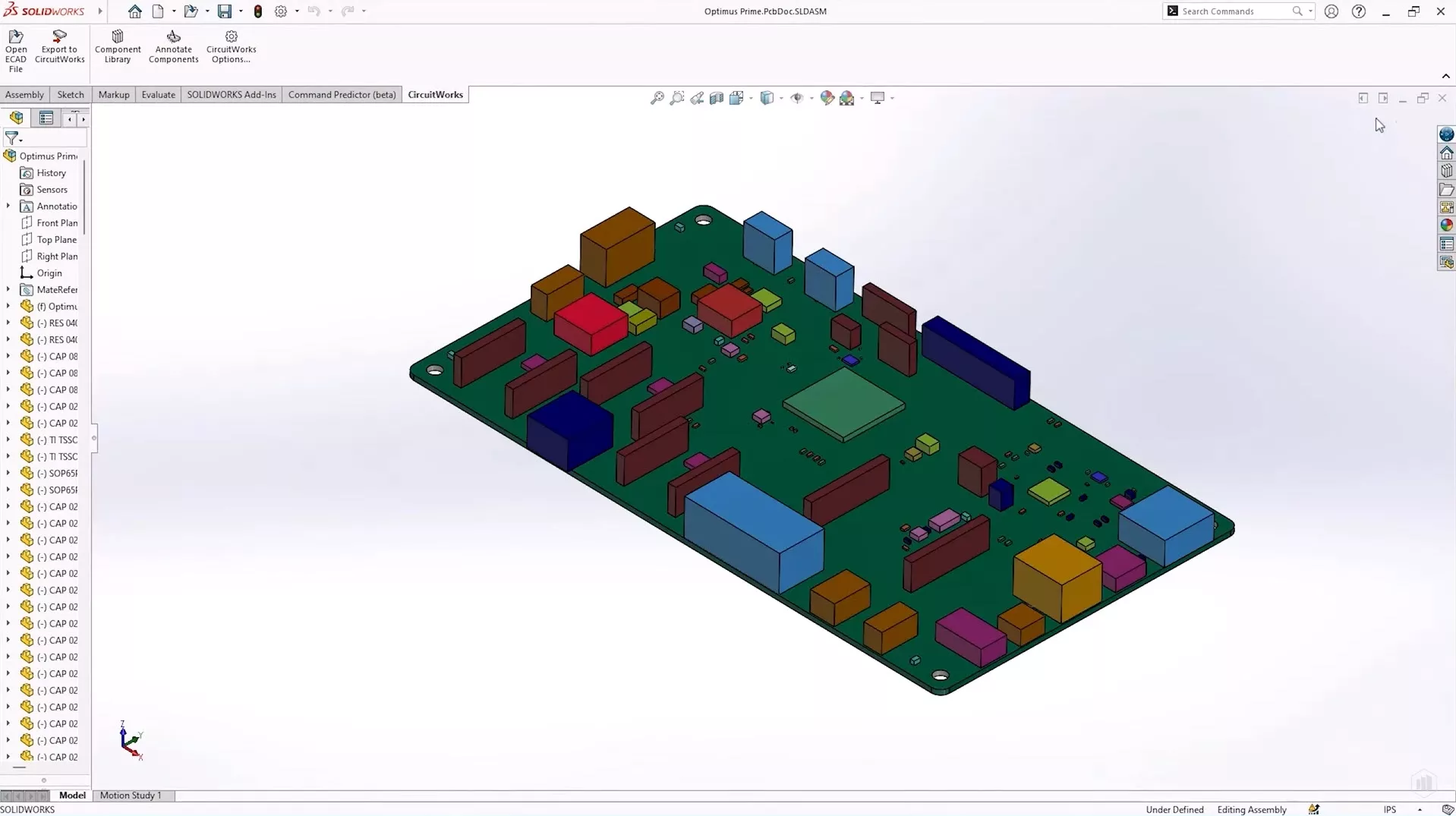
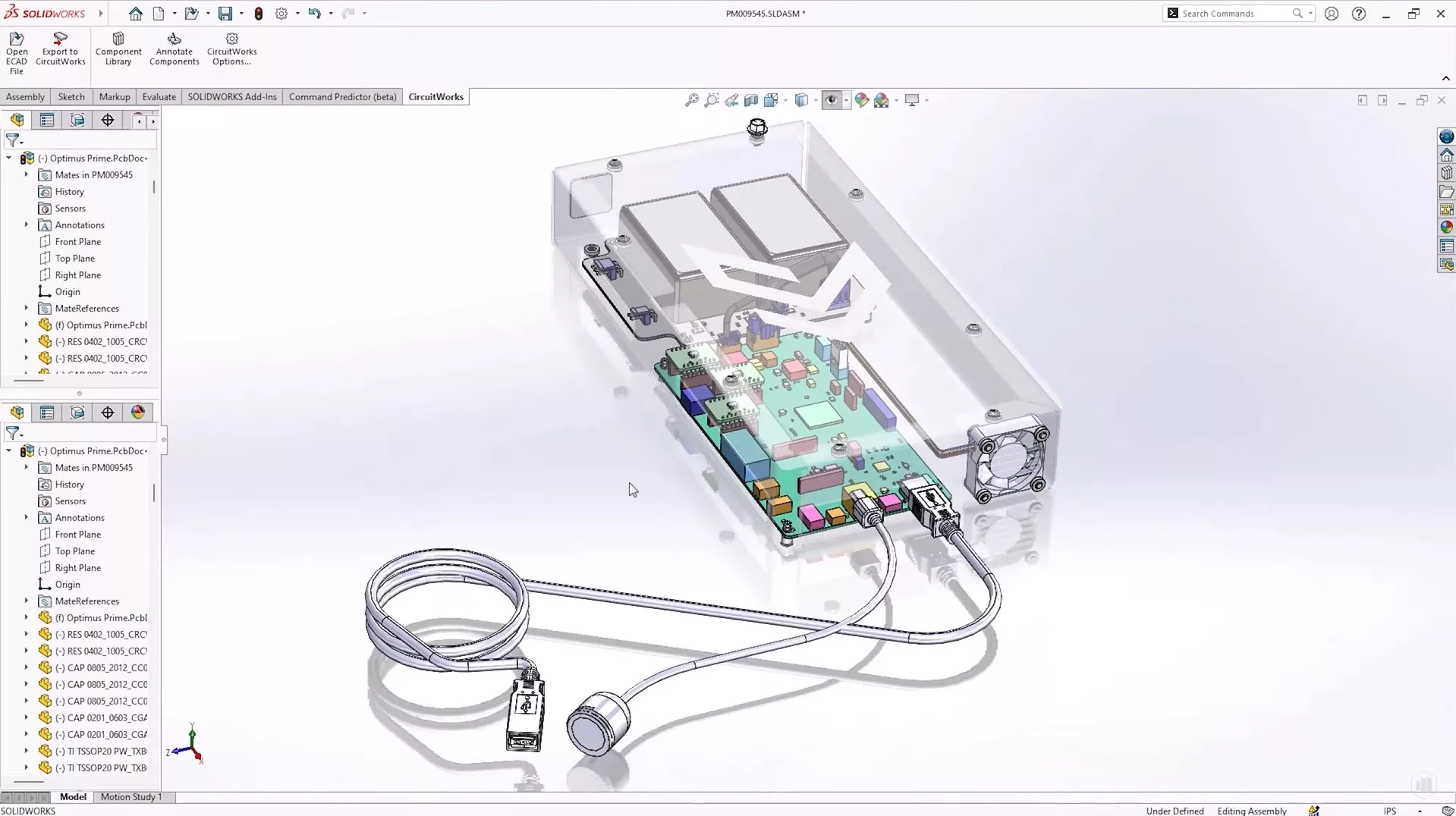
Using an IDX file, users can quickly generate a complete 3D model of a circuit board assembly by utilizing volume representations of components, keep-outs, and cuts.
This is particularly useful during the concept stage, where you might need to visualize basic assembly geometry without worrying about the intricate details of the full design. This means you can start working on the mechanical aspects of your design sooner, without needing a fully detailed circuit board model right from the start.
#4 Inclusion of copper trace geometry
IDX files can now include complex geometric data, such as copper trace geometry, which can be visualized across all layers of the circuit board—top, bottom, and internal traces.
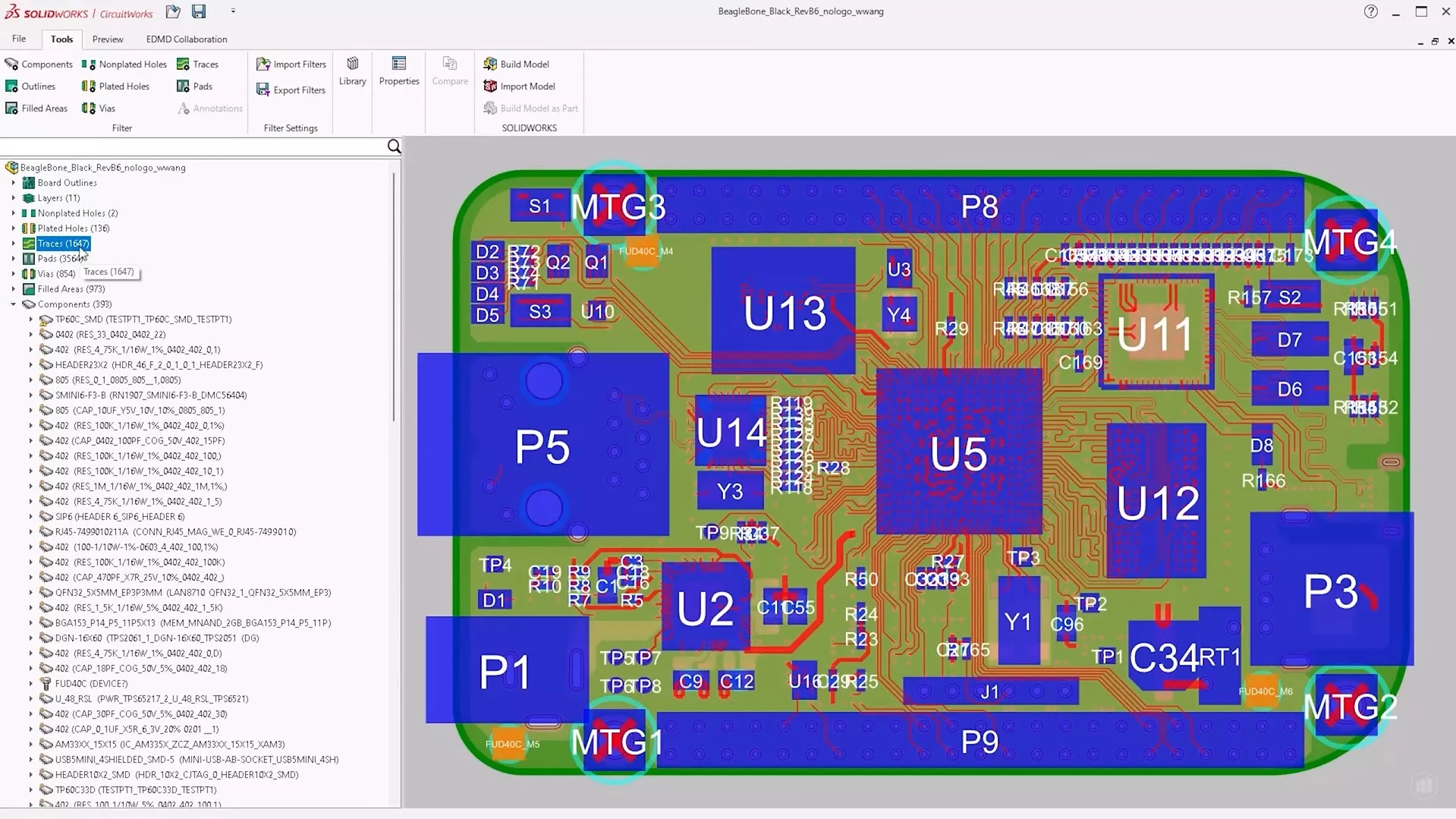
This allows for a more comprehensive representation of the electrical design, facilitating better mechanical integration and improving overall accuracy.
#5 Improved collaboration
SOLIDWORKS 2025 promotes collaboration between electrical and mechanical engineers by making it easier to work with detailed circuit board data. With the new capabilities in CircuitWorks, you can leverage downstream engineering tools for tasks like thermal analysis and shock validation.
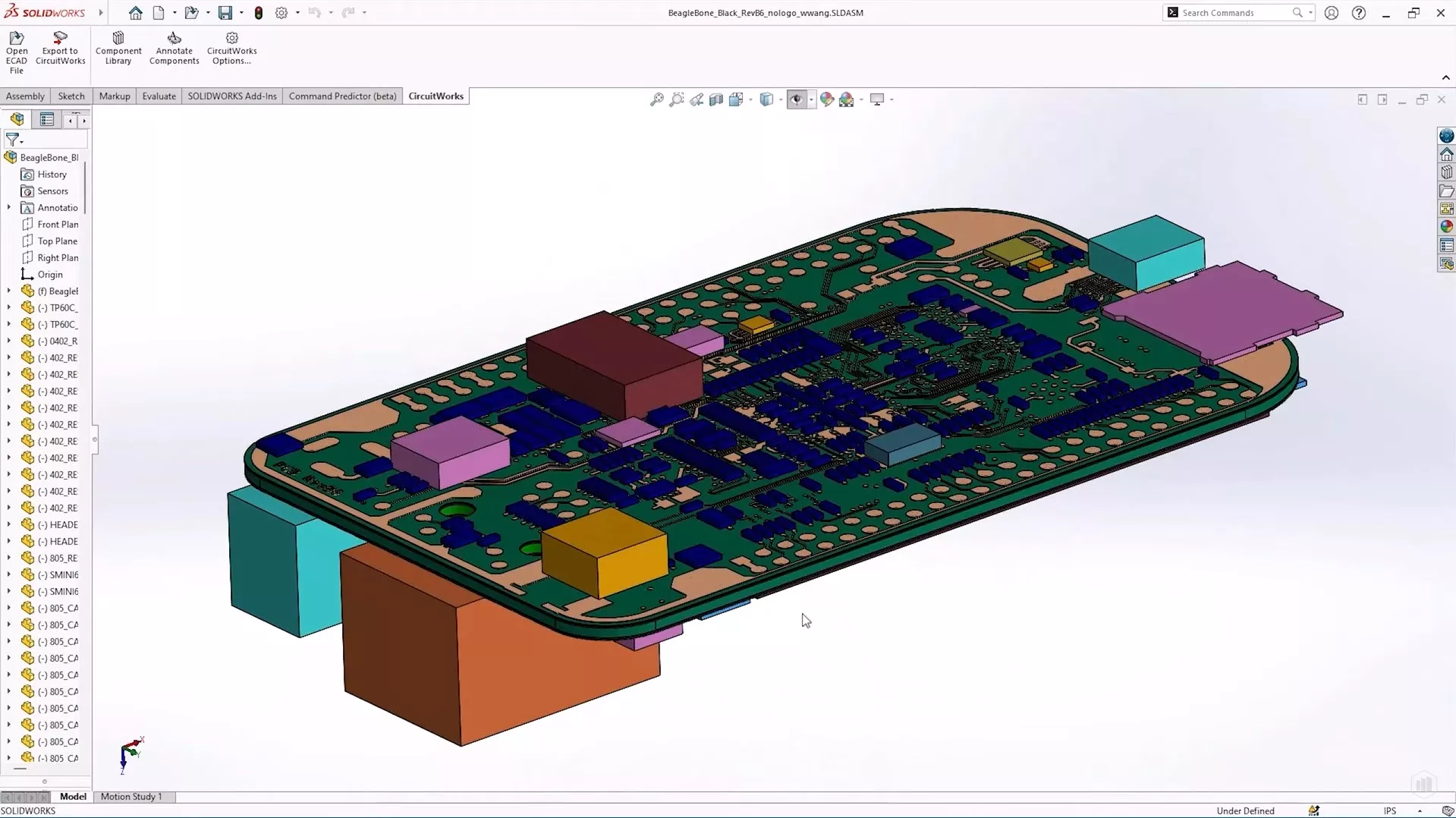
For example, the detailed copper trace data and layer information provided by IDX files enables engineers to run simulations that help identify potential thermal issues or mechanical stress points early in the design process.
Conclusion
The advancements in CircuitWorks for SOLIDWORKS 2025 elevate the integration between electrical and mechanical design, offering both new users and experienced engineers enhanced functionality and smoother workflows.
Whether you’re designing in the early stages or working with complex, multi-layered circuit board assemblies, these enhancements make it easier to import, visualize, and analyze your designs in 3D.
Categorised as: SOLIDWORKS Design | Simulation | What's New
Take the Next Steps
If you need to free up resources or help with predicting product performance, it’s worth considering the professional simulation services provided by our team of experience consultants.
Regardless of your industry or experience level, we can provide the expertise to optimise product performance and streamline your product development process.
Related Posts

How to Find Reaction Forces in SOLIDWORKS Simulation
SOLIDWORKS helps us to find resultant forces through simulation studies. These virtual tests reduce the need for physical prototypes and give us an accurate answer.

Setting number of decimal places in a table on a drawing
When creating an equation in a drawing general table, is it possible to define the…

SOLIDWORKS Smart Fasteners
SOLIDWORKS Smart Fasteners is a really useful time saving tool, allowing you to automatically insert toolbox fasteners such as bolts and screws into an assembly providing there is a standard hole.

Why is my Flat Pattern not showing in SOLIDWORKS Drawings?
This may be linked to how the drawing is saved or it can be related to how sheet metal parts are displayed in drawings, read on to find out how to fix it.

SOLIDWORKS Tips: Are you Making this Common Mistake in Fatigue Analysis?
Simulation is a vital and complex engineering need. Fortunately, SOLIDWORKS makes it easy to test, correct mistakes and obtain accurate results.

How to Recover SOLIDWORKS Files After a Crash
SOLIDWORKS has two different methods to help you recover from an unexpected crash or loss of data in the form of auto-recovery and back-up settings.

Redesigning Santa’s Sleigh in SOLIDWORKS
Every year Father Christmas has to fly in his sleigh to deliver presents to boys and girls all over the world in just one night. To put this into perspective, it takes a little under 24 hours to fly from London (UK) to Sydney (Australia) in a streamlined Boeing 747, whereas Father Christmas’ mode of transport is believed to be a rather non-aerodynamic sleigh.

Radiation in Flow Simulation – Part 1 : Reflection
Technical Manager Andy Fulcher explores ‘Radiation in Flow Simulation, Part 1 : Reflection’
Radiation in Flow Simulation – Part 2 : Refraction
Technical Manager Andy Fulcher explores ‘Radiation in Flow Simulation, Part 2 : Refraction’
The Coanda Effect in Flow Simulation
Can you take advantage of the Coanda Effect & can SOLIDWORKS Flow simulate it? Applications Engineer Romel Cumare investigates in his latest blog post.