











So how accurate is SOLIDWORKS Flow Simulation?

Written by: Tom McHale
Published: Oct 10, 2017
| View All Blogs
Previously we have had a look at the accuracy of SOLIDWORKS Simulation and now we are going to have a look at SOLIDWORKS Flow Simulation.
Unlike Simulation, Flow Simulation doesn’t have any bodies or organisations which run benchmarking tests that have been run against it. Instead, to “Benchmark” SOLIDWORKS Flow Simulation have validated the software against test and empirical data forever 20 flow problems. You can have a look at the whole validation document for Flow Simulation in your install directory:
Installation Directory: Program Files SOLIDWORKS Corp SOLIDWORKS Flow Simulation lang english Docs
We will have a look at a few of them in this blog.
Fluid flow around a circular cylinder is one of the most researched problems in fluid dynamics and SOLIDWORKS Flow Simulation is able to simulate it very accurately. Flow around a cylinder is actually very complicated and its behaviour is very dependent on the Reynold’s number of the Flow; which takes into account the density of the fluid, velocity of the fluid, characteristic length of the body (diameter in this case) and the dynamic viscosity of the fluid. As long as the Reynold’s number of the flow passing over the cylinder is the same as another case, the result should be directly comparable.
The example used in the validation looks at low Reynolds number flows, which produces two steady vortices formed symmetrically behind the cylinder. The image below shows the flow trajectories of result of the Flow Simulation above and an image of such flow below for comparison.

As you can see SOLIDWORKS Flow Simulation is able to correctly predict the vortex shedding at low Reynolds numbers. However, what about high Reynolds numbers? Well if we take a look at the results, we get very close to the empirical data. First we will have a look at the Strouhal number (which is a dimensionless number describing the oscillatory flow mechanisms) of the flow against the Reynolds number.
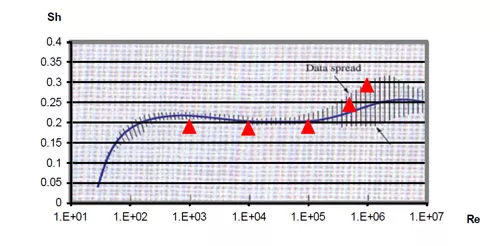
The blue line is the empirical data and the red triangles are SOLIDWORKS Flow Simulation results. As you can see it is staying accurate to the data spread. We also see a similar trend with the coefficient of drag against Reynold’s number plot.
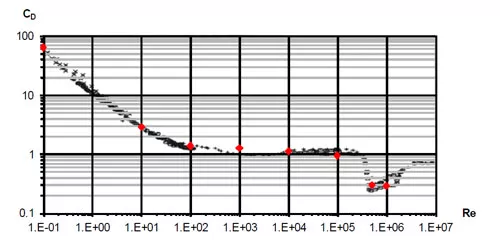
Again, we see that the results from the SOLIDWORKS Flow Simulation follows the trend of the empirical data accurately, giving you confidence in the results that you can achieve with this package.
If we take a look at another example, Plate Fin Heat Sink Cooling by Forced Convection. The study tested an aluminium heatsink which is heated by a 10 W electrical heater placed on top of a polystyrene block in a wind tunnel and tested at 5 different flow conditions.
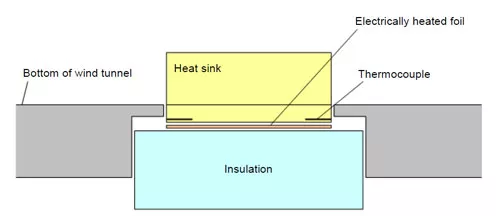
The performance of the heat sink is estimated by a thermal resistance defined as:
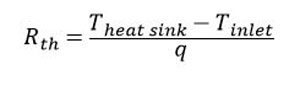
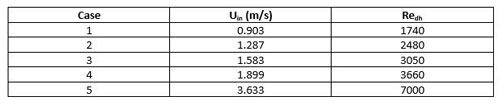
Where q is the total power input of the heat source (10W). The 5 different flow cases tested are as follows:
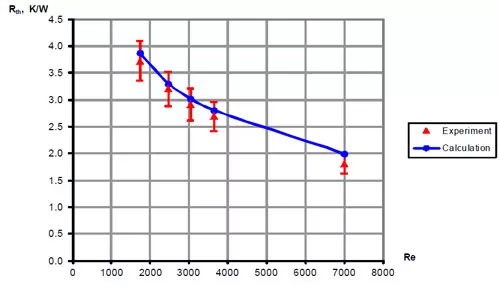
Now if we compare the results of the Flow Simulation study to the experimental data we can see a clear trend in the data where Flow Simulation is correctly able to simulate the forced convection of the heat sink.
In the blog I’ve tried to keep the technicality to a minimum, however if you are interested in the math calculations of the theory shown here, want to have a look at the flow simulation set up files or take a look at all of the other Flow Simulation validation examples have a look at the validation document. The files used along with their set up are located in:
Installation Directory: Program Files SOLIDWORKS Corp SOLIDWORKS Flow Simulation Validation examples
Categorised as: SOLIDWORKS Flow Simulation
Get Expert SOLIDWORKS Training
Get hands-on SOLIDWORKS training in-person or online, led by certified experts with real industry experience. With venues across the UK & Ireland, it’s easy to start learning today.
Related Posts

Redesigning Santa’s Sleigh in SOLIDWORKS
Every year Father Christmas has to fly in his sleigh to deliver presents to boys and girls all over the world in just one night. To put this into perspective, it takes a little under 24 hours to fly from London (UK) to Sydney (Australia) in a streamlined Boeing 747, whereas Father Christmas’ mode of transport is believed to be a rather non-aerodynamic sleigh.

Radiation in Flow Simulation – Part 1 : Reflection
Technical Manager Andy Fulcher explores ‘Radiation in Flow Simulation, Part 1 : Reflection’
Radiation in Flow Simulation – Part 2 : Refraction
Technical Manager Andy Fulcher explores ‘Radiation in Flow Simulation, Part 2 : Refraction’
The Coanda Effect in Flow Simulation
Can you take advantage of the Coanda Effect & can SOLIDWORKS Flow simulate it? Applications Engineer Romel Cumare investigates in his latest blog post.
Set Your Fluids Free with SOLIDWORKS Flow Simulation
A look at the new Free Surface feature coming in SOLIDWORKS Flow Simulation 2018.
Finding a Good Mesh Fast in SOLIDWORKS Flow Simulation
‘How do I know when to stop my calculation?’ and ‘How do I know my mesh is good enough?’ are questions often asked when running SOLIDWORKS Flow Simulation studies.
The answer is to ensure the solution reached is both fully converged AND mesh independent. In practice this can take a bit of trial and error as well as some experience in the process. However, SOLIDWORKS Flow can help us do both of these at once! Here’s how…

Free Surface Evaluation & Validation – SOLIDWORKS Flow Simulation
In 2018 SOLIDWORKS introduced a new capability to their Flow software. This is called ‘Free Surface’ and opens up many more applications for users who need to simulate fluid behaviour where a gas and a liquid (or two immiscible liquids) share the same region of space without an intervening solid

Tank Drainage Using Free Surface – SOLIDWORKS Flow Simulation
The SOLIDWORKS Flow Simulation tool called ‘Free Surface’ is a capability with many useful and practical applications. For instance, it can accurately predict the flow rate of a liquid out of a tank and also the time taken for the tank to drain. As a proof, below is a water tank design concept. One of the design goals is that the tank should be able to empty from its maximum level (/Administration 3m) in less than a minute. How large does the outlet pipe need to be and what design should it have?
Electronic Cooling: Comparing SOLIDWORKS Flow Simulation against Reality
Comparing SOLIDWORKS Flow Simulation against physical test data is an excellent way to validate and have confidence with the software as it proves that it can replicate what happens in a real world scenario.