











Free Surface Evaluation & Validation – SOLIDWORKS Flow Simulation

Written by: Tom McHale
Published: Feb 6, 2020
| View All Blogs
In 2018 SOLIDWORKS introduced a new capability to their Flow Simulation software. This is called ‘Free Surface’ and opens up many more applications for users who need to simulate fluid behaviour where a gas and a liquid (or two immiscible liquids) share the same region of space without an intervening solid.
Examples of free surface applications include:
- Sloshing of tanks e.g. petrol tankers where the petrol does not completely fill the tank
- Filling of chambers e.g. a barrel being filled with oil
- Cistern emptying e.g. a toilet cistern flushing a toilet pan
- Fountains and jetting e.g. a water jet hosing a car
- Waves impacting static bodies e.g. a sea wall or the legs of an oil platform in the ocean
- Civil engineering hydraulics e.g. dams, weirs, orifices, valves, sluices
- Process engineering e.g. partially filled valves, orifices, pipes
How are Free Surface Simulations Calculated
The underlying technology is called the ‘Volume of Fluid’ (VOF) method. In the case of air and water, this assigns a volume fraction of air and water to each cell in the domain. The sum of the two fractions is always 1, so calculating one fraction always implies the other. Where the volume fraction is 0.5, there will be a free surface. Either side of this cell the volume fraction will tend towards fully water or fully air. As with all Flow simulations, the software calculates the mass and volume of fluids entering and leaving each cell and conserves momentum, energy and mass. However, the actual movement of the free surface is obtained using ‘transport equations’ driven by fluid momentum calculations and external boundary conditions including gravity. More details are available in the Flow Simulation Technical Reference.
Testing the Technology
For those of us who struggle with understanding second order differential equations (most of us!) the proof of the pudding is in the eating, or in terms of Flow, the proof is whether the software actually works. There are plenty of fancy animations online that look impressive but I like to be sure of the technology before I recommend it to a customer – therefore I set myself a free surface challenge – based on a ‘Sharp Crested Weir’.
A Sharp Crested Weir is a well understood hydraulics problem which is taught in universities to civil engineers who need to design dams, splash pools, water courses and weirs. Below is an extract from one university lecture that is publicly available on YouTube.
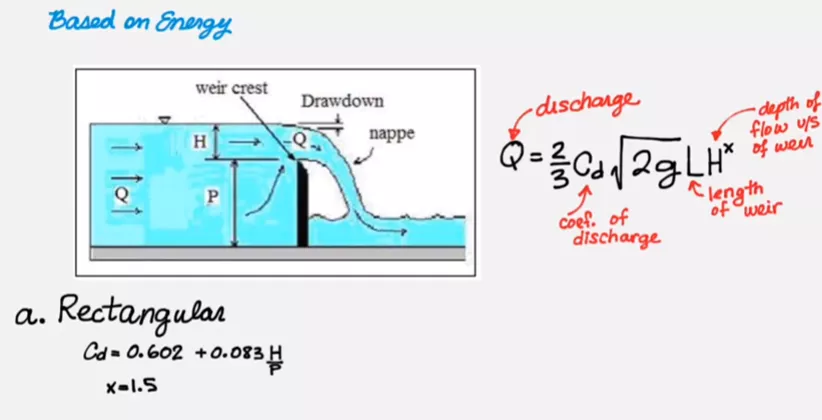
The critical equation is derived from energy balances and takes the form …
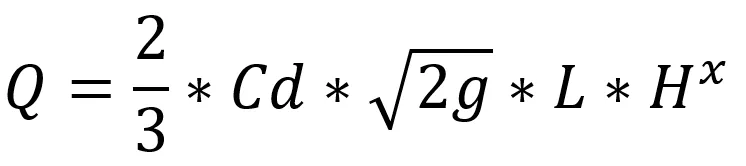
Where…
- Q = volumetric water flow rate over the weir in m3/sg = gravity in m/s2
- L = the width of the weir (perpendicular to the water flow)in metres
- H = the ‘head’ of the weir i.e. the height of the upstreamwater level measured vertically from the top of the weir in metres
- P = the upstream height of the weir in metres
- X = a constant for a sharp crested weir = 1.5
- Cd =the ‘DischargeCoefficient’ that has been obtained by experimental work and variables Hand P
Creating the SOLIDWORKS Model
The first step in simulating this is to build a simple model in SOLIDWORKS. This is for both the weir and 2 bodies to represent the water – upstream (with a head) and downstream as a splash pool. Since we will simulate a 2D slice, this can be done with simple extrudes ignoring any channel sides.
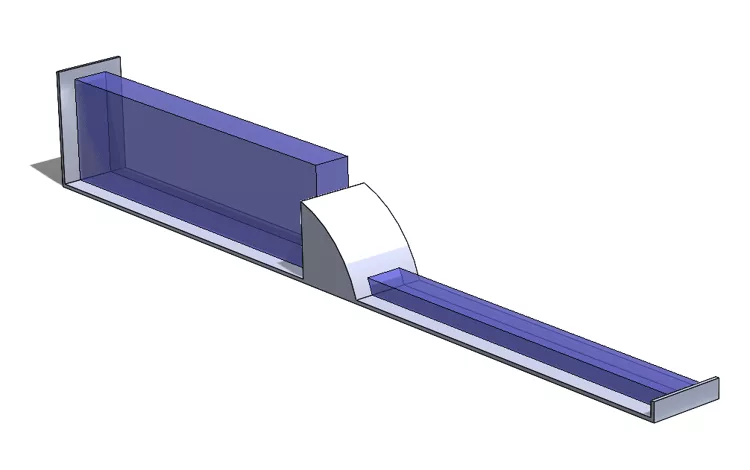
The dimensions used were:
- H = 400 mm
- P = 1000 mm
- L = 20 mm (i.e. the depth of the 2D computational domain)
Plugging these values into the equation gives a predicted flow rate, Q = 0.0095 m3/s
Flow Simulation Study Setup
The set up in Flow Simulation is simple
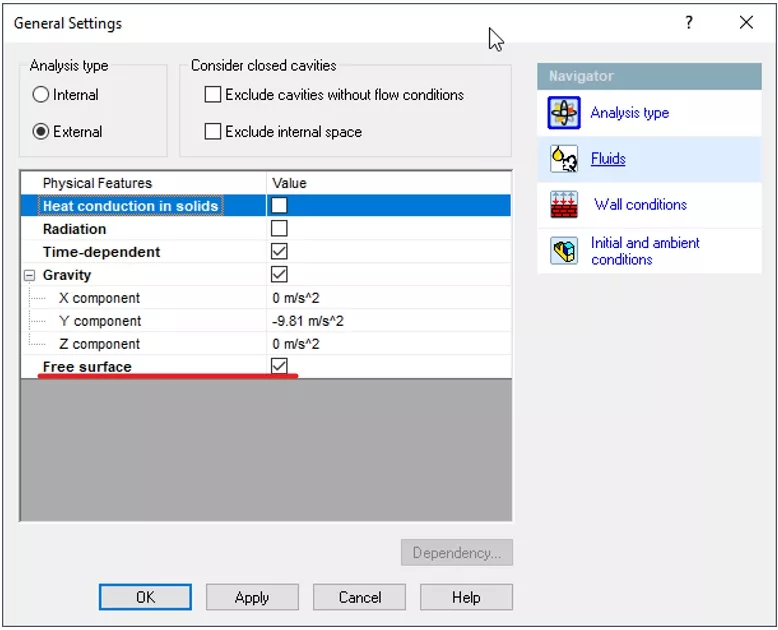
I also enabled saving of important parameters that I want to display using the ‘Transient Explorer’. I did this in ‘Calculation Control Options’ and chose saving of ‘Volume Fraction of Water’ and ‘Immiscible Water’. This enables a very quick and easy way to create animations of the chosen parameters over time.
The mesh in Free Surface simulations is very important. As a rough guide you need at least 5 cells across the width of each fluid stream. I used a ‘Manual’ mesh and several local meshes.
The Results
A result at 1 sec after the water is release is shown below. The water is spilling over the weir and has generated a wave in the splash pool.
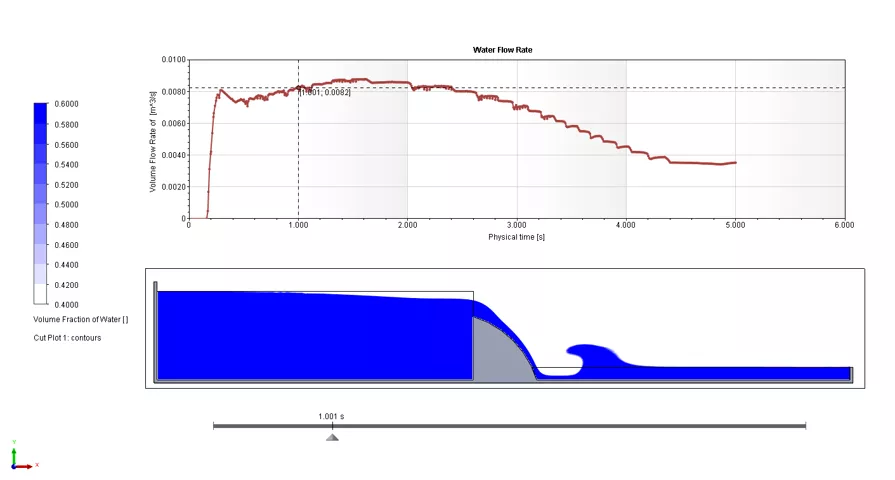
The graph above shows the volumetric flow rate of water over the weir (Q). At 1 sec the flow rate is 0.0082 m3/s.
The flow rate reaches a maximum value at 1.5 seconds of 0.0088 m3/s. This is within 8% of the theoretical value. This is a great start, but is there any reason for the small discrepancy? Is the theory correct or the simulation?
To answer that we need to understand the assumptions in the theory. The mathematical derivation (based on energy conservation) makes the assumption that the upstream flow is constant and sufficient to perfectly match the flow over the weir i.e. the surface of the water is at a fixed height (H and P are constants).
In contrast the Flow simulation is modelled as a tank with finite capacity so the water level slowly reduces. Furthermore, you can see from the animation below that the upstream water gently sloshes from end to end as a result of the initial release of the water.
Clearly we could extend the tank or even introduce more water upstream with an inlet boundary condition which would result in a higher flow rate over the weir giving an even closer match to the theory. However, I think it is informative to observe the sloshing effect.
Further Examples
This is just one of a number of Free Surface applications but the accuracy of the method gives confidence to apply the technology to more interesting situations like a more complex 3D weir (Cipolletti weir) with a downstream splash tank and a complex 3D outlet channel.
You can even simulate the flushing of toilets!
Categorised as: SOLIDWORKS Flow Simulation | Simulation
Get a SOLIDWORKS Quote
Interested in SOLIDWORKS? Contact us for questions, trials, or demos by clicking the button below or call 01926 333777. Our experts will help you find the perfect solution.

Related Posts

How to Find Reaction Forces in SOLIDWORKS Simulation
SOLIDWORKS helps us to find resultant forces through simulation studies. These virtual tests reduce the need for physical prototypes and give us an accurate answer.

SOLIDWORKS Tips: Are you Making this Common Mistake in Fatigue Analysis?
Simulation is a vital and complex engineering need. Fortunately, SOLIDWORKS makes it easy to test, correct mistakes and obtain accurate results.

Redesigning Santa’s Sleigh in SOLIDWORKS
Every year Father Christmas has to fly in his sleigh to deliver presents to boys and girls all over the world in just one night. To put this into perspective, it takes a little under 24 hours to fly from London (UK) to Sydney (Australia) in a streamlined Boeing 747, whereas Father Christmas’ mode of transport is believed to be a rather non-aerodynamic sleigh.

Radiation in Flow Simulation – Part 1 : Reflection
Technical Manager Andy Fulcher explores ‘Radiation in Flow Simulation, Part 1 : Reflection’
Radiation in Flow Simulation – Part 2 : Refraction
Technical Manager Andy Fulcher explores ‘Radiation in Flow Simulation, Part 2 : Refraction’
The Coanda Effect in Flow Simulation
Can you take advantage of the Coanda Effect & can SOLIDWORKS Flow simulate it? Applications Engineer Romel Cumare investigates in his latest blog post.
So how accurate is SOLIDWORKS Simulation?
How accurate is SOLIDWORKS Simulation? Elite Applications Engineer Chris Boyles investigates.
Set Your Fluids Free with SOLIDWORKS Flow Simulation
A look at the new Free Surface feature coming in SOLIDWORKS Flow Simulation 2018.

So how accurate is SOLIDWORKS Flow Simulation?
Applications Engineer Chris Boyles explores the accuracy of SOLIDWORKS Simulation.
Finding a Good Mesh Fast in SOLIDWORKS Flow Simulation
‘How do I know when to stop my calculation?’ and ‘How do I know my mesh is good enough?’ are questions often asked when running SOLIDWORKS Flow Simulation studies.
The answer is to ensure the solution reached is both fully converged AND mesh independent. In practice this can take a bit of trial and error as well as some experience in the process. However, SOLIDWORKS Flow can help us do both of these at once! Here’s how…