











Tank Drainage Using Free Surface – SOLIDWORKS Flow Simulation
Written by: Tom McHale
Published: Feb 7, 2020
| View All Blogs
The SOLIDWORKS Flow Simulation tool called ‘Free Surface’ is a capability with many useful and practical applications. For instance, it can accurately predict the flow rate of a liquid out of a tank and also the time taken for the tank to drain. As a proof, below is a water tank design concept. One of the design goals is that the tank should be able to empty from its maximum level (~ 3m) in less than a minute. How large does the outlet pipe need to be and what design should it have?
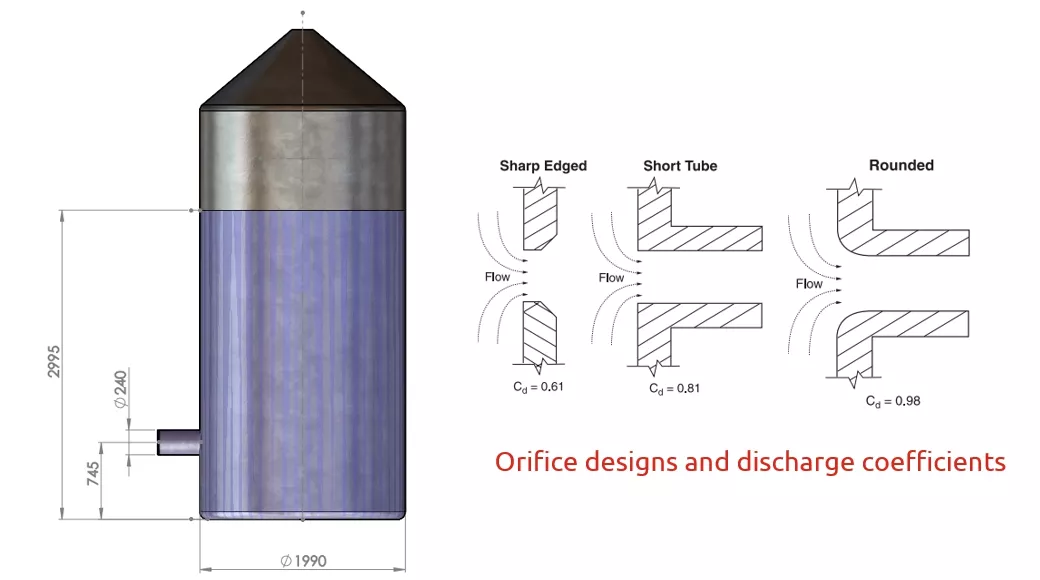
This section image shows the geometry, some key dimensions are:
- Max water level above base is 2,995 mm
- Height of orifice above bottom of tank is 745mm (to centreline)
- Inner diameter is 1,990 mm
- Orifice diameter is 240 mm
These values alone are almost enough to allow us to do a manual calculation based on Bernoulli theory. The only other piece of information we need is the ‘Discharge Coefficient’. This is not necessary for Flow as cfd works from first principles but the theory requires this value (an empirical fudge factor!). For an orifice with a ‘Short Tube’ the Cd is 0.81 as shown in the reference above.
Flow Simulation uses the ‘Volume of Fluid’ method which calculates the ‘Volume Fraction’ of liquid and ‘Volume Fraction’ of gas in each cell. The ‘Free Surface’ occurs where the fraction is 50%. The surface moves in time as calculated by ‘transport equations’. Therefore, all Free Surface studies are transient.
In this case a solid body was created within the tank (using the SOLIDWORKS ‘Intersect’ feature) and this was used in the Flow set up tree as an ‘Initial Condition’ with a ‘Substance Concentration’ of 100% water. The remainder of the domain was set to air.
The Bernoulli equation to calculate the flow rate from the orifice is…

The equation for the time required to empty the tank is
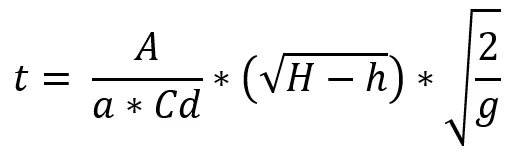
- Q = Flow rate of water in m3/s
- Cd = the Discharge Coefficient = 0.81 (see previous reference image)
- a = area of the orifice = 0.0452 m2 g = gravity = 9.81 m/s2
- H = height of water above bottom of the tank = 2.995 m
- h = height of centreline of orifice above bottom of the tank = 0.745 m
- A = area of the tank = 3.11 m2
These equations are derived from energy considerations and conservation of mass.
Below are images of results showing the pressure, volumetric fraction of water and velocity after 10 seconds of drainage when the initial water level was 2.995 m.
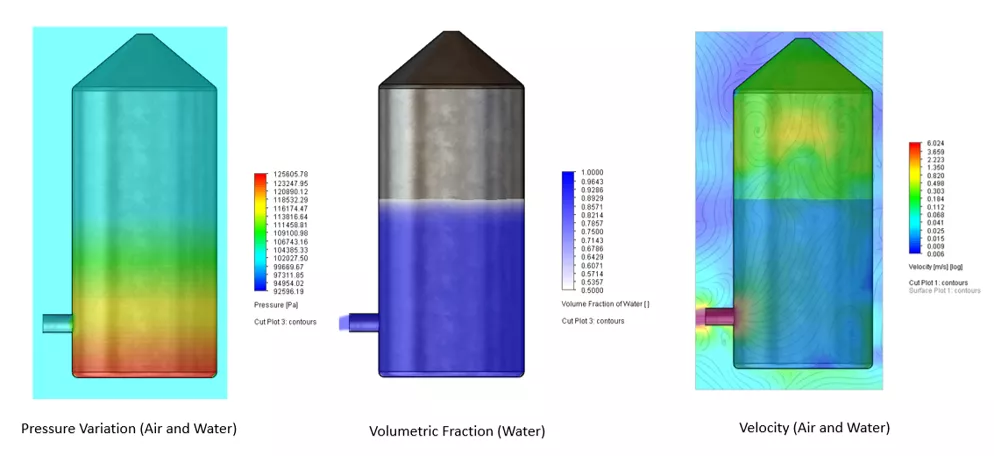
For this condition (initial water level of 2.995m), Bernoulli predicts an outlet flow rate of 14,429 l/min and a drainage time of 58.2 secs. Flow cfd predicts an outlet flow rate of 14,073 l/min and a drainage time of 59.9 secs. These result are within 3% of each other.
To further test the correlation, Flow simulations were run at 10 initial water levels using a Flow Parametric ‘What If’ analysis. The graphs below show the correlation of the Bernoulli equations with the 10 Flow cfd results. The top graph is the outlet flow rate, Q, from the nozzle (in m3/s) and the lower graph is the drainage time, t, (in secs) plotted against the initial head of water, H-h, (in m).
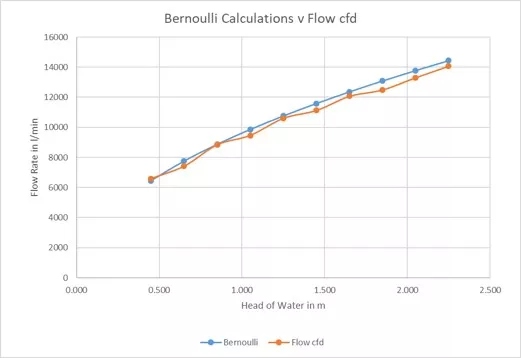
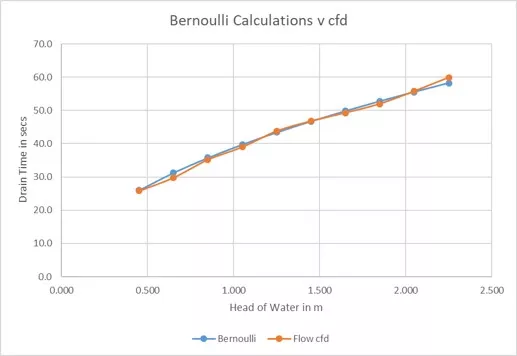
Clearly there is excellent agreement between the theory and the cfd simulation. The maximum difference between theory and Flow is less than 3% for all simulations.
From the above this design of tank and orifice would allow the water to drain in less than a minute – just. The design works! However, if we added a fillet to the inside of the tank at the orifice we could lower the Discharge Coefficient and get a slightly quicker drain time. In fact, if we introduce a 40 mm fillet on the inside of the tank, the new results are …

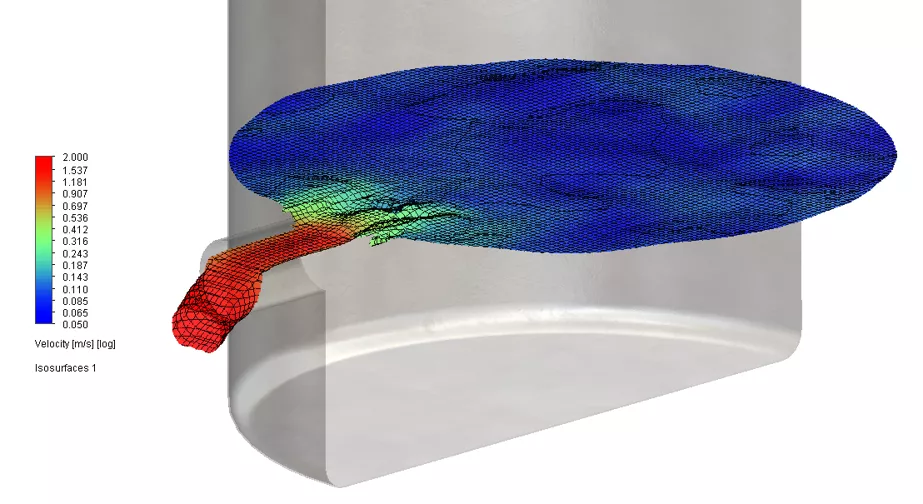
Interestingly when the tank is nearly empty the flow rate gets choppy. This is because the outlet is on one side and the flow pattern is not symmetric. A small wave starts to oscillate across the tank as air starts to enter the tank via the orifice. The ‘Iso-surface’ plot below shows this effect. This shows the ‘free surface’ after 20 seconds coloured by velocity. There is a gradient in the water surface in the vicinity of the orifice. Due to the gradient (and gravity) the water speeds up as it enters the orifice as can be seen by the red, green and pale blue colours.
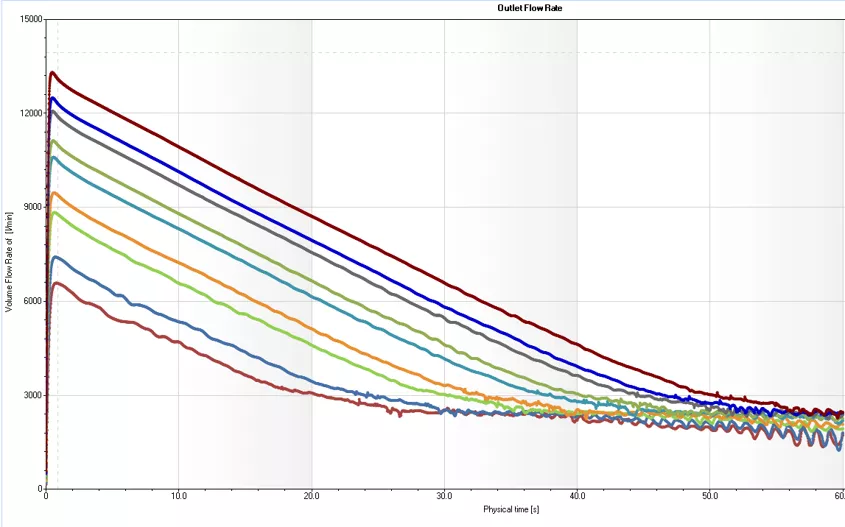
This effect can also be seen graphically below. This shows the outlet flow results v time for all 10 cfd calculations. For each one, you can see an oscillation as the water surface falls below the top of the orifice – at an outlet flow rate of about 2,500 l/min.
This is where Flow is so useful – it allows users to understand the physics of a design challenge at a very deep level which, otherwise, would not be appreciated. James Dyson has made his fortune understanding these types of subtleties in fluid dynamics!
However, you may well be wondering what would be the justification for using cfd if the calculation can be done by hand. Good question! Clearly, for a simple situation it would be quicker to do the maths (assuming you know the equations and are confident of not making a mistake with the numbers!). However, what if you wanted to change the orifice design, add a filter, introduce a ball valve or butterfly valve or even a second outlet to speed up the drainage. What would happen if there were an inlet pipe allowing water to flow in at the same time as it flows out? Suddenly the Bernoulli equations become inadequate and you are back to guesswork.
All these types of real life situations can be handled in Flow just as easily as the simple cases, yielding deeper insights, better products and reduced design lead time.
Categorised as: SOLIDWORKS Flow Simulation | Simulation
Get Expert SOLIDWORKS Training
Get hands-on SOLIDWORKS training in-person or online, led by certified experts with real industry experience. With venues across the UK & Ireland, it’s easy to start learning today.
Related Posts

How to Find Reaction Forces in SOLIDWORKS Simulation
SOLIDWORKS helps us to find resultant forces through simulation studies. These virtual tests reduce the need for physical prototypes and give us an accurate answer.

SOLIDWORKS Tips: Are you Making this Common Mistake in Fatigue Analysis?
Simulation is a vital and complex engineering need. Fortunately, SOLIDWORKS makes it easy to test, correct mistakes and obtain accurate results.

Redesigning Santa’s Sleigh in SOLIDWORKS
Every year Father Christmas has to fly in his sleigh to deliver presents to boys and girls all over the world in just one night. To put this into perspective, it takes a little under 24 hours to fly from London (UK) to Sydney (Australia) in a streamlined Boeing 747, whereas Father Christmas’ mode of transport is believed to be a rather non-aerodynamic sleigh.

Radiation in Flow Simulation – Part 1 : Reflection
Technical Manager Andy Fulcher explores ‘Radiation in Flow Simulation, Part 1 : Reflection’
Radiation in Flow Simulation – Part 2 : Refraction
Technical Manager Andy Fulcher explores ‘Radiation in Flow Simulation, Part 2 : Refraction’
The Coanda Effect in Flow Simulation
Can you take advantage of the Coanda Effect & can SOLIDWORKS Flow simulate it? Applications Engineer Romel Cumare investigates in his latest blog post.
So how accurate is SOLIDWORKS Simulation?
How accurate is SOLIDWORKS Simulation? Elite Applications Engineer Chris Boyles investigates.
Set Your Fluids Free with SOLIDWORKS Flow Simulation
A look at the new Free Surface feature coming in SOLIDWORKS Flow Simulation 2018.
So how accurate is SOLIDWORKS Flow Simulation?
Applications Engineer Chris Boyles explores the accuracy of SOLIDWORKS Simulation.
Finding a Good Mesh Fast in SOLIDWORKS Flow Simulation
‘How do I know when to stop my calculation?’ and ‘How do I know my mesh is good enough?’ are questions often asked when running SOLIDWORKS Flow Simulation studies.
The answer is to ensure the solution reached is both fully converged AND mesh independent. In practice this can take a bit of trial and error as well as some experience in the process. However, SOLIDWORKS Flow can help us do both of these at once! Here’s how…