











So how accurate is SOLIDWORKS Simulation?

Written by: Tom McHale
Published: Sep 18, 2017
| View All Blogs
So how accurate is SOLIDWORKS Simulation?
Customers often ask us this question; either on training or when they are interested in the software. The answer we always give is ‘very accurate’, obviously taking into account the correct set up of their problem.
There is no standard method to validate any piece of FEA software, but you can test it yourself and get accurate results in comparison to hand calculations. SOLIDWORKS uses 3 different methods to prove that their software gives good results.
The first method used by SOLIDWORKS utilises some verification problems, which are run using the software and the Simulation results are compared to either an analytical solution or a physical test. They supply the file along with the associated setup for the analysis and these can be found in the Simulation help files or in the tutorial examples. To find these, turn on the Simulation Add in and then:
Click Help > SOLIDWORKS Simulation > Validation > Verification Problems
Here you will find plenty of problems verifying Static, Frequency, Non-Linear, Thermal, Drop Test and Buckling simulations.
Here’s an example – a Deflection of a Cantilever Beam of Length 10”, Height 1”, Thickness 0.1” and a load vertically applied at the end of 1lb. This was done as a static simulation with a shell mesh and the results along with the percentage error are below.
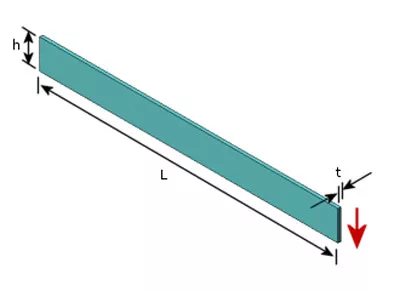
| Analytical | SOLIDWORKS Simulation | % Difference | |
|---|---|---|---|
| Deflection at free edge (inch) | 0.00133 | 0.001344 | 0.83 |
| Average Shear Stress (psi) | 10.000 | 9.877 | 1.23 |
The second used are the NAFEMS (National Agency for Finite Element Methods and Standards) Benchmarks, which is an independent non-profit organisation whose aim is to promote the effective use of engineering simulation methods.
NAFEMS Benchmarks are available in the exact same place as the verification problems and are available for Linear Static, Non-Linear, Thermal, Frequency, Forced Vibration and Composites.
An example from the NAFEMS Benchmarks is a Static Cylindrical Shell under uniform edge moment of 1.0 KNm /m.
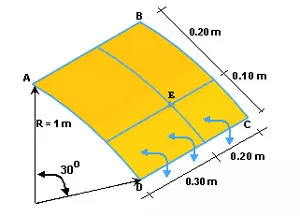
| Analytical | SOLIDWORKS Simulation | % Difference | |
|---|---|---|---|
| Tangential Stress a point E (MPa) | 60.00 | 60.05 | 0.08 |
The final method is using the French standard AFNOR (Association Française de NORmalisation, French Standardization Association). These benchmarks can be found in the SOLIDWORKS Knowledge Base under article S-069850. The report includes 100 examples of verification, one of which can be seen below – a Fixed Thin Arc under out of plane bending. The object is fixed at one end and a load is applied at the other, with the deflection compared at location B and bending moments at 15 degrees on the arc.
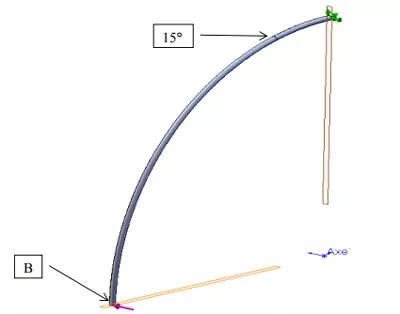
| Physical Testing | SOLIDWORKS Simulation | % Difference | ||
|---|---|---|---|---|
| Deflection at B (m) | 0.001333 | 00.001344 | 0.09 | |
| At 15deg | Mt (Nm) | 74.1180 | 74.1830 | 0.09 |
| Mf (Nm) | -96.5925 | -96.4050 | 0.19 | |
As you can see, SOLIDWORKS Simulation is accurate to these 3 benchmarking techniques. Have a look at some of the other examples yourself in your own time. SOLIDWORKS have also produced some design validation white papers for customers here:
If you’re interested in Simulation and want to do some hand calculations, physical testing and simulation results comparisons yourself, have a look at our specially designed Simulation Fundamentals training course to get up to speed with the basics of Static Simulation.
Categorised as: SOLIDWORKS Simulation | Simulation
Get Expert SOLIDWORKS Training
Get hands-on SOLIDWORKS training in-person or online, led by certified experts with real industry experience. With venues across the UK & Ireland, it’s easy to start learning today.
Related Posts

How to Find Reaction Forces in SOLIDWORKS Simulation
SOLIDWORKS helps us to find resultant forces through simulation studies. These virtual tests reduce the need for physical prototypes and give us an accurate answer.

SOLIDWORKS Tips: Are you Making this Common Mistake in Fatigue Analysis?
Simulation is a vital and complex engineering need. Fortunately, SOLIDWORKS makes it easy to test, correct mistakes and obtain accurate results.

Redesigning Santa’s Sleigh in SOLIDWORKS
Every year Father Christmas has to fly in his sleigh to deliver presents to boys and girls all over the world in just one night. To put this into perspective, it takes a little under 24 hours to fly from London (UK) to Sydney (Australia) in a streamlined Boeing 747, whereas Father Christmas’ mode of transport is believed to be a rather non-aerodynamic sleigh.

Radiation in Flow Simulation – Part 1 : Reflection
Technical Manager Andy Fulcher explores ‘Radiation in Flow Simulation, Part 1 : Reflection’
Radiation in Flow Simulation – Part 2 : Refraction
Technical Manager Andy Fulcher explores ‘Radiation in Flow Simulation, Part 2 : Refraction’
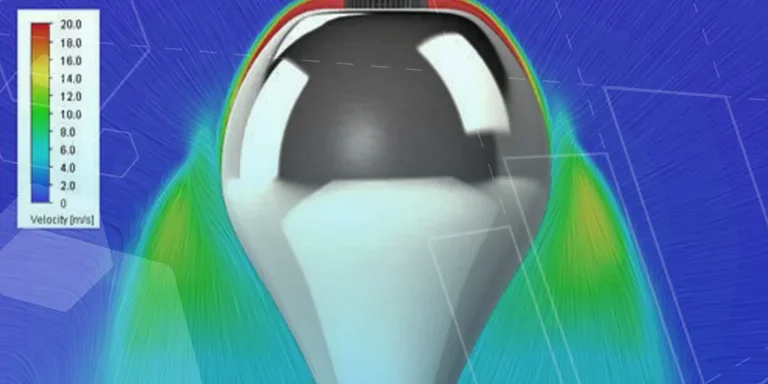
The Coanda Effect in Flow Simulation
Can you take advantage of the Coanda Effect & can SOLIDWORKS Flow simulate it? Applications Engineer Romel Cumare investigates in his latest blog post.
Set Your Fluids Free with SOLIDWORKS Flow Simulation
A look at the new Free Surface feature coming in SOLIDWORKS Flow Simulation 2018.
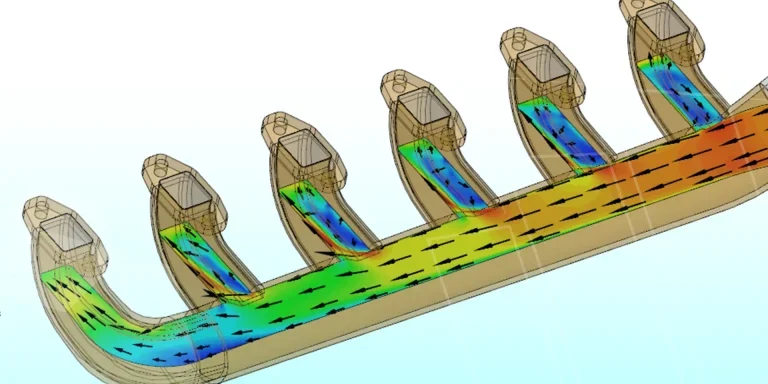
Finding a Good Mesh Fast in SOLIDWORKS Flow Simulation
‘How do I know when to stop my calculation?’ and ‘How do I know my mesh is good enough?’ are questions often asked when running SOLIDWORKS Flow Simulation studies.
The answer is to ensure the solution reached is both fully converged AND mesh independent. In practice this can take a bit of trial and error as well as some experience in the process. However, SOLIDWORKS Flow can help us do both of these at once! Here’s how…

Free Surface Evaluation & Validation – SOLIDWORKS Flow Simulation
In 2018 SOLIDWORKS introduced a new capability to their Flow software. This is called ‘Free Surface’ and opens up many more applications for users who need to simulate fluid behaviour where a gas and a liquid (or two immiscible liquids) share the same region of space without an intervening solid
Tank Drainage Using Free Surface – SOLIDWORKS Flow Simulation
The SOLIDWORKS Flow Simulation tool called ‘Free Surface’ is a capability with many useful and practical applications. For instance, it can accurately predict the flow rate of a liquid out of a tank and also the time taken for the tank to drain. As a proof, below is a water tank design concept. One of the design goals is that the tank should be able to empty from its maximum level (/Administration 3m) in less than a minute. How large does the outlet pipe need to be and what design should it have?