











What’s Included in a SOLIDWORKS Subscription?

Written by: Terry O'Reilly
Published: Jan 17, 2025
| View All Blogs
SOLIDWORKS subscriptions form a key part of your design development journey when designing and administering SOLIDWORKS 3D CAD, but exactly what do you get in a SOLIDWORKS subscription with Solid Solutions?
Access to new software releases
Your SOLIDWORKS subscription entitles you to immediate and exclusive access to the most up to date versions of the software available, enabling you to utilise time-saving tools to boost your productivity and, of course, enjoy all the new features that are added with each release.
Discover our favourites of the new features in SOLIDWORKS 2025 by watching the video above, or discover what’s new in SOLIDWORKS 2025 to find out about all the latest enhancements across the SOLIDWORKS portfolio.
Dedicated expert SOLIDWORKS support
When you have a subscription with us you gain access to our expert Technical Support team.
The team is comprised of experienced consultants and certified SOLIDWORKS engineers who are available to help you resolve any issues you may have with SOLIDWORKS.
The best part is they’re not just there for problems, but also for best practice advice and ‘how to’ questions, ensuring you can maximise your benefit of the software whilst staying on track of any upcoming deadlines.
You can learn more about how to access SOLIDWORKS Technical Support via our blog post here.
Our Support team are available every weekday from 8:00AM – 17:30PM.
Access to additional software
All SOLIDWORKS Subscription customers can access additional tools and software to boost your design capabilities and extend the functionality of SOLIDWORKS.
The software you gain access to varies depending on your SOLIDWORKS package. Read on to see what’s included!
SOLIDWORKS Cloud Services
The SOLIDWORKS Cloud Services are a powerful collaboration and data management solution designed to help SOLIDWORKS users manage data easily.
They are included with all active SOLIDWORKS subscriptions and enable increased productivity and collaboration by harnessing cloud data management; files can be viewed, shared and managed securely wherever and whenever required.
Our 3DEXPERIENCE platform starter guides will help you get up to speed using the SOLIDWORKS Cloud Services as quickly as possible.
In addition, all customers with an active subscription to SOLIDWORKS Professional, Premium or Ultimate packages have access to additional software for 3D rendering and CAM manufacturing that are built specifically to work with SOLIDWORKS.
SOLIDWORKS Visualise Standard
SOLIDWORKS Visualize Standard enables you to promote your products by creating photorealistic renders allowing for high quality images ideal for print and digital use.
While you’re here, why not discover what’s new in SOLIDWORKS Visualize too!
SOLIDWORKS CAM
Get your first taste of integrated design and manufacturing by installing SOLIDWORKS CAM.
Create toolpaths for 2.5 axis machining from your SOLIDWORKS models and experience how adding CAM into your design process can help you to reduce production time and enhance the quality of your products.
SOLIDWORKS Visualise Boost
For those customers who also have a license of SOLIDWORKS Visualize Professional, you can take advantage of Visualise Boost and offload tedious rendering tasks onto other machines!
This network rendering tool helps to ensuring your machines resources can be reserved for continued performance whilst using other applications.
SOLIDWORKS Certification vouchers
Certification is an excellent way to evaluate and showcase your SOLIDWORKS proficiency.
Customers with an active SOLIDWORKS subscription can access free training resocurces for the industry’s only recognised SOLIDWORKS accreditations.
Certifications provide a valuable benchmark for your team’s skill level and help to demonstrate your expertise to others.
Did you know?
Our SOLIDWORKS training courses teach you everything you need to know to pass your SOLIDWORKS certification exams.
Solid Solutions customers with an Enhanced SOLIDWORKS Subscription also gain access to our SOLIDWORKS skills assessment tool. Use it to test your SOLIDWORKS skills and identify areas where your knowledge could be improved!
Invitations to Exclusive Events
Our Customer Development team run a number of events all across the UK and Ireland throughout the year.
Whether you want to expand your professional network, develop your SOLIDWORKS and engineering skills, or just keep on top of new SOLIDWORKS features, there’s an event to suit you!
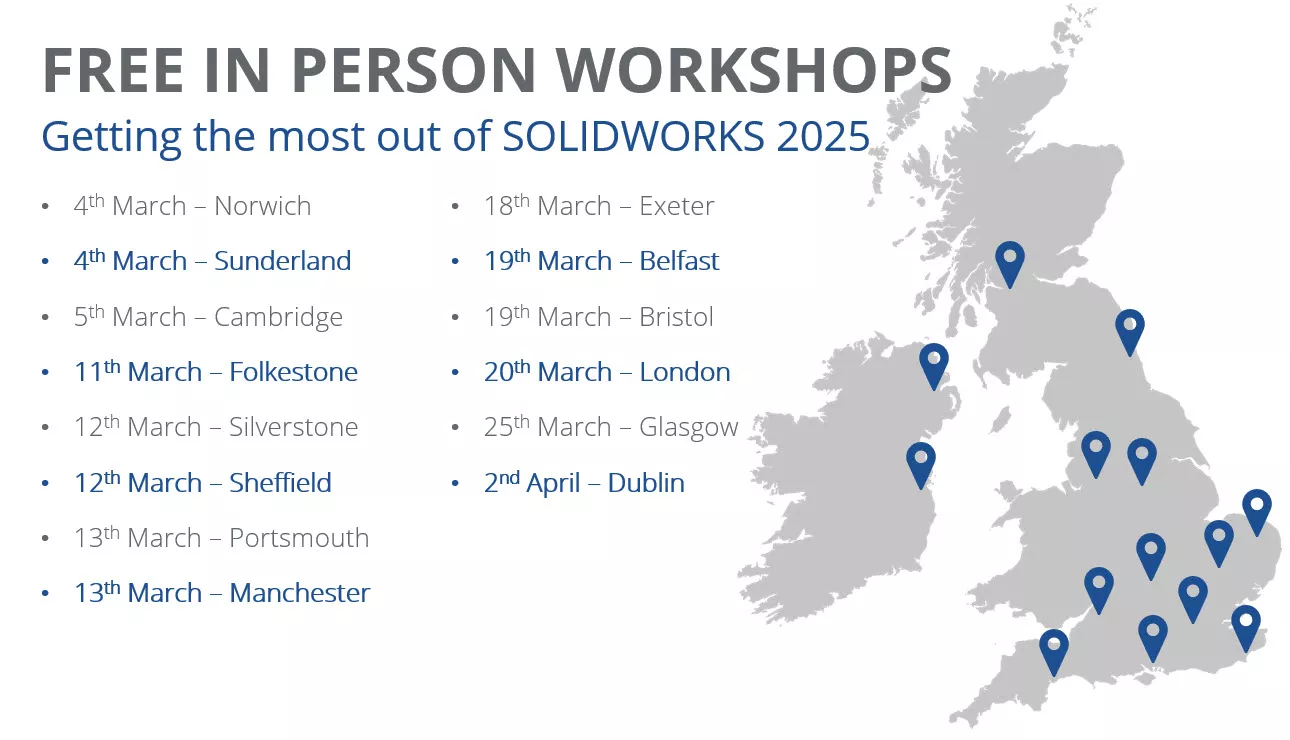
Find an event near you and view our scheduled events.
Opportunities to enhance your subscription
A SOLIDWORKS subscription with Solid Solutions unlocks a whole range of additional benefits. Feel free to give our team a call to discuss how to make the most of your subscription on 01926 333 777, or drop an email to support@solidsolutions.co.uk.
There are even more exclusive benefits with our Enhanced Subscription package including discounts on services across the TriMech Group, priority support, and additional software!
Why not upgrade your SOLIDWORKS subscription and unlock exclusive discounts and premium support?
Enhanced Subscription benefits include:
- Priority Support Ticket Handling and Upgrade Assistance
- Exclusive Workshops
- Discounts on Training Hardware and Services
- Further Learning resources and assessments
- Customer Care Sessions
- A license of SOLIDQ Professional
Check out the full list of SOLIDWORKS subscription benefits to see all the offers and benefits available to you with an active subscription.
Take the Next Steps
Discover all the latest updates across the SOLIDWORKS 2025 portfolio and how you can enhance your efficiency with our deep-dive webinar, blogs, and videos.
It’s more than just annual updates, though. Make the most of your SOLIDWORKS subscription with our Enhanced subscription package to unlock exclusive discounts, priority support, and so much more!
Categorised as: SOLIDWORKS Design | Startups
Get a SOLIDWORKS Quote
Interested in SOLIDWORKS? Contact us for questions, trials, or demos by clicking the button below or call 01926 333777. Our experts will help you find the perfect solution.

Related Posts

How to Find Reaction Forces in SOLIDWORKS Simulation
SOLIDWORKS helps us to find resultant forces through simulation studies. These virtual tests reduce the need for physical prototypes and give us an accurate answer.

Setting number of decimal places in a table on a drawing
When creating an equation in a drawing general table, is it possible to define the…

SOLIDWORKS Smart Fasteners
SOLIDWORKS Smart Fasteners is a really useful time saving tool, allowing you to automatically insert toolbox fasteners such as bolts and screws into an assembly providing there is a standard hole.

Why is my Flat Pattern not showing in SOLIDWORKS Drawings?
This may be linked to how the drawing is saved or it can be related to how sheet metal parts are displayed in drawings, read on to find out how to fix it.

SOLIDWORKS Tips: Are you Making this Common Mistake in Fatigue Analysis?
Simulation is a vital and complex engineering need. Fortunately, SOLIDWORKS makes it easy to test, correct mistakes and obtain accurate results.

How to Recover SOLIDWORKS Files After a Crash
SOLIDWORKS has two different methods to help you recover from an unexpected crash or loss of data in the form of auto-recovery and back-up settings.

Redesigning Santa’s Sleigh in SOLIDWORKS
Every year Father Christmas has to fly in his sleigh to deliver presents to boys and girls all over the world in just one night. To put this into perspective, it takes a little under 24 hours to fly from London (UK) to Sydney (Australia) in a streamlined Boeing 747, whereas Father Christmas’ mode of transport is believed to be a rather non-aerodynamic sleigh.
SOLIDWORKS Grid Systems – hidden away, but very useful!
Rory Niles provides an insight into the uses for Grid Systems within SOLIDWORKS 2018

Furniture Design Made Easy with SOLIDWORKS
Calling all furniture and interior designers: the days of creating square cabinets are over. What if we told you there’s a much easier way to bring your products to life?
Here’s 10 reasons why we feel SOLIDWORKS is better than any other software, especially if you’re designing furniture:
Making 3D Textures from Images on SOLIDWORKS
Turn images into 3D geometry with brand new SOLIDWORKS 3D Textures Feature