











When Does a CAD Model Stop Being Enough?
Written by: Keely Woodhead
Published: Oct 15, 2026
| View All Blogs
Product development is often presented as a straight line.
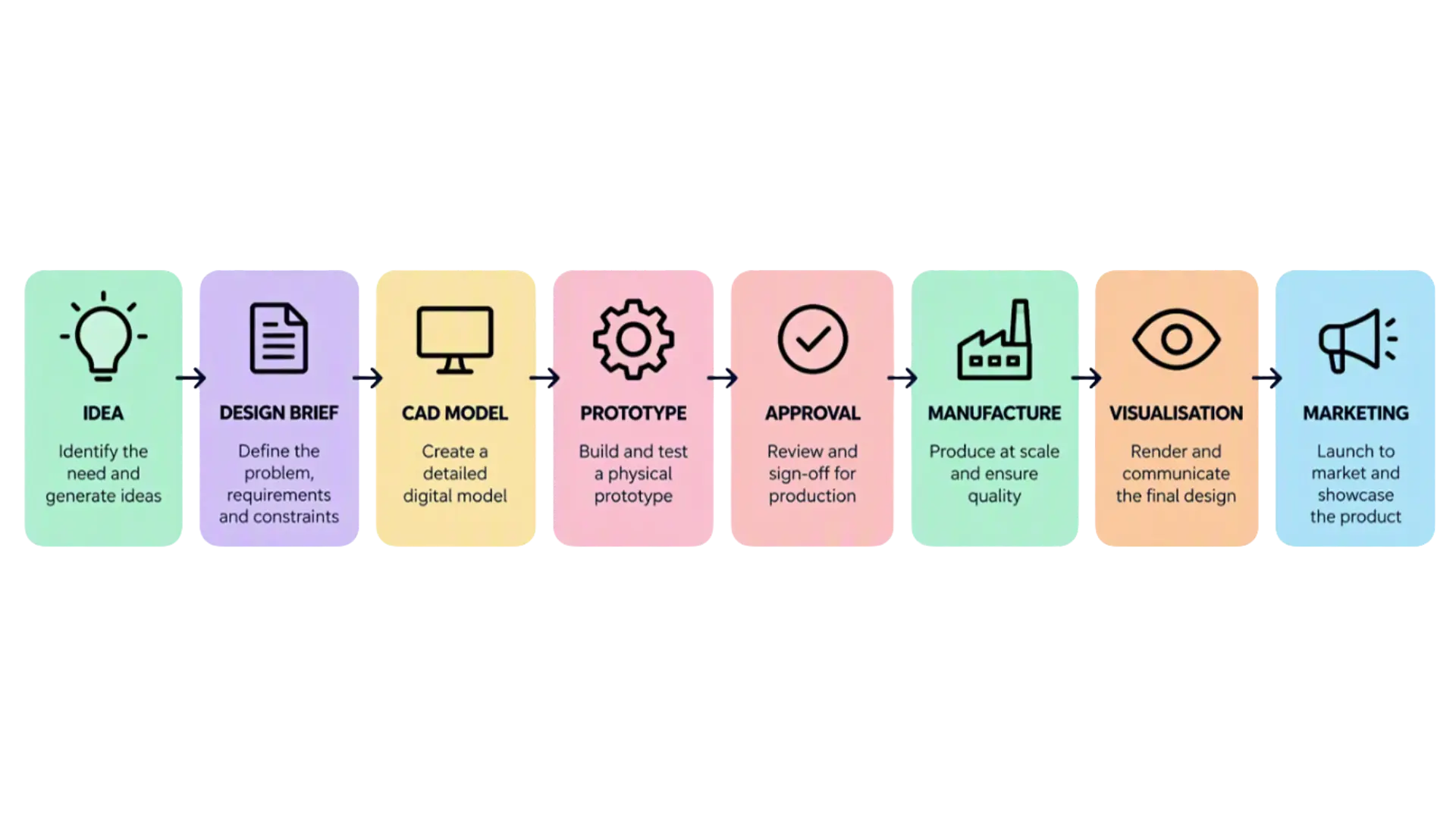
An idea becomes a design brief. The brief becomes a CAD model. The CAD model becomes a prototype. Eventually, the product reaches production. Perhaps a few marketing images are created afterwards.
In reality, projects rarely progress quite so neatly.
As a product designer, I’ve worked on projects where the engineering questions had largely been answered. The CAD model was complete, the assembly worked as intended and the functional requirements had been met. From an engineering perspective, the project appeared ready to move forward.
But one important question remained.
Did it actually fit the brief?
Functionally, perhaps.
Commercially, not always.
At this stage, conversations in review meetings often move away from fillet radii and fully defined sketches. Attention turns to colourways, surface finishes and perceived quality. The product may work exactly as intended, but stakeholders still need to decide whether it looks right for the customer and reflects the original commercial objective.
This is often where progress slows. Reviews continue while people try to agree a direction. Approval waits, tooling may be delayed and the teams preparing to procure or manufacture the product are left waiting for a decision.
The engineering team knows the design inside out. They’ve lived with it for months. They understand why every feature exists and how every component fits together.
Everyone else is seeing the product for the first time.
Customers, directors, marketing teams and product managers may be asked to make decisions about something they cannot yet hold. Asking them to “just imagine this” or “picture that” is rarely enough. Not everyone can, and even those who can may be imagining something completely different.
Close Your Eyes and Imagine an Apple
Most people reading this can form a reasonably clear mental image of an apple.
But what does yours look like?
Some people will picture a shiny red Gala. Others will imagine a green Granny Smith. It might have a stalk or a leaf. It might be sitting on a table, hanging from a tree or existing against no background at all.
Everyone understands the word apple, but that doesn’t mean everyone sees the same apple.
So, how can we assume that a room full of people evaluating the same product are imagining the same result?
If someone describes “a satin black finish” or “a premium feel”, every person in the room will interpret those words slightly differently. They may be discussing exactly the same design while forming very different ideas of the finished product.
Visualisation is often treated as something that happens after design, once the engineering work is complete and somebody needs an image for a website. In practice, teams use different forms of visual representation throughout product development.
The first sketch helps shape an idea. A mock-up gives it form. A prototype allows people to interact with it, while a CAD model captures the engineering intent behind it.
The process begins to look less like a straight line and more like this:
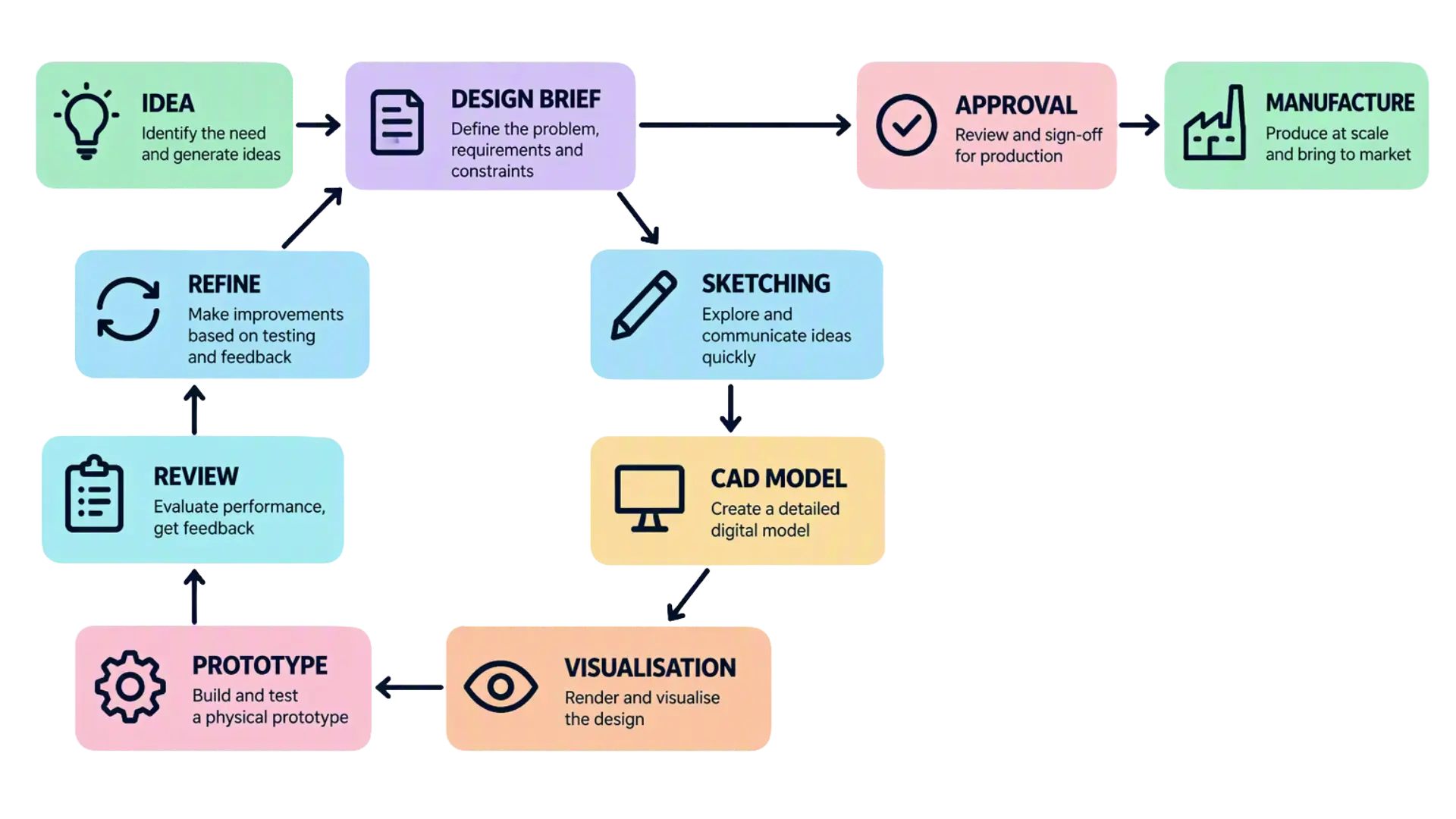
Each representation answers a different question. A sketch helps determine whether an idea is worth developing. A CAD model establishes how it can be engineered. A photorealistic visualisation helps people judge how the finished product is intended to appear before it physically exists.
The earlier a concern becomes visible, the easier it is to address. A visualisation created in hours may reveal an issue that would otherwise emerge after tooling had been ordered.
Design and photorealistic visualisation support each other as the product develops. The design provides the engineering definition, while the visualisation gives stakeholders the context needed to review it.
That raises an important question:
When does a CAD model stop being enough?
In my experience, the answer is surprisingly simple.
A CAD model stops being enough when the next decision depends on understanding the product rather than defining it.
This point often arrives during a stakeholder meeting, a customer review or a discussion about the product’s appearance. The design may already be technically defined, but the people responsible for approving it do not necessarily work in CAD every day.
Reviewing the Product, Not the CAD
A design review can bring together people with very different responsibilities.
The engineer knows the functional requirements have been met. A project manager is considering whether the product is ready to enter the next phase of development. A customer may need to approve the concept before tooling is ordered, while a director wants confidence that the product still supports the original business objective.
None of them needs to inspect sketch constraints or assembly mates. They need enough context to judge the product and decide what happens next.
The design may already be complete.
The review isn’t.
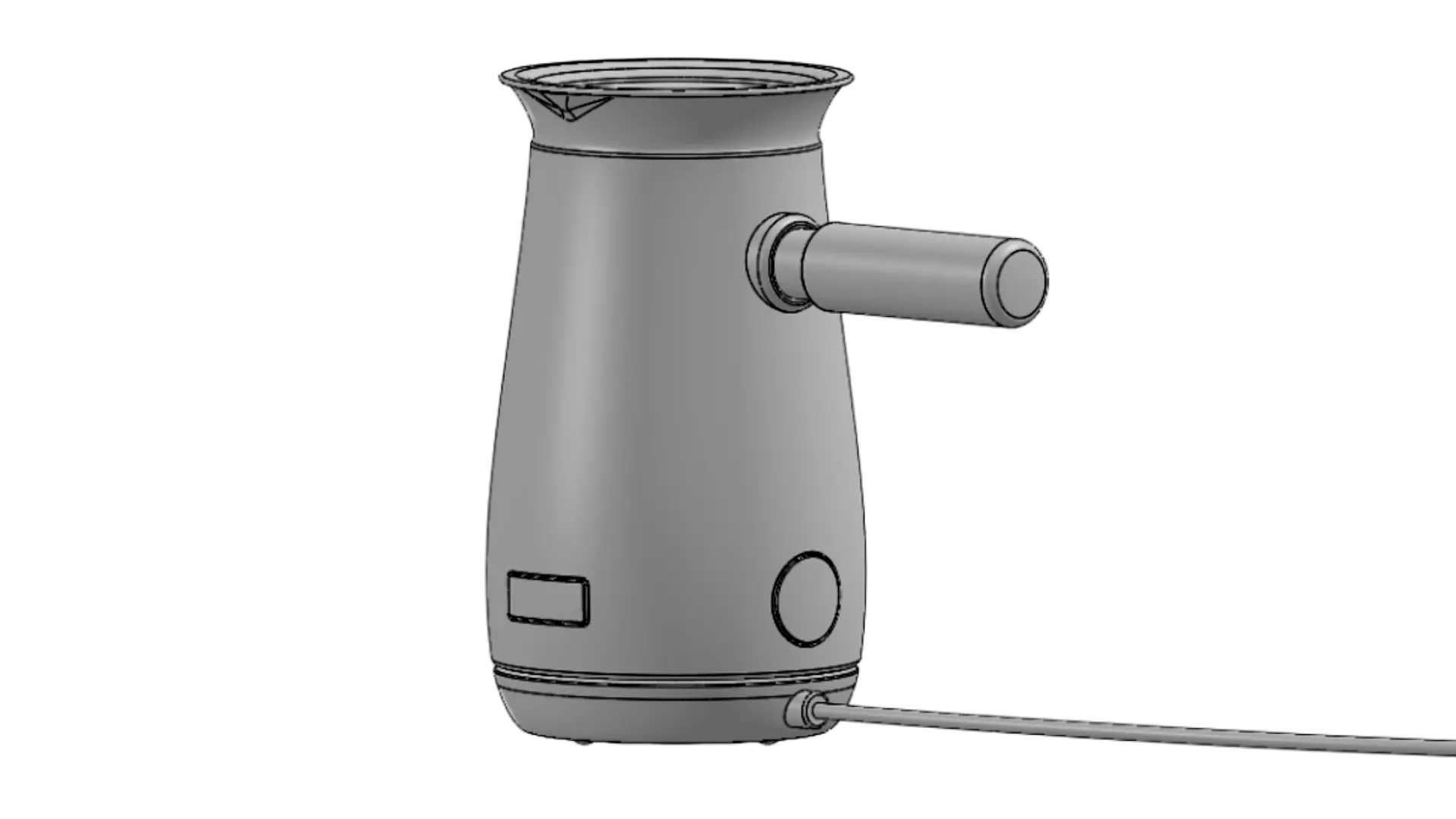
When the only reference is a plain grey CAD model, the room may ask:
- What am I actually looking at?
- Are they buttons?
- What will the finished product look and feel like?
These are not questions about engineering performance, but signs that people are still trying to interpret what they can see.

A photorealistic visualisation of the same model changes the conversation:
- Is this the right direction?
- Does it reflect what we agreed?
- Are there any concerns before we commit further investment?
- Are we ready to approve the next stage?
The value is not simply that the product looks more realistic, but that everyone is reviewing the same interpretation of it. Attention moves away from deciphering the design and towards deciding what happens next.
Clearer feedback can shorten the approval process. Concerns about the product’s appearance can also be addressed before they lead to expensive physical changes or delay tooling.
Visualisation gives the room something concrete to decide about.
Questions a CAD Model Can’t Answer
Even when a product has been approved functionally, important questions about its final appearance may remain.
During my time as a product designer, I frequently encountered projects where several colour, material or finish options were being considered. Producing a physical sample for every combination wasn’t practical, but stakeholders still needed to choose a direction.
Take a watch as an example.
A CAD model can represent its geometry precisely, but geometry alone says very little about how the product will be perceived.
Is it an everyday wearable or a luxury accessory?
Would a brushed metal finish feel more premium than a polished one?
Could an interchangeable fabric strap change who the product appeals to?
Would a two-tone metal variant support a higher price point?
None of these decisions changes the watch’s core function. The geometry can remain exactly the same while the product’s character and perceived value change significantly.
Now imagine the alternatives displayed side by side for the whole room to see.
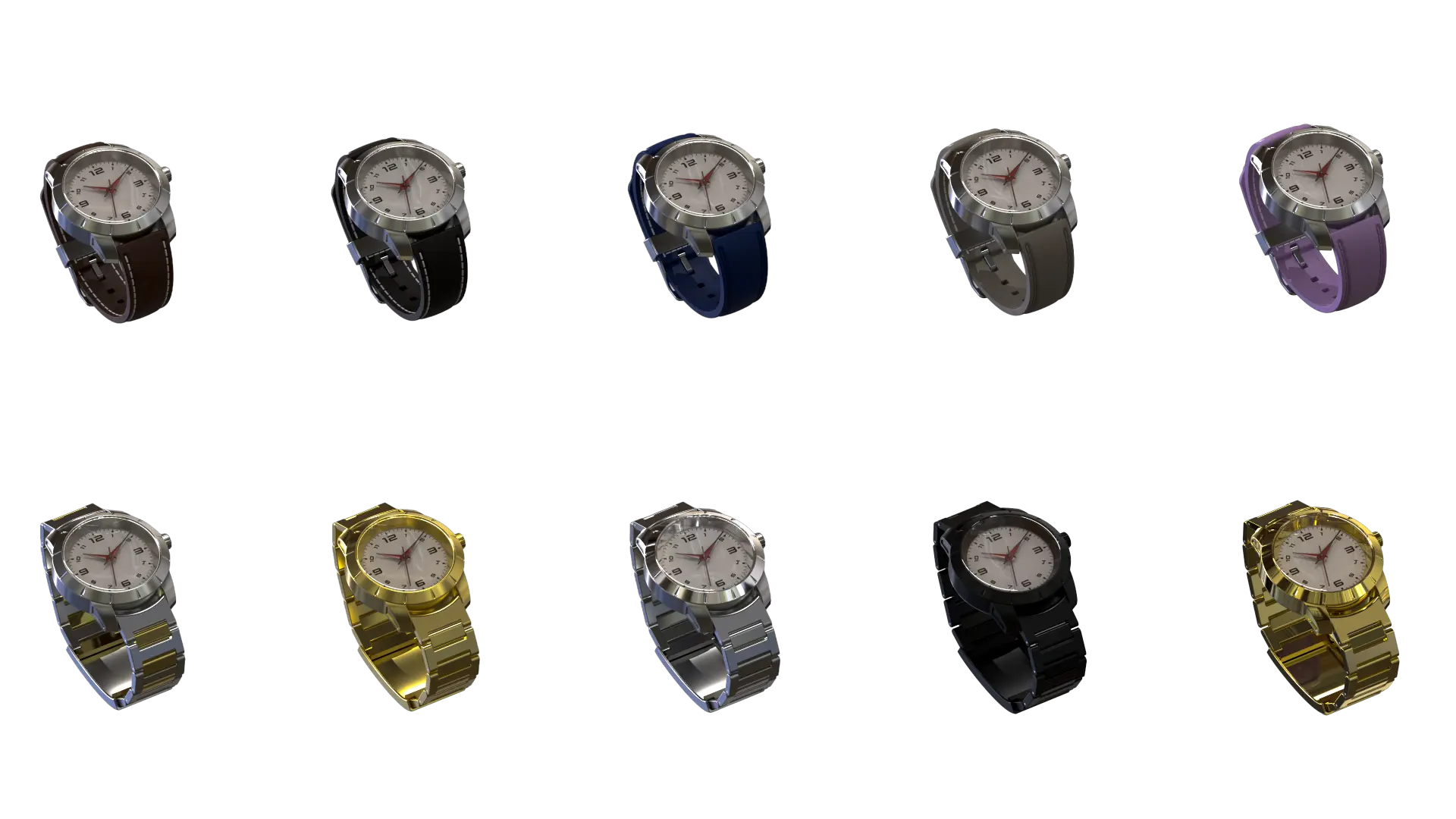
Instead of asking stakeholders to imagine each option, you’re giving them something they can compare.
A finish that sounded right in conversation may appear too reflective on the product, while another option may align more closely with the original brief.
These reactions are difficult to obtain from a plain CAD model because the relevant question is no longer whether the geometry is correct. It is how that geometry will be perceived as the finished product.
Weaker options can be removed before physical samples are commissioned. The remaining concepts can then be tested with greater purpose.
Physical samples stop being the means of choosing a direction. They become the means of validating one.
So, When Does a CAD Model Stop Being Enough?
A CAD model remains one of the most important tools in product development. Without it, there is no product. But completing the model does not complete the project.
This is where engineering tools such as SOLIDWORKS Visualize fit into the process. By showing the design as the finished product is intended to appear, photorealistic visualisation gives stakeholders a shared point of reference before physical samples exist.
This can help teams compare options before commissioning samples and address concerns before tooling is ordered.
So, when does a CAD model stop being enough?
When the next decision depends on understanding the product rather than defining it.
Categorised as: Design | SOLIDWORKS Visualize | Technical Communication | Visualisation
How AI is Changing Product Visualisation
Related Posts
Series 1 Land Rover Pedal Car – Made Easy with Solidworks!
The Series1 began production in 1948 designed to help get Britain farming after the war effort. It grew extremely popular and today enthusiasts are prepared to throw their life savings at restoring originals from that period.

SOLIDWORKS Visualize. Why go pro? – 6 Post Processing
In this blog we will be look at the post-processing options that can be found in SOLIDWORKS Visualize

SOLIDWORKS Visualize. Why go pro? – 7 Lighting
SOLIDWORKS Visualize uses a non-biased rendering engine, which allows for physically accurate lighting within a scene. It generates images with high amount of realism and correct set up can replicate photo studio lighting.
How to Get Your Serial Number for SOLIDWORKS Visualize Standard
Want to download Visualize to make photorealistic renders? Follow this guide for accessing your Visualize serial number that comes bundled in with SolidWorks Professional and Premium.

Redesigning Santa’s Sleigh in SOLIDWORKS
Every year Father Christmas has to fly in his sleigh to deliver presents to boys and girls all over the world in just one night. To put this into perspective, it takes a little under 24 hours to fly from London (UK) to Sydney (Australia) in a streamlined Boeing 747, whereas Father Christmas’ mode of transport is believed to be a rather non-aerodynamic sleigh.
SOLIDWORKS Grid Systems – hidden away, but very useful!
Rory Niles provides an insight into the uses for Grid Systems within SOLIDWORKS 2018

Furniture Design Made Easy with SOLIDWORKS
Calling all furniture and interior designers: the days of creating square cabinets are over. What if we told you there’s a much easier way to bring your products to life?
Here’s 10 reasons why we feel SOLIDWORKS is better than any other software, especially if you’re designing furniture:
Creating Interactive Animations with SOLIDWORKS Visualize
Interactive Images are a great export option within Visualize Professional, allowing you to view the model in a series of 360 orbital spins within a web browser.
However, what happens if I want to use this interactive method to demonstrate a mechanism or animation instead?

How to Create 360VR Video using SOLIDWORKS Visualize
Virtual Reality(VR) videos provide one of the most immersive methods of viewing a design concept and can be used to bring your product showcases to the next level. Recently VR has become a valuable tool for many companies when it comes to design reviews and interactive product training. Check out this short blog to learn how to export 360VR videos using SOLIDWORKS Visualize.
Modelling an Archimedes’ Screw with SOLIDWORKS
Archimedean screws are often referred to as “water screws” since they are commonly used to transport water between different heights. We often see some of our customers do screw feeders and we thought it may be beneficial to create a blog documenting an effective modelling workflow to create your very own Archimedean screw.