











FEA Simulation: Modelling Elastomeric Materials for Analysis
Written by: Tom McHale
Published: Jun 26, 2023
| View All Blogs
Representing elastomeric materials accurately in static analysis requires a non-linear material model. Many companies will make a simplification assumption that the behaviour is linear in a small strain region, but making assumptions like that can be risky, particularly as users become familiar with the assumption and stretch the limits on strain over time.
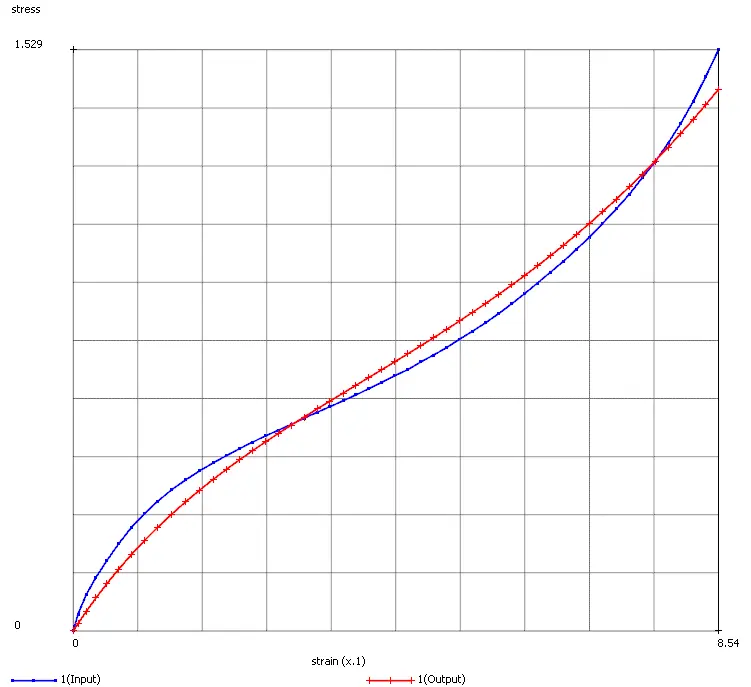
The stress/strain curve below is for a synthetic rubber in uniaxial tension/compression.
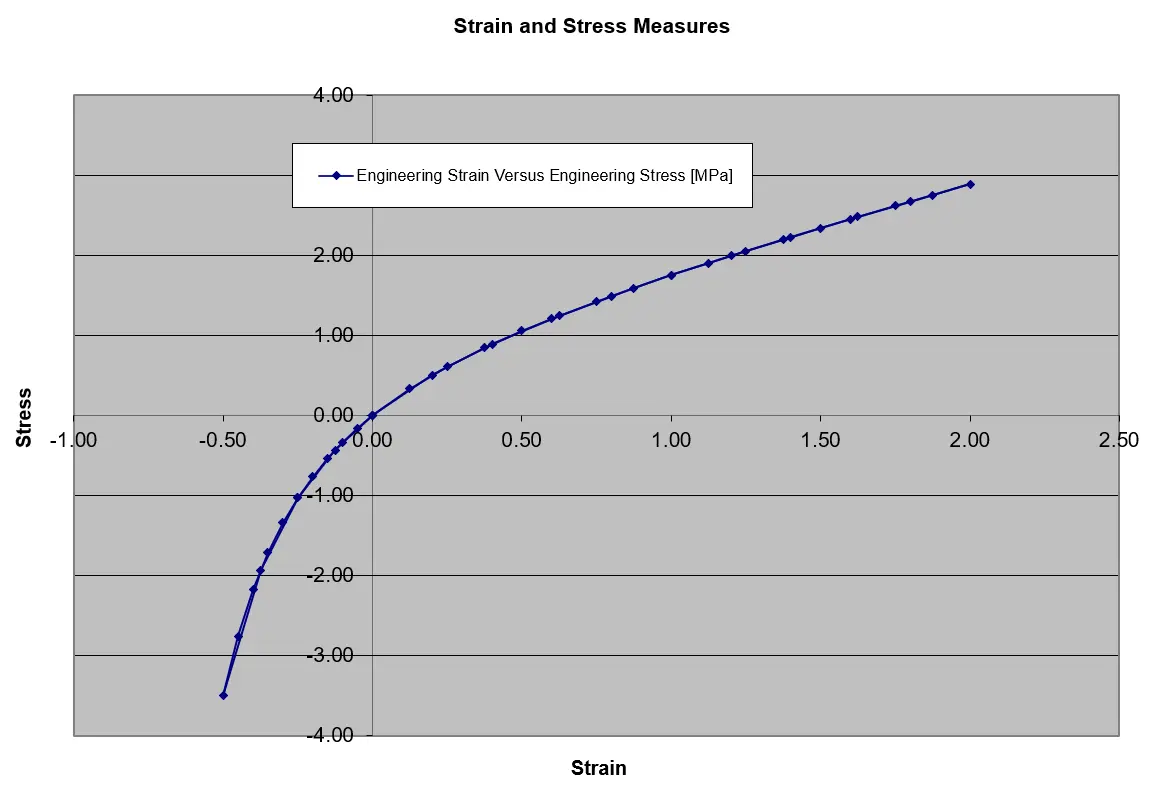
It’s very clear from this plot that the behaviour in tension and compression are very different and the response is not linear. Representing this with a linear elastic material is only valid if the strains are very small AND the strain state is not mixed between tension and compression.
So how do we proceed? We need to use a mathematical model to represent the test data. Many non-linear elastic models are available require inputs in the form of constants in a strain energy function, for example 2nd Order Mooney model:

Where C1 and C2 are the constants and λ1, λ2 and λ3 are stretch ratios in X,Y and Z.
We need to use physical test data to fit to the models in order to arrive at the constants to enter into our FEA package.
Data Fitting
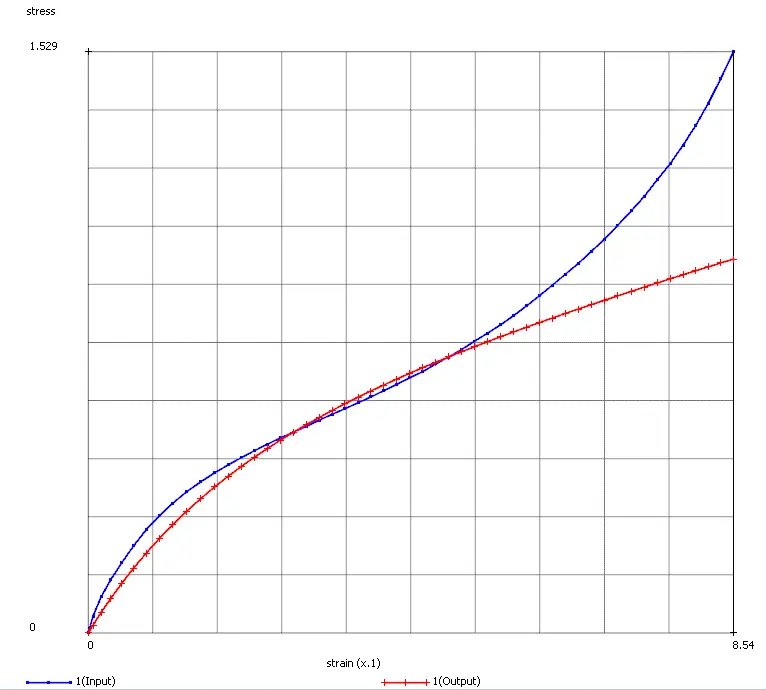
Ideally three sets of test data are needed as a minimum, uniaxial, equi-biaxial and planar shear. Omitting one or two of these will leave you with a model that isn’t necessarily representative of all the possible strain states and therefore may give inaccurate results. Your test data should go up to and a little beyond the range of strain that will be seen in practice, the risk being that a model extrapolating beyond measured data may well be inaccurate at that strain level.
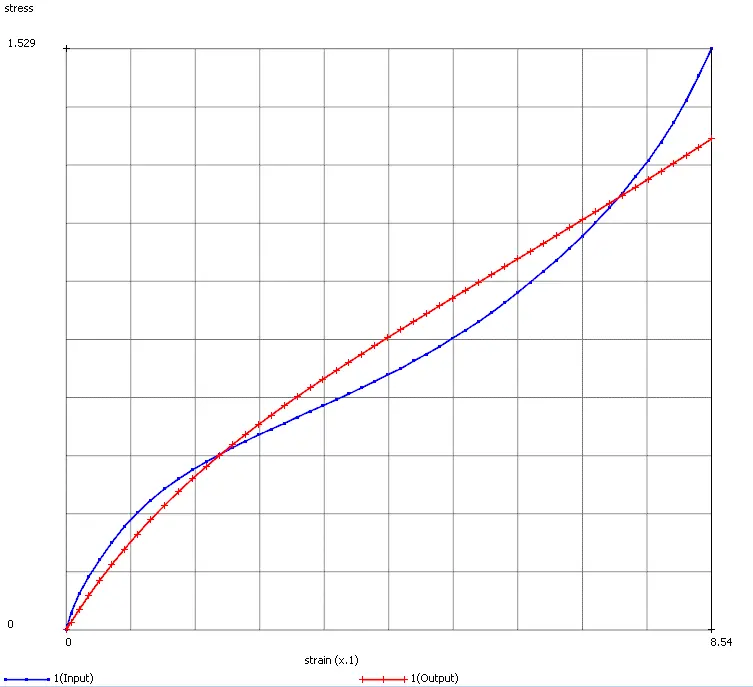
Most good FEA packages offer tools to fit the experimental data. The examples shown below are from MSC software for the Marc solver. Three sets of test data were used and fitted to a series of phenomenological models. Comparing the data vs model for a subset of those available is very useful in deciding which to use.
| 1st Order, Neo-Hookian | 2nd Order Mooney | 3rd Order Invariant | 2nd Order Ogden |
|---|---|---|---|
 |  |  |  |
Validating your model
Closing the loop on the material model creation by validating it is a very important step. One way to do this is to use the generated material model in three small FEA simulations of the tests used to capture the raw test data, then compare the force vs displacement curves to check that the match within an agreeable range.
It is very important that these FEA models are able to simulate the behavior of the test – not all FEA packages will support very large strain levels or need special elements to do so. If your strains are very large and cause element quality to degrade then an FEA package that uses adaptive remeshing to preserve element quality throughout the simulation should be considered.
Comparing approaches
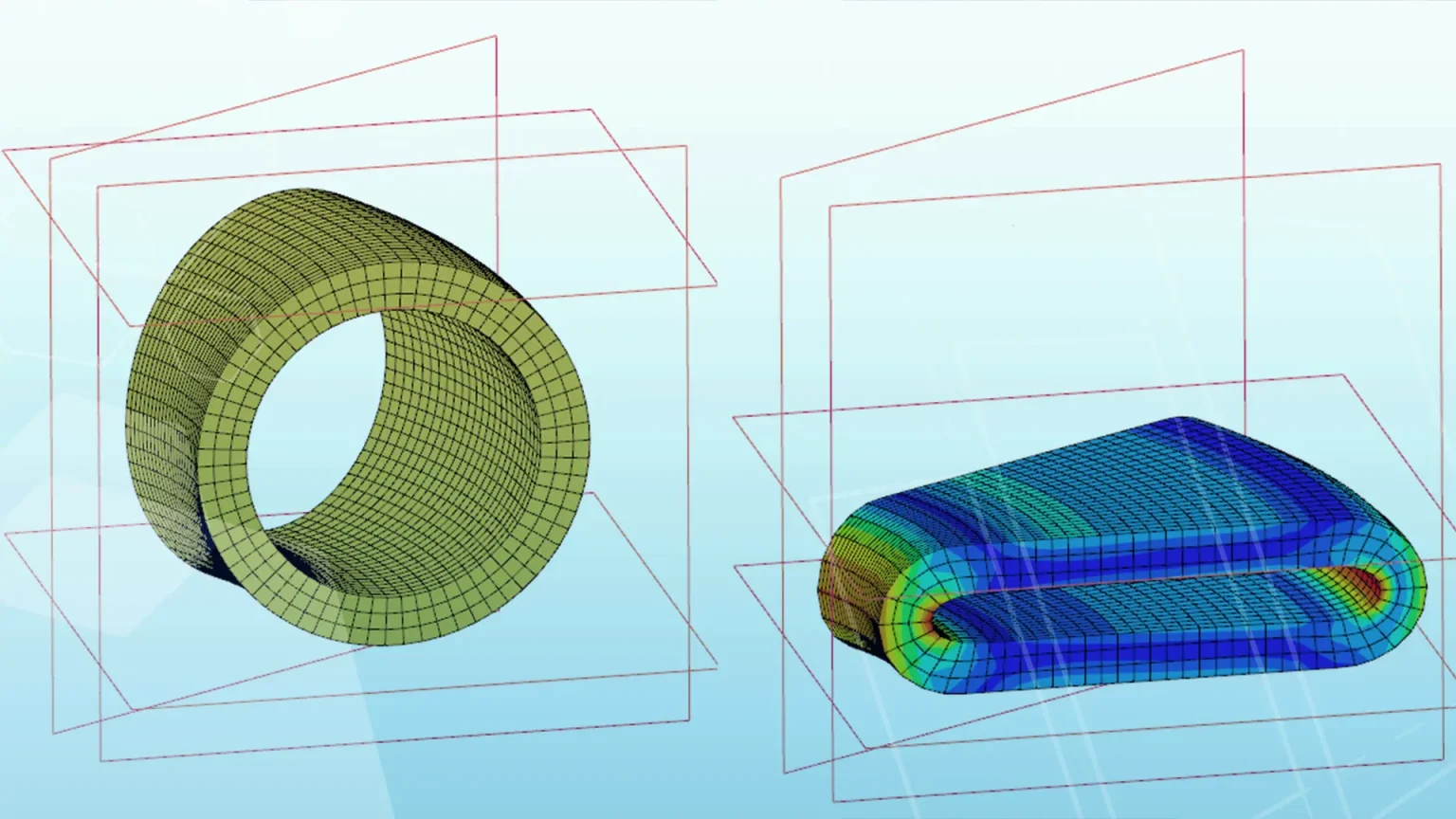
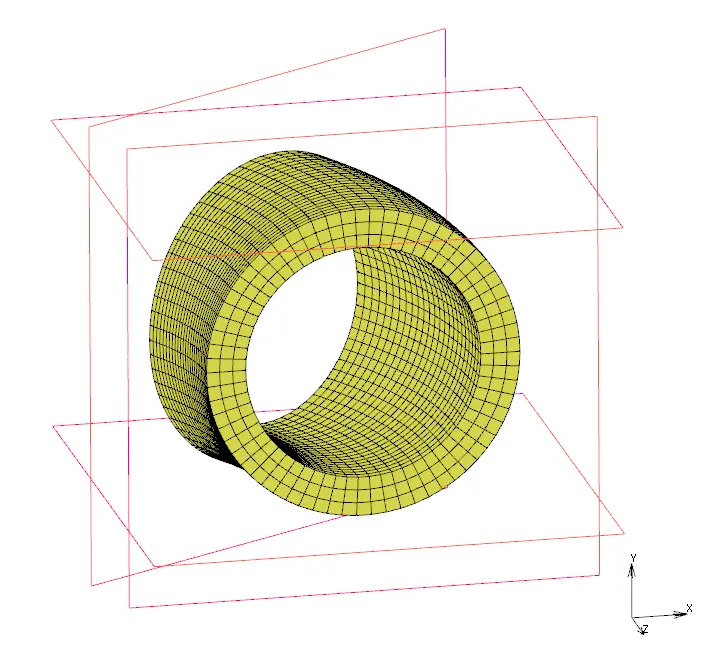
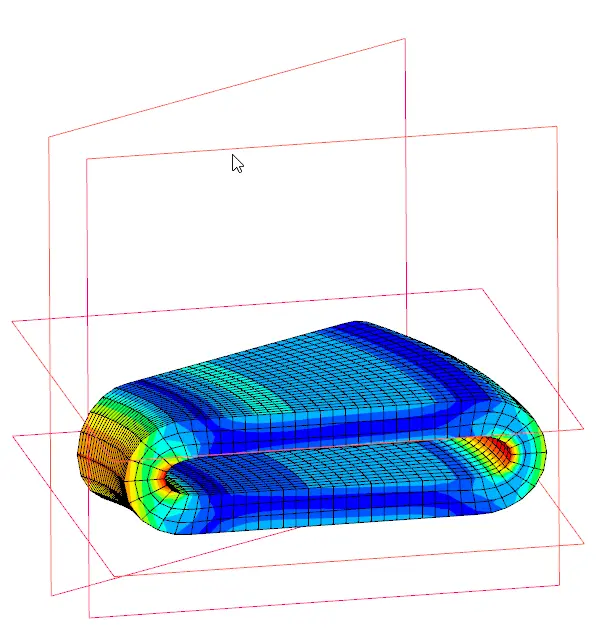
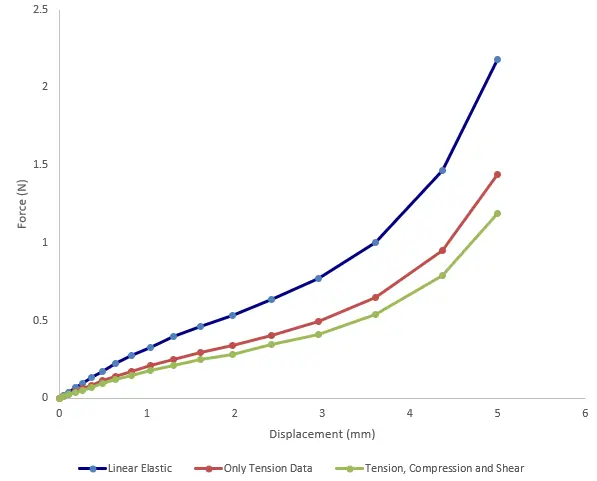
A comparison can be made between using a linear elastic model, an elastomeric model using only tensile data and an elastomeric model using tension, equi-biaxial and planar sheer data. A simple hollow O-ring model was used with a 30o slice and symmetry conditions to reduce the solve time.
The model was compressed and the results with all three material representations compared.
| Model in relaxed state | Compressed state |
|---|---|
 |  |
Comparing the force vs displacement behaviour for the rigid plate used to compress the part we can see the contrast in behaviour. The linear model is 80% stiffer than the best model using three sets of test data. The intermediate solution based on just tensile data is 20% stiffer.
Take the Next Steps
MSC Software have produced an excellent white paper on simulation of elastomers which provides a very good summary of the things to be aware of. You can download a copy here.
We have three decades of experience in our support team for the MSC Software analysis products at DTE looking after clients in a wide variety of industries. The MSC One token licensing scheme brings the market leading simulation tools used by global OEM’s to SME customers for a surprisingly affordable price compared with other top tier analysis providers. Please get in touch to talk about your needs and how we can help.
Categorised as: Simulation
Start Your Free SOLIDWORKS Trial
Get a FREE trial of 3D CAD SOLIDWORKS to experience the capabilities of SOLIDWORKS Premium and SOLIDWORKS Visualize.

Related Posts

How to Find Reaction Forces in SOLIDWORKS Simulation
SOLIDWORKS helps us to find resultant forces through simulation studies. These virtual tests reduce the need for physical prototypes and give us an accurate answer.

SOLIDWORKS Tips: Are you Making this Common Mistake in Fatigue Analysis?
Simulation is a vital and complex engineering need. Fortunately, SOLIDWORKS makes it easy to test, correct mistakes and obtain accurate results.

Redesigning Santa’s Sleigh in SOLIDWORKS
Every year Father Christmas has to fly in his sleigh to deliver presents to boys and girls all over the world in just one night. To put this into perspective, it takes a little under 24 hours to fly from London (UK) to Sydney (Australia) in a streamlined Boeing 747, whereas Father Christmas’ mode of transport is believed to be a rather non-aerodynamic sleigh.

Radiation in Flow Simulation – Part 1 : Reflection
Technical Manager Andy Fulcher explores ‘Radiation in Flow Simulation, Part 1 : Reflection’

Radiation in Flow Simulation – Part 2 : Refraction
Technical Manager Andy Fulcher explores ‘Radiation in Flow Simulation, Part 2 : Refraction’
The Coanda Effect in Flow Simulation
Can you take advantage of the Coanda Effect & can SOLIDWORKS Flow simulate it? Applications Engineer Romel Cumare investigates in his latest blog post.
So how accurate is SOLIDWORKS Simulation?
How accurate is SOLIDWORKS Simulation? Elite Applications Engineer Chris Boyles investigates.

Set Your Fluids Free with SOLIDWORKS Flow Simulation
A look at the new Free Surface feature coming in SOLIDWORKS Flow Simulation 2018.
Finding a Good Mesh Fast in SOLIDWORKS Flow Simulation
‘How do I know when to stop my calculation?’ and ‘How do I know my mesh is good enough?’ are questions often asked when running SOLIDWORKS Flow Simulation studies.
The answer is to ensure the solution reached is both fully converged AND mesh independent. In practice this can take a bit of trial and error as well as some experience in the process. However, SOLIDWORKS Flow can help us do both of these at once! Here’s how…

Free Surface Evaluation & Validation – SOLIDWORKS Flow Simulation
In 2018 SOLIDWORKS introduced a new capability to their Flow software. This is called ‘Free Surface’ and opens up many more applications for users who need to simulate fluid behaviour where a gas and a liquid (or two immiscible liquids) share the same region of space without an intervening solid