











Modelling Curing of Composite Structures

Written by: Tom McHale
Published: Apr 25, 2023
| View All Blogs
Multi-physics simulation is an expanding area of simulation, combining several physical phenomena into a model to more accurately predict the behaviour, rather than making assumptions about the boundary conditions and keeping the model simple.
Simulating manufacturing processes is one such area which couples structural and thermal simulation to examine, for example, the distortion due to welding for a ladder frame.
A step beyond this thermal/structural example is the simulation of the curing process for composites to determine spring back/forward as a result of differential curing contraction. This adds a third dimension of physics to capture the curing effects.
The biggest challenge with any multi-physics simulation isn’t choosing the right software (MSC Marc obviously!) or the job set up, but acquiring the necessary material properties. The more esoteric the properties, the harder they are to come by.
For a thermal/structural simulation a bare minimum is the basic linear mechanical properties (Young’s Modulus, Poisson’s Ratio (or Shear modulus) and Density) plus the coefficient of linear thermal expansion plus the conductivity and specific heat capacity for the material. If the temperature range is wide, then all these may need to be temperature dependent.
With curing added to the mix we need some more information still. We need the cure shrinkage as a function of degree of cure in order to predict the dimensional changes from the curing process, in three directions in the case of a continuous fibre reinforced material. In order to simulate the progressive curing of the part as it is ‘cooked’ we need a model for cure rate as a function of degree of cure and temperature. This set of curves will look something like this:

These plot the cure rate (in % per minute) vs degree of cure at seven different temperatures.
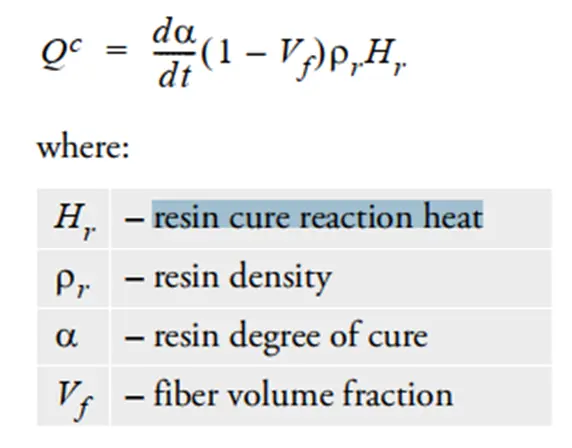
Lastly, we need to represent the exothermic heat generated as the resin cures. This is entered as a resin cure reaction heat which is used in the following equation to evolve heat within the curing resin.
With these values entered into the material model we can set up a curing simulation. In this example we have a 1m diameter reflector that is laid up on a solid aluminium male form and vacuum bagged for the oven. The reflector is modelled with layered solid elements, and we use contact modelling between the tool and the reflector which allows us to directly model the contact heat transfer between the two.
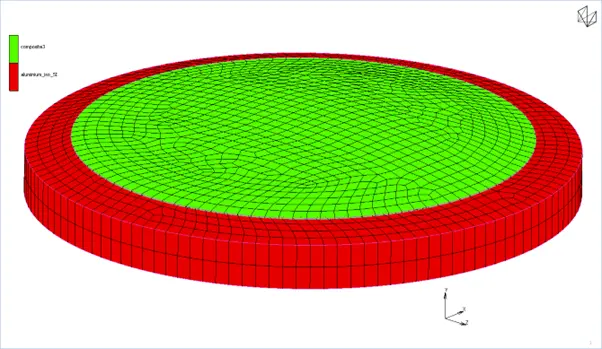
The assembly is heated using cavity radiation where the cavity background temperature is controlled as a function of time based on the oven settings. A pressure is applied to the top surface to simulate the vacuum load and the simulation is run as a transient dynamic analysis.
The solution is weakly coupled. The solver runs through a thermal step where temperature changes are calculated from the radiation and the instantaneous cure rate determined from the degree of cure and the absolute temperature to generate any exothermic heat. This temperature change is passed to the structural cycle as a thermal load, where the differential expansion plus the pressure load effects is evaluated. The updated structure is then passed to the thermal cycle for the next time increment and so on until the end of the analysis. At the end of the cure cycle, we remove the contact conditions and pressure load then add simple quasi-static constraints to examine the deformation of the part.
The runtimes can be very long and the results sets large if we’re not careful. The cure time in this instance was 105300s and for stable convergence we needed time steps of 5 seconds. Since the solution is weakly coupled and convergence is driven by the thermal cycle, we can set Marc to run a structural cycle at a lower frequency, for example every 5th thermal cycle, which can dramatically reduce the run time. Requesting results every 5th step too reduces the result set. The runtime for this simulation on a laptop was around three hours using four way parallel for the solver.
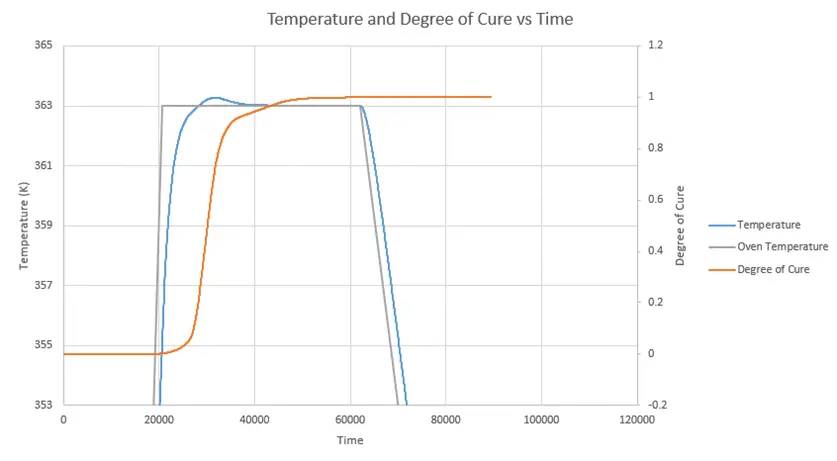
Plotting results for a node on the outer surface of the part we can see the change in the degree of cure as the analysis progresses.

A closer look at the top of the plot shows the exothermic effect as the cure rate ramps up and the part temperature exceeds the oven temperature for a while.
We can look at the deformation results, the plot of total displacement looks nice and symmetrical:
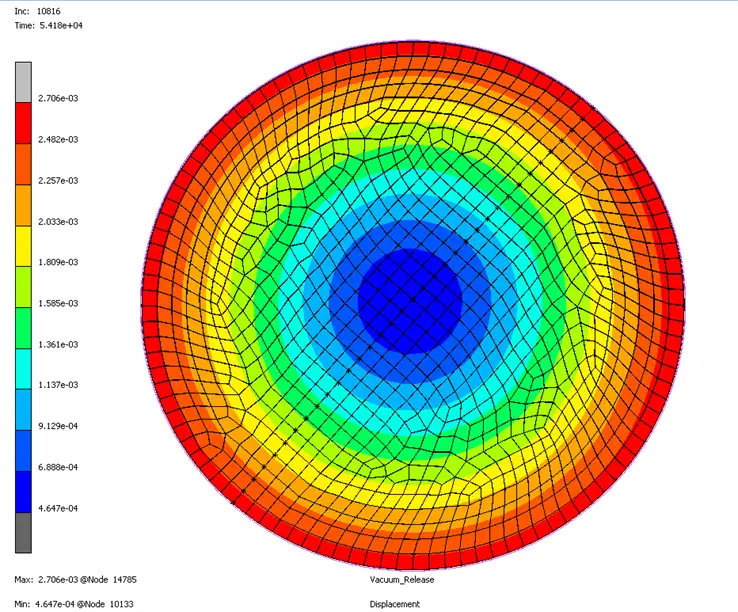
But the magnitude of the radial shrink masks the actual effect. If we look at the displacement in the out of plane direction, we can see it’s very much not a symmetrical response (the layup was deliberately imbalanced to magnify this effect).
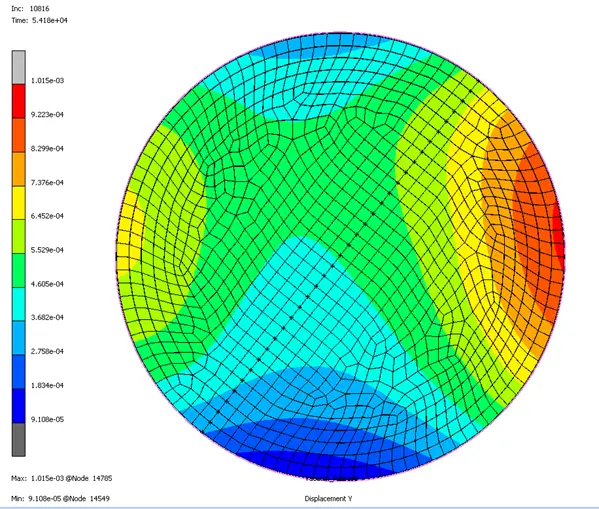
Taking measurements from the centreline nodes we get a resulting radius of curvature of between 2.365 and 2.475m indicating that the reflector is contracting on that axis rather than expanding.
Conclusion
This is a powerful tool. Being able to predict the degree of distortion of a part allows you to adjust tooling to create parts that are closer to the design intent. Obtaining the necessary material data is not straightforward, but indications are that the critical thing is getting the cure shrinkage right in all three directions.
Categorised as: Simulation
Get a SOLIDWORKS Quote
Interested in SOLIDWORKS? Contact us for questions, trials, or demos by clicking the button below or call 01926 333777. Our experts will help you find the perfect solution.

Related Posts

How to Find Reaction Forces in SOLIDWORKS Simulation
SOLIDWORKS helps us to find resultant forces through simulation studies. These virtual tests reduce the need for physical prototypes and give us an accurate answer.

SOLIDWORKS Tips: Are you Making this Common Mistake in Fatigue Analysis?
Simulation is a vital and complex engineering need. Fortunately, SOLIDWORKS makes it easy to test, correct mistakes and obtain accurate results.

Redesigning Santa’s Sleigh in SOLIDWORKS
Every year Father Christmas has to fly in his sleigh to deliver presents to boys and girls all over the world in just one night. To put this into perspective, it takes a little under 24 hours to fly from London (UK) to Sydney (Australia) in a streamlined Boeing 747, whereas Father Christmas’ mode of transport is believed to be a rather non-aerodynamic sleigh.

Radiation in Flow Simulation – Part 1 : Reflection
Technical Manager Andy Fulcher explores ‘Radiation in Flow Simulation, Part 1 : Reflection’
Radiation in Flow Simulation – Part 2 : Refraction
Technical Manager Andy Fulcher explores ‘Radiation in Flow Simulation, Part 2 : Refraction’
The Coanda Effect in Flow Simulation
Can you take advantage of the Coanda Effect & can SOLIDWORKS Flow simulate it? Applications Engineer Romel Cumare investigates in his latest blog post.
So how accurate is SOLIDWORKS Simulation?
How accurate is SOLIDWORKS Simulation? Elite Applications Engineer Chris Boyles investigates.
Set Your Fluids Free with SOLIDWORKS Flow Simulation
A look at the new Free Surface feature coming in SOLIDWORKS Flow Simulation 2018.
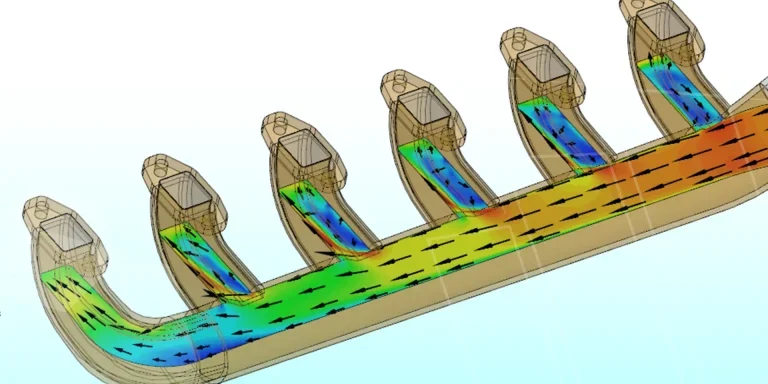
Finding a Good Mesh Fast in SOLIDWORKS Flow Simulation
‘How do I know when to stop my calculation?’ and ‘How do I know my mesh is good enough?’ are questions often asked when running SOLIDWORKS Flow Simulation studies.
The answer is to ensure the solution reached is both fully converged AND mesh independent. In practice this can take a bit of trial and error as well as some experience in the process. However, SOLIDWORKS Flow can help us do both of these at once! Here’s how…

Free Surface Evaluation & Validation – SOLIDWORKS Flow Simulation
In 2018 SOLIDWORKS introduced a new capability to their Flow software. This is called ‘Free Surface’ and opens up many more applications for users who need to simulate fluid behaviour where a gas and a liquid (or two immiscible liquids) share the same region of space without an intervening solid