











Resolving Redundant Constraints and Asymmetrical Results in Motion Simulation

Written by: Tom McHale
Published: Jun 25, 2025
| View All Blogs
MSC Adams is a powerful tool for motion simulation in multi-body systems. I recently came across a not uncommon issue as part of a benchmark project, the resolution to which forms the basis of this blog article.
It concerns redundant constraints, the consequences of the automatic elimination of them and how you can avoid the problem.
What is a Redundant Constraint?
Mechanism models are constrained using a variety of different joint types – planar, cylindrical, sliders, revolute, etc. to represent the way in which they are connected.
A redundant constraint is simply a constraint without which the mechanism would still function. These often occur when a mechanism has too many constraints applied.
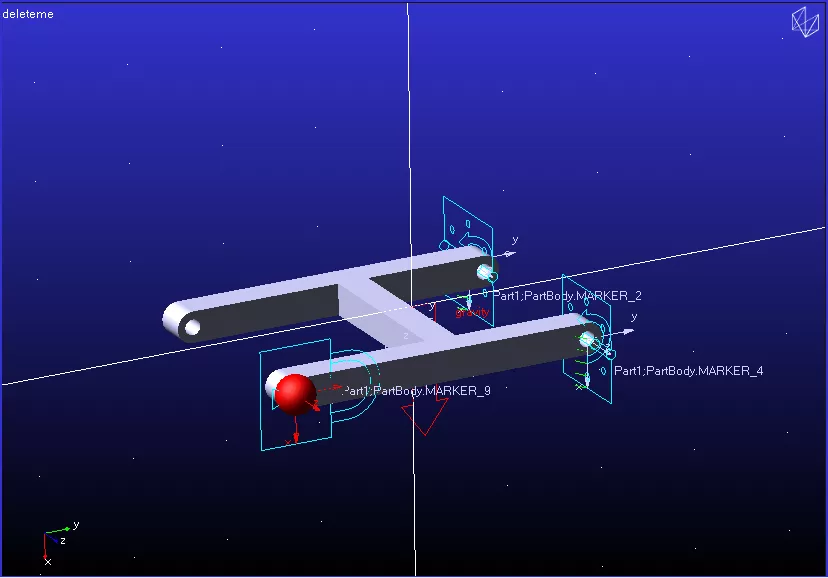
We can illustrate the idea of over-constraining a mechanism with a system of two parts fixed together.
Verifying Constraints with MSC Adams
This simple H-frame is grounded so that it can swing via revolute joints – these are simulating hinges to a grounded entity.
A lumped mass (in red) makes the forces unsymmetrical. Let’s run this model through the Model Verification app in Adams View to calculate the degrees of freedom.
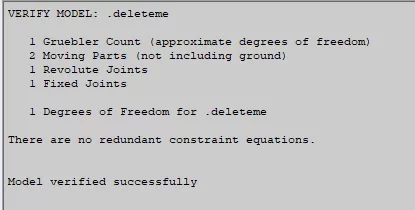
Here we have 5 redundant constraints, calculated as follows:
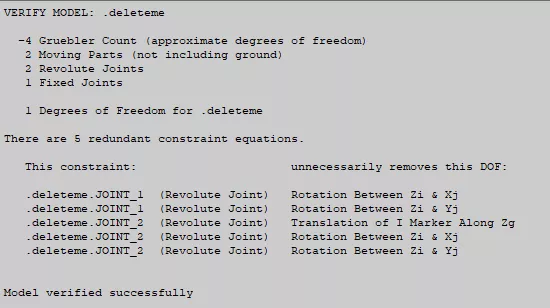
- Two solid bodies, each with six degrees of freedom, gives 12 degrees of freedom (DOF) in the model.
- As the system needs to swing on the axis with no other translations/rotations, we need constraints to reduce that 12 to just a single DOF.
- The Fixed Joint attaching the lumped mass part to the H-frame eliminates 6 of these.
- We then have two revolute joints, where the pin joint to ground is modelled, to remove 5 apiece.
- Therefore, our total DOF is 12 – 6 – 5 – 5 = -4.

So what’s the problem? Well, in practice, this contributes to an increase in the complexity of a model, expanding multi-body simulation tools like Adams.
This can present issues with redundancy elimination, where load paths through a symmetric system may yield asymmetric results.
Not ideal.
How to Handle Redundant Constraints in Motion Simulation
We have several options to consider when trying to eliminate redundant constraints from our models.
Option A
Firstly, we could eliminate one of the revolute joints.
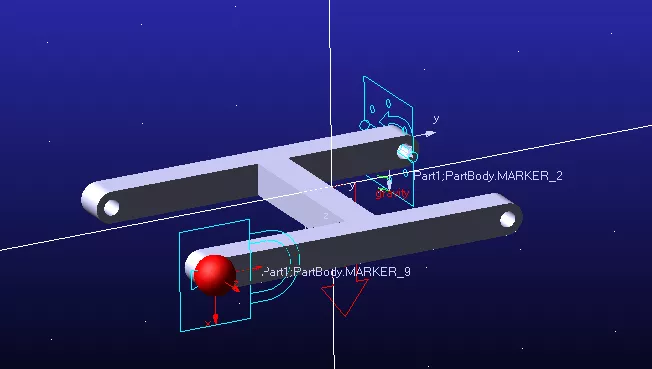
This will remove 11 DOFs from the system with no redundancies.
However, we lose the force output for one of the ground connections (which was the reason for this simulation in the first place!) that we need for quantifying the magnitude of the force to define the size of the components used to connect this.
Option B
We cannot apply friction to both sides, but we could replace the two joints with simpler joints.
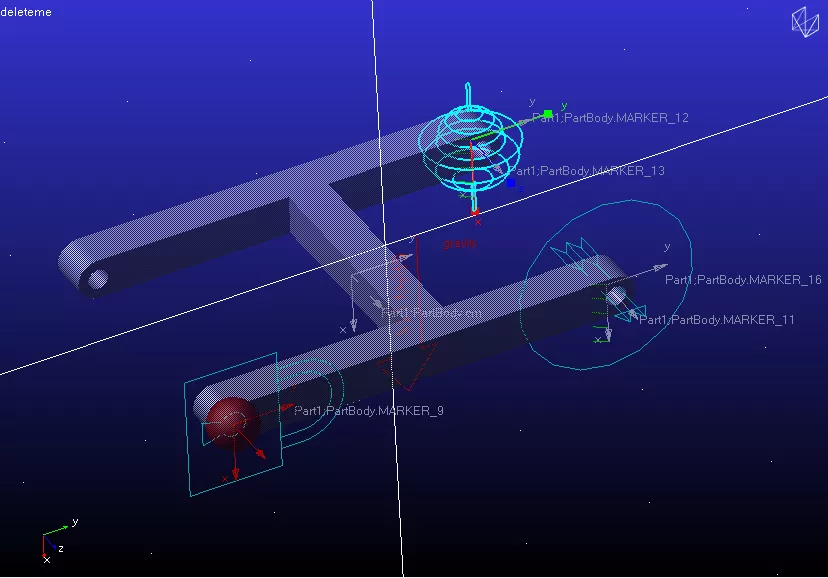
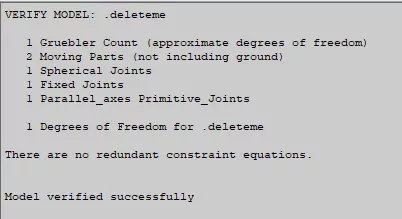
This spherical joint eliminates the translations at one location, and a parallel axis joint primitive at the other side leaves translations free but removes the rotations about X and Y.
This leaves just the rotation about Z that we want and it passes the redundant constraint check, because we remove 3 DOFs for the spherical joint and 2 for the Parallel axes.
We’ll apply standard joint friction models to both sides, but since the translations on the nearside are not constrained, we have no force output with which to design the components!
We could work backwards from the moments, but for a complex system that becomes impractical.
Option C
Okay, the final alternative, and what was used for the benchmark, is to not use standard joints at all, but to replace them with a bushing connection.
A bushing connection allows us to set the stiffness and damping for each of the six directions between locations on two separate components and/or the ground.
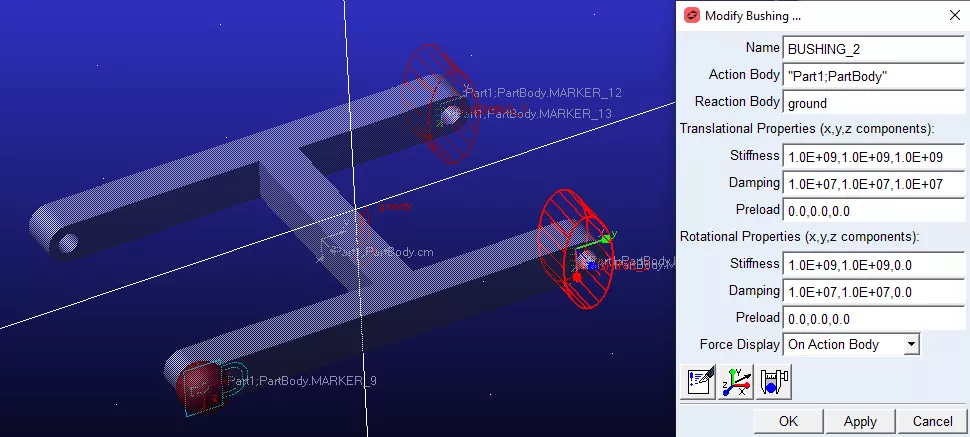
The stiffness values (N.mm-1) are set very high for the three translations and two rotations that we wish to constrain each side so that the forces seen from the system cause a numerical zero amount of displacement.
For this model, we can leave the rotational values about the axis of rotation at zero, so there are no restrictions on movement.
Running the Adams redundancy checker provides the following result:
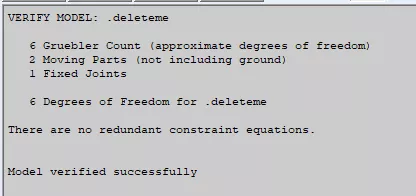
We have six degrees of freedom remaining in the model – five of these directions are reduced to near constraint by the very stiff bushing values.
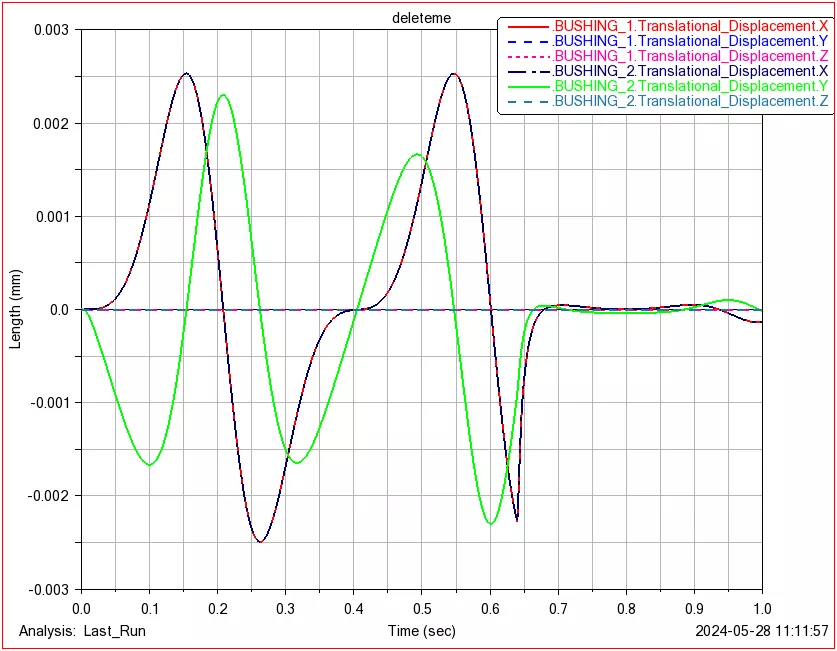
After running a simulation, we can plot the displacement of the bushes against time, showing values below 0.003 mm of displacement.
This can be adjusted by increasing/decreasing the stiffness values on the bushing.
The Pros and Cons of Bushings in Simulation
Building a complex model using bushings adds time to the process of construction, but retains the symmetry of the load path especially where sets of redundant constraints have been shown to fail.
By only using bushings, we lose the ability to easily apply friction to each joint, however, this can be resolved relatively easily using a torque that calculates its value from the forces in the bushing.
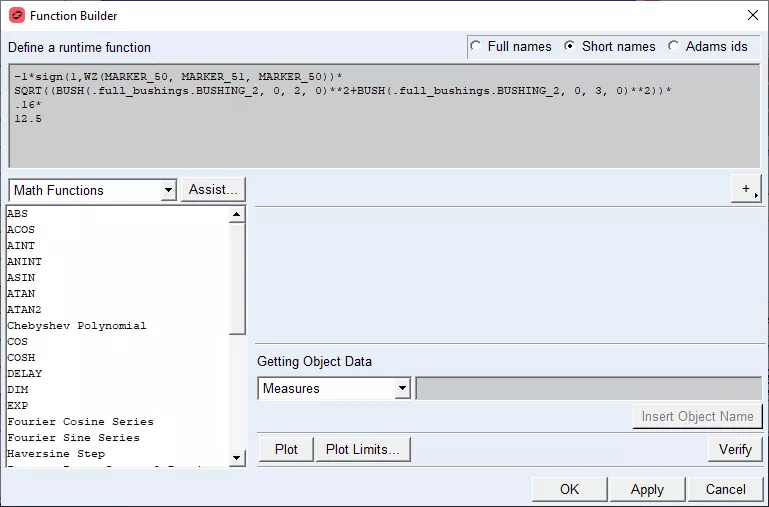
Torques are simple to add, picking the two bodies in the same way as for a bushing, we can select the point at, and the axis around which it acts.
By default, this creates a constant value of torque, but we can use the powerful Function Builder tool in Adams View to customise this.
Using the Function Builder in MSC Adams
The Function Builder allows us to construct equations to determine a value.
Existing values of forces/displacements/velocities in the model can be factored into the maths. In this example, we are reproducing the friction model used by Adams in a revolute joint.
To do this, we first need to use the SIGN function which gives us the +/- sign for a value to indicate the direction of motion of the axis of the bushing, so that our torque opposes the direction of motion.
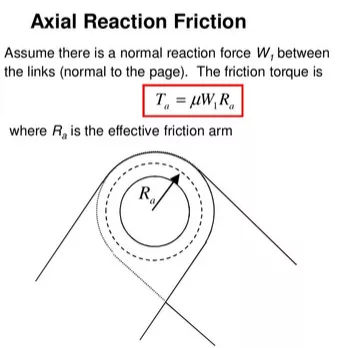
We then take the square root of the square of the shear forces in the bushing which is our contact force.
Multiply that by the coefficient of friction, 0.16, and the radius of the pin, 12.5 mm.
We now have a torque opposing the rotation with a magnitude dependent on the radial reaction force in the joint.
Beyond Standard Bushings with MSC Adams
Instead of using the standard bushing in Adams, if we use the new Advanced Bushing, we can replace the linear stiffness of each component with a non-linear curve.
This allows us to use a bilinear curve of stiffness, where an initial very low value turns to a very high value one the clearance in the joint is taken up.
Together with the Function Builder, MSC Adams provides a flexible set of tools to navigate multi-body dynamics challenges.
To learn more about MSC Adams advanced motion simulation software, get in touch with our experienced consultants or book a demonstration.
If you need to free up resources or help with predicting product performance, it’s worth considering the professional simulation services provided by our team of experience consultants.
Regardless of your industry or experience level, we can provide the expertise to optimise product performance and streamline your product development process.
Categorised as: Simulation
Get a SOLIDWORKS Quote
Interested in SOLIDWORKS? Contact us for questions, trials, or demos by clicking the button below or call 01926 333777. Our experts will help you find the perfect solution.

Related Posts

How to Find Reaction Forces in SOLIDWORKS Simulation
SOLIDWORKS helps us to find resultant forces through simulation studies. These virtual tests reduce the need for physical prototypes and give us an accurate answer.

SOLIDWORKS Tips: Are you Making this Common Mistake in Fatigue Analysis?
Simulation is a vital and complex engineering need. Fortunately, SOLIDWORKS makes it easy to test, correct mistakes and obtain accurate results.

Redesigning Santa’s Sleigh in SOLIDWORKS
Every year Father Christmas has to fly in his sleigh to deliver presents to boys and girls all over the world in just one night. To put this into perspective, it takes a little under 24 hours to fly from London (UK) to Sydney (Australia) in a streamlined Boeing 747, whereas Father Christmas’ mode of transport is believed to be a rather non-aerodynamic sleigh.

Radiation in Flow Simulation – Part 1 : Reflection
Technical Manager Andy Fulcher explores ‘Radiation in Flow Simulation, Part 1 : Reflection’
Radiation in Flow Simulation – Part 2 : Refraction
Technical Manager Andy Fulcher explores ‘Radiation in Flow Simulation, Part 2 : Refraction’
The Coanda Effect in Flow Simulation
Can you take advantage of the Coanda Effect & can SOLIDWORKS Flow simulate it? Applications Engineer Romel Cumare investigates in his latest blog post.
So how accurate is SOLIDWORKS Simulation?
How accurate is SOLIDWORKS Simulation? Elite Applications Engineer Chris Boyles investigates.
Set Your Fluids Free with SOLIDWORKS Flow Simulation
A look at the new Free Surface feature coming in SOLIDWORKS Flow Simulation 2018.
Finding a Good Mesh Fast in SOLIDWORKS Flow Simulation
‘How do I know when to stop my calculation?’ and ‘How do I know my mesh is good enough?’ are questions often asked when running SOLIDWORKS Flow Simulation studies.
The answer is to ensure the solution reached is both fully converged AND mesh independent. In practice this can take a bit of trial and error as well as some experience in the process. However, SOLIDWORKS Flow can help us do both of these at once! Here’s how…

Free Surface Evaluation & Validation – SOLIDWORKS Flow Simulation
In 2018 SOLIDWORKS introduced a new capability to their Flow software. This is called ‘Free Surface’ and opens up many more applications for users who need to simulate fluid behaviour where a gas and a liquid (or two immiscible liquids) share the same region of space without an intervening solid