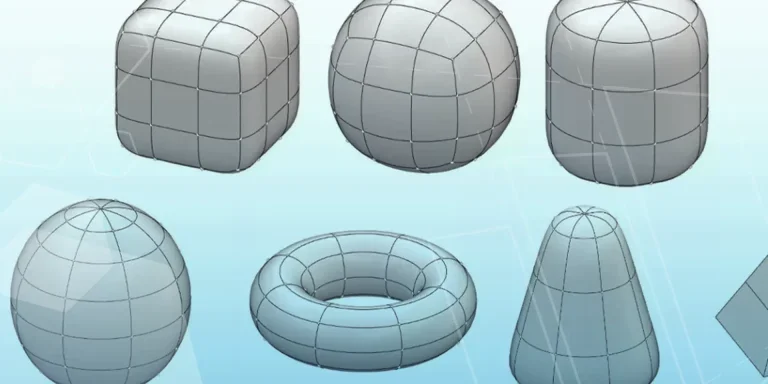
Discover What’s New in SolidCAM 2026 SP3
As manufacturers begin adopting SOLIDWORKS 2027 while continuing to support SOLIDWORKS 2026, upgrading to the latest SolidCAM 2026 SP3 ensures access to the newest advancements in CAM programming, 5-axis machining, 3D machining, simulation, HSM, HSR, WireEDM, and ToolKit functionality.
This new version of
SolidCAM introduces practical enhancements designed to help CNC programmers reduce setup time, automate repetitive programming tasks, improve machining accuracy, and verify toolpaths more effectively before they reach the machine. Whether you’re producing simple components or programming complex multi-axis parts, SolidCAM 2026 SP3 delivers meaningful improvements that increase productivity throughout the manufacturing process.
CAM Programming Improvements for Automated Hole Machining
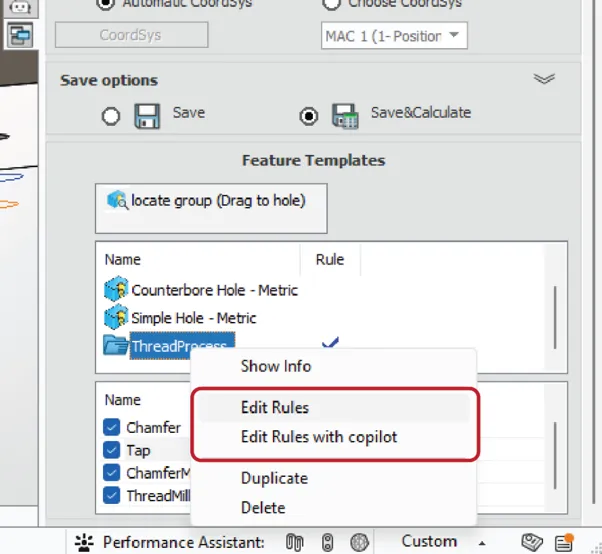
Adaptive Process Templates
One of the most significant CAM programming enhancements in SolidCAM 2026 SP3 is the introduction of adaptive process templates for recognised holes.
While many machined holes share the same process strategy, their dimensions, depths, and feature structures often differ. Process templates can now automatically adjust operation parameters based on the recognised hole geometry while removing unnecessary operations. This allows CAM programmers to standardise proven machining processes while reducing programming effort.
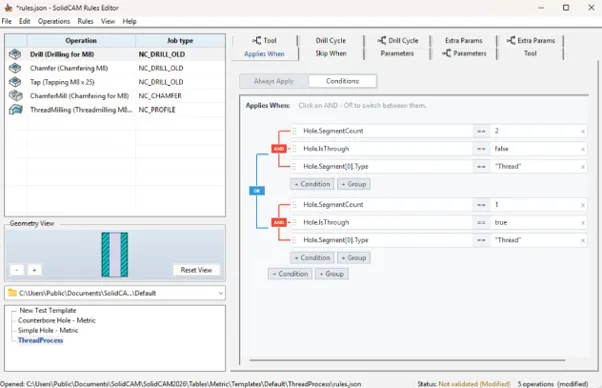
The result is faster programming, improved consistency, and fewer opportunities for human error across multiple jobs.
Enhanced Hole Feature Recognition
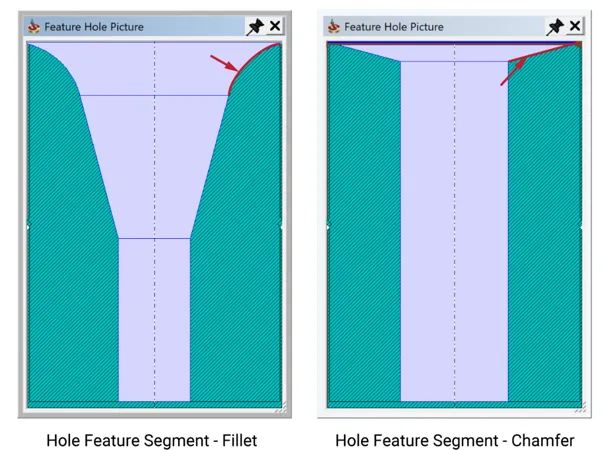
The latest release expands Hole Feature Recognition capabilities with support for HSS machining of conical segments and larger fillets. Recognised geometry can now be passed directly to Parallel Cuts and Morph Between Two Boundary Curves operations, reducing manual geometry selection.
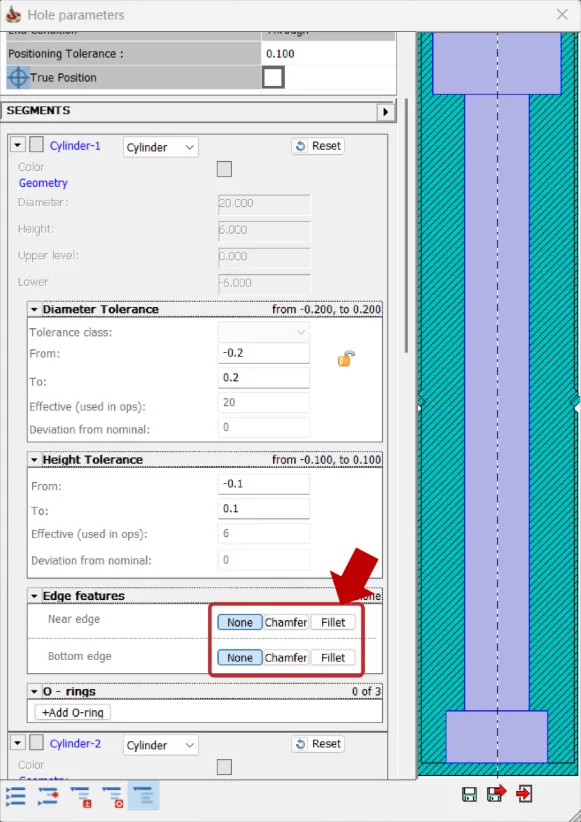
Additional controls for bottom-edge chamfers and fillets further enhance automated hole machining, making it easier to program complex components with internal blended features.
Greater Control Over Stock Preparation and Machining Data
Improved STL Stock Positioning
Accurate stock definition remains critical to efficient CAM programming.
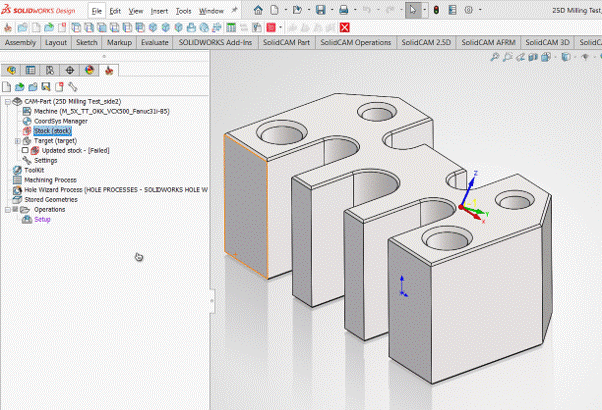
With SolidCAM 2026 SP3, programmers can translate STL stock models along X, Y and Z axes while also rotating them around Rx, Ry and Rz relative to the target coordinate system. A new Orientation and Position tool makes this process even more intuitive.
For castings, forgings and near-net-shape components, accurate stock placement ensures more reliable toolpath calculation, improved rest material identification, and increased confidence during simulation.
This enhancement supports more efficient 3D machining and reduces unnecessary air-cutting throughout the machining cycle.
New ToolKit Enhancements for Faster Programming
Improved Operation Parameters Management
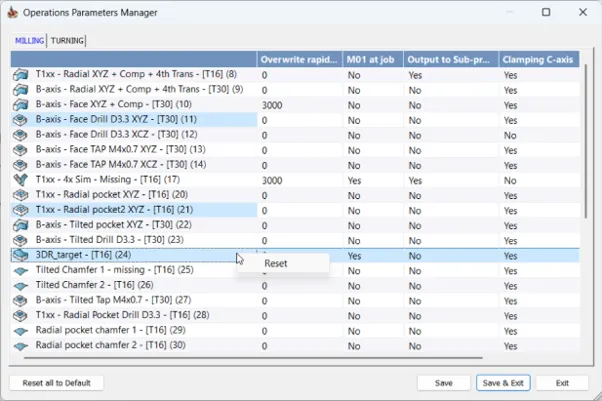
The enhanced Operation Parameters Manager introduces functionality that simplifies managing large CAM projects.
Users can now select multiple jobs using Shift-click and Ctrl-click controls, reset parameters in bulk, and quickly identify operations through visible tool numbers and job indexing.
These updates allow programmers to work more efficiently when managing large and complex machining projects.
ToolKit Engagement Angle Control
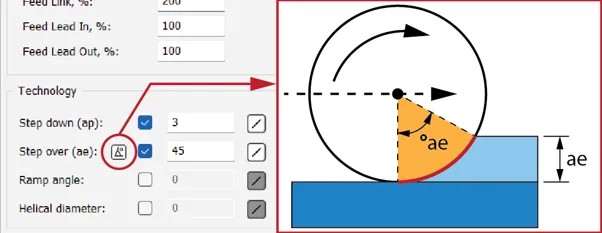
The latest ToolKit enhancements introduce the ability to define stepover using a cutter engagement angle rather than specifying only a stepover distance.
By automatically calculating the relationship between engagement angle and tool diameter, ToolKit allows programmers to maintain more consistent cutting conditions and improve machining performance.
For manufacturers implementing advanced HSM strategies, this provides additional flexibility when optimising material removal rates.
Enhanced Simulation for Safer Manufacturing
Stop Simulation at Machine Limits
Reliable simulation remains one of the most important safeguards in modern manufacturing workflows.
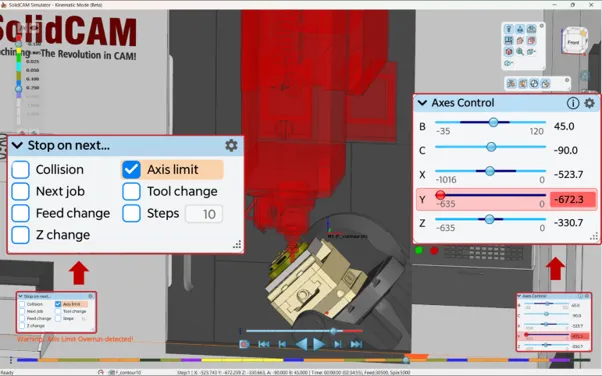
A new Axis Limit option allows the SolidCAM Simulator to automatically stop when a machine axis reaches its configured travel limit. Potential issues can be identified long before CNC code reaches the production floor.
This improvement is particularly valuable for complex 5-axis machining applications where fixture positions, tool assemblies and machine kinematics can create difficult-to-identify collisions or over-travel conditions.
By improving simulation accuracy, programmers can significantly reduce the risk of machine downtime and costly prove-out errors.
Flexible Multi-Workpiece Programming
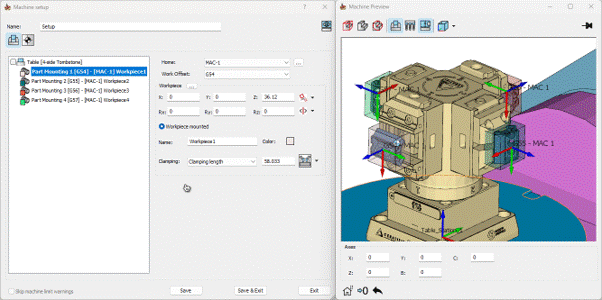
SolidCAM 2026 SP3 also introduces improved flexibility when assigning MAC (Machine Coordinate Systems) during multi-workpiece setups.
Different workpieces can now utilise independent reference systems while maintaining shared work offsets, making complex fixture programming more manageable.
Advanced 5-Axis Machining Capabilities
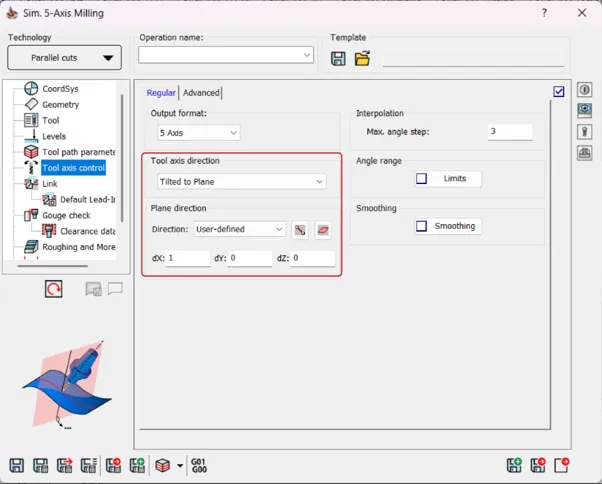
New Tilt-to-Plane Tool Axis Control
One of the standout additions in SolidCAM 2026 SP3 is a new tool orientation strategy for 5-axis machining.
The Tilted to Plane option allows programmers to constrain tool tilt movement within a user-defined plane. Plane direction can be defined using coordinate axes, selected geometry, or custom reference points.
This provides greater control over machine motion while maintaining optimal cutter engagement and accessibility throughout machining operations.
Manufacturers working in aerospace, tooling, mould and die, and medical industries will particularly benefit from these advanced 5-axis machining capabilities.
Enhanced Geodesic Machining
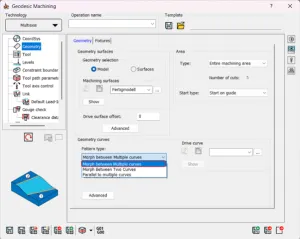
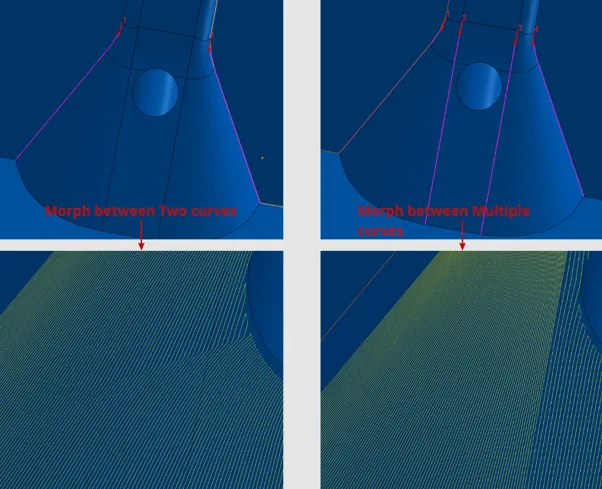
Geodesic Machining now supports morphing between multiple guide curves.
For freeform surfaces and complex geometry, this provides far greater control over toolpath flow than traditional two-curve morphing strategies.
The result is smoother 3D machining, improved surface quality, and fewer segmented operations.
New 3D Machining, HSM and HSR Enhancements
Better Horizontal Semi-Finishing
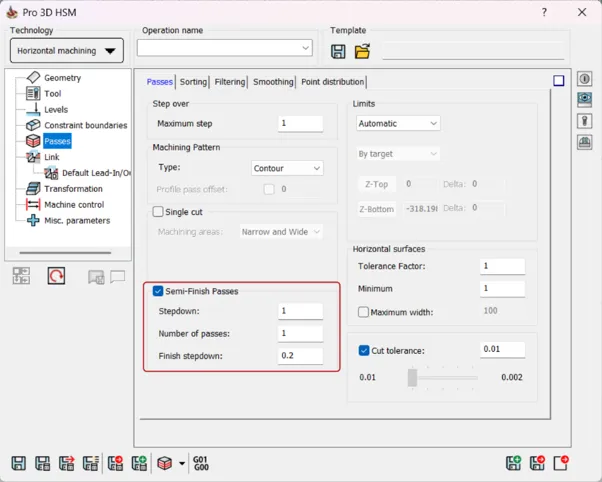
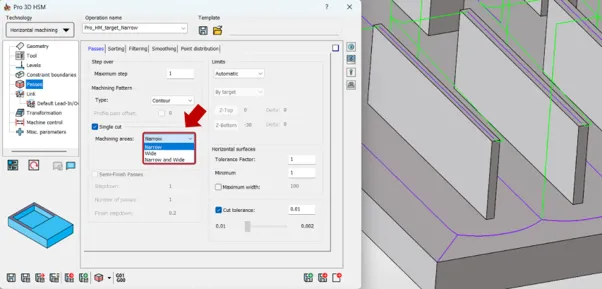
The latest HSM upgrades introduce multiple semi-finish passes within Pro 3D HSM Horizontal Milling operations.
Users can now define:
- Semi-finish stepdown values
- Number of semi-finish passes
- Finish stepdown values
This enables more controlled material removal and improved surface finish quality prior to final machining.
For narrow horizontal regions, the new Single Cut function automatically performs a single central pass, improving efficiency and reducing unnecessary tool movement.
Enhanced HSM Rest Machining
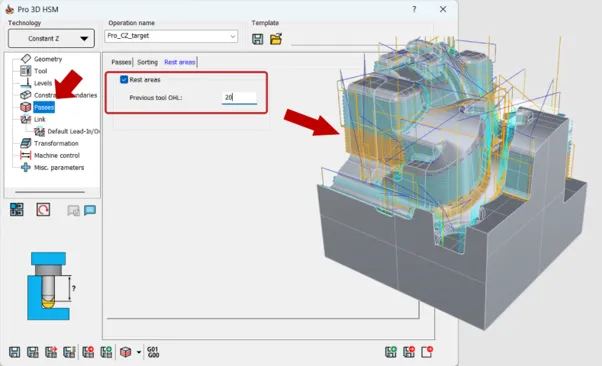
Another notable HSM enhancement allows rest material detection using Previous Tool Outside Holder Length.
This capability identifies areas inaccessible to previous tool assemblies and focuses subsequent toolpaths only where additional material removal is required.
The result is more intelligent 3D machining, improved cycle times, and reduced unnecessary machining.
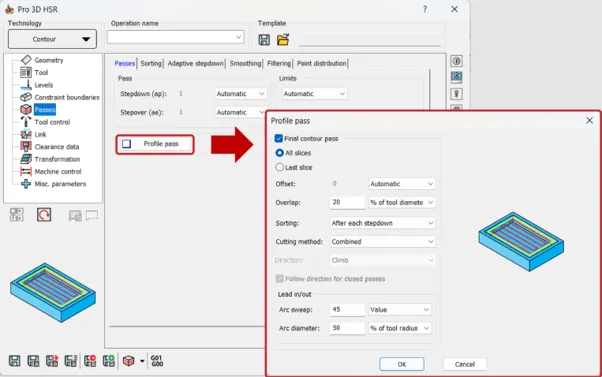
Improved HSR Boundary Control
This functionality follows component boundaries while maintaining stock allowance and removing unwanted cusps that often remain after roughing.
Manufacturers using HSR for aggressive material removal will benefit from improved boundary quality and reduced finishing requirements.
Better Edge Breaking and WireEDM Performance
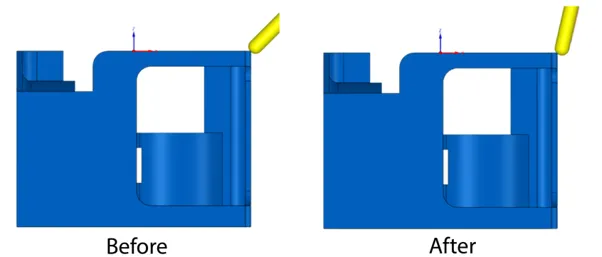
Optimised 5-Axis Edge Breaking
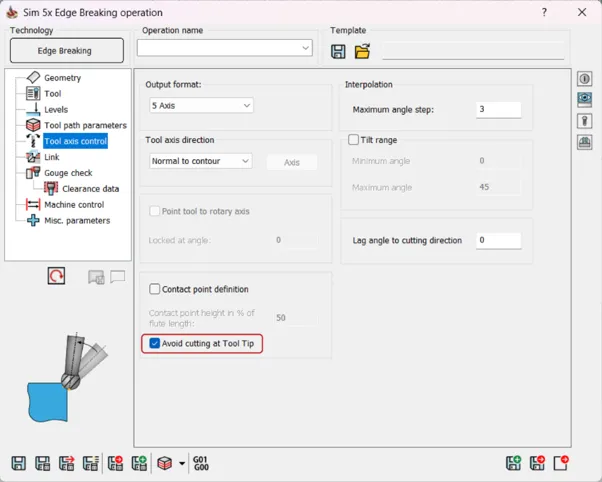
The Edge Breaking operation receives significant improvements in SolidCAM 2026 SP3.
Rather than cutting with the tool tip, the software can automatically orient the cutter to utilise the most effective cutting zone of ballnose, taper ballnose, and lollipop tools.
This leads to improved tool life, better surface quality, and more consistent edge preparation during 5-axis machining operations.
Smarter WireEDM Programming
Several valuable enhancements have been introduced for WireEDM users.
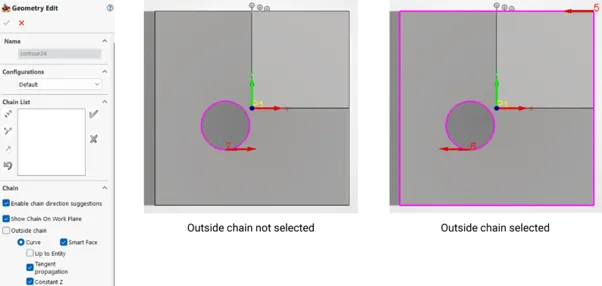
A new Outside Chain option allows programmers to more clearly define geometry selection when using Smart Face functionality.
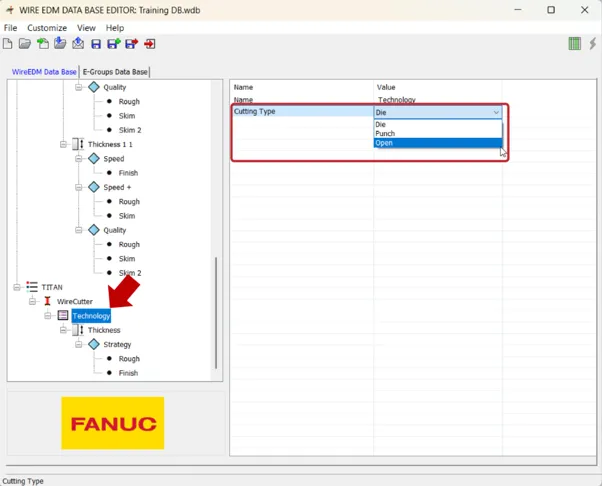
In addition, WireEDM operations now require the explicit selection of Punch, Die, or Open cutting types, while introducing a new Approach Technology option representing default machine technology conditions.
These updates make WireEDM programming more intuitive while improving visibility of machining intent within the operation structure.
What SolidCAM 2026 SP3 Means for Manufacturers
The overarching theme of SolidCAM 2026 SP3 is greater control.
Across CAM programming, 5-axis machining, 3D machining, ToolKit, simulation, HSM, HSR, and WireEDM, this new release helps manufacturers automate repetitive tasks, improve programming consistency, optimise toolpath performance, and verify machining operations more effectively.
For organisations upgrading to SOLIDWORKS 2027 or continuing to leverage SOLIDWORKS 2026, SolidCAM 2026 SP3 delivers practical enhancements that translate directly into reduced programming time, improved machine utilisation, and greater confidence on the shop floor.
Ready to explore the benefits of SolidCAM 2026 SP3?
Contact the Solid Solutions Manufacturing team to discuss upgrade requirements, compatibility with SOLIDWORKS 2026 and SOLIDWORKS 2027, and how the latest SolidCAM enhancements can support your manufacturing operations.